Best ChatGPT Alternatives in 2026: Tested, Priced, and Honest About the Catch
Every ChatGPT alternative worth switching to, sorted by the reason you're leaving — what each one costs, where each one falls down, how to move your history over, and why swapping one $20 subscription for another is usually a lateral move.
Most "best ChatGPT alternatives" lists are ranked wrong. They hand you nine tools in order of the writer's preference, when the only ranking that matters is the one that starts with why you want to leave. Cheaper? Better writing? Sources you can verify? Somewhere your data isn't feeding a US model provider? Each of those has a different answer, and picking off someone else's leaderboard is how people end up paying a second $20 for a tool that's worse at the thing they actually do.
So this guide is sorted by reason, not by rank. Every alternative below is one I use — I keep them in one workspace, which means running the same prompt through all of them is a two-second switch rather than five browser tabs. I'll give you what each one is genuinely best at, what it costs, and the catch nobody puts in the table. Then the honest structural finding at the end of it: for most people, replacing ChatGPT is the wrong move.
Prices are US figures from the week I wrote this. AI vendors reprice constantly — treat every number here as a dated snapshot.
Quick Picks: The Best ChatGPT Alternative for Each Reason You're Leaving
| Why you're leaving | Switch to | The catch |
|---|---|---|
| Writing comes back competent but flat | Claude | Same $20 you're already paying; weaker on live information |
| You need sources you can click and check | Perplexity | Brilliant at finding, thinner at long synthesis |
| Your work lives in Docs, Gmail and Drive | Gemini | The magic is mostly inside Google's own walls |
| You want what happened in the last hour | Grok | $8 for Plus, $30 for Premium; tone runs hot |
| You want to stop paying entirely | DeepSeek | Plain app, no ecosystem, prompts hosted in China |
| You want privacy and control above all | Open-weight models | Free as in "you maintain it" |
| You want the strengths of all of them | One multi-model workspace | Still a subscription — just one, at $6 |
That last row is the one this article ends on, and I'll earn it rather than assume it.
How I Compared Them
Same method as the head-to-heads in this series, with one addition. I ran a fixed set of real jobs through every tool — a 1,200-word article draft, a dense PDF to summarize, a "what changed in this market this month" research question, a messy spreadsheet of numbers to interpret, and a batch of everyday questions of the kind you'd normally fire at ChatGPT without thinking. No benchmark scores, because benchmark leadership changes monthly and tells you almost nothing about how a model handles your Tuesday.
The addition: I also tested the leaving. Exporting history, rebuilding saved instructions somewhere else, and living without ChatGPT's habits for a week. That part turns out to matter more than any quality gap, and almost no roundup covers it — so it gets its own section below.
Verdicts here stay consistent with the individual deep dives; if you want the long version of any single matchup, each mini-review links to it, and the five-model mega comparison is the condensed scoreboard.
The Alternatives, One by One
Claude — the best alternative for writing and careful thinking
Claude is the alternative most ex-ChatGPT users stick with, and the reason is prose. Ask both for a 1,200-word piece and Claude's comes back with rhythm, restraint and fewer of the tells — no throat-clearing intro, less compulsive bulleting, arguments that actually hold their shape to the end. It's also the one I trust on long analytical documents, where it tends to say "this part of the contract is ambiguous" instead of confidently smoothing over the ambiguity.
- Best for: long-form writing and editing, careful reasoning, dense document work. (Developers rate it highly too, though that's a different article.)
- Costs: $20/month for Pro, around $17 if you pay annually, with heavier tiers at $100 and $200.
- The catch: you're swapping a $20 subscription for a $20 subscription. Its live-web and image capabilities are less rounded than ChatGPT's, and hitting a session ceiling mid-task is a common complaint.
Full breakdown: Claude vs ChatGPT.
Perplexity — the best alternative if you don't trust unsourced answers
Perplexity isn't really a chatbot, and that's the point. It's an answer engine: it searches, reads, and returns a synthesis with inline citations you can open and verify. For anything where being wrong has consequences — competitive research, market numbers, "is this claim actually true" — that changes the workflow. You stop asking a model what it remembers and start asking it what it just read.
- Best for: research with receipts, current facts, fast competitive scans.
- Costs: $20/month for Pro, $200 a year if paid annually; a free tier covers light use.
- The catch: it's calibrated for answers, not craft. Ask it for a polished 1,500-word narrative and you get something serviceable and a bit clipped. Great first station, wrong last station.
Full breakdown: Perplexity vs ChatGPT.
Gemini — the best alternative if your work already lives in Google
Gemini's edge is scale and location. It swallows enormous documents without losing the plot, it's strong on images and video input, and it sits directly inside the tools a lot of people never leave — Docs, Gmail, Drive, Sheets. When your source material is a 300-page PDF or a folder in Drive, that proximity beats a marginally better paragraph.
- Best for: very long documents, multimodal input, Google-native workflows.
- Costs: about $19.99/month for the consumer Pro tier, bundled with storage and Workspace features.
- The catch: outside Google's walls the advantage thins out, and its writing voice is the most generic of the big three — competent, rarely memorable.
Full breakdown: Gemini vs ChatGPT.
Grok — the best alternative for right now
Grok's differentiator is recency. It's wired into a live social feed, so on breaking stories, evolving situations and "what are people saying about this" it's often hours ahead of models that wait for the web to settle. It also has a personality — blunter, funnier, less hedged — which some people find refreshing and others find exhausting.
- Best for: live events, social pulse, step-by-step math and reasoning.
- Costs: free, then $8/month for Plus and $30/month for Premium, with Super at $100 and Ultra at $200 above them. These are The X Subscription's plans, which replaced SuperGrok for new customers on 12 October 2026. Plus has no video. Premium adds video, Grok Bot, Cursor Pro and X Premium+, and every paid plan shares one weekly usage pool between Grok and Cursor.
- The catch: Premium costs $10 more than the $20 plans above, and Grok is the least neutral of the group. For anything you'll publish, verify it somewhere else first.
Full breakdown: Grok vs ChatGPT.
DeepSeek — the best alternative that costs nothing
DeepSeek gives away, for free, the kind of visible step-by-step reasoning that other vendors charge for. The consumer app has no paid tier — no Plus, no Pro, no upsell — and on hard analytical problems it holds its own against subscriptions. The interface is spartan and the ecosystem is thin, but the thinking is real.
- Best for: structured reasoning, math and analysis on a budget of zero.
- Costs: $0 in the app; developer API rates are a fraction of Western equivalents.
- The catch: the official app routes your prompts to servers in China under a legal regime that can compel access, which is a genuine disqualifier for work material. The models themselves are open — the catch is the app, not the model.
Full breakdown: DeepSeek vs ChatGPT.
Microsoft Copilot — the alternative you may already be paying for
Copilot is the same class of assistant wearing Office clothes: Word, Excel, Outlook and Teams, with the AI reaching into documents you already have. If your day is spent in Microsoft apps, that integration does more for you than a smarter model in a separate tab.
- Best for: people who live in Office and want AI where the files are.
- Costs: Copilot is free with a personal Microsoft account, and Microsoft 365 Personal ($9.99/month) and Premium ($19.99/month) raise its usage limits. Microsoft retired the standalone Copilot Pro, and support for existing subscribers ended on 1 August 2026. For a business, Copilot Chat comes free with Microsoft 365 business plans, and the full Copilot is cheapest bought bundled with Business Standard. I priced every route in Copilot vs ChatGPT. Retirements like Copilot Pro's aren't a Microsoft quirk, either. OpenAI closed Sora's consumer app in April 2026 and shut its API down on 24 September, and the alternatives that replaced it mostly cost less per clip than the thing that went away.
- The catch: you're buying a bundle, not a model. If Office isn't your workplace, you're paying for scaffolding you'll never use.
Update, 8 October 2026. An earlier version of this post said Copilot was the one alternative here without a free tier. That was wrong, because Copilot has a free version for personal Microsoft accounts. Copilot Pro's support has also ended since, on 1 August. And Microsoft has renamed its work products, so Microsoft 365 Copilot is now Microsoft Copilot and the free Microsoft 365 Copilot Chat is now Microsoft Copilot Chat.
The aggregators — many models, one login
There's a whole category that isn't a single model at all: services that put several vendors' models behind one subscription. Poe was the first many people tried, and browser assistants like Monica work the same territory. The idea is right. The execution usually reintroduces the problem in a new unit — credits, compute points, per-message costs that vary by model, so you end up rationing the good models. I broke that category down separately in the Poe alternatives guide. The team-facing half of this category prices itself differently again — per seat, with an enterprise feature set attached — which is why the best Langdock alternatives are sorted by headcount rather than by rank.
Open-source and self-hosted — the alternative you own
Covered in its own section below, because "open source ChatGPT alternative" means two very different things depending on who's asking.
The Alternatives at a Glance
| Alternative | What it is | Price (US, mid-2026) |
|---|---|---|
| Claude | Writing and reasoning specialist | $20/mo (from ~$17 annual) |
| Perplexity | Answer engine with citations | $20/mo, free tier available |
| Gemini | Google-native generalist at scale | ~$19.99/mo |
| Grok | Real-time, opinionated | $8/mo Plus, $30/mo Premium with video |
| DeepSeek | Free reasoning, plain app | $0 |
| Mistral | European, privacy-forward | ~$15/mo, free tier available |
| Copilot | AI inside Microsoft Office | Free; $9.99/mo with Microsoft 365 Personal |
| Open-weight models | Run it yourself | $0 licence + your hardware |
| izzedo chat | All of the above in one workspace | $6/mo, free plan, no card |
Free vs Paid: What You Actually Give Up at $0
Every alternative here has a free tier, and free tiers in 2026 are far better than the 2023 versions everyone still has in their head. What you give up is predictable:
- A lighter default model. Free tiers rarely default to the flagship. The gap shows up on long, structured tasks, not on quick questions.
- Lower ceilings. You'll hit a limit on a heavy afternoon and wait it out.
- Trimmed extras. Deeper research modes, longer uploads, agents and image generation are usually where the paywall sits.
- In some cases, ads. ChatGPT's own free tier started carrying them in the US this year — a reminder that "free" is a product decision, not a gift.
If you only need one model for everyday questions, free is genuinely enough and you should stop reading here. The honest comparison is between what a paid subscription costs and what it does for you — I put real numbers on that in is ChatGPT Plus worth it and the full ChatGPT pricing breakdown.
Open-Source ChatGPT Alternatives (and Who They're Actually For)
"Open source" gets used for two different things, and conflating them is why people end up disappointed.
Open-weight models are the real version: Qwen, DeepSeek, Mistral and Meta publish weights you can download, inspect and run. (Meta's open line has moved on from Llama — what actually powers Meta AI now is a different, closed model.) No licence fee, no vendor watching, no terms of service that change under you. Quality is close enough to the closed frontier that most people wouldn't notice the difference on ordinary work.
Self-hosting is the part that isn't free. Running a serious model well means a capable GPU or a rented one, a stack to maintain, and a chat interface bolted on top. It's a rewarding weekend if you enjoy that sort of thing, and a permanent side job if you don't. The honest test: do you want to own the model, or just avoid a subscription? Only the first justifies the work.
For everyone in the second group, the practical version of the open-source dream is hosted access to those same open models — you get Qwen, Llama and DeepSeek without running anything, and without the official Chinese apps in the loop.
The Catch Nobody Lists: Every Alternative Is a Lane
Here's what testing all of these back to back actually taught me, and it's not what a ranked list can tell you.
Not one of them replaces ChatGPT. Each one beats it somewhere — Claude on prose, Perplexity on sourcing, Gemini on scale, Grok on recency, DeepSeek on price — and each one is worse than it across the rest of the spread. ChatGPT's remaining strength isn't that it wins categories; it's that it loses fewer of them. It's the most reliable default, which is a different thing from being the best tool.
So the standard switch is a lateral move. You cancel a $20 subscription, start a $20 subscription, and trade one set of weaknesses for another. Two weeks later you're pasting a prompt into a free tier of the thing you left, because this particular question suited it better.
The people who get real value out of alternatives aren't the ones who switch. They're the ones who stop choosing: draft in one, pressure-test in another, research in a third, and treat disagreement between them as information. That workflow is the actual upgrade — I've written up why one model is never enough and how to run several at once if you want the method rather than the tool list.
The only thing standing in the way of that workflow used to be the bill.
Don't Replace ChatGPT — Add the Rest of Them
Six tools to have the whole field, five of them paid, bought the usual way, in the usual amounts: ChatGPT $20 + Claude $20 + Gemini $20 + Perplexity $20 + Grok Premium $30, with DeepSeek free — $110/month. Nobody does that, so nearly everyone under-buys instead, picks one vendor, and sends every task to it whether it fits or not.
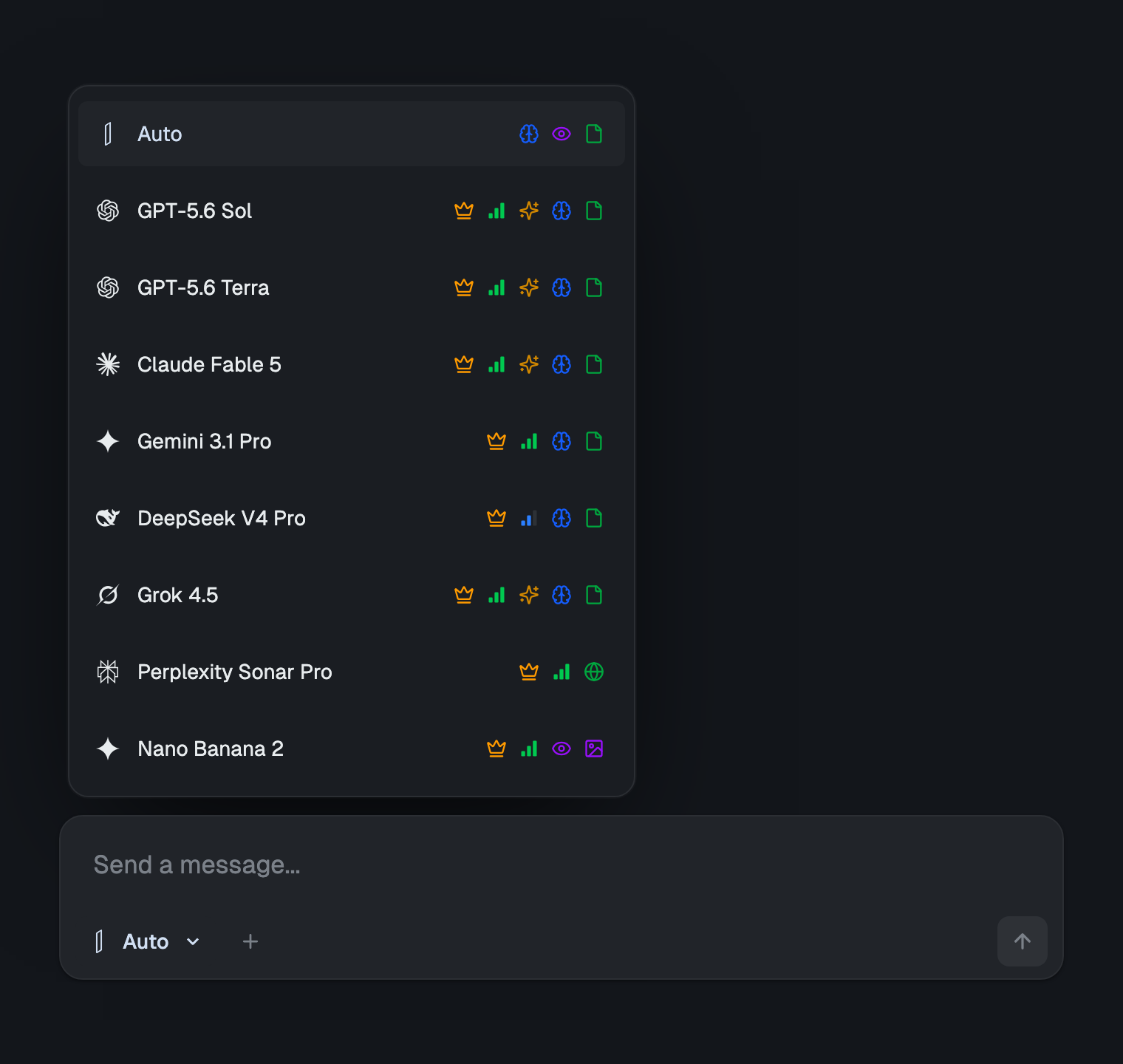
izzedo chat exists to break that trade-off: ChatGPT, Claude, Gemini, Grok, Perplexity, DeepSeek, Qwen and Llama — plus image models — under one login for $6/month, less than a third of any single one of them.
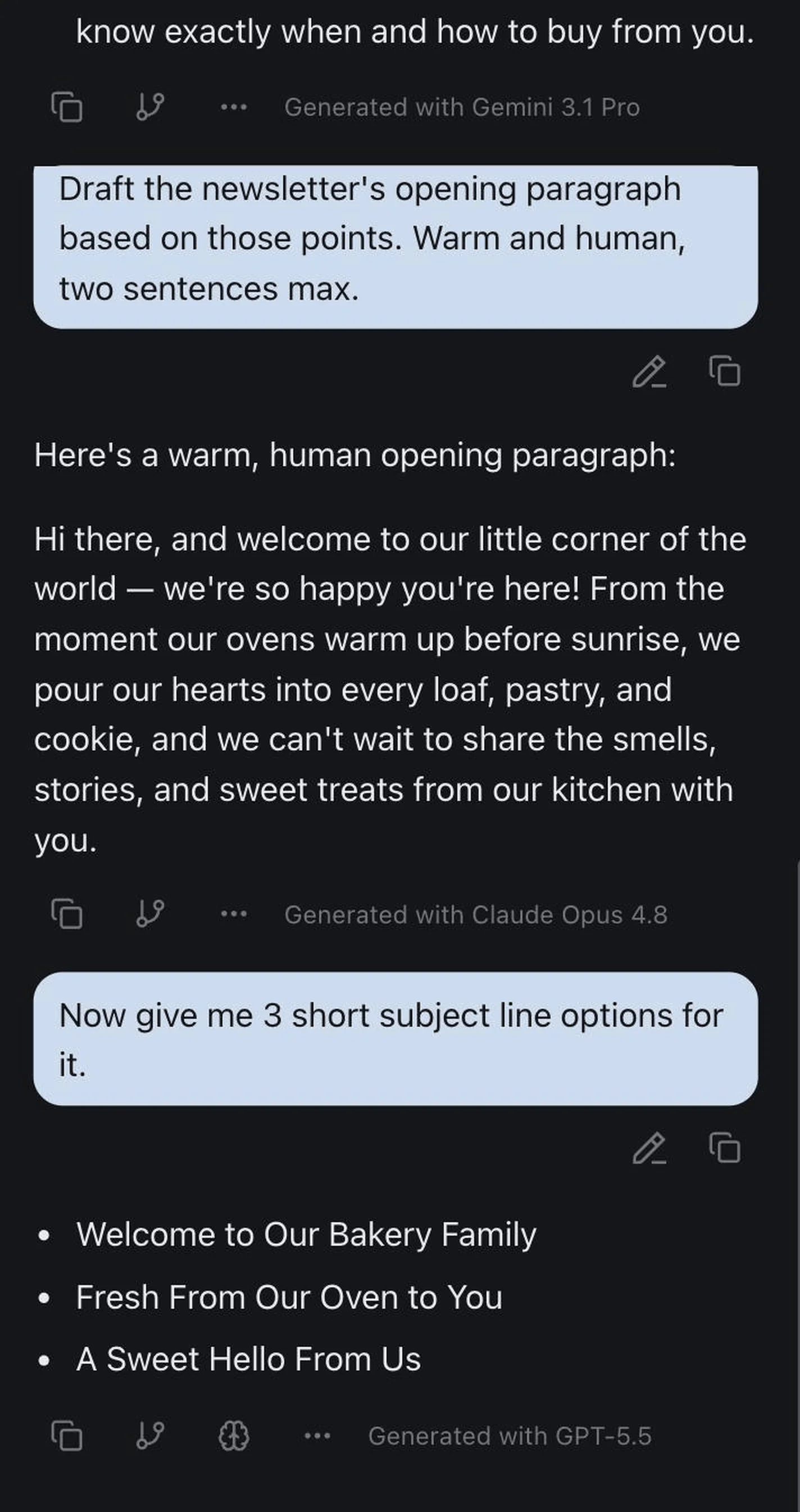
The part that changes how you work isn't the roster, it's that models share a conversation. Start a piece with one model, switch mid-thread, and the next model picks up with everything already said — no re-pasting, no re-explaining.
Around the chat there's the workspace an alternatives hunt usually ends up wanting anyway: projects with their own standing instructions (the clean replacement for custom GPTs), a knowledge base for your documents, scheduled automations, 50+ integrations across Notion, Google Drive, Gmail and Sheets, and answers from several models at once when one answer isn't enough to trust. It's GDPR compliant, doesn't train on your inputs, and keeps zero retention on what passes through.
On limits, since this whole page is about catches: izzedo caps usage too — every provider does, because the strongest models cost real money per run. The difference is the shape. No credit balance, no points to spend, nothing to prepay; fair use is measured quietly over a short rolling window that clears in hours, with a weekly pool sitting behind it. Run out on the default settings and the worst case is a pause — hours if it's the rolling window, longer if you've spent the week. If you would rather keep working than wait, there is an optional usage-based setting, off by default, that bills what you actually use past the pool on your next invoice, under a cap you set. There's a free plan with no credit card if you'd rather test that claim than believe it, and the current allowances are on the pricing page.
How to Leave ChatGPT Without Losing Your History
Whichever alternative you pick, do this before you cancel anything. It's the part every listicle skips, and the reason people bounce back after a week.
- Export your conversations first. In ChatGPT: Settings → Data controls → Export data. A download link arrives by email; it can take a while to generate and the link expires 24 hours after it lands, so grab it promptly. (Export isn't available on Business or Enterprise workspaces.) The archive is a personal record — no other AI ingests it as memory — but you'll want it.
- Copy your memories by hand. Saved memories have no export file. Open Settings → Personalization → manage memories, and copy the handful that actually matter into a note. It's the difference between an assistant that knows your context and a blank slate.
- Rescue your custom GPTs. Their instructions aren't in the export either. Open each one you built, copy the instruction text, and paste it wherever your new tool keeps standing instructions — in izzedo that's a project's system prompt, which then applies across every model rather than being locked to one.
- Overlap for two weeks. Don't cancel on day one. Run the alternative alongside ChatGPT on real work and see which tab you reach for under deadline pressure. That's the only honest test.
- Re-home the habit, not just the account. Rebuild your three or four most-used prompts in the new tool. Switching fails on muscle memory far more often than on model quality.
So What's the Best ChatGPT Alternative?
If you want a single name: Claude, for most people, most of the time — it's the one that beats ChatGPT at the thing people use ChatGPT for most, which is writing and thinking through problems in words. Add Perplexity if your work needs citations, Gemini if Google is your office, Grok if you trade on what's happening now, and DeepSeek if the budget is zero.
But the more useful answer is that the question has an outdated premise. "Alternative" assumes a slot with one tool in it, and that stopped being true the moment these models started diverging into specialists. The strongest setup in 2026 isn't ChatGPT, and it isn't the best alternative to ChatGPT — it's ChatGPT and the best alternative to it, in one thread, for less than either charges alone. Then you never have to pick a side again; you just pick the right model for the sentence in front of you.
Want to try every ChatGPT alternative on this page without six sign-ups and six invoices? Try izzedo chat free — no credit card required.
Topics
- best chatgpt alternative
- ChatGPT alternatives
- AI alternatives to ChatGPT
- open source ChatGPT alternative
Start on the free plan. Pay when you want the premium models.
Free
$0
Claude Haiku, Gemini Flash, Grok and more, with agent mode and 50+ connectors
Hobby
$6/mo
Every chat and image model
Pro
$12/mo
Higher limits, 400k context and more video models
Max
from $50/mo
5x or 10x Pro's usage, and every video model
Frequently asked questions
What is the best alternative to ChatGPT?
There isn't one best alternative — there's a best alternative per reason for leaving. Claude is the pick if you want more careful writing and reasoning on long documents. Perplexity wins if you need answers with clickable sources. Gemini wins if you live inside Google Docs, Gmail and Drive. Grok is the one for real-time chatter. DeepSeek is the one that costs nothing. Every one of them is stronger than ChatGPT in its lane and weaker outside it, which is why a lot of people end up using several instead of switching to one.
Is there a free ChatGPT alternative?
Several. DeepSeek's own app is free with no paid consumer tier at all, and Claude, Gemini, Perplexity and Grok all run free tiers with tighter limits and lighter default models. izzedo chat also has a free plan with no credit card that includes free models, so you can try a multi-model setup before paying anything. Free tiers are genuinely usable for everyday questions; you feel the ceiling on long, heavy sessions.
Is there an open-source ChatGPT alternative?
Yes — open-weight models like Llama, Qwen, DeepSeek and Mistral can be downloaded and run on your own hardware or a rented GPU, paired with a free chat interface. You get privacy and no subscription, and you pay for it in setup, maintenance and hardware. Unless you actively want to run infrastructure, hosted access to the same open models is usually the practical version of this idea.
Which AI is better than ChatGPT?
Per task, yes — several. In side-by-side testing Claude produces better long-form writing and more careful reasoning, Perplexity produces better sourced research, Gemini handles very long documents and Google-native work better, and Grok is better on what happened in the last few hours. Across the whole spread of everyday tasks, ChatGPT is still the most consistent generalist, which is exactly why 'better' has to be asked one job at a time.
Can I move my ChatGPT history to another AI?
Partly. ChatGPT can export your conversations — Settings → Data controls → Export data, and a download link arrives by email — but the archive is for your records; no other AI imports it as memory. Saved memories have no export file at all, so you copy them by hand from Settings → Personalization, and custom GPT instructions aren't included in the export either. Budget ten minutes to copy the instructions and facts you actually rely on before you cancel anything.
What's the cheapest way to use several ChatGPT alternatives?
One multi-model workspace instead of one subscription each. Bought separately, ChatGPT, Claude, Gemini, Perplexity and Grok run about $110/month combined, with DeepSeek free. izzedo chat puts all of them behind a single login for $6/month, with a free plan that needs no credit card — so trying an alternative costs a model switch instead of another card on file.