Google Search Console MCP: There's No Official Server, and You May Not Need One
Google publishes MCP servers for Drive, Gmail and Maps, but not for Search Console, and neither Claude nor ChatGPT has a built-in Search Console connector. Here are the three ways to get your clicks and queries into an AI chat, what each one can change in your account, and the questions worth asking once the data is in.
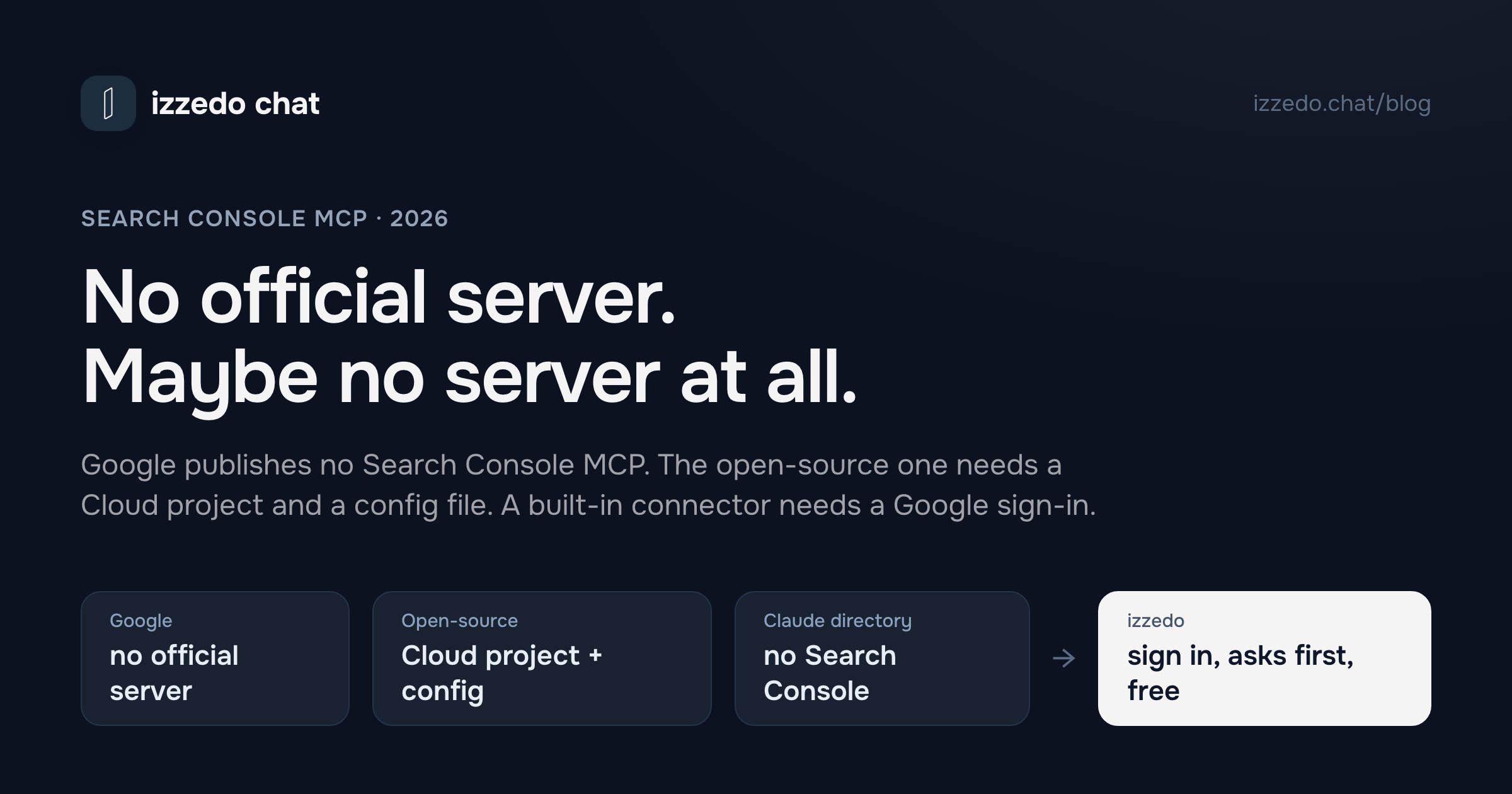
There are lots of Search Console MCP servers. None of them is Google's.
Google publishes MCP servers for BigQuery, Maps, Drive, Gmail and more than eighty other products. Its list, last updated on 20 October, has no entry for Search Console. Claude's connector directory has Semrush and Ahrefs but no Search Console. ChatGPT's plugin directory has Search Console apps, all of them from third parties. So getting your clicks and queries into an AI chat means picking someone's server, or using an app that has Search Console built in.
For this post I read Google's MCP pages, the Search Console API documentation, Anthropic's and OpenAI's help articles, and the setup guides of the biggest open-source servers on GitHub, all on 21 October 2026. Below are the three routes, what each one can change in your account, and the questions worth asking once your data is in.
The Short Answer
| Route | What you set up | Where it works | Can it change your Search Console? |
|---|---|---|---|
| Open-source MCP server, such as mcp-gsc | A Google Cloud project, the Search Console API, a credential and a config file | Claude Desktop and other apps that run local servers | Usually. mcp-gsc can submit sitemaps out of the box |
| Hosted server or third-party app | An account with the provider | Claude on every plan, one on Free. ChatGPT Business and Enterprise, read-only on Pro | Depends on the provider |
| Built-in connector in a chat app | A Google sign-in | The app that has it | Depends on its tools. Read-only ones can't |
Three things to know first.
Nothing here comes from Google. Whichever route you pick, a third party sits between your Search Console account and the model, and it's worth knowing what that party's tools are allowed to do.
Setup is the small part. Every route ends in the same place, a chat that can query your performance data. The value is in the questions you ask, and there's a list of eight further down.
No route can press Request Indexing. That button isn't in Google's API, so no server or connector can do it for you.
Is There an Official Google Search Console MCP Server?
No. Google keeps one list of its remote MCP servers, and on 21 October 2026 it held 67 Google Cloud servers, nine for other Google products such as Maps, Google Home and Google Pay, and nine Workspace servers in developer preview, among them Drive, Gmail, Calendar, Docs and Sheets. Search Console and Google Analytics aren't on it. The Search Console API's landing page doesn't mention MCP, and the Search Central blog hasn't announced a server.
Google Analytics is different. Google's GitHub list of MCP servers includes the Google Analytics MCP Server, labelled experimental. It runs on your computer, needs Python and Google's read-only Analytics scope, and has seven tools, among them reports and realtime reports. Nothing equivalent exists for Search Console.
The nearest thing Google ships is inside Search Console itself. Since December 2025 it has been rolling out an experimental AI-powered configuration in the Performance report, to a limited set of sites so far. You describe the view you want in plain language, and it sets the filters, the comparison and the metrics. Google says it "cannot perform actions like sorting the table and exporting data," so it builds a view faster but doesn't answer questions about your data.
Gemini doesn't fill the gap either. Search Console isn't among the Gemini app's connected apps, and adding your own MCP server to the Gemini app is limited to people 18 or over in the US.
What a Search Console MCP Server Can and Can't Do
Search Console MCP servers, open-source or hosted, wrap the same Google API, and that API has four parts:
- Search Analytics. Clicks, impressions, click-through rate and average position, broken down by query, page, country, device, date or search appearance. This is where nearly all the useful questions live.
- URL Inspection. Whether a page is indexed, when Google last crawled it and which canonical Google chose. Google allows 2,000 inspections a day per site.
- Sitemaps. List, read, submit and delete.
- Sites. List the properties you have access to, add one, remove one.
What it can't do matters as much. There is no Request Indexing method. URL inspection reports the version of the page in Google's index, and Google's documentation says "you cannot test the indexability of a live URL." Google's separate Indexing API only accepts pages with job postings or livestream video, so it's no help for a blog post or a product page. Anonymised queries don't come back at all. And a single request returns at most 25,000 rows, with Google exposing up to 50,000 rows a day per search type.
So when you compare servers, the useful question is which of those four parts it reaches, and whether it can write to Sitemaps and Sites or only read them.
Route 1: Run an Open-Source Server in Claude Desktop
The biggest dedicated project on GitHub is mcp-gsc, written in Python. Its setup, in order:
- In the Google Cloud console, create or pick a project and enable the Search Console API.
- Create a credential. The README recommends an OAuth client of the Desktop app type, which uses your own Google account. The alternative is a service account with a JSON key, which you then add to your property under Settings, Users and permissions in Search Console. The guide says to give it Full access.
- Install uv, a Python tool runner, and start the server with it.
- Add the server to Claude Desktop's config file,
claude_desktop_config.json, using the full path to uv's runner. - Quit Claude completely and open it again.
If you're comfortable in a terminal, none of that is hard, and the server itself costs nothing. Two limits are worth knowing first. The README says it "only works in the Claude Desktop app," and Anthropic's help centre confirms that servers set up in that config file aren't available on claude.ai or in Cowork. And it asks Google for the full read-write Search Console scope. Submitting a sitemap works by default, while adding or deleting a site and deleting a sitemap stay switched off until you set an environment variable to allow them.
If you'd rather a server that Google won't let write anything, mcp-server-gsc runs on Node, uses a service account and asks only for Google's read-only Search Console scope.
Route 2: A Hosted Server or a Third-Party App
If you don't want to run anything yourself, someone else will run the server for you, and you connect it to your chat app.
Claude calls these custom connectors. Anthropic's help centre says custom connectors using remote MCP are available on Free, Pro, Max, Team and Enterprise, that "Free users are limited to one custom connector," and that on Team plans only Owners and Primary Owners can add them.
ChatGPT has two paths. Its plugin directory lists several Search Console apps, all built by third parties. Connecting your own MCP server is, in OpenAI's words, "available for ChatGPT Business and Enterprise/Edu customers on ChatGPT web," and "Pro users can connect custom MCP servers with read/fetch permissions." The page doesn't list Plus, and it says custom servers don't work on mobile.
The trade with any hosted route is that your Search Console data passes through the provider. Some directory listings say plainly that the app is read-only and can't submit sitemaps or request indexing. Read that part of the listing, and the scopes on Google's consent screen, before you click Allow.
Route 3: A Built-In Connector, Step by Step
The third route skips the server entirely. In izzedo chat, Google Search Console is one of the built-in connectors, so there's nothing to install and no Google Cloud project to create. Here's the whole setup.
1. Connect your Google account. Open Settings, then Connectors, and select Add connectors. Search for Search Console, open the card and select Start connection. izzedo runs its integrations through Composio, an integration platform, so your Google sign-in and each Search Console call pass through Composio, as they would with a hosted server. The connect screen tells you so too. Google's consent screen opens, and you sign in with the account that has access to your property. If you look after more than one site under different Google accounts, you can connect each of them and give it a name.
2. Switch it on where you'll use it. For a site you check regularly, make a project for it and turn Search Console on in the project's Tools tab, with Google Analytics next to it if you use that too. For a one-off question, open the + menu in the message box, choose Connectors and switch Search Console on for that chat.
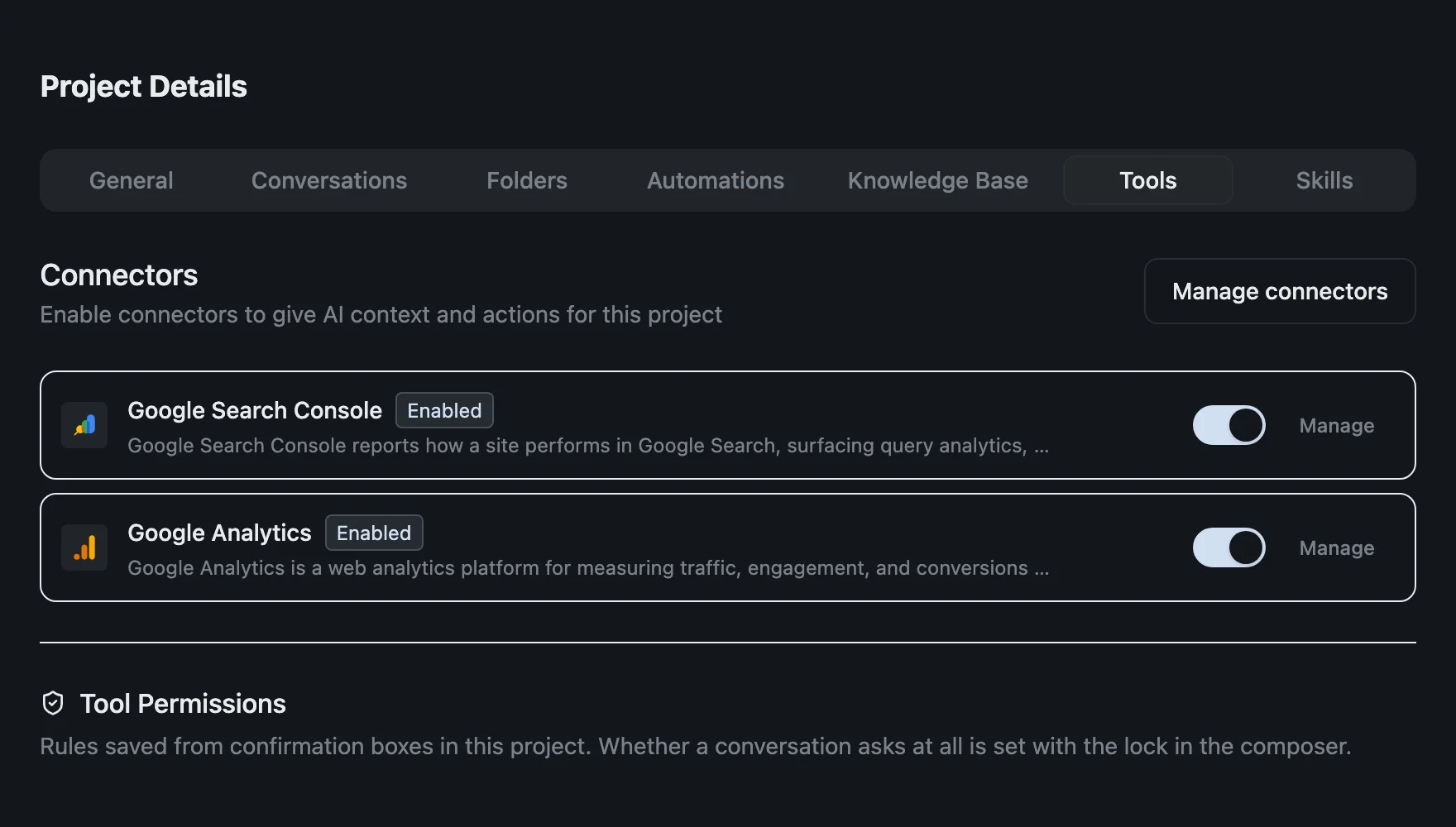
3. Pick a model and ask. Any chat model that can use tools will work. On the free plan that includes Claude Haiku, Gemini Flash, Grok, DeepSeek, Qwen and Kimi. Agent mode needs to be on, which it is by default, because that's how the model finds the Search Console tools.
4. Approve the call. izzedo starts in supervised mode, which stops before every tool call, reads included. The first time the model wants your performance data, you see the exact tool it's about to run.
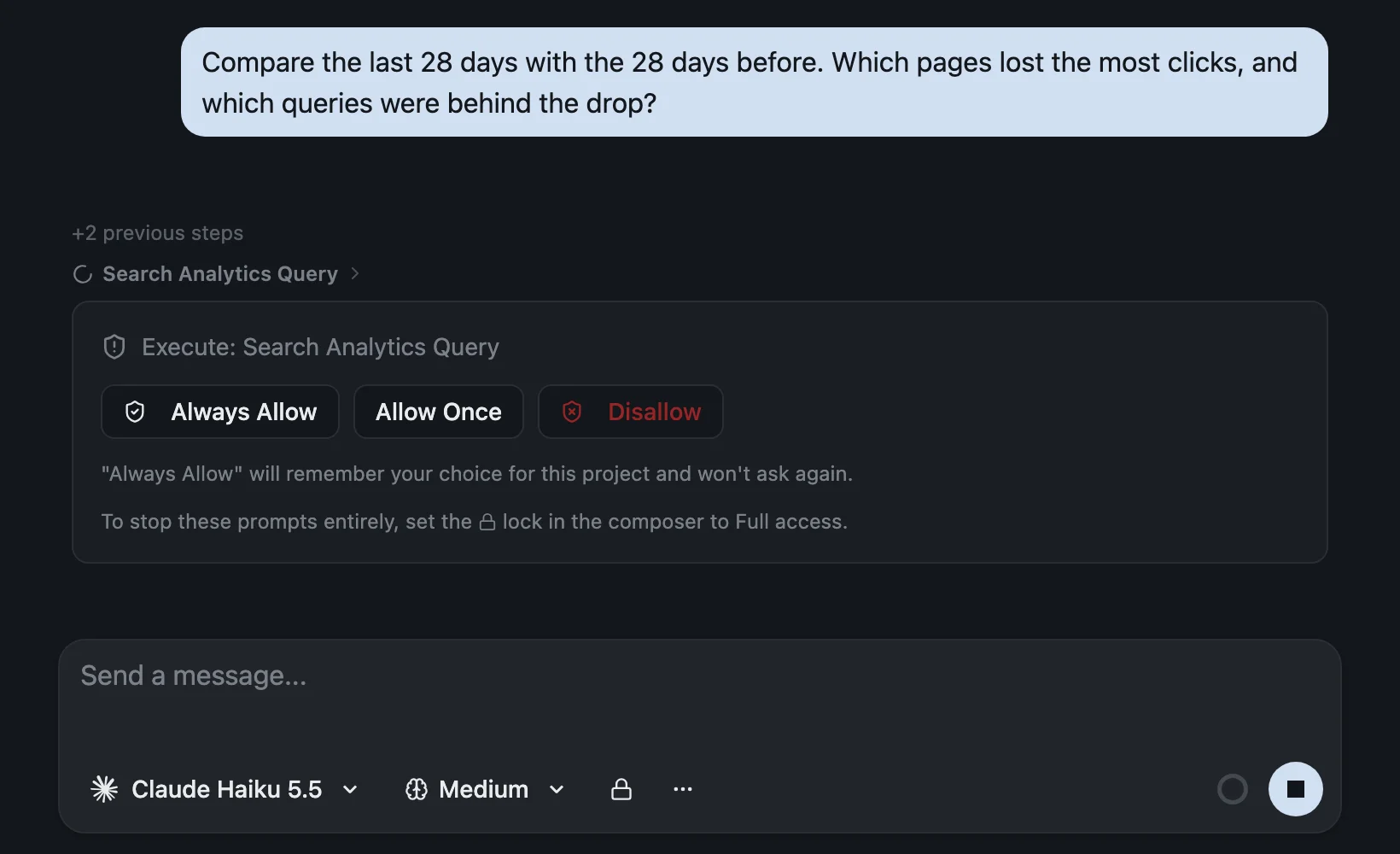
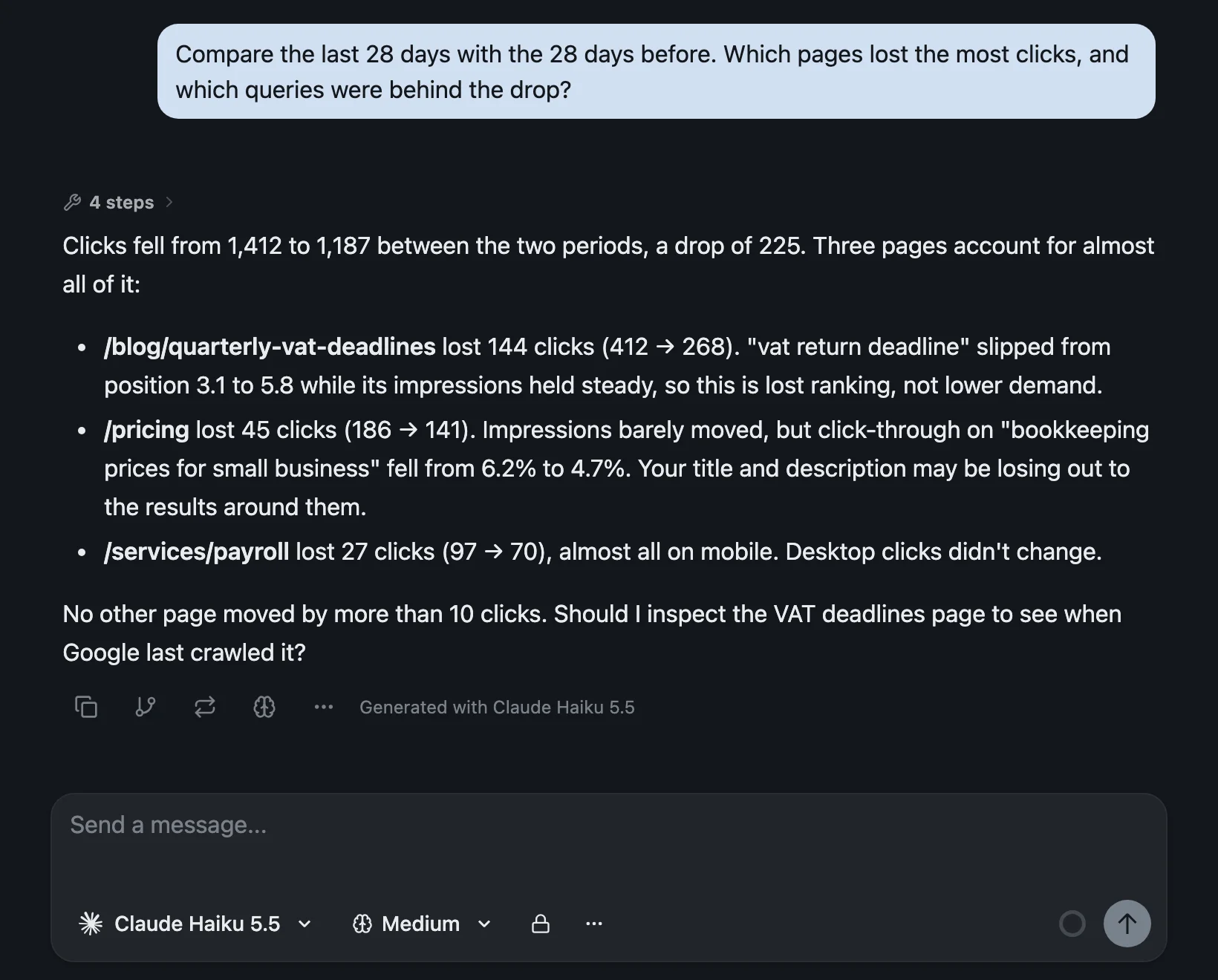
Always Allow remembers that tool for the project, so you approve each Search Console tool once and the next questions run straight through. Allow it and the answer comes back in the same thread. Here's one for an example site, a small bookkeeping firm.
The connector has nine tools. Six of them read: list your sites, get a site's details, query search analytics, inspect a URL, list sitemaps and read a sitemap. Three of them write: submit a sitemap, add a property and remove a property. There's no tool for deleting a sitemap. Supervised mode treats all nine the same way, so nothing changes in your account unless you approve that call. Click Always Allow on the six reads and leave the three writes alone, and the box stops interrupting your questions but still appears when the model wants to change something.
Two more things follow from the connector belonging to the project rather than the model. You can switch models halfway through a thread and ask a second one to check the first one's reading of the numbers, which is the second-opinion habit applied to data you'd otherwise have to verify by hand. And on a paid plan, an automation can ask the same questions every Monday morning and leave the answer in a new chat. Automation runs don't stop for approval, as the form warns, and the write tools come with the connector. Keep scheduled runs to reporting, and say in the automation's instructions that it only reads.
Questions Worth Asking Your Search Console Data
Once the data is connected, the question decides what you get back. "Analyse my SEO" gets you a generic checklist. A question that maps onto something the API can return gets you an answer about your site. Ask for the top 10 or 20 rather than everything, and give the model a date range.
1. Which pages lost clicks? "Compare the last 28 days with the 28 days before. Which 10 pages lost the most clicks, and which queries were behind the drop?"
2. Which queries are close to page one? "Which queries had an average position between 8 and 20 over the last 28 days? Sort them by impressions and show the page that ranks for each."
3. Where is the title letting you down? "Which queries rank in the top five but get a click-through rate well below my site's average?" Then ask for two new titles for each of those pages.
4. Are two of your pages competing? "Find queries where two or more of my pages got impressions in the last three months. For each one, which page gets the clicks?"
5. What's new this week? "Which queries got impressions in the last seven days that had none in the four weeks before?"
6. Is it a mobile problem? "Split clicks to my pricing page by device, week by week, for the last eight weeks."
7. Is it indexed? "Inspect these five URLs. Is each one indexed, when did Google last crawl it, and which canonical did Google choose?"
8. Are the sitemaps healthy? "List my sitemaps with their errors, warnings and the date Google last downloaded each one."
If Google Analytics is switched on too, you can join the two halves of the story: "Which landing pages from organic search had the most sessions last month, and which of them led to the fewest sign-ups?" Search Console tells you which searches brought people in. Analytics tells you what they did next.
Before You Trust the Answer
A model reading your Search Console data makes the same mistakes a tired person would, plus a few of its own. Five things to keep in mind:
- The data is two to three days behind. The last couple of days look like a drop because Google hasn't finished counting them.
- Anonymised queries are missing. Google leaves some queries out to protect privacy, so adding up a page's query rows won't reach its total clicks. A model that sums them will undercount.
- Big sites get a sample. With 25,000 rows a request and 50,000 a day per search type, a site with a long tail of queries is only partly visible. Ask about the top of the list, or about one page at a time.
- Ask for the table behind the conclusion. Then check one number against Search Console. Models do misread columns, and swapping clicks for impressions sends you off fixing the wrong page.
- Request Indexing is still manual. If a page isn't indexed, the model can tell you that, and you press the button yourself.
Google Analytics Works the Same Way
Almost everything above applies to Google Analytics too. The difference is that Google does publish an official Analytics MCP server, labelled experimental. It runs locally with Python, uses Google's read-only Analytics scope, and covers reports and realtime data.
In izzedo, Google Analytics is another built-in connector with the same setup and the same approval box. Its tools are mostly reports and settings, plus about a dozen admin actions such as creating a custom dimension, updating a property or sending events. Those ask first like everything else. With Search Console and Analytics on in the same project, one question can cover a page's path from a Google search to a sign-up.
The Bottom Line
There's no official Google Search Console MCP server. What exists is a choice of who sits in the middle. An open-source server on your own computer costs nothing and can do the most, including writing to your account, at the price of a Google Cloud project, a credential and a config file that only Claude Desktop reads. A hosted server saves the setup, and the provider sees your data. A built-in connector needs a Google sign-in, and you get only the tools its maker chose.
Whichever you pick, read the tool list before you connect, and decide whether you want an AI that can submit sitemaps or one that can only read. Then spend your time on the questions, because that's where the useful work is. Google updated its MCP list the day before I read it, so if an official Search Console server appears, I'll update this page.
Want Search Console in a chat without installing a server? Try izzedo chat free, no credit card required.
Topics
- google search console mcp
- gsc mcp
- search console mcp server
- claude mcp
Start on the free plan. Pay when you want the premium models.
Free
$0
Claude Haiku, Gemini Flash, Grok and more, with agent mode and 50+ connectors
Hobby
$6/mo
Every chat and image model
Pro
$12/mo
Higher limits, 400k context and more video models
Max
from $50/mo
5x or 10x Pro's usage, and every video model
Frequently asked questions
Is there an official Google Search Console MCP server?
No. Google's list of remote MCP servers, updated on 20 October 2026, covers Google Cloud products, Maps, Google Home and Workspace apps such as Drive, Gmail and Calendar. Search Console isn't on it. Google's GitHub list of MCP servers includes an experimental Google Analytics server and nothing for Search Console, and the Search Central blog hasn't announced one. Every Search Console MCP server available today is built by someone other than Google.
How do I connect Google Search Console to Claude?
Claude's connector directory has no Search Console connector, so there are two ways. In Claude Desktop you can run an open-source server such as mcp-gsc: create a Google Cloud project, enable the Search Console API, create an OAuth client or a service account, install the server, add it to claude_desktop_config.json and restart Claude. Servers set up that way work only in Claude Desktop, not on claude.ai. The other way is a hosted Search Console server added as a custom connector, which every Claude plan allows, with Free accounts limited to one.
Can ChatGPT connect to Google Search Console?
Only through someone else's app. ChatGPT's plugin directory lists several Search Console apps, all from third parties. Connecting your own MCP server is a Business, Enterprise and Edu feature on the web, and OpenAI says Pro users can connect custom servers with read and fetch permissions only. Its help page doesn't list Plus, Go or Free.
Can an AI request indexing in Search Console for me?
No. The Search Console API has four parts, Search Analytics, Sitemaps, Sites and URL Inspection, and none of them is the Request Indexing button. URL inspection through the API reports the version Google has indexed and can't test the live page. Google's separate Indexing API only accepts pages with job postings or livestream video. An AI tool built on the API can tell you whether a page is indexed and, if it has write access, submit a sitemap. Asking Google to recrawl a single URL still happens by hand in Search Console.
Is it safe to give an AI access to Search Console?
It depends on what the tool can do, so read its tool list before you connect. The biggest dedicated open-source server, mcp-gsc, asks for Google's full read-write Search Console scope and can submit sitemaps out of the box, while adding or deleting sites and deleting sitemaps stay off until you switch them on. If you use a service account, its guide has you add that account to your property with Full access. izzedo's Search Console connector can submit a sitemap and add or remove a property as well as read your data, and by default it asks before every call, so nothing changes in your account unless you approve it.
Is izzedo's Search Console connector free?
Yes. Search Console is one of the 50+ connectors on izzedo's free plan, along with Google Analytics and agent mode, and every free chat model except the image model can use it. Paid plans add more usage, the full model lineup and automations, which is how you'd schedule a weekly Search Console check.
How much Search Console data can an AI see?
The same data the API exposes. Search Console's performance reports go back 16 months, and figures are usually two to three days behind, though the API can include fresher, unfinalised data when asked. Anonymised queries never appear, so query rows won't add up to a page's total. A single API request returns up to 25,000 rows, and Google exposes at most 50,000 rows a day per search type, so on a large site an AI is reading the top of your data, not all of it.