Copilot vs ChatGPT: Copilot Runs OpenAI's Models Now, and ChatGPT Runs Inside Word
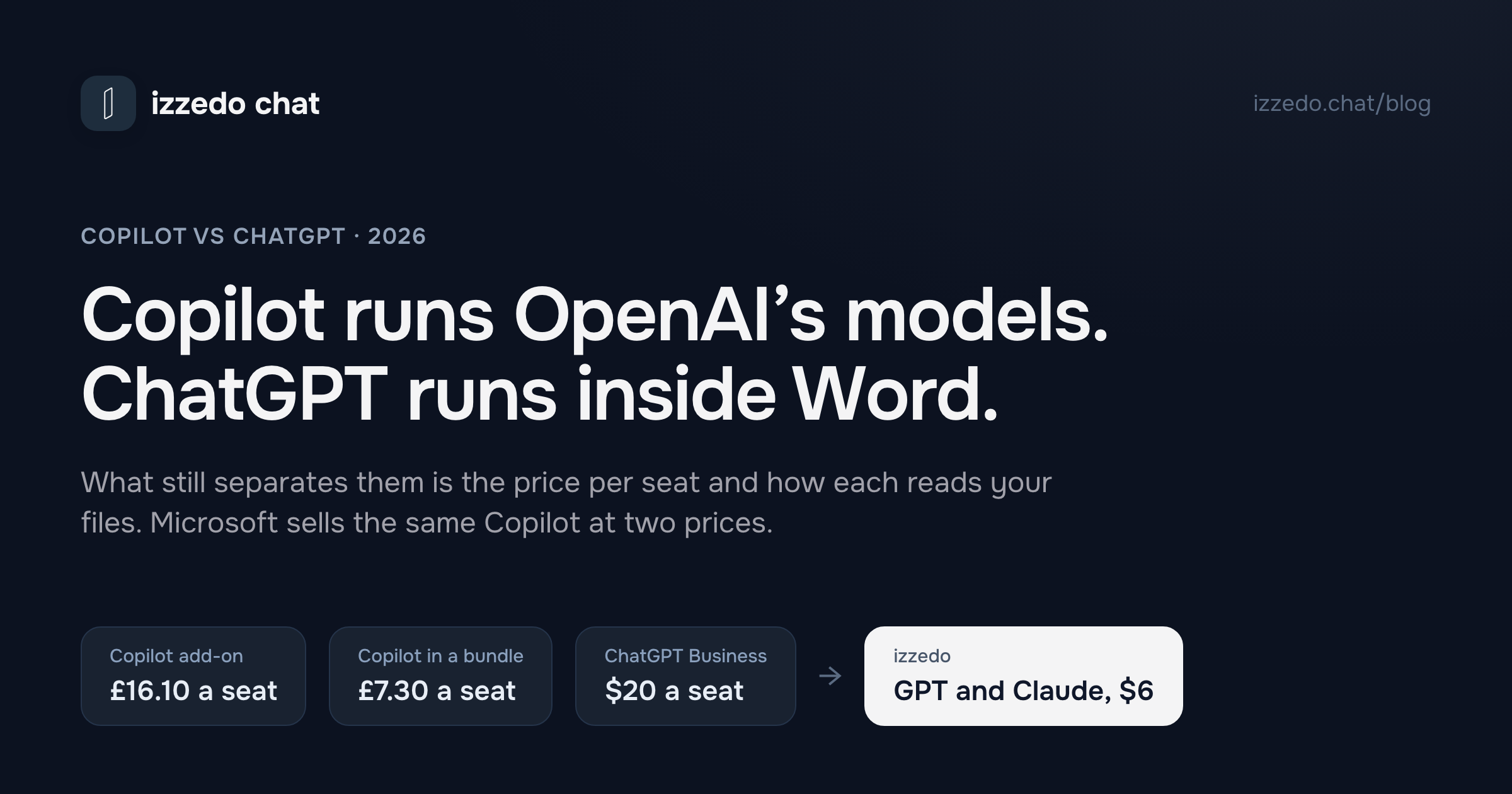
Since July, OpenAI itself runs GPT models inside Microsoft's Copilot, and ChatGPT now works inside Word, Excel and PowerPoint and connects to Outlook and SharePoint. What still separates them is what you already pay Microsoft and how each one finds your files. In the UK, Microsoft's bundle adds Copilot to Business Standard for £7.30 a seat, against £16.10 for the add-on.
A year ago the answer fit on a sticky note. Copilot was the one inside Office, and ChatGPT was the cleverer chatbot. Both halves have gone out of date.
Since July, OpenAI itself has been running GPT models inside Microsoft's Copilot, under contract to Microsoft, and the paid Copilot offers Anthropic's Claude too. ChatGPT, for its part, now sits in a sidebar inside Word on every plan, the free one included, and connects to Outlook, SharePoint and Teams. Each product has moved onto the other's ground.
So for a small business the model isn't what separates them any more. Three things do: what you already pay Microsoft, how each one finds your files, and which of Microsoft's two prices you pay for Copilot. Microsoft sells the same Copilot as a bundle and as an add-on, and in the UK the add-on costs more than twice as much per seat.
I read Microsoft's UK and US plan pages, Microsoft Learn's Copilot documentation, OpenAI's pricing grid and ten of its help articles on 8 October 2026. Microsoft prices its UK business plans in pounds, excluding VAT, so those come first, with dollars alongside.
The Short Answer
| If this is you | Pick | Why |
|---|---|---|
| A team already on Microsoft 365 Business Standard or Premium | Copilot, bought as the "with Copilot" plan | It adds Copilot for £7.30 a seat on Standard, against £16.10 for the add-on |
| A team on Business Basic that wants Copilot | Business Standard with Copilot | £18.10 a seat, less than Basic plus the add-on at £21.50, and you gain the desktop apps |
| A team on Google Workspace, or with no Microsoft plan | ChatGPT Business | Copilot needs a Microsoft 365 plan underneath it |
| A Microsoft 365 business that wants AI on client work at no extra cost | Copilot Chat, already in your plan | Microsoft's data protection terms cover it. ChatGPT's free plan trains on your content unless you opt out |
| One person working alone | ChatGPT Plus or Go, or Microsoft 365 Personal if you also need Office | ChatGPT Business needs two paid seats |
The table leaves out one case, and it's the one I built something for. Some teams want OpenAI's and Anthropic's models side by side without a Microsoft licence. izzedo chat puts the newest of both in one picker, with Gemini and Grok, for $6 a month, and connects to Outlook, OneDrive, Teams and Excel. It doesn't sit inside Word or index your SharePoint, which is what Copilot's licence buys, so it's an answer for the model choice rather than a Copilot replacement.
Which Copilot Are We Comparing?
Microsoft has renamed its Copilots again. Microsoft Learn now notes that "Microsoft 365 Copilot is now named Microsoft Copilot, and Microsoft 365 Copilot Chat is now named Microsoft Copilot Chat." That leaves three products:
- Microsoft Copilot Chat. Free for anyone signed in with a work account on a Microsoft 365 business plan. It answers from the web and from files you give it.
- Microsoft Copilot. The paid licence that reads your work files and works fully inside Word, Excel, PowerPoint, Outlook and Teams. Businesses with up to 300 users buy it as Copilot Business, either as an add-on or bundled into a plan.
- Copilot for personal Microsoft accounts. Free, with more usage if you pay for Microsoft 365 Personal, Family, Premium or Pro.
Microsoft is moving all three into one Copilot app, at copilot.cloud.microsoft, with a marker showing which account you're signed into. GitHub Copilot is a different product, for software developers, and it isn't part of this comparison.
ChatGPT's line-up is simpler. Free, Go and Plus are personal plans, Pro comes in three tiers for heavy users, Business is the self-serve team plan and Enterprise is priced by quote.
The Models: Same Family, and Copilot Adds Claude
OpenAI's help centre, updated on 7 October, says GPT-6 is rolling out in ChatGPT to Plus, Pro, Business and Enterprise. On Plus it runs at Medium and High thinking. Business adds Extra High and a Pro level powered by GPT-6 Astra, and Plus gets Astra only inside ChatGPT Work and Codex. Free and Go run a lighter model. Every model in ChatGPT is an OpenAI model.
Copilot Chat, the free one, routes your prompt automatically, or lets you pick Quick response or Think deeper. Microsoft describes its access to models as "standard", gives GPT-5 as an example, and says quality "might also vary depending on service availability". The paid licence buys priority access.
Microsoft has also changed the line-up in three ways this year.
- OpenAI now runs GPT models itself. Microsoft has long run OpenAI's models on its own Azure servers. OpenAI joined Microsoft's subprocessor list on 23 June 2026, became usable on 9 July, and from 24 July its own servers are switched on for eligible business customers unless an admin turns them off. Microsoft says they "serve the same GPT-based Copilot experiences your users already have", so this changes who runs the model more than what you get, except in Cowork.
- Claude works in Word, Excel and PowerPoint. For UK and EU tenants created after 25 March 2026, the Anthropic setting is on by default, so Copilot in those three apps can draft with Claude. Older UK and EU tenants should check the setting in the admin centre. Elsewhere, Microsoft switches Anthropic's models on by default for most business customers.
- Copilot Cowork has a model menu. It lists GPT-5.5, GPT-5.6 Sol and Terra, GPT-6 Astra, Claude Opus 5, Claude Sonnet 5 and Claude Fable 5.1.
On paper, then, a Copilot Business seat offers two model families where ChatGPT Business offers one. The catch is that the full menu lives in Cowork, Copilot's agent mode, which Microsoft bills per use on top of the licence. More on that below.
What Copilot and ChatGPT Cost a Small Business
Prices per user per month on an annual plan, from Microsoft's UK and US plan pages and OpenAI's pricing page on 8 October:
| Plan | UK, excluding VAT | US |
|---|---|---|
| Microsoft 365 Business Basic, with free Copilot Chat | £5.40 | $7.00 |
| Microsoft 365 Business Standard, with free Copilot Chat | £10.80 | $14.00 |
| Microsoft 365 Business Premium, with free Copilot Chat | £16.90 | $22.00 |
| Business Standard with Copilot | £18.10 | $23.50 |
| Business Premium with Copilot | £24.60 | $32.00 |
| Copilot Business add-on, on top of a plan | £16.10, or £13.80 in year one | $21.00, or $18.00 in year one |
| ChatGPT Business, standard seat | Billed in pounds at checkout | $20.00, or $25 billed monthly |
Microsoft also sells cheaper versions of each plan without Teams, and month-to-month billing at a higher price. Business Standard with Copilot is £21.72 a month that way.
The Add-On Is the Expensive Way to Buy Copilot
Subtract the plan from the plan with Copilot and you get what Microsoft charges for Copilot inside a bundle. On Business Standard it's £7.30 a user a month, and on Business Premium £7.70. In the US it's $9.50 and $10.
The add-on, which is the same Copilot Business bolted onto the plan you have, costs £16.10. Microsoft is running an offer that takes it to £13.80 for the first year, for existing customers who sign up between 1 July and 31 December 2026, but even at £13.80 it's nearly twice the bundled price.
Two results follow, and both surprised me.
If you're on Business Basic, Copilot is cheaper with an upgrade. Basic plus the add-on is £21.50 a user, or £19.20 in the offer's first year. Business Standard with Copilot is £18.10, and it includes the desktop versions of Word, Excel and PowerPoint, which Basic doesn't. In the US it's $28 against $23.50.
If you're on Business Standard, don't add Copilot. Switch plans. Standard plus the add-on comes to £26.90, or £24.60 in the offer's first year. That £24.60 is exactly what Business Premium with Copilot costs, and Premium adds Microsoft's device management and stronger threat protection. Microsoft's own Business Standard page offers the switch to the bundle.
The add-on makes sense for a business on a plan the bundles don't cover, such as Microsoft 365 Apps for business.
ChatGPT Business: $20 a Standard Seat, Two Seats Minimum
A standard ChatGPT Business seat is $20 on annual billing and $25 month to month, with a minimum of two paid seats. A Premium seat with more usage costs $100 a month billed annually, or $125 monthly. OpenAI bills UK customers in pounds, but its pricing page showed me dollars from where I am, so I can't give you OpenAI's sterling figure. Check it at checkout. I've covered what Business adds over Plus separately, including the catch that members can't export their own chats.
Here's how it works out for a four-person firm already on Business Standard, before VAT. Switching all four seats to Business Standard with Copilot adds £29.20 a month, or £350 a year. ChatGPT Business for the same four people costs $80 a month on annual billing with standard seats, on top of the Microsoft plan they still need for email.
Neither price includes the agent modes. Microsoft bills Copilot Cowork per use, in Copilot Credits, and Microsoft's Cowork documentation points you to a cost estimator rather than a price list. ChatGPT Work shares an allowance with Codex inside the seat, and Business workspaces can buy credits for more.
How Each One Reads Your Files
This is the difference that matters day to day. Licensed Copilot has your files indexed already. ChatGPT goes and looks when you ask, through connections someone has to approve.
| Where your work lives | Copilot Chat, free | Copilot, licensed | ChatGPT |
|---|---|---|---|
| Word, Excel, PowerPoint | Basic help in the apps on some tenants, none on others | Full Copilot in the apps, priority access | One add-in for all three. Word works on every plan, Free included |
| Outlook | Reads your mailbox, calendar and meetings in supported versions of Outlook | Reads across email, meetings, chats and files at once | An app that searches and reads your mail and calendar |
| SharePoint and OneDrive | Only files you upload or point to | Everything you have permission to open, indexed | A live search app, after a Microsoft admin approves read access |
| Teams | Works in Teams, with the content you have open | Answers across all your chats, channels and meetings | An app that searches chats and channels and can post when an admin allows it |
Licensed Copilot: Everything You Can Open, Already Indexed
Microsoft calls the layer underneath Work IQ. With a licence, Copilot reasons across "emails, meetings, calendars, chats, documents, sites, files" and anything else in Microsoft 365 you have permission to see, from an index Microsoft builds for you. You can ask what you promised a client across an email thread, a Teams chat and a proposal in SharePoint, and it searches all three at once. The licence also adds Microsoft's Researcher and Analyst agents.
Without a licence, Copilot Chat is "primarily web grounded". You paste text, upload a file or point to one. The exception is Outlook. In supported versions of Outlook, the free Copilot Chat can answer questions across your emails, calendar, meetings and chats. For a small team whose work is mostly email, that's worth trying before you pay for anything.
Inside Word, Excel and PowerPoint, unlicensed users get one of two experiences depending on how the tenant is set up. Microsoft labels them in the app. One gives "standard access" to Copilot in those apps, subject to capacity. The other gives no Copilot there at all.
ChatGPT: It Goes Looking When You Ask
ChatGPT's Microsoft apps read your data live, one request at a time. The SharePoint app searches SharePoint and work OneDrive content your account can already open. Before it works, a Microsoft administrator has to approve two read permissions, Sites.Read.All and Files.Read.All. Personal OneDrive accounts aren't supported. The Outlook app searches and reads your mail and calendar. The Teams app searches chats and channels, and it can send messages if your admin enables that.
OpenAI builds a stored index of SharePoint and Teams content only for Enterprise and Edu workspaces. On Business, every question starts a fresh search.
The Word, Excel and PowerPoint add-in is the newest piece. ChatGPT for Word "is available on all ChatGPT plans, including Free". OpenAI switched it on by default for workspaces from 1 October, although a Microsoft 365 admin still has to allow the add-in. Three limits are worth knowing. The Word add-in can't read other files on your computer. Its chats are kept apart from your ChatGPT history. And it draws on the same allowance as Codex and ChatGPT's other premium features, so heavy use in Word leaves less for those.
For a five-person firm where the owner is also the Microsoft admin, ChatGPT's setup is a short job. Where licensed Copilot is built to win is the question that spans everything, because it searches one index while ChatGPT queries each connected app in turn.
Agents: Copilot Cowork and ChatGPT Work
Both now have a mode that does multi-step work rather than answering one question.
Copilot Cowork is generally available. It can send emails, schedule meetings, create Word, Excel, PowerPoint and PDF files, post in Teams and run scheduled prompts, plus tasks that start when a matching email or Teams message arrives. By default it asks before it sends an email, posts a message or changes a shared system. An admin has to switch it on by setting up usage-based billing and a spending policy, and every model response, tool call and browser task counts against that budget.
ChatGPT Work creates documents, spreadsheets, presentations and reports. It comes with Plus on desktop, web and mobile, and with Business. Free and Go get a limited version in the desktop app. Its usage is separate from chat.
For a small business the practical difference is billing. ChatGPT Work's allowance, shared with Codex, comes inside the seat you already pay for. Cowork starts a second bill, so someone has to create a spending policy for it, and that policy is where you set a monthly limit.
Client Data: What Each Plan Promises
At the business tier the two make similar promises. Copilot Chat and the paid Copilot both come under Microsoft's enterprise data protection for anyone signed in with a work account, with no admin setup. Microsoft says prompts and responses "aren't used to train language models", and they're logged under your retention policies. ChatGPT Business doesn't train on your data by default and holds a SOC 2 Type 2 report.
Two details matter for UK and EU businesses. When Claude runs in Copilot in Word, Excel or PowerPoint, Microsoft says the processing "occurs outside of the Microsoft EU Data Boundary". The OpenAI-run models are inside that boundary but excluded from Microsoft's in-country processing commitments. On OpenAI's side, choosing where your data is stored, the UK included, is an Enterprise feature. Business doesn't have it.
The real gap is at the free and personal level. A Microsoft 365 business account already includes an AI chat under Microsoft's data protection terms. OpenAI's pricing grid answers "Opt-out available" for Free, Go, Plus and Pro on its row "Content is used to train our models", which means your chats train OpenAI's models until you switch that off. If a team member is pasting client details into a free ChatGPT account today, Copilot Chat is the free alternative you've already paid for.
If You Work Alone
ChatGPT Business needs two seats, so a sole trader is choosing between personal plans.
On Microsoft's side, Copilot Pro is gone. Microsoft stopped selling it and ended support on 1 August 2026. Copilot now comes with Microsoft 365 Personal, at £84.99 a year or £8.49 a month in the UK ($99.99 or $9.99 in the US), which includes the desktop Office apps and "higher usage than free" for Copilot. Microsoft 365 Premium, at £189.99 a year or £18.99 a month ($199.99 or $19.99), raises the limits and adds the Researcher and Analyst agents, which Personal and Family don't get. Microsoft 365 Pro, at £94.99 a month ($99.99), has the highest Copilot limits Microsoft sells to individuals. On Family, Premium and Pro, only the subscription owner gets the AI features.
On OpenAI's side, its UK App Store listing prices Go at £6.99 and Plus at £19.99 a month. Bought on the web in the US they're $6 and $20.
So if you'd pay for Office anyway, Microsoft 365 Personal gets you Copilot inside your documents for less than Plus. If you mostly want a strong model to think with, Plus gives you more of one. I've put real numbers on whether Plus is worth it before, and the ChatGPT limits post covers what each plan runs out of first.
Which One for Which Business
An accountancy or bookkeeping practice on Microsoft 365. Copilot, via Business Standard with Copilot. Client email, Teams chats and working papers in SharePoint are exactly what Copilot's index is built for, and £7.30 a seat is hard to beat for an AI that reads all three.
A small agency on Google Workspace. ChatGPT Business. Copilot needs a Microsoft plan underneath it, and ChatGPT's Google Drive and Gmail connections do for you what its Microsoft apps do for others. I've compared every vendor's connectors if Google is your stack.
A firm on Business Basic. Move to Business Standard with Copilot rather than adding Copilot to Basic. You pay less and get the desktop apps.
A team that writes for clients and wants Claude for drafting. Licensed Copilot can draft with Claude in Word. On a UK tenant created after 25 March it's on already, and on an older UK tenant an admin can switch it on in the Microsoft 365 admin centre.
A sole trader. ChatGPT Plus for the model, or Microsoft 365 Personal if Office is part of the job anyway.
Where izzedo Fits
izzedo chat isn't inside Word and doesn't index your SharePoint. If that's what your team needs, the Copilot bundle above is the better buy.
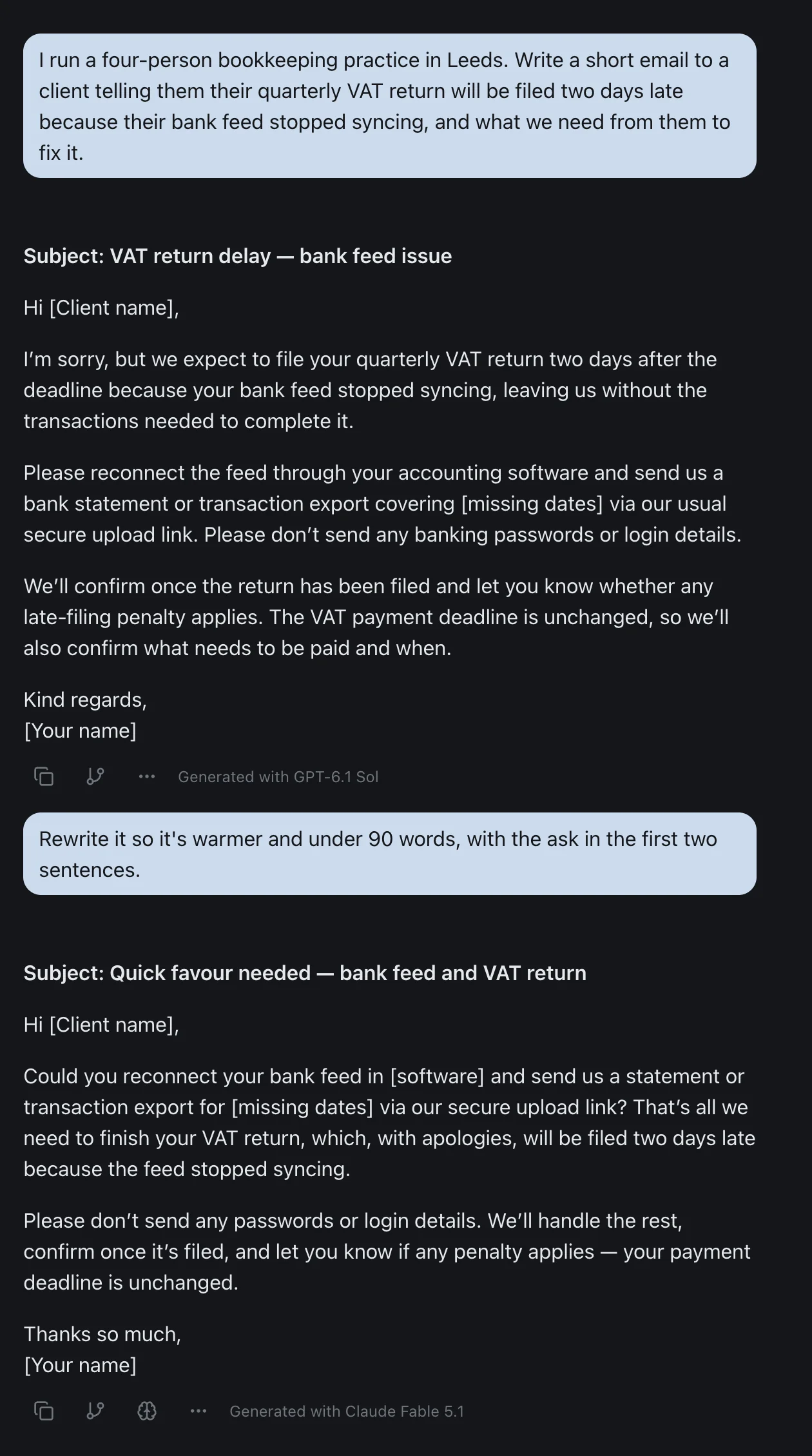
What it does is the other half of what Copilot's licence advertises, the choice of models, without a Microsoft plan underneath. OpenAI's newest models, Anthropic's Claude, Gemini and Grok sit in one picker, and the model you switch to reads the whole thread. That's how I wrote the email in the screenshot below. GPT-6.1 Sol wrote the first draft, then Claude Fable 5.1 rewrote it warmer and shorter in the same thread, with the request moved to the top.
It connects to the Microsoft apps a small business uses most. In Outlook it can search, read, draft, send and reply to email and manage calendar events. In OneDrive it can find, download and upload files. It reads Teams chats and channels, and it reads and updates Excel ranges, tables and charts. It doesn't connect to SharePoint. By default it asks you before every action it takes, read or write.
All the chat models come with the $6 Hobby plan, and the Team plan is $15 a user a month, or $12 billed annually. Connectors and agent mode are on the free plan as well, with the lighter models. The details are on the pricing page, and if you're comparing more than two products, every matchup I've run is on one page.
The Bottom Line
Copilot and ChatGPT run the same family of models now, and both reach into Word, Outlook and SharePoint. What still separates them is where your work lives and how you buy.
If your business runs on Microsoft 365, buy Copilot, but buy it bundled. In the UK, Business Standard with Copilot costs £7.30 a seat more than Business Standard, while the add-on costs £16.10, and Business Basic plus the add-on costs more than the bundle. If your business doesn't run on Microsoft 365, ChatGPT Business is the cleaner choice at $20 a standard seat. And if all you need today is an AI that's safe to use on client email, Copilot Chat is already in your Microsoft plan.
Microsoft has renamed these products twice in two years and is running a Copilot offer that ends in December, so check the date on any comparison you read, this one included.
Want OpenAI's and Anthropic's models in one thread, without a Microsoft licence? Try izzedo chat free, no credit card required.
Frequently asked questions
Is Copilot better than ChatGPT?
For a business that already runs on Microsoft 365, the paid Copilot is usually the better buy, because it can search your whole mailbox, Teams chats and SharePoint at once, and bundled with Business Standard it adds $9.50 a seat in the US, or £7.30 in the UK, against $20 for a standard ChatGPT Business seat. For a business on Google Workspace, or one person working alone, ChatGPT is the better buy, because Copilot needs a Microsoft 365 plan underneath it. The models are no longer the deciding factor, since Copilot runs OpenAI's GPT models and the paid tier adds Anthropic's Claude.
Does Copilot use ChatGPT?
It uses the same family of models, not the ChatGPT app. Microsoft's Copilot runs OpenAI's GPT models, and since 9 July 2026 some of them are run by OpenAI itself as a Microsoft subprocessor, switched on by default for eligible business customers from 24 July. The paid Copilot also uses Anthropic's Claude models, in Word, Excel and PowerPoint and in Copilot Cowork, where the model menu lists GPT-6 Astra next to Claude Fable 5.1.
How much is Copilot for a small business?
In the UK, Microsoft 365 Business Standard with Copilot costs £18.10 per user per month on an annual plan, against £10.80 for Business Standard alone, and Business Premium with Copilot costs £24.60 against £16.90. Bought as an add-on to an existing plan, Copilot Business costs £16.10 per user, or £13.80 in the first year under an offer that runs to 31 December 2026. Prices exclude VAT. In the US the same plans are $23.50, $14.00, $32.00 and $22.00, and the add-on is $21, or $18 under the offer.
Is Copilot free?
Partly. Microsoft Copilot Chat is included at no extra cost with Microsoft 365 business plans for anyone signed in with a work account, with Microsoft's enterprise data protection. It answers from the web and from files you give it, and in supported versions of Outlook it can also read your mailbox and calendar. The version that searches all your work files and works fully inside Word, Excel and PowerPoint needs a paid licence. There is also a free Copilot for personal Microsoft accounts.
Is it worth paying extra for Copilot?
If your team already works in Outlook, Teams and SharePoint, buying it as Business Standard with Copilot is good value in the UK, at £7.30 more per user per month than Business Standard alone. Buying the add-on instead costs £16.10, so the same Copilot is more than twice the price that way. If you're on Business Basic, moving to Business Standard with Copilot at £18.10 costs less than Basic plus the add-on at £21.50. If your team doesn't live in Microsoft 365, the licence buys little you'd use.
Can ChatGPT work with Outlook, SharePoint and Teams?
Yes. ChatGPT has apps for Outlook email and calendar, SharePoint, Teams and OneNote, plus one add-in for Word, Excel and PowerPoint. The Word add-in works on every ChatGPT plan, including Free. The SharePoint app needs a Microsoft administrator to approve read permissions first, and it searches live each time you ask. The pre-built index of SharePoint and Teams content is only for ChatGPT Enterprise and Edu workspaces.
Which is safer for client data, Copilot or ChatGPT?
Both business tiers promise not to train on your data. Copilot Chat and the paid Copilot come under Microsoft's enterprise data protection and the data protection terms you already have with Microsoft. ChatGPT Business doesn't train on your data by default, but data residency, including in the UK, is only on Enterprise. The gap is at the free and personal level: ChatGPT's Free, Go, Plus and Pro plans use your content for training unless you opt out, while Copilot Chat in a business account doesn't.
What happened to Copilot Pro?
Microsoft stopped selling Copilot Pro and ended support for existing subscribers on 1 August 2026. Microsoft points heavy personal users to Microsoft 365 Premium, at £18.99 a month or £189.99 a year in the UK and $19.99 or $199.99 in the US, and Microsoft 365 Pro, at £94.99 or $99.99 a month, has the highest Copilot limits. Microsoft 365 Personal and Family also include Copilot, with lower usage limits than Premium.
Ready to try multi-model AI workflows?
Access GPT, Claude, Gemini, Perplexity, and more — all in one place.
Start for Free →