How to Use Multiple AI Models at Once (Without 6 Browser Tabs)
Switching between ChatGPT, Claude, Gemini, and Perplexity means six tabs, six logins, and lost context. Here's how to run every model in one conversation instead.
You open ChatGPT for a draft. Then Claude, because it's better at tightening long prose. Then Perplexity, because you need a real source. Then Gemini, because the document is too long for the others. Four tabs, four logins, and you've pasted the same context four times.
If you use AI seriously, you already know no single model is best at everything. The problem was never picking the right model — it's that using more than one is a logistical mess. Separate tabs, separate bills, and context that doesn't follow you from one to the next.
This guide shows you how to use multiple AI models at once the practical way: in a single conversation, with one login, switching models as the task changes. No tab circus required.
Why You End Up With Six AI Tabs Open
Nobody plans to run six AI tools. It happens one task at a time.
You start with one model for everything. Then you notice it's weak somewhere — maybe it invents sources, or its writing all sounds the same, or it chokes on a long PDF. So you add a second tool for that job. A few weeks later you add a third for research, a fourth for polishing drafts. Each one is genuinely better at its specialty:
- One model drafts fast but its prose is generic.
- Another follows instructions to the letter and writes in a cleaner, more natural voice.
- A research engine cites real, live sources instead of guessing.
- A long-context model swallows an entire contract or report without losing the thread.
Every addition is rational. The pile of tabs that results is not. (For a full breakdown of which model actually wins at which task, see Stop Using Just One AI Model — or, for the big three specifically, Claude vs ChatGPT vs Gemini.)
The Hidden Cost of Switching Between AI Tools
The pain of a multi-tool setup isn't the models — it's the switching. Three costs add up quietly:
- Lost context. Every time you move to a new tool, you start from zero. You re-paste the brief, the constraints, the half-finished draft. The new model has no idea what the last one just did.
- Repeated prompts. That re-pasting isn't free. You're rewriting the same setup over and over, and any detail you forget to carry across degrades the answer.
- Multiple bills. ChatGPT, Claude, Gemini, Perplexity, and Grok each charge $20–$30/month for their paid tiers. Stack five or six and you're paying around $110/month — often for tools you only open a few times a week.
The fix isn't to give up and crawl back to one model. It's to keep the multi-model approach and delete the switching tax.
How to Use Multiple AI Models in One Place (Step by Step)
The cleanest way to run several models is to stop treating them as separate apps and put them in one workspace, where they share a single conversation and a single subscription. Here's the workflow.
1. Pick the right model for each task
Instead of opening a different app, you open a model picker inside the same chat and choose the right engine for the job at hand — a generalist for drafting, a sharp reasoner for tricky problems, a research model for sourced facts, a long-context model for big documents.
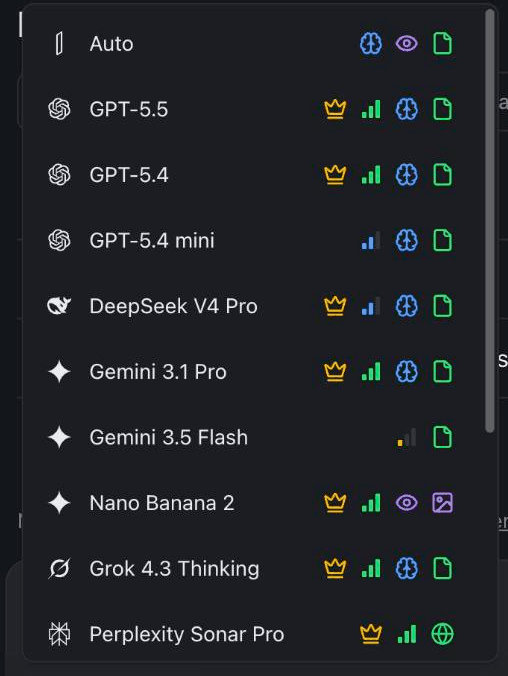
In izzedo chat, every leading model — GPT, Claude, Gemini, Grok, Perplexity Sonar, DeepSeek, Qwen, Llama, plus image models — sits in one dropdown. Choosing a model is a single click, not a new tab and a new login.
It also quietly solves an access problem. The Chinese ChatGPT alternatives — DeepSeek and Qwen — are region-locked or phone-verified in their own apps, and here they're just two more entries in the list. Other multi-model apps make a similar pitch but meter it in compute points, which is the trade-off I worked through in the best Poe alternatives. The same move covers vendor throttling. When ChatGPT stops you with its concurrency error or the status page says it is having an afternoon, the thread carries on with another model instead of waiting.
Here's a quick cheat sheet for which model to reach for:
| What you're doing | Reach for | Why |
|---|---|---|
| First drafts & brainstorming | ChatGPT | A fast, versatile generalist for getting ideas down |
| Polishing & long-form editing | Claude | Follows detailed instructions and writes in a clean, natural voice |
| Research with real sources | Perplexity Sonar | Searches the live web and cites where each fact came from |
| Hard reasoning & math | Gemini or Grok | Built for careful, step-by-step problem-solving |
| Very long documents | Gemini | Handles huge amounts of context in a single pass |
| Images | Image models | Generate and edit visuals without leaving the chat |
None of these are locked in — the whole point is that you can pick the best model for each step and change your mind a sentence later.
2. Switch models mid-conversation without losing context
This is the part separate tabs can't do. Because every model shares the same thread, you can switch models in the middle of a conversation and the context comes with you.
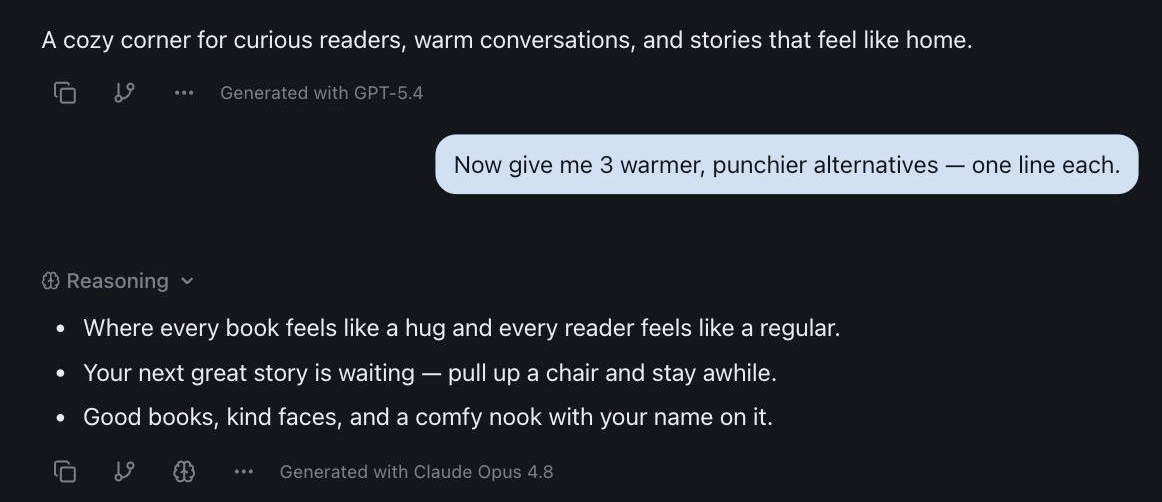
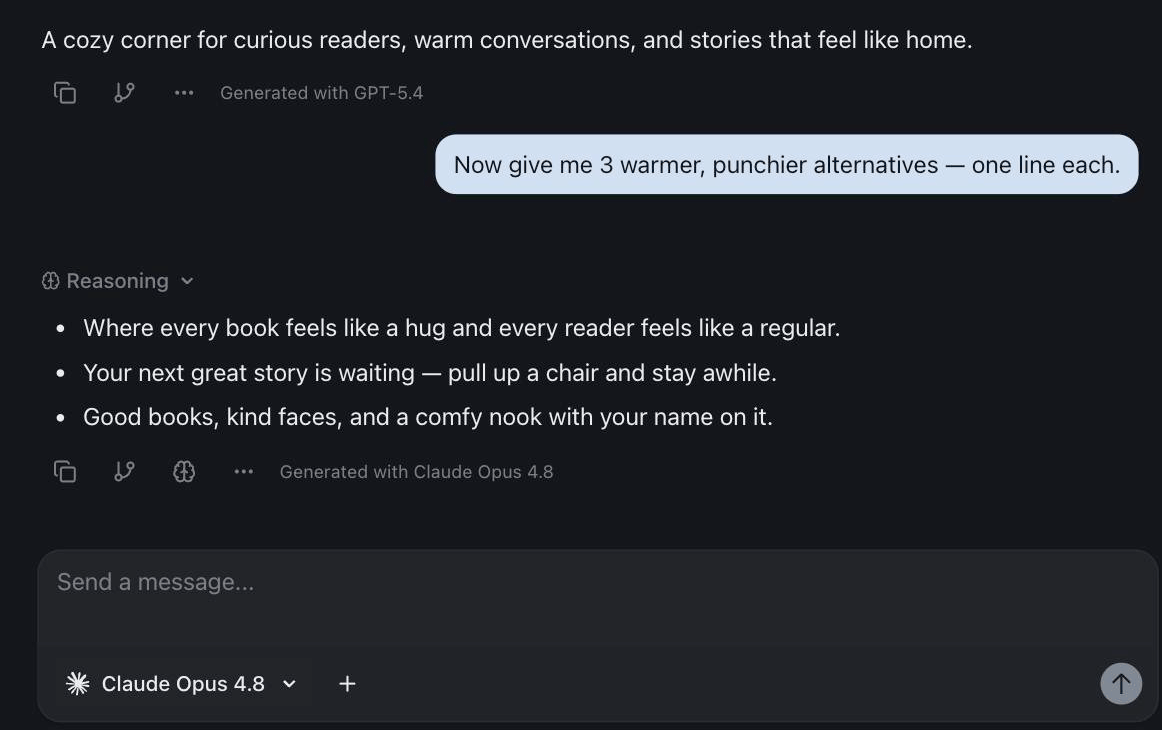
Draft with one model, then switch to another to sharpen the tone — in the same thread, with no copy-paste. The second model sees everything the first one wrote, so it builds on the work instead of restarting it. Ask one model for a fast answer, then hand the exact same conversation to a stronger reasoning model when you hit something hard.
Here's a real exchange from the screenshot above. I asked ChatGPT for a one-sentence welcome tagline for a bookstore and got a solid one: "A cozy corner for curious readers, warm conversations, and stories that feel like home." I wanted punchier options, so I switched to Claude in the same thread — without re-pasting the brief. Because Claude already had the full context, it built straight on the idea instead of starting over: "Where every book feels like a hug and every reader feels like a regular." Two models, one conversation, zero copied-and-pasted setup.
3. Ask several models the same question at once
For anything high-stakes — a fact you'll publish, a number you'll act on, a recommendation you'll put your name on — don't trust one model's word. Ask the same question to several models at the same time and compare their answers side by side.
When the answers agree, you can move on with confidence. When they disagree, you've just caught something worth a second look — and the disagreement itself is the signal. izzedo's Multiple Model Opinions feature is built for exactly this: same question, multiple models, side by side, in one place.
4. Scan the answers in 60 seconds instead of reading them
Three answers is only useful if comparing them is fast. Don't read all three word for word — scan for four signals:
| Signal | What it means |
|---|---|
| It answered the question you meant to ask | This model inferred your intent, not just your words |
| The structure is immediately usable | You can see how to use this output right away |
| It raised a point you hadn't considered | This model is thinking with you, not just for you |
| The tone matches your context | Business formal? Creative brainstorm? Technical deep-dive? |
You're not judging which answer is better in the abstract. You're finding the model that understood the assignment.
Here's what that looks like on something ordinary — "help me write an email to my team about our new AI policy." ChatGPT returns a polished, ready-to-send draft. Claude asks a clarifying question first: is the primary concern compliance or productivity, and should this be directive or collaborative? Gemini offers three tonal options — formal, friendly, hybrid — with a short example of each.
Which one won depends entirely on what you needed. A draft to send now: ChatGPT. Help thinking the decision through: Claude. Options to pick from: Gemini. There's no universal best, only the model that met you where you were for that specific task — which is the whole reason for keeping several within reach.
When Using Multiple Models Actually Matters
You don't need three models for a grocery list. Multi-model pays off most in three situations:
- Research you'll rely on. Gather sourced facts with a web-research model like Perplexity Sonar, then hand the findings to a strong writer to synthesize. Sources stay attached; the synthesis stays grounded.
- Writing that has to land. Draft fast with one model, then pass it to a more precise editor model to tighten the structure and voice. The second model catches the weak transitions and filler the first one glossed over.
- Important decisions and facts. Anything you'll publish, send to a client, or base a decision on deserves a second opinion. Cross-checking across two models is the fastest hallucination filter there is.
In every case the workflow is the same: the right model for each step, all inside one conversation. That's what people are really after when they ask how to use multiple chat AI at once, and note that it isn't a volume trick. Two well-chosen models beat five models answering in parallel, because the value comes from the disagreement between them, not from the count. (Want exact, copy-pasteable workflows? 4 Tasks That Take 3 Hours With One AI — and 20 Minutes With Three walks through four of them.) And when a task is too big to conduct by hand, the same idea can run itself: with Parallel Agents, one orchestrator model delegates the grunt work to sub-agents on cheaper models — I metered what that does to the cost of a real research session here.
Looking for AI With Unlimited File Uploads? Here's What Everyone Actually Caps
One request comes up constantly from people juggling several tools: they want AI with unlimited file uploads, because the documents are the whole job. Contracts, PDFs of readings, exports, decks, scans.
Nobody sells unlimited. What they sell is differently-shaped ceilings, and the differences are bigger than the marketing suggests:
| ChatGPT | Claude | Gemini | |
|---|---|---|---|
| Files at once | Up to 80 per 3 hours on paid plans; 3 per day on free | Up to 20 per chat, free and paid alike | Up to 10 per prompt |
| Max file size | 512MB (20MB for images) | 500MB | 100MB, or 2GB for video |
| PDF handling | Standard text and data extraction | Up to 1,000 pages, but visual elements like charts only on PDFs of 100 pages or fewer | Rolling limits on how much you can analyse in a period |
| Stored library | 20GB on Plus, 100GB on Pro | Not published as a storage quota | Tied to your Google account |
Read that table with your actual work in mind and the picture changes. Free ChatGPT at three uploads a day isn't a document tool at all. Claude's 20-files-per-chat looks tight next to ChatGPT's 80 until you notice Claude applies the same limit to free accounts. And Gemini's 100MB cap is the one that stops a scanned archive dead, while its video allowance is the most generous on the list.
Here's the part that matters for a post about running several models, though. The limit people actually hit isn't any single number in that table. It's uploading the same file into three different services. The contract goes into Claude for the close read, then into ChatGPT for the summary, then into Gemini because it's 300 pages. Three uploads, three quotas, three copies of your document sitting in three companies' storage, and none of the three has any idea what the others concluded.
Uploading once into a workspace where every model can see the file removes most of that friction. A project's knowledge base holds the documents; you switch models and the file stays in context, so the second opinion is genuinely a second opinion on the same source rather than a fresh start with a re-upload. On our own limits, since it would be strange to publish that table and go quiet about izzedo: usage isn't bottomless here either, fair use applies as it does everywhere, and it runs on a short rolling window rather than a monthly pool. Current plan numbers live on the pricing page.
One Workspace, Every Model
Here's the math that makes this easy. Running ChatGPT, Claude, Gemini, Perplexity, Grok, and DeepSeek as separate subscriptions costs around $110/month — six bills, six logins, zero shared context. (DeepSeek is the odd one out on that list — its own app is free, which is exactly what makes DeepSeek vs ChatGPT such an unusual matchup.)
This is the problem we built izzedo chat to solve. Every model in one conversation, one login, one bill — starting at $6/month, with a free plan that needs no credit card. Switch models mid-thread, ask several at once, and keep your projects and context in one place instead of scattered across a browser full of tabs. Usage is the one thing worth being upfront about: it isn't bottomless — fair use applies here as it does with every AI service — but it's enforced in the background on a short rolling window that resets in hours, with a weekly pool behind it for sustained heavy use, so there's no points balance to watch and the bill never moves.
See the pricing plans to compare it against the stack of subscriptions you're paying for now. Running a team rather than a personal setup? The best AI for business breaks the picks down by function — from marketing to support to ops.
The goal was never to find the one perfect AI. It's to use the best one for each task — without the six tabs, six logins, and six invoices that used to come with it.
Ready to run every leading AI model in one conversation? Start using izzedo chat for free — no credit card required.
Frequently asked questions
Can you use ChatGPT and Claude together?
Yes. You can run them side by side in separate tabs, but it's far easier in a multi-model workspace where both — plus Gemini, Grok, Perplexity, and DeepSeek — live in one conversation and you switch between them without losing context.
Do you need a separate subscription for each AI model?
Not anymore. Buying ChatGPT, Claude, Gemini, Perplexity and Grok separately adds up to roughly $110 a month, with DeepSeek free. A multi-model workspace like izzedo chat gives you all of them under one subscription starting at $6 a month.
Can you chat with multiple AI models in one platform?
Yes. izzedo chat puts every leading model in a single thread. You pick a model per message, switch mid-conversation, or ask several models the same question at once and compare their answers side by side.
Can you use multiple chat AI at once?
Yes, and there are two ways to do it. Run them in separate browser tabs, which works but means re-pasting your context into each one, or use a multi-model workspace where ChatGPT, Claude, Gemini, Grok, Perplexity and DeepSeek all answer inside the same thread. The second way keeps context, so a model you switch to mid-conversation can see everything that came before it.
Is there an AI with unlimited file uploads?
No service offers genuinely unlimited uploads. ChatGPT allows up to 80 files per three hours on paid plans but only three per day on free, Claude allows 20 files per chat on every tier, and Gemini takes 10 files per prompt at up to 100MB each. The bigger practical limit is uploading the same document into several tools separately. Uploading once into a workspace where every model can read it removes that duplication.
What does it mean to use multiple AI models at once?
It means routing each task to the model best suited for it — research with one, drafting with another, analysis with a third — and cross-checking important answers across models, instead of relying on a single model for everything.
Is it better to use one AI model or several?
Several. Each model has different strengths, so matching the model to the task — and cross-checking important answers across two of them — beats relying on one model for everything. The only real downside is juggling separate tools and bills, which is exactly what a multi-model workspace removes.
Can you switch between AI models in the same chat?
In a multi-model workspace like izzedo chat, yes. You can change models mid-conversation and the full context carries over, so the next model builds on what came before instead of starting from scratch.
Ready to try multi-model AI workflows?
Access GPT, Claude, Gemini, Perplexity, and more — all in one place.
Start for Free →