Grok Limits in 2026: One Weekly Pool, a Percentage Bar, and No Published Numbers
Since 12 October Grok sells usage as multiples of a Plus allowance that xAI never sizes. Here is every limit xAI and X actually publish, what SuperGrok subscribers keep, and what to do when the weekly pool runs out.
Grok tells you how much you have left as a percentage. There is a bar in Settings under Usage, it fills up as you work, and beneath it sits a breakdown of which product spent what.
Ask what the percentage is a percentage of and nobody answers. Not the pricing page, not the help centre, not X. I first went looking on 7 September 2026 across all three, and on the consumer plans not one published figure told you how much Grok you get. On 12 October xAI replaced SuperGrok with a new plan family, The X Subscription, so I read everything again on 13 October. The new comparison table on x.ai/pricing has a usage row, and it reads "Limited", "Basic", "4x Plus", "15x Plus" and "50x Plus". Every paid plan is now a multiple of Plus. Nothing on the page says how much Plus is.
I want to be fair about why. Since June 2026 Grok has metered compute rather than actions, and a compute budget genuinely does not convert into a message count, because a chat reply and a ten-second video are not the same purchase. Anthropic and OpenAI arrived at versions of the same answer. But Grok took it furthest, and the result is a subscription whose size you learn by spending it.
So this is not a table of Grok message limits, because that table does not exist. It is everything xAI and X do publish, in one place: what replaced the daily limits, what changed on 12 October and what SuperGrok subscribers keep, when the pool resets, what happens when it empties, the Imagine limit that quietly degrades your work instead of stopping it, and the only corner of Grok where the numbers are printed in full.
Update, 13 October 2026. This guide now covers The X Subscription, which replaced SuperGrok and X Premium for new customers on 12 October. Where SuperGrok's rules differ, I've kept them and said so, because existing subscribers still live under them. If the new bundle is more than you need, the Grok alternatives guide prices a replacement for each job.
Grok Limits in 2026: The Short Answer
| Plan | Price | What actually limits you | Published number |
|---|---|---|---|
| Free | $0 | "Limited" chat, images and Grok Build, no video | None |
| Plus | $8/mo or $80/yr | A weekly pool shared with Cursor, no video | None. The grid calls it "Basic" |
| Premium | $30/mo or $300/yr | The same pool at 4x Plus, video included | Only a multiple of Plus |
| Super | $100/mo or $1,000/yr | 15x Plus, priority at peak times | Only a multiple of Plus |
| Ultra | $200/mo or $2,000/yr | 50x Plus | Only a multiple of Plus |
| Teams | $30, $100 or $200 a seat | A pool per seat, extra use from a shared prepaid balance | Only a multiple of Plus |
| SuperGrok plans and X Premium | Existing subscribers only | The older weekly pool, covered below | None |
| API | Per token | Requests per second and tokens per minute | Yes, a full table |
Four things in that table need saying out loud.
The new plans are multiples of a number nobody prints. Premium's card says "4x more usage compared to Plus", and Super and Ultra say 15x and 50x. Plus itself is "Basic" on the plan grid and "Base" in the launch post. You can work out that Ultra holds 12.5 times Premium's usage. You can't work out whether Premium covers your week. xAI also says "each comparable new tier provides more usage-per-dollar than the plan it replaces", which nobody outside xAI can check, because the old plans never published a size either.
The free plan is vaguer still. Its card promises "Limited Chat requests", and the grid marks chat, image generation and Grok Build as "Limited" with no figure. The new table also dropped the row that used to say which model each plan runs. Premium's card lists "Latest Grok models" among the things it adds over Plus, so don't assume the free plan answers with the model a paying subscriber gets. I put Grok's free tier next to Claude's in Grok vs Claude, which was written before the change.
The pool isn't only Grok's any more. The X Subscription bundles Grok with Grok Bot, the coding agent Cursor and X Premium, and one weekly pool covers Grok models "whether you use them in the Grok apps, the Grok tab on X, or Cursor." xAI's pricing FAQ lists Chat, Imagine, Voice, Bot and API access as the Grok side of it. If you never open Cursor, the whole pool is yours. If you use both, a long coding session and a batch of videos come out of the same week.
SuperGrok limits still apply, but only to existing subscribers. xAI's launch post says "The previous plans are no longer available for new sign-ups," so SuperGrok, SuperGrok Heavy and X Premium can't be bought new. Existing subscribers keep their plan, price and features unless they switch, and xAI's help centre warns that a completed switch "is permanent and cannot be undone by Support." That's why the sections below cover both systems wherever they differ.
The API row is the odd one out. Developers get exact per-model numbers, five spend tiers and a documented error code. Consumers get a bar. Same company, same models, opposite disclosure.
If you're here because the bar is nearly full, there's another route. izzedo chat puts Grok in one model picker with ChatGPT, Claude and Gemini, on izzedo's own allowance rather than your xAI pool. Grok is on the free plan, which needs no card. Switch models for the next message and the new one reads everything Grok wrote in the thread. Every chat model is on the $6 plan.
The Grok Daily Limit Is Gone
If you are searching for a Grok daily limit, you are searching for a system that was retired. xAI's FAQ dates the change to June 2026 and explains the reasoning plainly: before, "each Grok product had its own daily limits", which "often meant running out of usage in one product (for example, Imagine) while still having usage left in another (for example, Chat)."
What replaced it is one weekly usage pool, spent however you like across Chat, Imagine, Voice, Build and the API. No per-product caps, no daily reset, no separate video budget. The X Subscription kept that design and widened it to Grok Bot and Cursor. Its pricing FAQ puts it this way: "Your allowance refreshes weekly, so one heavy day never wipes out your whole month."
For most people this is better, and I would rather have it than the old arrangement. The catch is in how it is measured. From the FAQ: "Different products cost different amounts depending on how much compute that product requires. A chat message uses little compute; generating a high-quality video or running a long coding task uses far more." The help page for the new plans says it in fewer words: "Usage rates vary by product, so different activities can draw different amounts from the pool."
Read that as a budgeting rule and it stops being a footnote. One pool means the expensive thing you did on Monday is why the cheap thing feels tight on Friday. Video is the obvious offender, and video is also the reason many people pick Grok in the first place, so the feature that sold you the plan is the feature most likely to end your week early. There is no ring-fenced allowance to protect ordinary chat from it.
On SuperGrok the pool is shown as a percentage used, broken down by product, with the five categories named as API, Build, Chat, Imagine and Voice. That breakdown is the most useful thing in Settings, because it turns a vague sense that Grok has got stingy into a specific line item you can stop doing. For The X Subscription, xAI's help pages describe a live usage view at grok.com/dashboard that shows how much you've used and the next reset date.
When Does the Grok Limit Reset?
Weekly, on a schedule attached to your account rather than a calendar day shared by everyone. xAI's SuperGrok wording is that the pool "resets every week on a schedule shown in the Usage tab in Settings", and that the tab shows "your weekly reset date and time". The help pages for The X Subscription say less. Your usage view shows "the next reset date", and that's all.
There is no published day. No Monday, no Sunday midnight, no billing-date rule. If you want yours, the usage view is the only place it exists. On SuperGrok that's Settings under Usage, on web and mobile alike. On the new plans it's grok.com/dashboard.
Free-tier limits work differently. xAI's SuperGrok FAQ says so directly while explaining what happens when a paid pool empties: free-tier limits on Chat and Voice are "separate from your weekly usage limit and reset on their own schedule". So a SuperGrok account that has run dry is not one clock but two, the weekly one you are waiting on and the free-tier one still ticking underneath. The X Subscription sells its free plan as "daily access to Grok", with no figure attached.
What Happens When You Hit Your Grok Limit
Neither system tells you in writing what that moment looks like. There is no published wording for the message you see when the pool empties, no documented error code, and no status-page entry for it. Grok tells you in the app, and the app is the only place it is written down.
What happens next depends on which plan you're on.
On The X Subscription
xAI's pricing FAQ offers two choices: "you can keep going with top-ups, or wait for your allowance to refresh." Its help pages add a third, upgrading to a bigger plan, which on the web starts immediately. Waiting costs nothing. Keeping going means paying from a prepaid balance, and xAI's help centre describes three controls for it.
Top-ups. You buy credit in advance under Additional usage credits at grok.com/dashboard/billing, and anything past your weekly pool draws from it. xAI hasn't published a minimum top-up for the new plans.
Auto Top-up. It's off unless you turn it on. You pick a threshold and an amount, and xAI charges your saved payment method whenever your credit drops below that threshold.
A monthly spending cap. It's a separate setting, called "Monthly additional usage limit", and it caps the extra usage you consume, not the credit you buy. Reach it and extra usage pauses until next month "even if money remains in your prepaid credit." Leave it unset and there is no cap.
The cap is the one to set. Turn on Auto Top-up without one and the pool never stops you, and nothing stops the bill either.
What none of it tells you is how far a top-up goes. xAI's pages say third-party models in Cursor are billed "at API list prices", and they give no rate for Grok usage past the pool. On SuperGrok, xAI warned outright that top-ups cost more per action than the plan. On the new plans you can't compare the two at all.
On team plans, each seat has its own weekly pool, and the team shares one prepaid balance for extra usage.
One thing the new pages leave out is the free-tier fallback described below. They list top-ups, upgrading and waiting, and they don't say whether a paid account that runs dry still drops back to free-tier chat.
SuperGrok Limits, for Existing Subscribers
If you kept SuperGrok, xAI's FAQ still describes your account. Paid features pause. That is the whole mechanism, and xAI is careful to add that "hitting the weekly usage limit is not a hard stop", which is accurate for a reason most write-ups miss.
You do not lose Grok. You fall back to the free tier on Chat and Voice, because those limits sit outside the pool. A SuperGrok subscriber who empties the week still has a working assistant, on the free plan's terms, until the reset. That is a genuinely decent piece of design and nobody advertises it.
From there xAI lists three ways forward, and they are worth pricing out before you meet the wall rather than during.
Buy Extra Usage Credits. From $5, purchased in the Usage tab on the web, added immediately, spent only after your included weekly usage is gone, and they expire a year after purchase. The line that matters is the warning xAI prints itself: credits "are priced at standard rates, which means the cost per action is higher than the effective rate you get from the included weekly usage in your plan." Top-ups cost more per action than the plan you already pay for. That is ordinary pricing, and it is also how a $30 month becomes a $50 month without a decision being made anywhere.
Turn on Auto Top Up. You set an amount and a monthly cap, and credits are added when the balance runs low. Convenient, and the point at which your usage limit stops being a limit and becomes a spending rate.
Upgrade. xAI's own advice on choosing between the two is the honest version: "Upgrading to a higher plan provides significantly more weekly usage at a lower cost per action compared to repeatedly buying Extra Usage Credits." If you top up most weeks, you are paying the expensive rate on purpose. Since 12 October the bigger plans on sale are The X Subscription's, and moving to one of them can't be undone.
One practical note for anyone who subscribed through a phone. Extra Usage Credits can currently only be bought on the web. In-app purchases on mobile are listed as a future thing, so an iOS subscriber who runs out on a Saturday needs a browser.
Grok Imagine Limits: The Cap That Doesn't Announce Itself
Image and video generation have no published count. Imagine draws from the same weekly pool as everything else, at the heavy end of it, and that is the entire official answer to how many images or videos you get.
There is one hard cap xAI documents, though, and it is buried in a troubleshooting question rather than anywhere near the pricing page. Someone asks why their 720p video came out at 480p. The answer: "720p videos automatically fall back to 480p once you hit the 720p cap for your tier."
Sit with that. There is a per-tier cap on high-resolution video, xAI never says what it is, and crossing it does not produce an error, a warning, or a prompt to upgrade. It produces a worse video. You would reasonably conclude the model had a bad day. This is the single most useful thing in this article and it is a support answer about a rendering complaint.
One caveat since 12 October. That FAQ is still written for SuperGrok, and none of The X Subscription's pages mention a resolution cap. If you're on SuperGrok, it applies to you. On the new plans, xAI hasn't said either way.
The bigger paywall on the new plans is video itself. Free and Plus don't make video at all, so the cheapest Grok that does is Premium at $30 a month. The new table has no resolution row. Under the old ladder, 1080p was listed only on SuperGrok Plus, the $100 tier, and the $30 SuperGrok plan topped out at 720p.
Two more Imagine limits people search for and hit:
The watermark is not removable. Every generated image and video carries a Grok watermark, there is no setting to turn it off, and xAI notes that removing or obscuring it is prohibited under its acceptable use policy and that labelling AI content is legally required in some places. If you need unwatermarked output, this is a limit that no amount of money on this pricing page lifts.
Free and Plus accounts get images but not video. More on that next.
If Imagine's ceiling is what pushed you to look this up, the per-second rate card in our roundup of Sora alternatives is the useful comparison, because paying per second of video is a different shape of bill from spending a weekly pool and often a cheaper one for occasional work.
Grok Free Limits, and What "Limited" Means
The free plan is more capable than its price suggests and less specified than any other tier, which is saying something.
What the new comparison table grants a free account is chat, image generation and Grok Build, each marked "Limited". The launch post adds voice, describing the free plan as "daily access to Grok Chat, Imagine, Voice, and Build".
What it withholds is video generation, Grok Bot and the Grok API. Two things the old table answered are missing from the new one. It has no search row, so it doesn't say whether the free plan still searches X. The version xAI showed on 10 October marked web and X search on the free plan as "Limited", and that's the last thing xAI published on it. It also has no model row, so it doesn't say which Grok model a free account talks to.
So "is Grok Imagine free" has a split answer. Images, yes, on a free account, with the watermark. Video, no, at any usage level, because the row is a dash rather than a smaller number. The $8 Plus plan gets the same dash.
As for how much free usage you get, the new plan card says "Limited Chat requests" and the launch post says "daily access". xAI's SuperGrok FAQ calls it "free tier limits on Chat and Voice" with a reset schedule of their own. None of them is a number. On SuperGrok the free tier is also the floor a paid subscriber lands on when the weekly pool runs out, which makes its size the most consequential unpublished figure in the product.
Grok on X Now Shares the Same Pool
Until 12 October, Grok inside X and Grok at grok.com were sold by two companies with one owner, and they metered you separately. The X Subscription folds them together. The same weekly pool now covers the Grok tab on X, and every paid plan carries X benefits once you connect your X account. Plus adds a checkmark, creator tools and fewer ads. Premium and above add the full X Premium+ benefits.
Existing X subscribers are still on the old split. X's help centre says "If you already subscribe to X Premium, your plan, price, and features stay the same until you choose to switch." On that system, X Premium at $8 a month, or $84 a year, lists "increased usage limits on Grok" among its benefits. Increased from what, to what, is not stated. Premium+ at $40 a month, or $395 a year, goes further and includes SuperGrok itself: X describes it as "higher limits on the latest Grok models so you can keep going", along with Grok Bot, Imagine for images and video, and voice mode. Basic at $3 lists no Grok benefit at all.
Two consequences worth knowing.
First, if you pay for both Premium+ and SuperGrok, you are paying twice for the same Grok. People end up there because the two were sold on different websites with different account systems, and neither can be bought new now, but old double subscriptions keep renewing. Link your X account to your xAI account in Settings under Account, then check what you are actually paying for before the next renewal. Switching to The X Subscription cancels the old subscriptions you select and refunds the unused time, and xAI's help centre says to choose Premium or higher if you want to keep X Premium+ benefits. Our full breakdown of what Grok costs has the prices.
Second, X's own help centre article about Grok does not contain the word "limit" once. It covers training data, personalisation, opting out and deleting conversation history in detail, and how much Grok you get not at all. When you are limited inside X, the page that is supposed to explain Grok on X will not tell you why.
Grok Rate Limits: The Only Numbers xAI Publishes
Two different things go by this name, and searching for one gets you the other.
On consumer plans there is no rate figure at all. SuperGrok's card promised "higher rate limits", and The X Subscription's grid says "4x Plus" and adds "Priority model access at peak times" from Super up. Both describe the weekly pool above, not a number.
On the API, rate limits are exact. Every team gets per-model caps on two dimensions, requests per second and tokens per minute, and those caps scale across five tiers set by cumulative spend since 1 January 2026: Tier 0 at $0, then $50, $250, $1,000 and $5,000, with Enterprise on request. Tiers unlock automatically, and xAI states they never downgrade once earned.
The published numbers are generous at the bottom. A brand new Tier 0 team gets 150 requests per second and 50 million tokens per minute on the flagship models, dropping to 37 requests per second on the lighter and coding models, and to single digits on the multi-agent and image endpoints. Video generation sits at 10 requests per second on Tier 0. Exceed either dimension and you get an HTTP 429, which xAI's docs pair with a worked exponential-backoff example rather than a sales pitch. That is more than OpenAI gives ChatGPT subscribers, who get the same throttle as a one-line concurrency error with no number behind it.
One detail catches people out: your per-second budget is derived from your per-minute one, deliberately, so you cannot spend a minute's worth of requests in a single second. Bursts fail before your quota does. And cached prompt tokens still count toward the tokens-per-minute limit even though they are billed at a reduced rate.
Rate limit tiers cover text, embedding and voice models. Raising Imagine's limits is a sales conversation, not an automatic unlock.
If this is the section you came for, you are building rather than chatting, and the relevant cost model is what running an AI agent actually costs rather than any subscription tier on this page.
Grok File Upload Limits: The Hard Numbers
Here is the one place xAI publishes real figures for consumers, and they are worth knowing because file-heavy work is a fast way to spend a pool.
| Limit | Figure |
|---|---|
| Size per file | Up to 150 MB for documents, images, code and audio |
| Files per message, web | Up to about 100 |
| Files per message, Android | Up to 20 |
| Files per message, iOS | "Multiple", unspecified |
| Large PDFs | Over 100 pages, Grok focuses on text and key visuals |
Supported formats are broad: PDF, DOCX, TXT, CSV, XLSX, PPTX, HTML, XML, JSON, Markdown, LaTeX, ODT and RTF for documents, JPEG, PNG, WebP, HEIC and BMP for images, MP3, WAV, M4A, OGG, FLAC and AAC for audio, and MP4 and MOV for video. GIF and SVG are flagged as inconsistent across platforms, which is a polite way of saying try it and see.
Two caveats xAI adds itself. Very long files "may be summarized or handled in sections", so a 150 MB upload does not mean 150 MB of attention. And embedded images inside non-PDF documents may not be read visually at all, which quietly breaks the common case of a slide deck exported to Word.
To clear space, grok.com/files deletes uploaded content and generated assets.
The Honest Workaround: Move the Work Before the Bar Fills
Every vendor's advice for running out is some version of pay more, and Grok's is unusually explicit about it, with a top-up button and an automatic top-up switch. There is a cheaper move, and it is the same one every AI company quietly recommends: put the task on a lighter model.
Inside Grok that advice has nowhere to land. The pool covers everything, so choosing a cheaper Grok product only changes your burn rate, and once the bar reads 100% there is no model in the picker that is still open. You wait for the reset, drop to free-tier chat if you're on SuperGrok, or pay for top-ups.
It works properly when the lighter model belongs to somebody else.
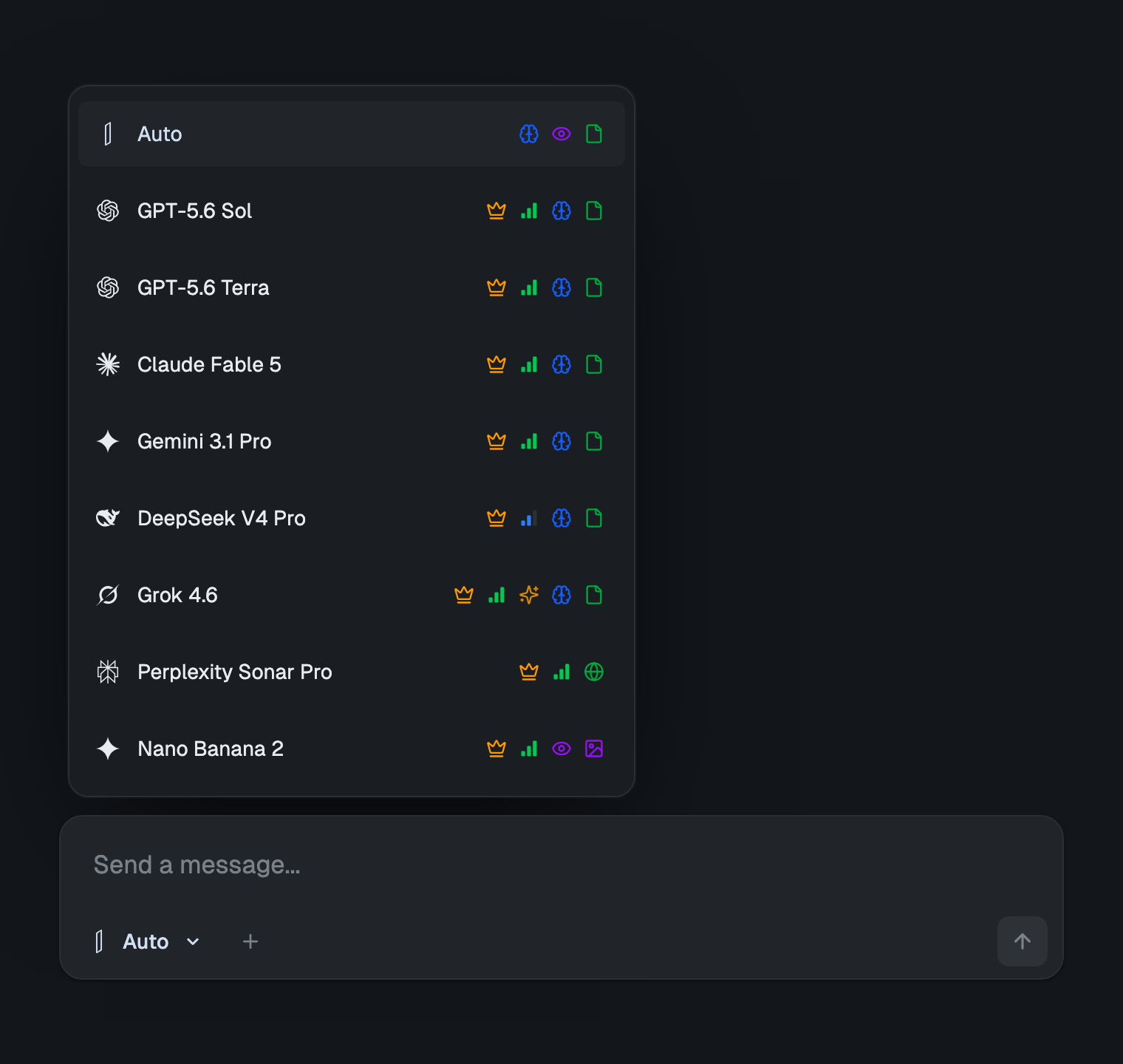
izzedo chat runs Grok next to ChatGPT, Claude, Gemini, Perplexity Sonar, DeepSeek and around twenty more models behind one login for $6/month, with a free plan that needs no card. Assembled one subscription at a time, that lineup is about $110 a month across six accounts.
The shape of the allowance is what changes. One pool, metered by what each model costs to run, with no vendor holding its own clock. Move a summarising job off a frontier model and onto a light one and the same allowance covers several times more work, because the cheap model draws less from it. Nothing sits outside the plan waiting to bill you separately.
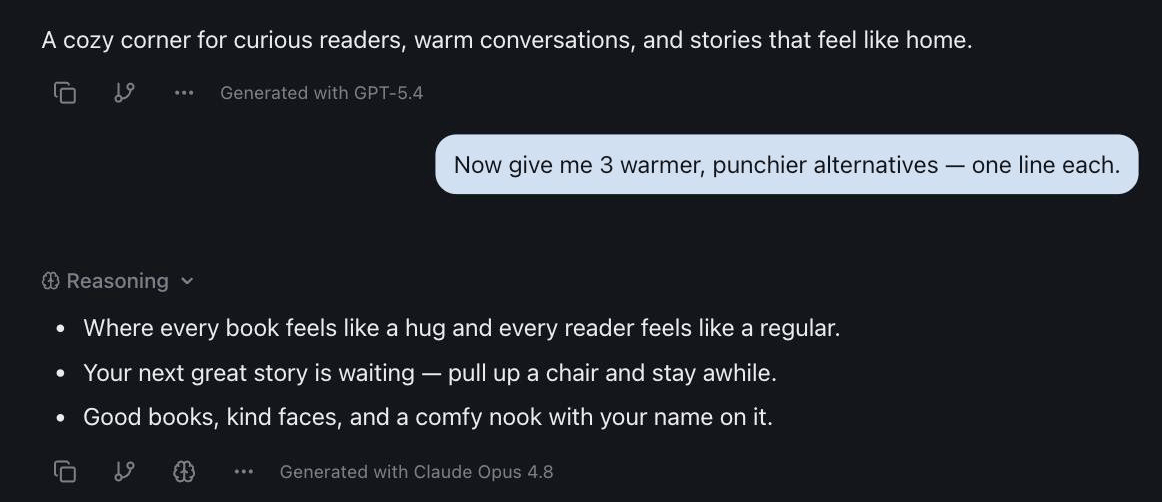
Switching happens inside the thread, and the model you switch to reads everything above it. Ask Grok what X is saying about a story, hand the thread to another model to write it up, send it to a third to check the claims, and none of it involves copying text between tabs.
Since the whole point of this page is that vendors should publish their limits, here are ours. izzedo meters usage too, because every frontier answer costs real money and nobody serves them for free. Fair use runs on a short rolling window with a weekly pool behind it, and the current allowances live on the pricing page instead of in a post that would go stale by December. There is an optional usage-based setting in Settings as well, off by default, and it works unlike a credit balance: nothing to prepay, nothing to expire, and anything past the pool appears on your invoice for what you used, under a cap you set. Leave it off and the bill does not move. Spend the pool and you wait for the window, the same as anywhere.
The difference is not that the ceiling disappears. It is that switching models is a real answer rather than a consolation, and that you are never told a percentage without being told what it is a percentage of.
There is a second reason to keep several models in reach, unrelated to limits. Grok is the best of the major assistants at telling you what happened twenty minutes ago, and it is not the best at everything else. Asking two models the same question and reading the disagreement is a one-minute habit that catches the confident wrong answer before it reaches anything public, which is most of the case for not routing everything through a single vendor. If you want to see the split for yourself, Grok against ChatGPT and Gemini makes it obvious within a few questions.
The Bottom Line
Grok's limits in 2026 are one weekly pool, measured in compute and quantified nowhere. Daily limits ended in June 2026. Since 12 October the pool is shared with Grok Bot and Cursor, and the plans are sold as multiples of a Plus allowance xAI never sizes. The reset is weekly on a schedule specific to your account, visible only in your usage view. Empty the pool on the new plans and you either top up a prepaid balance or wait. On SuperGrok you drop to the free tier, which is a softer landing than most vendors give you and which xAI barely mentions. The other two are mapped the same way here: ChatGPT's limits are mostly unpublished, and Claude's are the most visible of the three.
The parts that catch people are the ones written down in the wrong places. xAI's FAQ says video drops from 720p to 480p when you cross a cap that has no published size. SuperGrok's top-up credits cost more per action than the plan, and the new plans don't say what Grok usage past the pool costs at all. A monthly spending cap is the only setting that keeps a top-up balance from becoming an open-ended bill. And anyone still paying for both X Premium+ and SuperGrok is paying two companies for the same Grok.
If you want an exact number from xAI, there is one place to find it, and it is the API documentation. Everywhere else, the honest answer to how much Grok you get is: spend it and find out.
Tired of finding out where the limit is by hitting it? Try izzedo chat free with no card required, and move the task to another model instead of waiting out the week.
Topics
- grok limits
- supergrok limits
- grok imagine limit
- grok rate limit
Start on the free plan. Pay when you want the premium models.
Free
$0
Claude Haiku, Gemini Flash, Grok and more, with agent mode and 50+ connectors
Hobby
$6/mo
Every chat and image model
Pro
$12/mo
Higher limits, 400k context and more video models
Max
from $50/mo
5x or 10x Pro's usage, and every video model
Frequently asked questions
What is Grok's daily limit?
There isn't one on paid plans. xAI's FAQ says that from June 2026 the separate daily limits for Chat, Imagine, Voice and Build were replaced by a single weekly usage pool, and The X Subscription, which replaced SuperGrok for new customers on 12 October 2026, kept the weekly refresh. If you find a page quoting Grok daily message counts, it is describing the old system. The free plan is sold as 'daily access' to Grok, and xAI puts no number on it.
When does the Grok limit reset?
Weekly, on a schedule tied to your account rather than a fixed day for everyone. xAI does not publish the day or the hour. On The X Subscription, the usage view at grok.com/dashboard shows how much you have used and the next reset date. On SuperGrok, the reset date and time sit in Settings under Usage, next to the percentage bar. xAI's SuperGrok FAQ says free-tier limits on Chat and Voice sit outside the pool and reset on their own schedule.
What happens when you hit the Grok limit?
On The X Subscription you wait for the weekly refresh, upgrade, or keep going on prepaid credit. You can top up by hand or turn on Auto Top-up, and a separate monthly spending cap stops extra usage once it is reached, even if credit remains. xAI has not published a minimum top-up for the new plans. On SuperGrok, paid features pause, you drop to the free tier on Chat and Voice, and Extra Usage Credits start at $5 on the web, billed at standard rates that cost more per action than your plan.
What is the Grok Imagine limit?
There is no published number of images or videos. Imagine draws from the same weekly pool as everything else, and video draws far more than chat. Video starts at Premium, $30 a month, because neither the free plan nor the $8 Plus plan includes it. xAI's FAQ, still written for SuperGrok, also says 720p videos fall back to 480p once you hit the 720p cap for your tier, so you get a lower-resolution clip instead of an error. xAI has not said whether that cap carries over to the new plans.
Is Grok Imagine free?
Image generation is, in a limited amount. Video is not. xAI's plan table marks image generation as Limited on the free plan and included from Plus at $8, and video starts at Premium, $30 a month. Every generated image and video carries a Grok watermark, on every plan, with no setting to remove it.
What are Grok's rate limits?
Two different things share that name. On the API, xAI publishes exact per-model limits on requests per second and tokens per minute, scaling across five tiers set by your cumulative spend, with a 429 error when you exceed either. Consumer plans have no rate figure. The X Subscription sells usage as multiples of its Plus plan, 4x on Premium, 15x on Super and 50x on Ultra, and never says how much Plus includes.
What are SuperGrok's limits?
SuperGrok closed to new sign-ups on 12 October 2026, but existing subscribers keep its plan, price and limits unless they switch. That means one weekly pool across Chat, Imagine, Voice, Build and the API, shown as a percentage in Settings under Usage, a drop to free-tier Chat and Voice when it runs out, and Extra Usage Credits from $5. Switching to The X Subscription is optional, and xAI's help centre says a completed switch can't be undone.