Claude Limits in 2026: The Five-Hour Session, the Weekly Cap, and the Meter Behind Them
Claude never tells you how many messages you get, because there is no such number. What it has instead is two clocks, a five-hour session and a weekly cap, and behind them a pay-as-you-go meter that most Pro subscribers have not noticed they are already standing on.
The message is unusually polite for a wall. "5-hour limit reached, resets 3:00 PM." No mystery about what happened, no guessing whether it was the network. Claude tells you exactly which limit you hit and exactly when it lifts, and in that one respect it is the most honest product in consumer AI.
What it does not tell you, and what nobody searching for "Claude Pro limits" ever finds, is a number. There is no message count. There has never been one. The unit Anthropic meters is not messages but work: how long your messages run, how heavy the files are, how deep the conversation already is, which model answered, and how hard you asked it to think. Two people on the same $20 plan can hit the wall hours apart doing what looks like the same thing.
So this guide is not a quota table, because that table would be fiction. It is a map of the three things that actually govern how much Claude you get. Two clocks, a five-hour session and a weekly cap, that every plan runs on. And behind them a third mechanism that arrived this year with little announcement and changes what a Claude subscription is: a pay-as-you-go meter at API rates, which on the Pro plan is where Anthropic's top model already lives.
I read every figure below on 4 September 2026 from Anthropic's pricing page and its help centre. Where two Anthropic pages disagree, and they do twice, I have said so.
Claude Limits in 2026: The Short Answer
| Plan | Price | Five-hour session | Weekly cap | The Fable tier | Usage credits |
|---|---|---|---|---|---|
| Free | $0 | Yes, resets every 5 hours | Not stated as a fixed cap | Not available | No |
| Pro | $20/mo, or $17/mo on a $200 annual plan | At least 5x Free, per session | Yes, fixed weekly reset | Usage credits only | Yes |
| Max 5x | $100/mo | 5x Pro, per session | Yes | Up to 50% of the week | Yes |
| Max 20x | $200/mo | 20x Pro, per session | Yes | Up to 50% of the week | Yes |
| Team, Standard seat | $25/seat/mo, $20 annual, 2 seats minimum | 1.25x Pro | Yes, per member | Usage credits only | If the org enables it |
| Team, Premium seat | $125/seat/mo, $100 annual | 6.25x Pro | Yes, per member | Up to 50% of the week | If the org enables it |
Three things in that table do most of the work.
Every multiplier is "per session". Max 20x does not mean twenty times more Claude per month. It means twenty times more within each five-hour window, and the weekly cap sitting above the window is what decides how many heavy sessions you can string together. Anthropic's pricing page is careful about this wording and most write-ups are not.
The Fable column is the surprise. On the free plan Anthropic's top model tier is unavailable, and on Pro it is listed as "Usage credits", which means it is not part of the plan's allowance at all. You pay per token for it from the first message. Only Max and Premium Team seats include it, and even there it is capped at half the week. More on that below, because it reframes what the $20 buys.
And every plan has a fine-print clause on top of both clocks. The Pro and Max pages both say Anthropic "may limit your usage in other ways, such as weekly and monthly caps or model and feature usage, at our discretion." A monthly cap exists in the small print even though nothing on the pricing page names it.
The Two Clocks: The Five-Hour Session and the Weekly Cap
Claude's limit system has two layers, and understanding which one you hit changes what you should do about it.
The session is the short clock. Anthropic's pricing FAQ puts it in one sentence: "Every plan has usage limits that reset on a rolling five-hour session window, and paid plans add weekly limits on top." The free plan runs on the session clock alone. Pro gets "at least five times the usage per session compared to our free service", and the Pro help page attaches an interesting qualifier to that promise: it is what Pro offers "during peak hours". Read literally, the 5x is a floor that applies when the system is busiest, not a fixed multiple.
The help pages do not say when a session starts, but the Usage page itself does: the current-session bar is labelled "Starts when a message is sent." So the clock starts at your first message after a reset, not on a fixed schedule, and the countdown in Settings is the only authority on how much of it is left.
Update, 13 October 2026. The gap between Free and the paid plans widened on 22 September. With the Opus 5.5 launch, Anthropic raised five-hour limits on Pro, Max, Team and seat-based Enterprise plans, and gave subscribers a limit reset they can save and use when they choose. Neither applies to the free plan. What the free plan does include now is in is Claude free.
The week is the long clock, and it only exists on paid plans. Pro, Max and Team seats all carry "a weekly usage limit that applies across all models." The reset is the part people search for most, so here is Anthropic's wording in full: "Weekly limits reset at a fixed time each week that is assigned to your account. Your reset day and time stay the same regardless of when you start using Claude or when your subscription begins, and you receive your full weekly allowance each cycle."
That design has two consequences. Your weekly reset is not seven days after you last ran out, it is a fixed appointment, which is why regulars know their reset hour the way they know bin day. And the allowance does not roll over. A quiet week is not banked against a busy one.
Anthropic's best-practices page still describes the weekly section as showing resets "for Opus only and all other models", but that sentence is out of date. On a Max plan today the weekly section has two bars, "All models" and "Fable", both resetting at the same fixed time, and the Fable bar is the 50% sub-cap covered below rather than a separate pool. On Pro, where the Fable tier is not part of the plan, there is nothing to sub-cap.
Which brings up the one useful thing Claude does that most competitors don't. It shows you the meter. On Pro, Max, Team and seat-based Enterprise plans, Settings under Usage has progress bars for the current session, the time left in it, and the weekly limits. On Claude you can pace yourself before the wall arrives. That is rarer than it should be.
When Does the Claude Weekly Limit Reset?
Since this question gets typed into Google on its own, the short version:
- Weekly limit: at a fixed day and hour that Anthropic assigned to your account when it started tracking you. It does not move with your usage or your billing date. The exact time is in Settings under Usage, and on Max the Fable bar shows the same reset.
- Five-hour session: on its own clock, independent of the week. The Usage page shows the time remaining.
- Usage credits: do not change either reset. Anthropic's credits page says the plan's included limit "will reset every five hours once you reach it. Usage credits don't affect this reset timing."
Nothing you do speeds either clock up. Upgrading changes the size of the allowance, not the schedule.
Which Message Did You Just Get?
Claude's error text is precise, which makes this table shorter than the ChatGPT equivalent. Every string below is quoted from Anthropic's troubleshooting article or its plan pages.
| What you see | What it is | What works |
|---|---|---|
| "Approaching 5-hour limit" | A warning, you are not blocked yet | Send the message that matters most, drop the effort level |
| "5-hour limit reached, resets [time]" | The session cap, the real one | Wait for the time shown, upgrade, or turn on usage credits. Switching models does not help; the cap covers every model |
| "5-hour limit resets [time], continuing with usage credits" | You are now paying API rates | Check Settings under Usage before you carry on |
| Weekly limit reached | The long clock | The reset is fixed, see Settings under Usage |
| "Your message will exceed the length limit for this chat" | A length limit, not a usage limit | New chat, fewer or smaller files, or use a project |
| "Due to unexpected capacity constraints, Claude is unable to respond" | Not a limit and not an outage | Try again in a few minutes |
| "Output blocked by content filtering policy" | A safety filter | Rephrase, this has nothing to do with usage |
| A notice that Claude switched to another model mid-chat | An automated safety check re-ran your request on a different model | Not usage; it can be turned off in Settings under Capabilities |
| "There was an error logging you in" | A login fault | Drop the VPN, disable extensions, clear cache, check status.claude.com |
| "Rate limit exceeded" or a 429 | An API error | Only developers see this; it is not a chat limit. ChatGPT's consumer-side cousin is the concurrency error |
Four rows need more than a table cell.
The capacity message is not on the status page, by design. Anthropic is direct about it: "Capacity constraints are not outages. The system is functioning normally but managing high demand across all users." And then: "Capacity issues will not appear on our status page because they represent normal load management rather than technical problems." So if Claude tells you it cannot respond and the status page is all green, both are telling the truth. Nothing is broken and you still cannot use it. Wait a few minutes.
"Prompt is too long" is a length limit, and length limits are a different animal. People search for that phrase because older versions of the app used it. The current text is the "exceed the length limit for this chat" line, and it means that your message plus everything already in the thread would not fit the model's working memory. Anthropic's own distinction is clean: "usage limits control how much you can use Claude across all your conversations, while length limits control how long any single conversation can become." Waiting will not fix a length limit. Starting a new conversation will.
The model-switch notice is the odd one out. Anthropic's newest models run automated safety checks on every request, and on a narrow set of requests the answer is re-run on a less capable model in the same conversation, with a label showing which model replied. That is a safeguard, not rationing, and the model picker stays on the fallback model for the rest of that chat unless you switch it back. If you ever wonder why a long conversation got noticeably shallower halfway through, check the label on the last reply before you check your usage bar.
Claude Upload Limits and Context: The Hard Numbers
Uploads are the one place Anthropic publishes clean numbers, and the two sets, chat and project, are different enough that people mix them up.
| Limit | In a chat | In a project |
|---|---|---|
| Files | Up to 20 per chat | Unlimited, within the context window |
| File size | 500MB per file | 30MB per file |
| Images | Up to 8000 x 8000 pixels | Text extraction only, except multimodal PDFs |
| PDFs | Up to 1,000 pages | Same page cap, text only |
| Visual elements in PDFs | Analysed up to 100 pages | Not analysed |
| Supported documents | PDF, DOCX, CSV, TXT, HTML, ODT, RTF, EPUB, JSON, XLSX | Same |
| Supported images | JPEG, PNG, GIF, WebP | n/a |
The same page carries three caveats.
PDFs between 101 and 1,000 pages are processed as text only, so a scanned report full of charts stops being a report and becomes a transcript. Over 1,000 pages the upload is refused with "Uploaded file is too large."
XLSX uploads need code execution and file creation switched on in your account first. If a spreadsheet is bouncing and a CSV is not, that toggle is why.
Project files are capped at a much smaller 30MB each, and the trade is worth it. Content in projects is cached, and Anthropic says that when you reference it again "only new/uncached portions count against your limits." A project is the cheapest place to keep a document you will ask about more than once.
Context is where two Anthropic pages disagree. The pricing page's comparison table lists the context window as 200K for Free, Pro and both Max tiers. The help centre's dedicated context-window article says that on paid plans the newest models "support up to a 1M token context window, while others support 500K or 200K tokens." The Team plan page, meanwhile, still promises a "200k context window" under everything in Pro. My reading is that the help article is the current one and the two plan pages are older copy, but I would not build a workflow around a million tokens until it turns up on the page you pay from.
Update, 17 September 2026. It has. The comparison table now prints "Up to 1M, varies by model" for every consumer tier, free included, which resolves the disagreement in the direction I guessed. It also creates a smaller one going the other way, because the help article still restricts the million-token window to paid plans. Worth knowing that a row this load-bearing can change inside a fortnight, which is a habit I picked apart in Grok vs Claude after xAI's pricing page turned out to contradict itself three times on one screen.
Paid plans with code execution enabled also get automatic context management. When a conversation nears the window, Claude summarises earlier messages and continues, and the article says most users "will rarely encounter length limit errors during normal use." One catch is stated on the usage page and not the context one: "Longer conversations that trigger automatic context management consume more of your usage limit." The summarising itself is free. The long conversation that needed it is not.
What Drains the Allowance Faster Than You Expect
Because there is no message count, the useful question is what makes one message cost more than another. Anthropic lists the factors outright: message length, file attachment size, current conversation length, tool usage such as Research and web search, model choice, effort level, and artifact creation. A few of these are far bigger levers than they look.
Conversation length compounds. Every message you send carries the whole thread with it. Message forty in a long chat costs a great deal more than message one, which is why Anthropic's first tip for people near their limit is to start a new conversation.
Research is the same allowance, spent faster. The Research help page is explicit that Research "is subject to the same limits as standard Claude conversations. However, research sessions can use up your limits faster due to Claude retrieving multiple sources and providing comprehensive responses." On the free plan the question does not arise, because Research is a paid feature.
Effort is a dial most people have never touched. The model menu next to the send button has an effort level, and Anthropic describes the settings in usage terms: Low and Medium "stretch your usage further", High is the balance, and Max effort is for work where you want the deepest reasoning and are willing to pay for it in allowance. Thinking is a separate toggle, and on Anthropic's two newest models it cannot be turned off at all, so on those the only way to spend less per message is the effort dial.
Tools and connectors cost tokens even when idle. Anthropic's advice is to disable web search, Research and connectors from the search-and-tools settings "when they're not needed for specific conversations", because they are "token-intensive". A connector you forgot to switch off taxes every message you send.
Everything shares one pool. Chat on the web, the desktop app, mobile, Claude Code and the task hand-off that was a separate Cowork mode until Anthropic folded it into chat on 16 September 2026 all draw from the same limit. If someone in the household is using the account's terminal tool in the afternoon, the chat window pays for it.
The Model That Isn't in Your Plan
This is the finding that changed how I read the Pro page.
The pricing page has a row labelled Fable, Anthropic's top model tier. Free: No. Pro: "Usage credits". Max 5x and Max 20x: "50% of weekly limits". The help centre spells out what the Pro cell means: on Pro plans and standard Team seats, Fable models "aren't included in your plan's usage limits" and "run on pay-as-you-go usage credits from the start."
It was not always this way. A promotion let Pro subscribers put up to half their weekly limit on the Fable tier at no extra cost, and it ended on 19 July 2026. Since then the top model on the $20 plan is metered per token like the API, with a one-time credit offered to soften the change for one model and, Anthropic notes, "no equivalent credit" for the newer one.
Max is not exempt either, just less exposed. On Max, Fable models draw from the regular weekly allowance "and use them faster than other Claude models", and the 50% figure is a ceiling, not a bonus. Anthropic's own FAQ pre-empts the obvious misreading: "You can use up to 50% of your weekly limit on Fable models, but your use of other models draws from the same usage limits and you can never use more than your weekly limit."
Read all of that together and the Pro plan's headline feature, "ability to use more Claude models", is accurate and incomplete. It unlocks the Opus tier. The tier above it is not a plan feature. It is a per-token purchase with a subscription attached, and the "5-hour limit resets, continuing with usage credits" message is the moment you find out.
Which tier you spend the allowance on is the other half of this, and the tiers differ by more than depth: context window, effort control and knowledge cutoff all change as you move down the ladder. I took all four apart in Claude Opus vs Sonnet vs Haiku.
When You Hit a Claude Limit: Wait, Climb, or Turn On the Meter
Anthropic's pricing FAQ gives the three options in one line: "wait for it to reset, move to a higher plan, or, on paid plans, turn on usage credits to keep working at standard API rates." Each deserves a look.
Waiting is what the free plan does, and what most Pro subscribers do. The reset times are shown, nothing is hidden, and there is nothing to argue about. Support cannot help: the Pro and Max pages both say Anthropic offers no standard discounts on any paid plan and its support team "cannot issue one-off discounts or coupons." Nor is leaving a clean exit. Anthropic's refund article opens with the line that except as its consumer terms provide or the law requires, "all payments are non-refundable", with one carve-out: in the European Economic Area and the UK you can claim a prorated refund within 14 days of purchase. That makes the annual plan a heavier decision than the $40 saving suggests, which is one of the things I weighed in is Claude Pro worth it.
Climbing means Max, at $100 for 5x Pro's per-session usage or $200 for 20x. Max is monthly only, the upgrade is prorated, and if you were on an annual Pro plan the unused balance becomes a credit, provided your billing address has not changed. Note which clock that multiplier applies to before you pay: it is the five-hour session, and Anthropic publishes no multiplier for the weekly limit at all, which is the whole argument of Claude Pro vs Max. Beyond that sit Team seats at $25 or $125 a month per person with a two-seat minimum, where a Standard seat is only 1.25x Pro. For an individual whose problem is a Tuesday afternoon, not a lifestyle, Max is a large step.
The meter is the new thing, and you want to understand it before Claude offers it to you mid-task. Usage credits are switched on in Settings under Usage. Once on, hitting your session limit no longer blocks you; you see a notification and can keep going, billed "at standard API pricing rates", and the charges "appear as additional charges on your bill." You prepay by adding funds, you can set a monthly cap or choose "Set to unlimited", and there is an auto-reload that tops the balance back up from your card when it falls below a threshold you set. There is a daily redemption limit of $2,000.
Then there are bundles, which are a newer layer on top of the credits. Buy $50 of usage for $45, $250 for $200, or $1,000 for $700, up to $2,000 of bundles a month on Pro and Max, with anything past that at standard rates. The credits mostly do not expire, with one exception Anthropic flags: in Japan they lapse six months after purchase from 10 September 2026. Subscribers who pay through the mobile app stores have to set credits up on the web, because the apps cannot.
Anthropic's help centre even has a section titled "How can I get unlimited usage?" and the answer, in full, is to buy credits.
I want to be fair to this, because a metered top-up is a reasonable product. It beats being forced from $20 to $100 for one busy week, and every control a careful person would want, a cap, alerts, a kill switch, is there. But it changes what you are subscribed to. A flat plan with a balance, an auto-reload and a spend cap is a ledger, and a ledger has to be watched. OpenAI reached the same design a month earlier with its own pay-as-you-go credits, and the two systems differ mainly in the fine print, where Anthropic's terms are friendlier: no twelve-month expiry, and a discount for buying ahead. Either way, the industry's answer to "I ran out" has become "here is a card reader."
Anthropic's Own Advice Is to Switch Models
Set the meter aside and look at what Anthropic tells people who would rather not pay more.
When a Max subscriber reaches the Fable cap, the help page offers two routes, and the second is to "switch to another model to stay within your plan's usage limits." The credits page's first cost tip is "Choose efficient models", pointing at the Haiku and Sonnet tiers, which "provide excellent performance at lower token costs." The effort article says lower effort "stretches your usage further." The consistent theme across all of Anthropic's guidance is that the cheapest fix for a limit is a lighter model, not a bigger plan.
The catch is structural. Inside Claude, "another model" means another Claude model, and that advice only works before the wall, or when the wall is the Fable sub-cap on Max. The five-hour session limit and the weekly limit both apply across all models, so once "5-hour limit reached" is on screen, every Claude model is behind it and the picker is not a way out. Switching from Opus to Sonnet earlier changes your burn rate, which does help, but you are still spending the same weekly pool and waiting on the same fixed reset. And the model above Opus is not in the pool at all.
Put more than one vendor in the picker and that advice stops being a consolation.
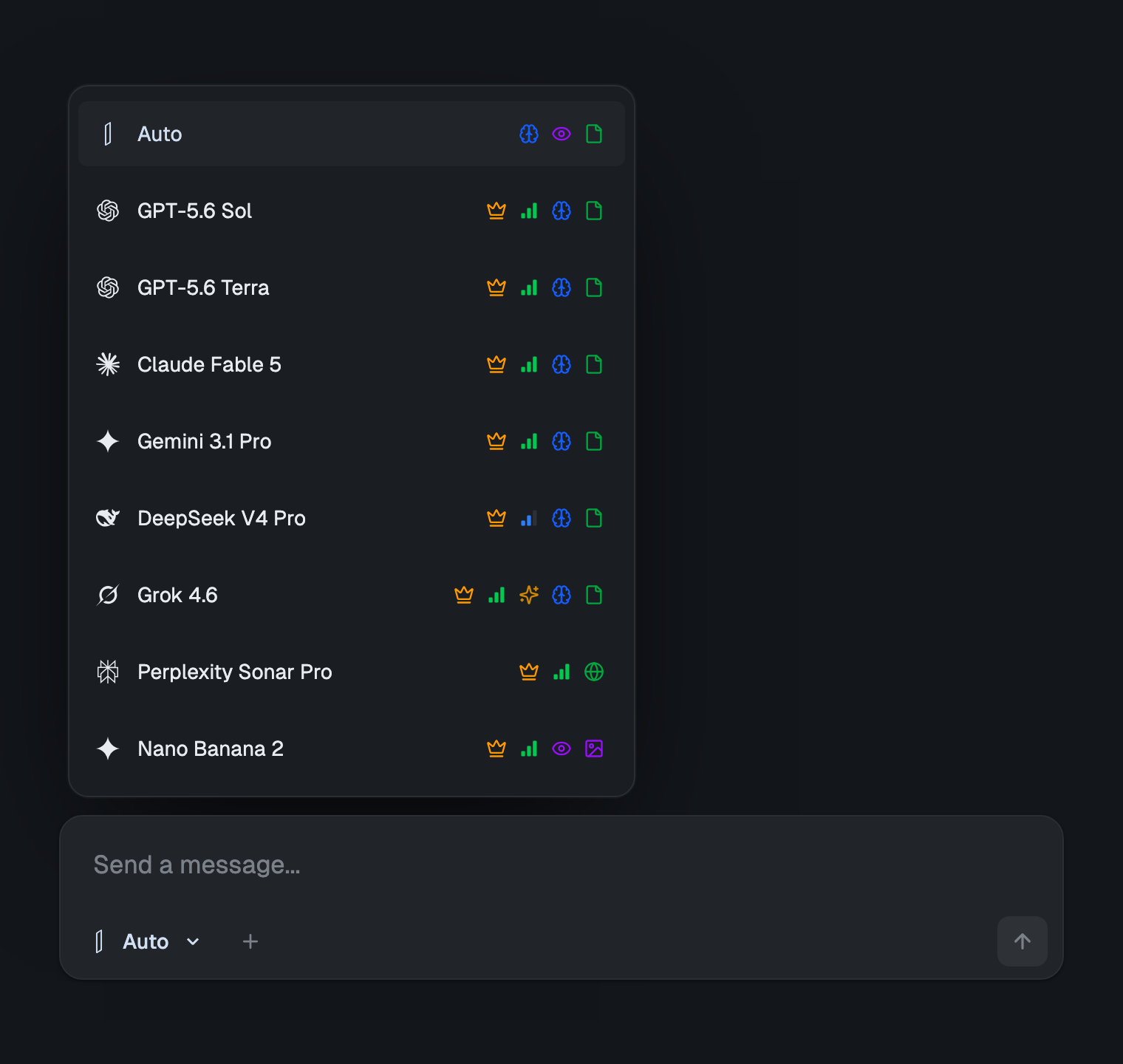
izzedo chat puts Claude's Haiku, Sonnet, Opus and Fable tiers in one picker alongside ChatGPT, Gemini, Grok, Perplexity Sonar, DeepSeek and around twenty more models, for $6/month, with a free plan that needs no card. Buying that lineup separately runs about $110/month across six accounts.
What matters for anyone who has just watched a five-hour countdown is how the allowance is shaped. There is one pooled allowance, and it is metered by what a model actually costs to run, not by a clock per vendor. Take a task off Opus and put it on Sonnet, or on Gemini, or on DeepSeek, and what is left goes several times further, because the lighter model draws less from the same pool. Claude's top tier is in that picker on the $6 plan too, drawing on the same shared allowance rather than a separate per-token ledger.
Switching happens inside the thread, and the new model inherits everything above it. A draft that Claude started can be edited by ChatGPT, checked against Perplexity's citations, then handed back to Claude, in one thread, without re-pasting. That is the other half of the switching advice that a single vendor cannot offer.
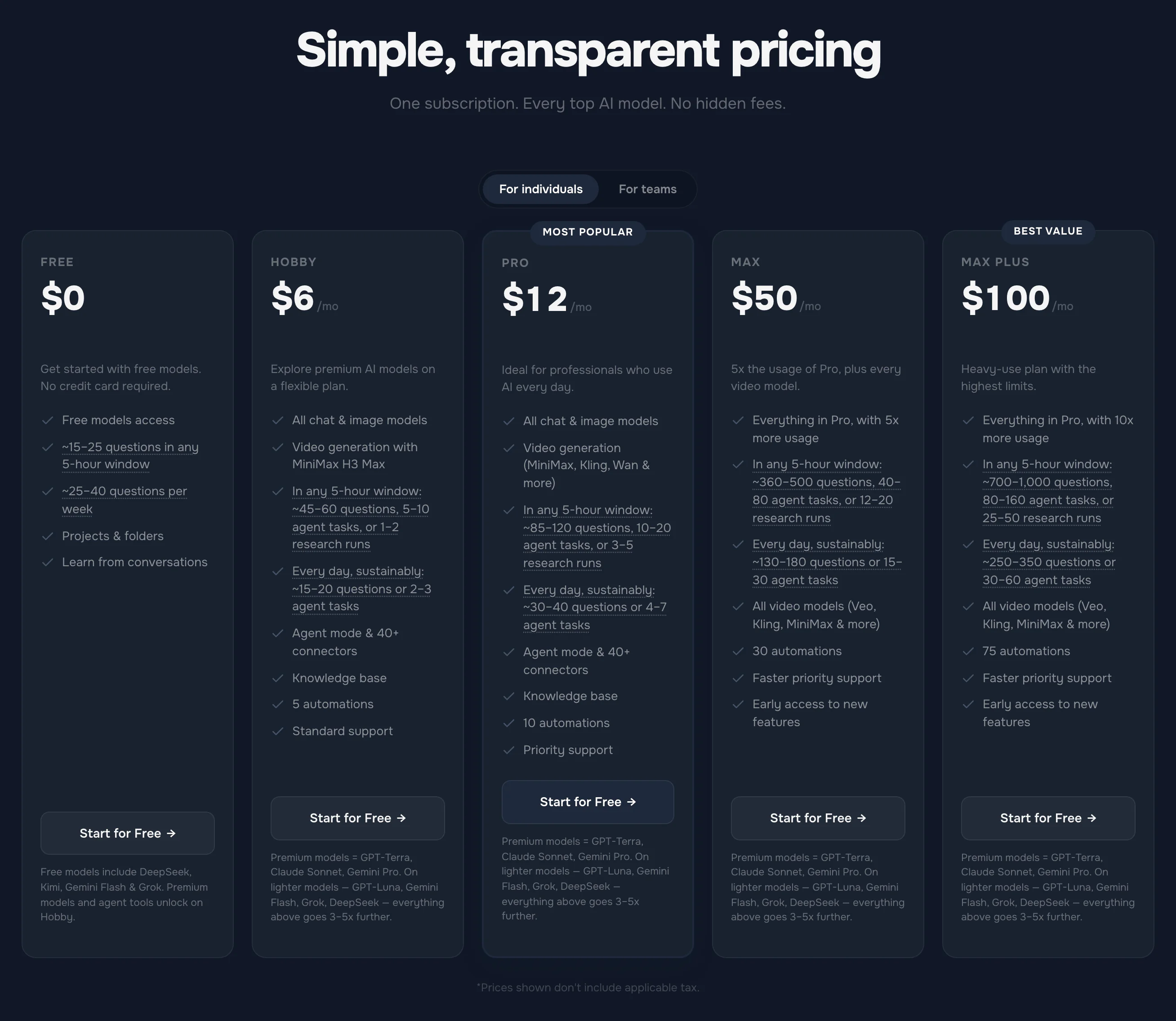
I owe you the same honesty I have asked of Anthropic. izzedo limits usage too, because frontier models cost real money every time they answer, and there is no such thing as unlimited. Fair use runs on a short rolling window with a weekly pool behind it, handled in the background, and the current allowances are on the pricing page rather than in this post. The difference is not the existence of a ceiling. It is that switching models is a real lever, because the lighter model draws less from the same pool, and no model is kept outside the plan. There is an optional usage-based switch in Settings as well, off by default, and it is built differently from a credit ledger: nothing to prepay, no auto-reload, and anything past the pool is billed on your invoice for what you actually used, under a monthly cap you set. Leave it off and the bill is flat. Spend the allowance and you wait, the same as anywhere.
There is a second reason to keep more than one model within reach, and it has nothing to do with limits. Claude's answers can be confidently wrong, and so can everyone else's. Asking a second model the same question is a one-minute habit that catches the errors a single model will never flag, and it is most of the argument for not routing everything through one vendor in the first place.
The Bottom Line
Claude's limits in 2026 are two clocks and a meter. The five-hour session governs a working block, the weekly cap governs the week and resets at a fixed hour you can look up, and both are visible in Settings before you hit them, which is more than most vendors manage. For contrast, ChatGPT publishes almost none of the equivalent numbers, and Grok shows you a percentage of a pool it never sizes. There is no message count and there will not be one, because Anthropic meters work rather than messages.
The parts that surprise people are further down the page. On Max, the Fable tier gets a weekly bar of its own inside the plan allowance. The Fable tier is not in the Pro plan at all and bills at API rates from the first message. And Anthropic's answer to running out is a usage-credit ledger with a top-up button, which is a fair product and a different one from the flat subscription you thought you bought.
When you can see the wall coming, take Anthropic's advice and move the task to a lighter model. It is the right instinct. Inside Claude it only works before the limit lands, and it only stretches the same pool. It works better when the lighter model is not drawing from the weekly pool that just ran dry, and when the model above it is not sitting behind a meter.
Watching a five-hour countdown with work still to do? Try izzedo chat free with no card required, and switch models mid-conversation instead of waiting for the reset.
Topics
- claude limits
- claude pro limits
- claude usage limits
- claude weekly limit
Start on the free plan. Pay when you want the premium models.
Free
$0
Claude Haiku, Gemini Flash, Grok and more, with agent mode and 50+ connectors
Hobby
$6/mo
Every chat and image model
Pro
$12/mo
Higher limits, 400k context and more video models
Max
from $50/mo
5x or 10x Pro's usage, and every video model
Frequently asked questions
Does Claude Pro have usage limits?
Yes, two of them. A session limit that resets every five hours, sized at 'at least five times' the free plan's usage per session, and a weekly limit that applies across all models and resets at a fixed day and hour assigned to your account. There is no published message count, because Anthropic says the number of messages depends on message length, attached files, how long the conversation already is, and which model and effort level you pick. Both limits are shown as progress bars in Settings under Usage.
When does the Claude weekly limit reset?
At a fixed time each week that Anthropic assigns to your account. The reset day and hour do not move when you start using Claude or when you renew, and you get the full weekly allowance every cycle. The exact time for your account is shown in Settings under Usage. On Max plans the weekly section has a second bar for the Fable tier, which is the 50% sub-cap inside the same allowance. The five-hour session limit is separate and resets on its own clock.
What are Claude's upload limits?
In a chat, up to 20 files, each up to 500MB, images up to 8000 by 8000 pixels, and PDFs up to 1,000 pages, with visual elements only analysed in PDFs of 100 pages or fewer. In a project, files are capped at 30MB each with no limit on the count as long as everything fits the context window, and only text is extracted. Spreadsheets in XLSX format need code execution and file creation switched on before they can be uploaded.
Can I reset or bypass the Claude five-hour limit?
No. When you see '5-hour limit reached, resets at' a given time, the only ways forward Anthropic lists are waiting for that time, upgrading to a Max plan, or switching on usage credits, which bill everything past your included allowance at standard API rates. Support cannot lift the limit and Anthropic states it offers no discounts on any paid plan. Switching models does not lift a session block either: the five-hour and weekly limits apply across all Claude models, so once one is reached every model waits together. Picking a lighter model earlier only slows how fast you get there.
Why does Claude say my message is too long?
That is a length limit, not a usage limit. The current wording is 'Your message will exceed the length limit for this chat. Try attaching fewer or smaller files or starting a new conversation.' It means the message plus everything already in the conversation would not fit the model's context window. Waiting does nothing. Start a new chat, attach less, or put large documents in a project so Claude retrieves only the relevant parts.
What is the cheapest way to keep working after hitting a Claude limit?
Inside Claude, nothing until the reset. The session and weekly limits cover every Claude model, so the picker is not an exit once the block is up. Anthropic's advice to switch to another model applies to the Fable sub-cap on Max, where the rest of the weekly pool is still open, and it works as a way to avoid the wall rather than to get past it: put lighter tasks on a lighter model before you reach it. izzedo chat puts Claude's Haiku, Sonnet, Opus and Fable tiers in one picker alongside ChatGPT, Gemini, Grok, Perplexity, DeepSeek and around twenty more models for $6/month, with a free plan that needs no card. There is one pooled allowance metered by what each model costs to run, so a lighter model stretches it, and there is no prepaid credit balance to fund. It is still a fair-use allowance, not unlimited usage.