Best AI for College Students in 2026: The Free Tools That Actually Help
Forget the 40-app listicles. A handful of AI models cover everything college asks of you — essays, research, readings, math — and most of it is free. Here's which model to use for what.
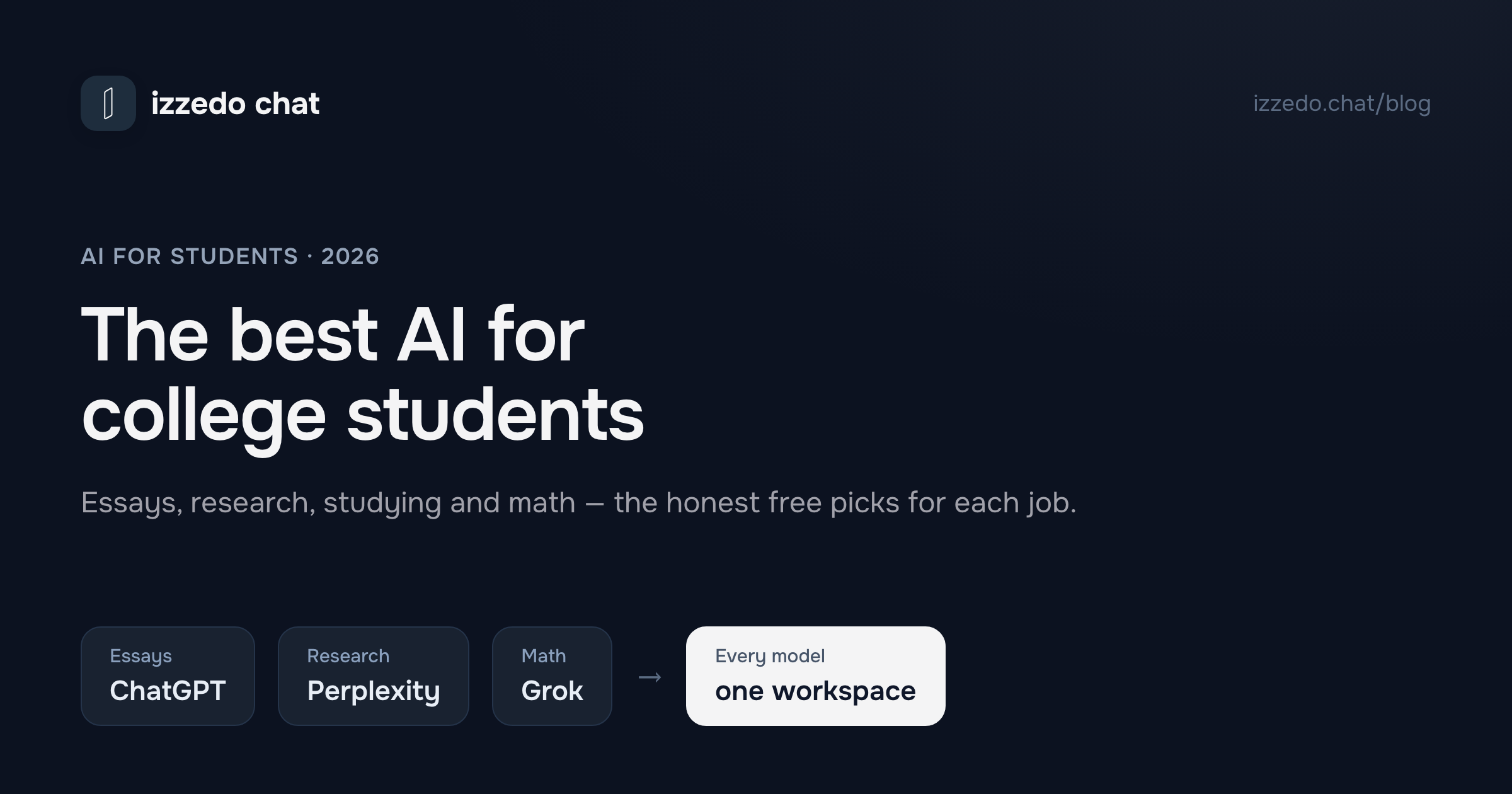
Search "best AI for college students" and you'll mostly find the same article wearing different headlines: a numbered list of thirty apps — an essay app, a flashcard app, a citation app, a note-taking app — each with its own login, its own onboarding, and its own subscription waiting at the end of the free trial.
Here's what those lists don't tell you: most of those apps are the same few AI models with different branding on top. The actual intelligence comes from a handful of frontier models — ChatGPT, Claude, Gemini, Grok, Perplexity, DeepSeek — and you can use those directly, for free or close to it. So instead of thirty tools, this guide covers the only decision that matters: which model to reach for, for which part of college. Essays, readings, research, math, exam prep — honestly matched, free tiers and weak spots included.
Quick Picks: The Best AI for Each Student Job
| Student job | Reach for | Why it wins |
|---|---|---|
| Outlining & drafting essays | ChatGPT | Fastest from messy notes to a structured draft |
| Editing & feedback on your writing | Claude | Follows precise instructions, natural voice |
| Long readings & lecture notes | Gemini | Digests huge PDFs and slide decks in one pass |
| Research with real sources | Perplexity Sonar | Searches the live web, links every claim |
| Math & problem sets | Grok / DeepSeek | Strong step-by-step reasoning |
| Checking anything before you submit | A second model | Disagreement between models flags the errors |
Two things to notice. Every row has a different winner — that's not a gimmick, it's the consistent result of testing these models against real student work. And every model in the table has a free tier, so the whole setup costs nothing to try.
What Students Actually Use AI For (and Where It Bites)
Strip away the hype and college AI use comes down to five jobs: writing (outlines, drafts, revisions), understanding (readings, lectures, concepts that didn't click), research (finding and digesting sources), problem-solving (math and anything quantitative), and preparing (turning a semester of notes into something you can be tested on).
AI is genuinely good at all five. It's also confidently wrong at all five, which is the part that gets students in trouble. Models invent citations that look real. They misremember dates and numbers. They'll walk through a math problem with authority and a sign error in step three. The failure mode is never "I don't know" — it's a wrong answer delivered in the same calm tone as a right one.
That's why the single most useful AI habit a student can build isn't a prompt trick. It's this: before you rely on an answer, ask a different model the same question. Two models agreeing doesn't guarantee truth, but two models disagreeing almost always marks the exact spot that needed checking. Keep that habit in mind — it comes back at the end of this guide, because it changes which setup you should use.
The Best AI by Job
Essays and writing: ChatGPT to draft, Claude to edit
Writing is really two jobs. Getting from a blank page to a structured draft is ChatGPT territory — it takes a messy brain-dump of notes and returns a thesis, an outline, and workable prose faster than anything else. Turning that draft into something that sounds like a person is Claude territory: hand it your draft with specific notes — tighten the argument, vary the rhythm, cut the filler — and it edits with a precision the other models don't match.
The trap is stopping after step one and submitting the "AI essay voice" everyone recognizes. Don't. I tested seven models across every stage of essay writing — research, outlining, drafting, editing, fact-checking — and broke down the full workflow in Best AI for Writing Essays; if writing is where AI helps you most, start there.
Readings and summarizing: Gemini
The unglamorous half of college is volume: a 60-page PDF for Thursday, three chapters for Friday, a semester of slide decks before the final. This is Gemini's lane. It handles very long documents in a single pass, so you can give it the entire reading and ask for the argument structure, the key evidence, or a plain-language explanation of the section that lost you — instead of feeding it fragments and hoping it keeps the thread.
Use it to prepare your reading, not replace it: get the map first, then read the source knowing what to look for. Summaries drift, and professors have a sixth sense for students who only read the summary.
Gemini is also the only one of the big three that accepts a recording. Google's help page caps total audio at 10 minutes on the free tier and extends it to 3 hours on a paid plan, checked 17 September 2026, so a fifty-minute lecture fits one of those and not the other. Claude's supported file list has no audio format on it at all. Claude vs Grok vs Gemini for school puts all three vendors' upload limits in one table, because which files a model will take decides more coursework than which model reasons best.
Research with real sources: Perplexity Sonar
Most models write citations the way they write everything else — from memory, plausibly, and sometimes fictionally. A made-up source in a bibliography is the single fastest way for AI to wreck your grade. Perplexity Sonar works differently: it searches the live web and attaches the actual source behind each claim, which makes it the right starting point for any research paper.
Treat it as a lead generator, not an authority. Its job is to surface the sources; your job is to open each one and confirm it says what's claimed. (For a deeper look at how an answer engine differs from a chat model, see Perplexity vs ChatGPT — or the full research three-way, Perplexity vs ChatGPT vs Claude.)
Math and problem sets: Grok or DeepSeek
For quantitative work you want a model that shows its reasoning, not just an answer — the steps are the part you're graded on and the part you're supposed to learn. Grok is strong on math and handles "walk me through why this works" especially well. DeepSeek delivers similar step-by-step reasoning at a fraction of the usual cost, which makes it the budget pick for problem-set-heavy courses. (I gave the whole bench the same problem set — algebra, calculus, word problems, proofs — in Best AI for Math.)
One warning, twice as loud as the others: models make arithmetic mistakes with total confidence. A flipped sign or a botched substitution mid-derivation looks exactly like a correct step. For any answer that counts, run the same problem past a second model — a thirty-second check that catches most of the damage.
Exam prep: any strong model, fed your own notes
Exam prep is the job where the model matters least and the input matters most. Any capable generalist can turn material into practice questions, quiz you on weak areas, or explain a concept five different ways until one clicks. The difference between generic help and a real study partner is whether it's working from your course — your notes, your slides, your professor's emphasis — rather than its general knowledge of the subject. Upload your materials and make it test you on what will actually be on the exam.
Free vs Paid: What a Student Should Actually Pay
Here's the honest budget advice: start by paying nothing. Student AI usage is bursty — quiet weeks, then everything at once around deadlines and finals. Free tiers handle that pattern better than you'd expect, and combining several models' free tiers covers more ground than any single vendor's paid plan.
Before you pay for anything, check what you can get for free by proving you're enrolled. Google hands verified students a full year, OpenAI four months, and Perplexity sells students and educators a permanently half-price plan; Anthropic offers nothing at all. Every AI student discount in 2026 lists who qualifies for what, and more importantly what each one renews at once the free period ends.
If you do hit the ceiling, resist the default move of handing $20/month to one company. I've written a full breakdown of whether ChatGPT Plus makes sense on a student budget, and the short version is: $20 buys you depth in exactly one vendor, while the table at the top of this post shows the winners are spread across five. Buying them all separately — ChatGPT $20, Claude $20, Gemini $20, Perplexity $20, Grok $30, and DeepSeek free — comes to $110/month, which is not a student number.
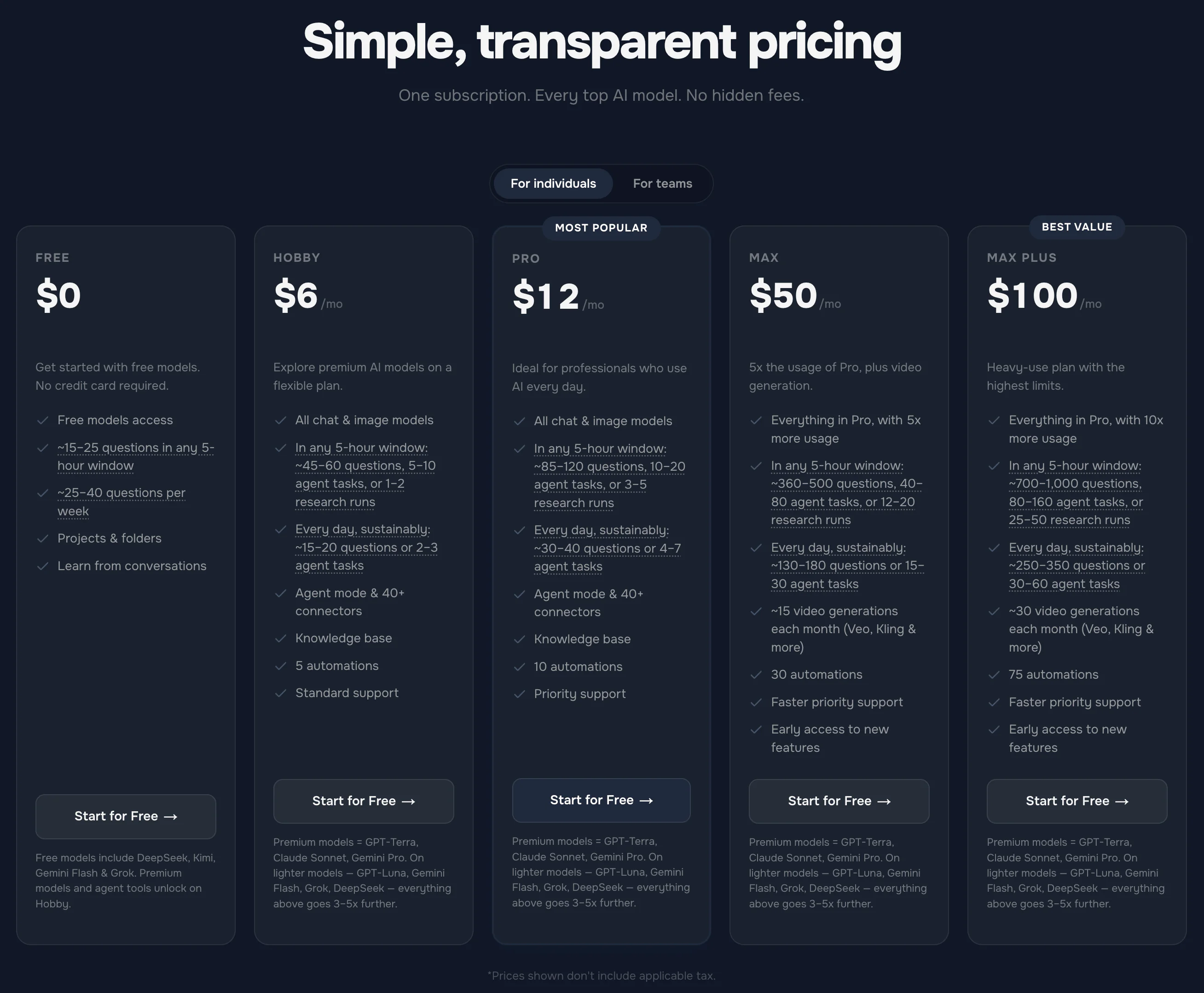
The setup I'd actually point a student at: izzedo chat puts all of those models in one workspace for $6/month — less than a third of one subscription, for all of them. And the free plan needs no credit card: the free models with a usage allowance, and the current numbers are on the pricing page. There are no points to ration. The bill is a flat monthly price, with fair use handled quietly in the background on a short rolling window and a weekly pool, so a brutal exam week reaches a ceiling and waits it out. It only costs more if you've switched on usage-based billing, which is off by default.
The Smart-Student Workflow: One Workspace, Second Opinions
The reason to want every model in one place isn't the price — it's the workflow the price unlocks. In a single izzedo thread you can pick the right model per step and switch mid-conversation without losing context: Perplexity gathers sources, ChatGPT outlines from them, Claude edits your draft, and none of it gets re-pasted between tabs.
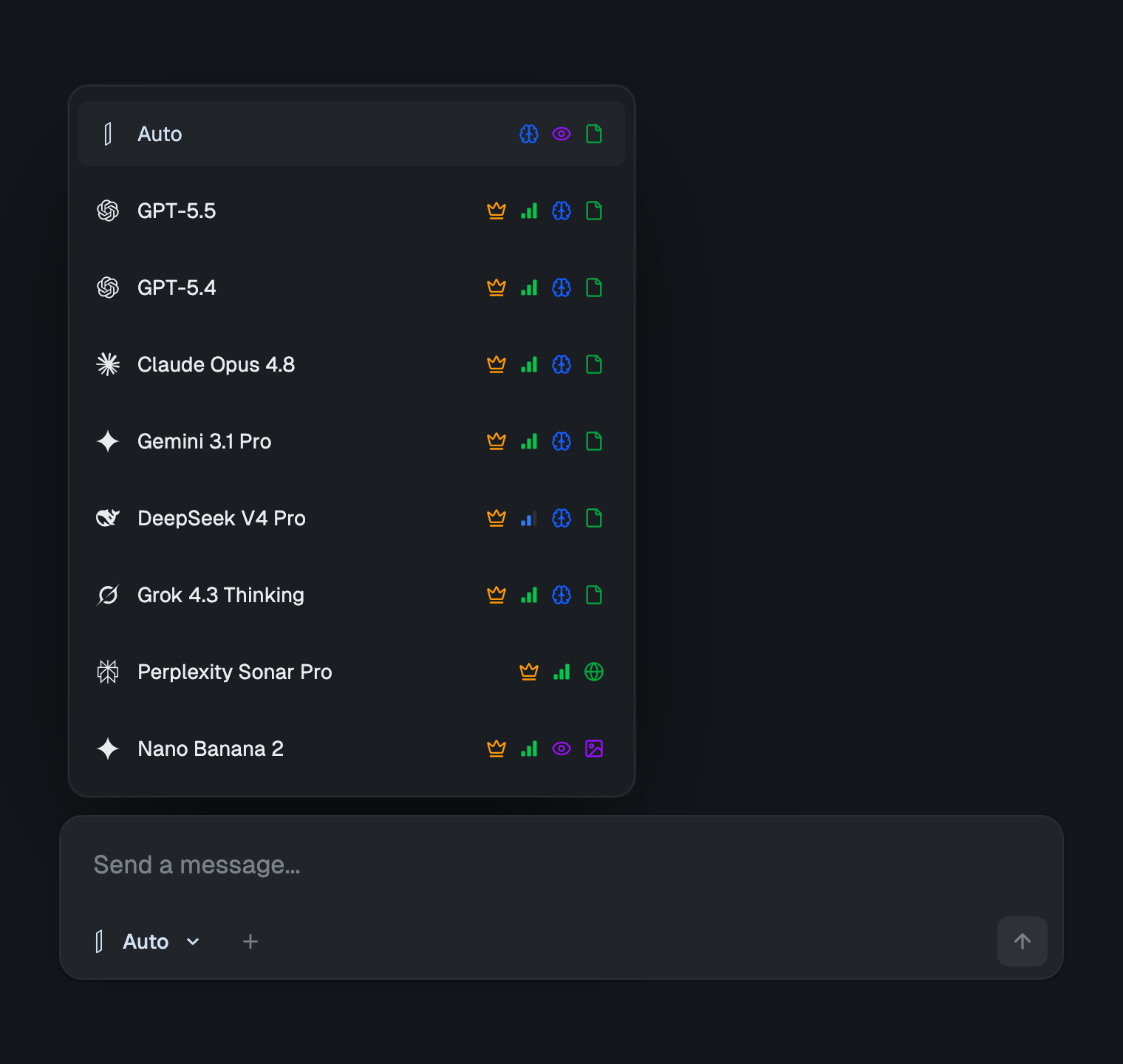
A few pieces of the workspace earn their keep fast in a semester:
- Projects per course. Keep each class's conversations together, with a project-level prompt (the course, the professor's style, the citation format) that every new chat inherits.
- A knowledge base for your readings. Upload the syllabus, slides, and PDFs once; every model in the project can draw on them — which is what turns generic exam prep into prep for your exam.
- Side-by-side answers. Ask several models the same question at once and compare — the built-in version of the second-opinion habit, and the fastest way to catch a wrong "fact" before a grader does.
- Export when you're done. Generate the finished document as Word or PDF instead of copy-pasting out of a chat window.
If running several models in one conversation is new to you, How to Use Multiple AI Models at Once is the full how-to, and the study method itself, quizzing first and checking with a second model, has its own guide.
Using AI Without Risking Your Degree
The line is simpler than the panic around it suggests. AI as a study aid — brainstorming, outlining, source-finding, concept explanations, feedback on a draft you wrote — is the same category of help as a tutor or a study group, and most policies treat it that way. AI as a ghostwriter — submitting generated work as your own — is plagiarism, everywhere.
Three rules keep you on the right side. Write graded work in your own words, with AI upstream (research, structure) and downstream (feedback) of the writing itself. Verify every fact and citation an AI hands you — that's what the second model is for. And read your school's actual policy, because it varies by institution and sometimes by course; thirty seconds with the syllabus beats a semester of assuming.
Used this way, AI doesn't just avoid trouble — it's the version that actually makes you better at the work, which is the point of being there.
The Bottom Line
The best AI for college students in 2026 isn't one tool — it's a short roster: ChatGPT to draft, Claude to edit, Gemini for the readings, Perplexity Sonar for sources, Grok or DeepSeek for math, and always a second model before you trust anything. Every one of them has a free tier, so the roster costs nothing to assemble.
The only real friction is juggling them — and that's a solved problem. One workspace, every model, $6 a month if you ever outgrow free. Spend the savings on coffee for the all-nighters the AI didn't prevent.
Want every major AI model in one thread — free, no credit card, student-budget-proof? Start using izzedo chat for free.
Frequently asked questions
What is the best AI for college students?
There's no single best one — each model wins a different student job. ChatGPT is the strongest all-rounder for outlining and drafting, Claude for editing and feedback on your writing, Gemini for long readings and lecture notes, Perplexity Sonar for research with real sources, and Grok or DeepSeek for working through math step by step. The best setup is access to several, so you can match the model to the task.
What is the best free AI for students?
Most major models have a capable free tier, and open models like Llama and Qwen handle everyday drafting and explanations well. The catch is that free tiers are scattered across separate apps. izzedo chat bundles them: the free plan needs no credit card and includes the free models with a usage allowance, so you can run a multi-model study workflow without paying anything.
Is ChatGPT enough for college?
For brainstorming, outlining, and drafting — mostly yes. Where one model alone falls short is sources and self-checking: ChatGPT can invent citations, and no model reliably catches its own mistakes. Pair it with a research model that links real sources and a second model to cross-check facts, and the weak spots are covered.
Which AI is best for research papers?
Perplexity Sonar, because it searches the live web and links the source behind each claim instead of citing from memory. Use Gemini when the job is digesting long PDFs or a stack of readings. Either way, open every source and confirm it says what the AI claims before it goes in your bibliography.
Can I use AI in college without breaking the rules?
Yes — used as a study aid. Brainstorming, outlining, finding sources, explaining concepts, and getting feedback on your own draft are tutor-style help most policies allow. Submitting AI-generated work as your own is plagiarism. Policies differ by school and even by course, so check the syllabus before using AI on anything graded.
How much should a student pay for AI?
Start at zero — free tiers cover the typical bursty student usage pattern. If you outgrow them, don't pay $20 for a single vendor: a multi-model workspace like izzedo chat has every major model for $6/month, so the upgrade costs less than one subscription and covers every study job at once.
Ready to try multi-model AI workflows?
Access GPT, Claude, Gemini, Perplexity, and more — all in one place.
Start for Free →