Best AI for Writing Essays in 2026: I Tested 7 Models
There's no single best AI for writing essays — each model wins a different stage. Here's what I found testing seven across research, drafting, and editing.
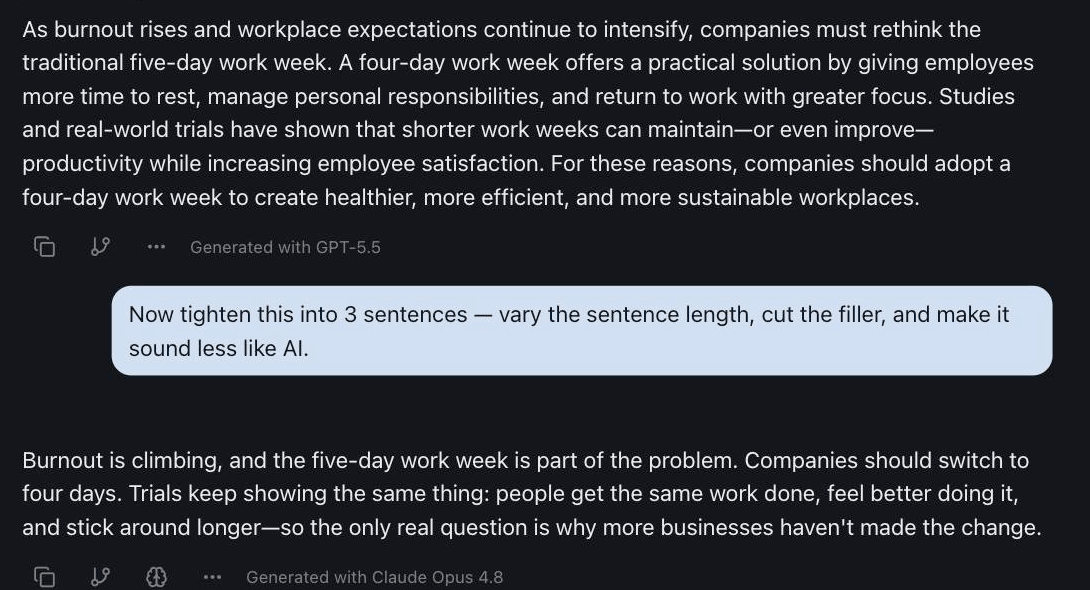
Ask any AI to "write me an essay" and you'll get the same thing every time: a competent, forgettable five paragraphs that sound like every other AI essay, sometimes propped up by a citation that doesn't exist.
The problem isn't the model. It's the request. An essay isn't one task — it's four or five. You research, you structure an argument, you draft, you edit for voice, and you check that nothing you wrote is wrong. No single model is best at all of those, which is exactly why "just use ChatGPT for everything" leaves you with a flat draft and a lot of cleanup.
So I tested seven models across the real stages of writing an essay to find which one actually wins each step. The short version: the best AI for writing essays isn't a tool — it's the right model for each part of the job. Here's the breakdown.
The Short Answer: Best AI for Writing Essays by Stage
If you only read one section, read this. Here's which model to reach for at each stage of an essay, and why.
| Essay stage | Best AI to use | Why it wins here |
|---|---|---|
| Finding sources & research | Perplexity Sonar | Searches the live web and links the source behind every claim |
| Brainstorming & outlining | ChatGPT | Fast, structured ideas and a clean argument skeleton |
| Writing the first draft | ChatGPT | A versatile generalist that turns notes into prose quickly |
| Editing, tone & flow | Claude | Follows detailed instructions and writes in a clean, natural voice |
| Reading long sources | Gemini | Swallows huge documents and readings in one pass |
| Fact-checking & logic | A second model (Gemini or Grok) | Cross-checking catches the errors one model misses |
Notice that no single model wins every row. That's the whole point — and the reason the back half of this guide is about a workflow, not a winner.
How I Tested
I gave every model the same assignment: a 1,200-word argumentative essay on whether companies should adopt a four-day work week — a topic with real evidence on both sides and an easy temptation to invent statistics.
Then I ran each model through the actual stages a student or writer goes through: gather sources, outline the argument, draft, edit, and fact-check. I judged the output on four things — the strength of the argument structure, the quality and realness of the evidence, how original the phrasing was (versus generic AI filler), and how much editing the draft needed before it was usable.
These are my own hands-on results, not benchmark scores. Your mileage will vary by topic, but the pattern below held up across several essays.
The 7 Best AI Models for Writing Essays in 2026
1. ChatGPT — best all-rounder for outlining and drafting
ChatGPT is the generalist you start with. It's fast, it understands a messy prompt, and it's reliably good at turning a pile of notes into a structured outline or a first draft. For brainstorming angles and getting words on the page, it's hard to beat.
Watch-out: its default voice is the "AI essay" voice — competent and a little flat. Great for a draft, but plan to edit for personality.
2. Claude — best for editing, structure, and voice
Claude is the editor. It follows detailed instructions closely and writes in a cleaner, more natural voice than most models, which makes it the one I hand a finished draft to with notes like "tighten the argument, vary the sentence length, and lose the filler." It also handles very long inputs well, so you can paste an entire reading or your whole draft and ask for structural feedback without it losing the thread.
Watch-out: it can be cautious and a touch wordy on a first pass — push it with specifics.
3. Gemini — best for long readings and research synthesis
Gemini's strength for essays is context. It handles extremely long documents in a single pass, so when your assignment comes with a 60-page PDF of readings, Gemini can digest the lot and help you pull the relevant arguments out. It's also a strong reasoner for hard, structured topics.
Watch-out: like any model, it will summarize confidently — spot-check anything you'll cite.
4. Perplexity Sonar — best for research and real sources
This is the one that changes how you research. Perplexity Sonar does deep web research and links the source behind each claim, instead of writing a plausible-looking citation from memory. For the stage where you're gathering evidence and references, nothing else in this list comes close.
Watch-out: it finds sources; it doesn't vouch for them. Open each link and confirm the page actually says what's claimed before you build an argument on it.
5. Grok — best for counterarguments and current-event topics
Grok is good at language, math, and reasoning, and it's blunt in a useful way. I reach for it to pressure-test an argument — "what's the strongest objection to this thesis?" — and for essays on fast-moving, current-events topics where a fresher, more direct take helps.
Watch-out: its directness needs a human editor for academic tone.
6. DeepSeek — best reasoning on a budget
DeepSeek delivers strong, chain-of-thought reasoning at a fraction of the usual cost, and it's open-source. For working through the logic of an argument — does this premise actually support this conclusion? — it punches well above its price.
Watch-out: the prose is more functional than elegant, so it's a thinking tool more than a final-draft writer.
7. Qwen & Llama — best free, open models for everyday drafts
The open models — Qwen and Llama — are genuinely capable for everyday essay drafting and rewriting, and they're the cheapest way to get real work done. If you're a student on a budget, they cover a surprising amount of ground.
Watch-out: for a high-stakes final essay, run the draft through one of the stronger editors above.
The Best AI Model for Writing Essays, by Essay Type
The stage table above splits the job by what you're doing. This one splits it by what you're writing, because the best AI model for writing essays changes more with the assignment than most rankings admit. An argumentative essay and a literature review fail in completely different ways.
| Essay type | Lead model | The failure mode to watch for |
|---|---|---|
| Argumentative essay | Claude to draft, Grok to attack it | A thesis so balanced it argues nothing |
| Research paper or literature review | Perplexity Sonar for sources, Gemini to read them | Invented citations, or real sources summarised from the abstract alone |
| Analytical essay on a set text | Claude | Plot summary wearing the costume of analysis |
| Personal statement or application essay | Claude, heavily edited by you | Fluent, generic, and indistinguishable from every other applicant's |
| Timed exam essay | None in the room. Prep with ChatGPT | Practising with AI available and then sitting the exam without it |
A few of those deserve more than a table row.
Argumentative essays need an adversary, not a co-author. The models are trained to be agreeable, so they'll strengthen whatever thesis you hand them. That's the opposite of what an argument needs. Draft with Claude, then paste the draft into a different model with one instruction: make the strongest possible case that this thesis is wrong. Whatever survives that is worth keeping, and the objection you can't answer is usually the paragraph your essay was missing.
Research papers are where AI gets people caught. Not through detection software, but through a fake citation in a bibliography a supervisor actually reads. Perplexity Sonar is the right lead here specifically because it links the source behind each claim, which converts the risk from "invented reference" to "reference I still have to open and read." Do open them. A model that has read only an abstract will summarise the abstract with total confidence.
Analytical essays reward the model that reads closely. Ask for analysis of a text and most models return a plot summary with a few adjectives about theme. Claude holds a close reading better than the rest, especially when you give it the passage rather than trusting its memory of the book. If the text is long, hand the whole thing to Gemini first and work from what it actually says on the page.
Timed essays are the one case where the answer is no model at all. If the exam is handwritten and closed-book, every hour spent drafting with AI is practice at a skill you won't have access to. Use the models to generate practice prompts and to mark your attempts against the rubric, then write the thing cold.
Whichever type you're writing, the academic-integrity section further down is the part to read before you paste anything anywhere.
The Best AI for Each Part of an Essay (the Workflow)
Here's where the multi-model idea pays off. Instead of asking one model to "write an essay," route each stage to the model that's best at it. This is the method that consistently produced the strongest essays in my testing.
1. Research and find real sources
Start with Perplexity Sonar. Ask it for the strongest arguments on each side of your thesis and the evidence behind them. Because it cites as it goes, you finish this step with a list of real sources to read — not a draft full of invented references. Open each one; the AI's job here is to find leads, yours is to verify them.
2. Outline and structure the argument
Hand your research notes to ChatGPT and ask for an outline: thesis, the two or three strongest supporting points, the best counterargument, and a conclusion. This is where you decide the shape of the essay before a single paragraph exists, which is the difference between a tight argument and a ramble.
3. Write the first draft
Still in ChatGPT, turn the outline into a draft — but feed it your notes, your angle, and your voice, so the output is a scaffold you'll rewrite, not a final answer you'll paste. A draft is a starting point, never the finish line.
4. Edit, tighten, and fix the voice
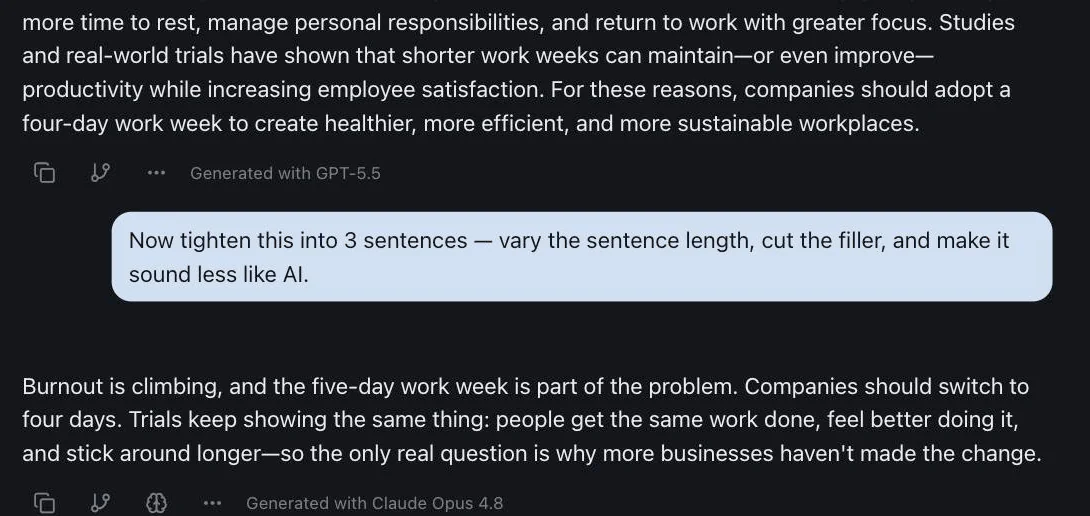
Pass the draft to Claude with specific notes: tighten the argument, vary the rhythm, cut the filler, and make it sound like a person wrote it. This is the step most people skip, and it's the one that turns a generic AI essay into something that reads like you.
If you upload your source readings and notes to a project, the editing model can also check the draft against them — keeping the synthesis honest instead of drifting into things you never actually read.
5. Fact-check and pressure-test the argument
Before you're done, ask a second model the same factual questions and to poke holes in your thesis. When two models agree on a fact, you can relax; when they disagree, you've just caught something worth checking. That disagreement is the single fastest way to catch a confidently wrong "fact" before a teacher does.
If essays are just one of your student jobs, Best AI for College Students covers the rest: readings, research, math, and exam prep. For exam prep, how to use AI for studying sets out the method. And every AI student discount is worth reading before you pay for any of them. For writing outside coursework — articles, copy, fiction, reports — the same models get ranked by what you're producing in the best AI for writing.
The Catch: Doing It "Right" Means Juggling Tools
You might have spotted the problem. That workflow touches four different tools — Perplexity for research, ChatGPT for drafting, Claude for editing, a second model for the fact-check. Done the usual way, that's four tabs, four logins, and four subscriptions. ChatGPT, Claude, Gemini, Perplexity, and Grok each charge $20–$30/month, so a full stack runs around $110/month — a brutal number on a student budget, and most of it sitting idle.
Worse, every time you switch tools you start from zero: re-paste the brief, re-paste the draft, re-explain the assignment. The context never follows you.
The fix isn't to give up the multi-model approach — it's to put every model in one place. In izzedo chat, all the models above live in a single conversation, and switching between them is one click, not a new tab and a new bill.
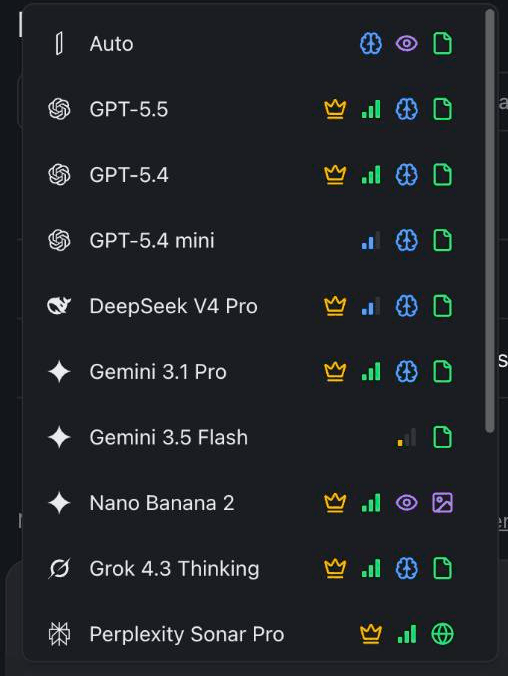
Because they share one thread, you can research with Perplexity, draft with ChatGPT, and edit with Claude without re-pasting anything — each model sees everything that came before. You can upload your readings once and every model can use them, ask several models the same question side by side to catch errors, and export the finished essay straight to Word or PDF. One login, one bill, starting at $6/month, with a free plan that needs no credit card. And the bill stays flat during finals week: fair-use limits exist like anywhere else, but they run in the background on a short rolling window that clears in hours, with a weekly pool underneath it — so a genuinely relentless week can run you out until that resets.
For the full picture of running several models in a single conversation, see How to Use Multiple AI Models at Once.
Using AI for Essays Without Crossing the Line
A quick, honest word on this, because "best AI for writing essays" can mean two very different things.
Used as a study partner, AI is genuinely great: brainstorming topics, building an outline, finding sources to read, explaining a confusing concept, and giving feedback on a draft you wrote. That's the same kind of help a tutor or a study group gives, and it makes you a better writer.
Used as a ghostwriter — generating an essay and submitting it as your own — it's a different story. That's plagiarism under most schools' academic-integrity policies, AI "facts" and citations are wrong often enough to sink you, and the result rarely sounds like you anyway. A few rules that keep you on the right side:
- Use it to think, not to submit. Outline, research, and edit with AI; write the actual essay in your own words.
- Verify every fact and source. If you can't open the source and confirm it, don't cite it — this is exactly where a second model earns its keep.
- Check your institution's policy before you use AI for any graded work. Rules vary a lot.
The multi-model workflow above is built for the study-partner use: it makes your research more solid and your editing sharper, while keeping the thinking yours.
The Bottom Line
The best AI for writing essays in 2026 isn't a single model — it's Perplexity for research, ChatGPT for drafting, Claude for editing, and a second model to check the facts, each doing the part it's best at. The only thing that ever made that hard was the tooling: too many tabs, logins, and bills.
Put every model in one conversation and the workflow gets easy — which is the whole reason izzedo chat exists. Match the model to the stage, keep your context in one place, and let the disagreement between two models catch the mistakes before anyone else does.
Want to research, draft, and edit an essay with every leading AI model in one thread? Start using izzedo chat for free — no credit card required.
Frequently asked questions
What is the best AI for writing essays?
There isn't a single one. Different models win different stages of an essay: a web-research model like Perplexity Sonar for sources, a fast generalist like ChatGPT for outlining and drafting, and a precise model like Claude for editing and voice. The best results come from matching the model to the stage instead of asking one model to do everything.
Is it cheating to use AI to write an essay?
Using AI to brainstorm topics, build an outline, find sources to read, or get feedback on a draft is a study aid — much like a tutor. Submitting AI-generated text as your own work is plagiarism and breaks most schools' academic-integrity policies. Use it to think and revise, write the essay in your own words, and check your institution's rules first.
What is the best AI model for writing essays?
It depends on the essay. For an argumentative essay, draft with Claude and then have a second model attack the thesis. For a research paper or literature review, lead with Perplexity Sonar for real, linked sources and use Gemini to read them in full. For close analysis of a set text, Claude reads most carefully. For a timed handwritten exam, the honest answer is no model at all in the room — use one to generate practice prompts and mark your attempts instead.
What is the best free AI for writing essays?
Several leading models have capable free tiers, and open models like Llama, Qwen, and DeepSeek are strong for everyday drafting. izzedo chat has a free plan with no credit card — the free models, with a usage allowance detailed on the pricing page — so you can use multiple models for an essay without paying for one subscription per tool.
Which AI is best for essay research and citations?
Perplexity Sonar is built for research: it searches the live web and links the sources behind each claim, which beats a model that writes citations from memory and sometimes invents them. Always open the source and confirm it actually says what the AI claims before you cite it.
Can teachers detect AI-written essays?
AI detectors exist, but they are unreliable and flag plenty of human writing by mistake, especially from non-native speakers. The dependable path isn't beating a detector — it's using AI as a research and editing partner rather than a ghostwriter, so the thinking and the words are genuinely yours.
Can one AI write the whole essay for me?
It can produce a draft, but the quality jumps when you split the job: research with one model, outline and draft with another, edit with a third, and cross-check the facts with a second model. Each model has different strengths, so routing each stage to the right one beats relying on a single model for the entire essay.
Ready to try multi-model AI workflows?
Access GPT, Claude, Gemini, Perplexity, and more — all in one place.
Start for Free →