Google AI Pro vs ChatGPT Plus (2026): Same Price, Different Plans
Google AI Pro and ChatGPT Plus both cost about $20 a month. One covers up to six people and reads 1,500 pages at once. The other covers one person and keeps its best model in a separate Work app. Every difference that matters, from both vendors' own pages.
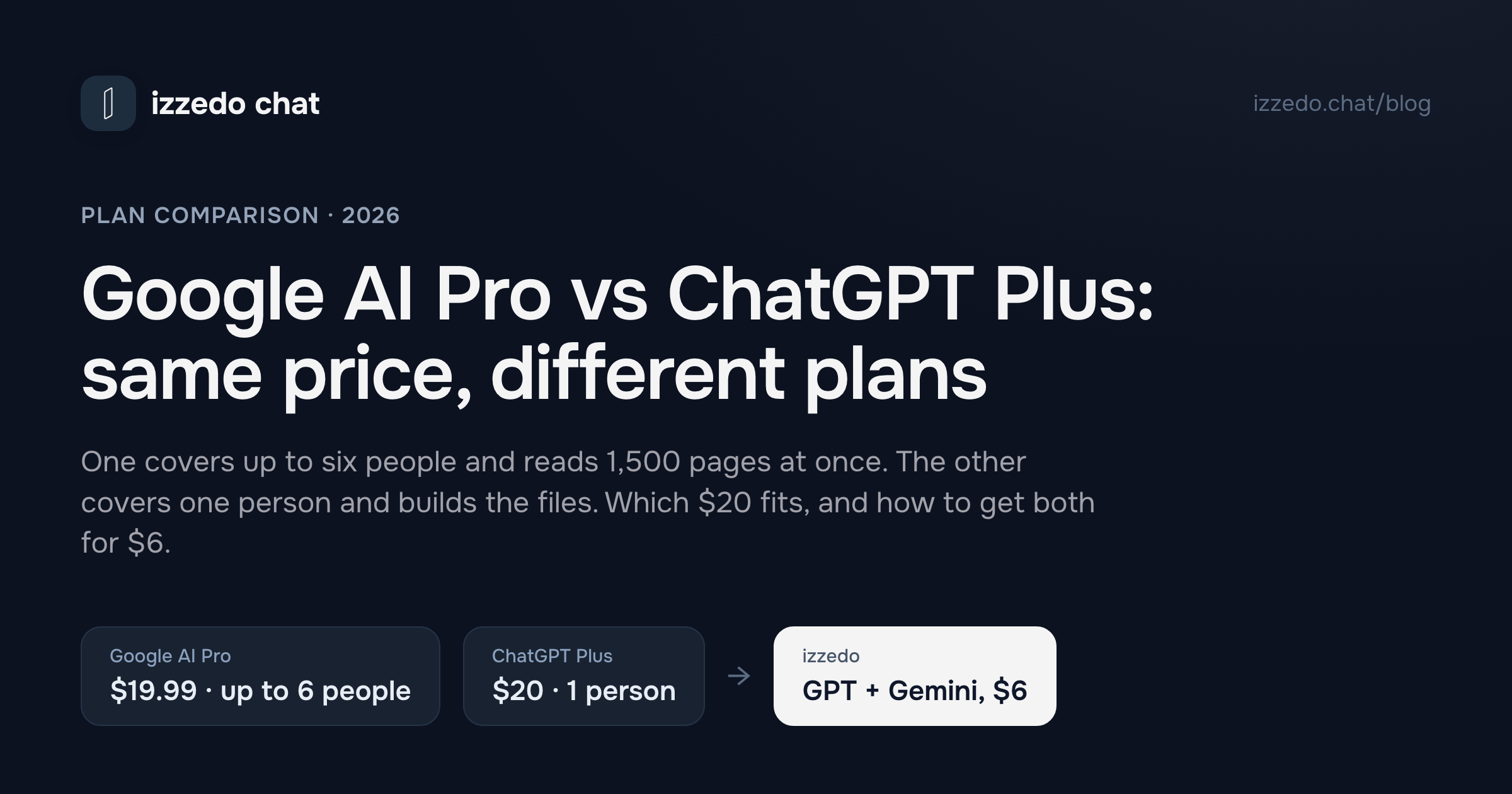
Google AI Pro costs $19.99 a month. ChatGPT Plus costs $20. A one-cent gap can't settle anything, so the choice comes down to what each company puts behind the price, and the two plans have surprisingly little in common.
Google sells a household plan. One AI Pro subscription can be shared with five other people, it comes with 5 TB of storage, and its chat reads about 1,500 pages at once. OpenAI sells a plan for one person, built around getting finished work out of ChatGPT: documents, spreadsheets, sites and code, much of it in a separate Work app with its own meter. And there's a difference most comparisons skip. For the Gemini app to read your Gmail, Google requires the setting that lets it train on your chats. ChatGPT connects to Gmail with training switched off.
Everything below comes from the two vendors' plan pages and help centres, read on 28 October 2026. OpenAI is still rolling GPT-6 out to Plus accounts and Google reworked its free plan on 9 October, so treat this as a dated snapshot.
Google AI Pro vs ChatGPT Plus at a Glance
| Google AI Pro | ChatGPT Plus | |
|---|---|---|
| Price (US) | $19.99/month | $20/month |
| Who can use it | You and up to five family members | You only |
| Best model in the chat | Gemini 4 Argon, plus the Pro and Flash models | GPT-6 Sol at Medium or High thinking, still rolling out |
| Where the top model lives | In the chat | GPT-6 Astra, in ChatGPT Work and Codex only |
| Reads at once | 1 million tokens, "up to 1,500 pages of text" | 256K tokens with reasoning, about 320 pages. 54K on Instant, about 40 |
| Usage | 4x the free plan, refreshed every five hours up to a weekly cap | Everyday chat listed as unlimited, with caps possible at busy times. Work and Codex on five-hour and weekly windows |
| When you run out | The chat continues on Flash-Lite | The chat "may continue with another available model" |
| Paying for more | AI credits, for video in Flow and coding in Antigravity | Credits for Work, Codex, Word, Excel and PowerPoint, or a paid reset |
| AI inside office apps | Gemini in Gmail, Docs, Sheets and Vids | Extensions for Excel, Word, PowerPoint and Google Sheets |
| Extras | 5 TB storage, YouTube Premium Lite, Google Home Premium | Codex, ChatGPT Work, Sites, scheduled tasks |
| Trains on your chats by default | Yes. The Gemini app needs it on to read Gmail | Yes. Switch it off and Gmail still connects |
| Billing | Monthly. No refunds for partial months | Monthly only. You can request a refund |
The short version: Google AI Pro is the better $20 if more than one person in your home will use it, if you work with long documents, or if your work lives in Google Docs. ChatGPT Plus is the better $20 for one person who wants AI to produce finished files, who works in Excel, Word or PowerPoint, or who wants Gmail connected without training on. Plenty of people want both models, and that doesn't have to cost $40. More on that at the end.
What Google AI Pro Gets You for $19.99
AI Pro is the second of Google's three paid personal plans, sold through Google One with storage attached. Google's US plan page and its Google One page list:
- Gemini 4 Argon, Google's newest model, plus its Pro and Flash models, and you pick which one answers
- Four times the free plan's usage, plus video generation and Daily Brief
- A 1 million token context window
- Gemini inside Gmail, Docs, Sheets and Vids
- Chrome auto browse, which Google limits to the US and India
- 1,000 credits for Google Flow, its video studio
- 5 TB of storage across Gmail, Drive and Photos
- YouTube Premium Lite and Google Home Premium Standard
One setting changes what you get from Argon. Google's models article says that if you don't choose a thinking level, "it will default to Low," and that Gemini keeps whatever model and level you pick for the rest of that conversation. So unless you change it, you're paying for Google's best model and getting its lightest setting. For anything that needs careful reasoning, set it to High at the start of the chat.
Whether $19.99 is good value depends mostly on the bundle. If you already pay for storage above 200 GB, or for YouTube Premium Lite, Google AI Pro replaces something on your card statement and the AI costs you little extra. If you want a chatbot and nothing else, you're buying 5 TB you won't fill. I priced every Google tier, from the free app to Ultra and the API, in how much Gemini costs.
What ChatGPT Plus Gets You for $20
OpenAI's Plus card lists reasoning models with GPT-6, more messages and uploads, image creation, deep research, memory, projects, scheduled tasks, custom GPTs, Codex, and "expanded access to ChatGPT Work on desktop, web, and mobile." The comparison grid under it adds Sites, voice with video, a built-in browser, and ChatGPT extensions for Excel, Word, PowerPoint and Google Sheets.
Where each model sits is the part of Plus that takes some reading, and it matters more than the feature list.
In the regular chat, Plus gets GPT-6 Sol at Instant, Medium and High thinking. OpenAI's help centre says GPT-6 "is rolling out in Chat" and that if you don't see it, "it may not be available for your account yet." Extra High thinking and GPT-6 Pro are left out of Plus. OpenAI's strongest model, GPT-6 Astra, is included on Plus only inside ChatGPT Work and Codex, and OpenAI's own estimate there is 5 to 45 Astra messages per five-hour window.
So Plus is really two products at one price. One is the chat. The other is a work app that builds documents, spreadsheets, presentations and sites on its own allowance. If you'll use the second, that's where much of Plus's value sits. If you only ever chat, part of your $20 pays for an allowance you never touch. The rest of OpenAI's ladder, from Go at $6 to Pro at up to $500, is in ChatGPT Go vs Plus vs Pro.
Which Plan Gets the Better Model?
Google puts its newest model in the ordinary chat for AI Pro subscribers. OpenAI keeps its best model out of the Plus chat and puts it behind Work and Codex. So a Plus subscriber typing into the chat isn't using OpenAI's strongest model, while an AI Pro subscriber can pick Google's.
Which model gives better answers is a separate question, and it depends on the task. I tested Gemini and ChatGPT against each other on writing, research, long documents and reasoning in Gemini vs ChatGPT, and covered who gets Argon and what it costs in Gemini 4 Argon.
A note on names, since search results mix them up. People still search for "Gemini Pro vs ChatGPT Plus" and "Gemini Advanced vs ChatGPT Plus." The plan is Google AI Pro. Gemini Advanced was its old name, and Gemini Pro is one of the models inside it.
How Much Each Plan Reads at Once
This is the clearest gap between the two, and Google wins it.
Google lists a 1 million token context window for AI Pro and says that's "up to 1,500 pages of text." OpenAI's pricing page lists 256K tokens for reasoning models on Plus, which it puts at about 320 pages, and 54K for Instant, about 40 pages. It also notes that the part available for your own input is smaller than the total, because system instructions, memories and the model's reasoning use the same space. By the vendors' own page counts, Gemini reads four to five times as much in one conversation. That's my arithmetic on their figures.
Who notices: a bookkeeper loading a year of bank exports, a consultant checking a long contract against the proposal it came from, anyone pasting in interview transcripts. Under about 300 pages, both plans take the whole document, as long as ChatGPT's reasoning is on. Above that, OpenAI's own figure says it won't fit in one conversation.
A big window also costs more of your allowance. Google's limits article rates large file analysis and long ongoing conversations as "medium" usage and suggests starting a new chat when you change topic, so Gemini doesn't have to re-read everything above.
Usage Limits: What Happens When You Run Out
Neither company publishes a message count for its $20 chat. Both describe the shape of the limit instead, and both handle the moment you hit it the same way.
Google AI Pro. Gemini's limits are compute-based: Google says they "factor in the complexity of your prompt, the models and features you use, and the length of your chat." AI Pro gets 4x the free plan's limit, which refreshes every five hours until you reach a weekly cap. Gemini warns you when you're close and shows the refresh time once you hit it, and you can check under Settings, then Usage limits. When a paid plan reaches its limit, Google says, "you can continue your conversation with Flash-Lite."
AI Pro can also buy AI credits, but Google's credits help page says they get you "extra usage in Google Flow and Google Antigravity," its video and coding tools. The plan page footnote says credits extend Gemini app limits too. I'd go by the help page, which is more specific: when the chat runs out, you wait, carry on with Flash-Lite, or upgrade to Ultra.
ChatGPT Plus. OpenAI's grid lists everyday text chat as unlimited on every plan, with a footnote that usage "must be reasonable." Its Plus help article adds that Plus "may include usage limits such as message caps, especially during high demand." For the thinking levels, OpenAI says "if you reach a Thinking limit, ChatGPT may continue with another available model," and it shows when the allowance resets if it knows.
Work and Codex run on a different meter: a five-hour window and a weekly window, both visible under Settings, then Usage. When those run out, Plus can buy credits that cover Codex, ChatGPT Work, Word, Excel and PowerPoint, or an instant reset that, in OpenAI's words, "pulls your normal weekly allowance forward rather than adding a separate usage entitlement." OpenAI says it generally doesn't refund resets.
So in the chat, both plans move you to a lighter model when you've used your share, and neither sells you more chat. What you can buy is different. OpenAI sells more of its work tools, Google sells more video and coding. Every ChatGPT cap, including the ones on uploads and images, is in ChatGPT limits.
One Person or Six: The Sharing Rule
This is the difference that changes the maths for most households.
Google One's plan page says AI Pro includes "family sharing with up to five others," and Google's family help page lists "access to AI benefits such as Gemini App, Google Antigravity, Gemini Notebook, and other AI features" among what everyone in the group can use. The plan manager has to be 18 or over and everyone has to live in the same country.
OpenAI's account sharing policy is the opposite: "Your OpenAI account is meant for you—the individual who created it. If someone else needs to use OpenAI's products, they should sign up for their own account."
| People in the household | Google AI Pro | ChatGPT Plus for each |
|---|---|---|
| 1 | $19.99 | $20 |
| 2 | $19.99 | $40 |
| 4 | $19.99 | $80 |
| 6 | $19.99 | $120 |
There are limits to Google's version. Its family page says Flow and Antigravity limits are shared by the whole group, and it doesn't say whether each member gets their own Gemini chat allowance. YouTube Premium Lite goes to the plan manager only, family members don't get Google Home Premium, and only the manager can buy AI credits. It's a family group, too, so it isn't a way to split one plan between business partners.
Even with those caveats, two people who both want a paid AI plan pay half as much with Google.
Gemini in Google Docs, ChatGPT in Google Sheets
"I work in Google Docs and Sheets" sounds like an easy reason to pick Gemini. It's only half right.
Google AI Pro puts Gemini inside Gmail, Docs, Sheets and Vids. Google One's page sells it as help to "proofread in Gmail and work smarter in Docs and Sheets." The cheaper AI Plus plan gets Gmail and Vids but not Docs.
OpenAI now has ChatGPT for Excel and Google Sheets, a sidebar inside the spreadsheet that builds, updates and explains sheets. You install it from the Google Workspace Marketplace, and OpenAI's help article says it's available on Free, Go, Plus and Pro, with the pricing grid marking it "Limited" on Free and Go. Plus also gets extensions for Word and PowerPoint. OpenAI says Excel, PowerPoint and Word share one allowance with Codex and ChatGPT Work on Plus, and its rate card estimates an Excel or Sheets task at 5 to 20 credits per message once you're past it. There's no ChatGPT extension for Google Docs on OpenAI's list.
So if you write in Google Docs, Gemini is the one that works inside it. If you live in spreadsheets, both plans work in Google Sheets. If your clients send Word, Excel and PowerPoint files, ChatGPT is the one with extensions for all three.
If those Docs are on a business email address, a personal Google AI Pro plan isn't the route at all. Google Workspace includes Gemini from $7 a seat, and I compared the business options in the Gemini pricing breakdown.
Which One Trains on Your Chats?
Both, by default. The difference is what you give up to stop it.
ChatGPT Plus. OpenAI's help centre says that on Free, Plus and Pro "we may use your content to train our models." You opt out by turning off "Improve the model for everyone" under Settings, then Data controls. One catch: if you rate an answer with a thumbs up or down, "the entire conversation associated with that feedback may be used," even after you've opted out. For connected Google apps, OpenAI says "we do not train our generalized models on data directly from connected Google apps," except when you send feedback, paste the data into the chat, or it appears in ChatGPT's reply.
Google AI Pro. Google's activity help page says "if you're 18 or over, Keep Activity is on by default." With it on, Google uses your activity to "provide, develop, and improve its services (including training generative AI models)," with human reviewers. Chats that reviewers have seen are disconnected from your account and kept for up to three years, and deleting your activity doesn't delete them. Turn Keep Activity off and future chats aren't used for training, though Google still keeps them for 72 hours.
Here's the catch. Google's help page for connecting the Gemini app to Gmail, Docs and Drive says "Have Keep Activity on," and its privacy hub says "some Connected Apps are unavailable when this setting is off." Google's privacy notice also says Gemini "saves and uses info from Connected Apps according to this notice, including to provide and improve Gemini Apps."
So on ChatGPT Plus you can switch training off and keep Gmail connected. On Google AI Pro, having the Gemini app read your Gmail means leaving Keep Activity on, with the training and human review that come with it. If client emails pass through your inbox, that's worth knowing before you connect anything. The free Gemini plan has the same rule, and I went through its other settings in Is Gemini free?.
Students Get Different Deals
Google offers eligible US students a free year of Google AI Pro. You redeem it by 31 December 2026, a payment method is required, and it renews at $19.99 a month. OpenAI offers students at eligible US degree-granting institutions four free months of ChatGPT Plus, with a claim deadline of 31 October. A year against four months is an easy call if you qualify for both. All the student offers, country by country, are in AI student discounts.
Is Google AI Pro Worth It Over ChatGPT Plus?
Pick Google AI Pro if:
- Two or more people at home will use a paid AI plan. Shared six ways, it's $3.33 a person.
- You work with long documents. Its window is four to five times larger by the vendors' page counts.
- You write in Google Docs and want the AI inside it.
- You'd pay for 5 TB of storage or YouTube Premium Lite anyway.
Pick ChatGPT Plus if:
- You're one person and want AI to build the deck, the spreadsheet or the site, not just talk about it.
- Your clients work in Excel, Word and PowerPoint.
- You want Gmail connected with model training switched off.
- You'll use Codex or ChatGPT Work enough to justify their separate allowance.
If you'd tick boxes on both lists, paying both companies is the obvious option and the worst value. It's $39.99 a month, two apps that can't see each other's chats, and two separate meters. The same tradeoff between ChatGPT and Anthropic's plan is in ChatGPT Plus vs Claude Pro, and the other $20 plans are compared in the best AI subscription.
Both Models for $6
izzedo chat has GPT and Gemini in the same chat, next to Claude, Grok, DeepSeek and the rest. On the free plan, which needs no card, you get GPT-6 Luna and Gemini 3.8 Flash. The $6 Hobby plan adds GPT-6.1 Sol, GPT-6 Astra, Gemini 4 Argon and Gemini 3.1 Pro, along with every other chat model.
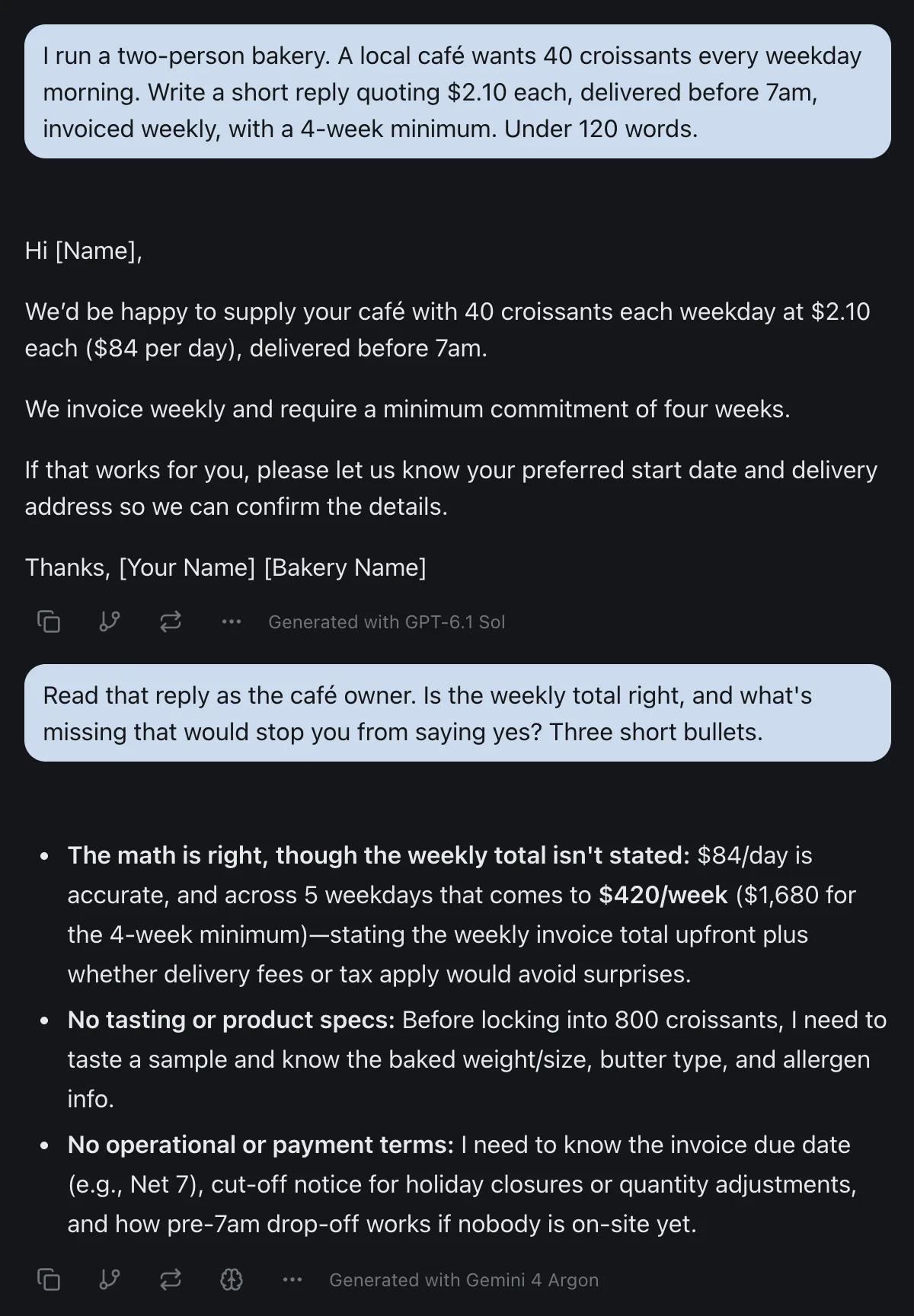
That's GPT-6.1 Sol drafting a quote for a two-person bakery and Gemini 4 Argon reading it as the café owner. Argon worked out the weekly total the draft left out, $420, and the $1,680 the four-week minimum commits the café to. Pick a different model for the next message and it sees the whole conversation, so nothing gets copied between apps.
Usage runs on a rolling window here too, and the figures are on the pricing page. One allowance covers every model, and Astra and Argon use more of it than the lighter ones, so it pays to save them for the answers that need them. GPT and Gemini reach izzedo through OpenAI's and Google's paid APIs, which don't use what you send to train their models.
It isn't a storage plan, and it doesn't put AI inside Google Docs or Excel. If those are why you'd pay Google or OpenAI, pay them. If what you wanted was both companies' best models in one place, that's what the $6 is for. (Here's how running several models in one place works day to day.)
The Bottom Line
Google AI Pro and ChatGPT Plus are priced to look like rivals, but they're built for different buyers. Google's plan is for a household that lives in Google's apps and wants one bill for storage, YouTube and AI. OpenAI's is for one person who wants AI to produce finished work, and it keeps its strongest model for that work rather than for the chat.
Decide by who will use it and where your files live. For most small-business work, those two answers will matter more than which model wins a benchmark this month.
Want GPT and Gemini in the same conversation, with Claude and Grok a click away? Try izzedo chat free and no card needed.
Topics
- google ai pro vs chatgpt plus
- gemini pro vs chatgpt plus
- Google AI Pro
- ChatGPT Plus
Start on the free plan. Pay when you want the premium models.
Free
$0
Claude Haiku, Gemini Flash, Grok and more, with agent mode and 50+ connectors
Hobby
$6/mo
Every chat and image model
Pro
$12/mo
Higher limits, 400k context and more video models
Max
from $50/mo
5x or 10x Pro's usage, and every video model
Frequently asked questions
Is Google AI Pro better than ChatGPT Plus?
It depends on who will use it and what you do with it. Google AI Pro ($19.99) is the better plan for a household, because it can be shared with five family members, and for long documents, because it reads up to 1 million tokens at once. ChatGPT Plus ($20) is the better plan for one person who wants finished files, since it includes ChatGPT Work, Codex, Sites and extensions for Excel, Word, PowerPoint and Google Sheets.
Is Google AI Pro worth it?
Google AI Pro is worth $19.99 a month if you'd use at least two of its parts: Gemini 4 Argon and a 1 million token context window, Gemini inside Gmail and Docs, 5 TB of storage, YouTube Premium Lite, or sharing with up to five family members. If you only want a chatbot for yourself, Google AI Plus at $4.99 or ChatGPT Plus at $20 may fit better.
What is the difference between Gemini Pro and ChatGPT Plus?
Gemini Pro is a model name. The plan people usually mean is Google AI Pro, $19.99 a month, which used to be called Gemini Advanced and includes the Pro model plus Gemini 4 Argon and Flash. ChatGPT Plus is OpenAI's $20 plan, with GPT-6 Sol in the chat and GPT-6 Astra in ChatGPT Work and Codex.
Can you share Google AI Pro or ChatGPT Plus with family?
Google AI Pro can be shared with up to five other people in a Google family group living in the same country, and Google lists the Gemini app among the shared benefits. ChatGPT Plus can't be shared. OpenAI's account sharing policy says an account is meant for the individual who created it and anyone else should sign up for their own.
Which has the bigger context window, Google AI Pro or ChatGPT Plus?
Google AI Pro. Google lists a 1 million token context window for AI Pro, which it describes as up to 1,500 pages of text. OpenAI's pricing page lists 256K tokens for reasoning models on Plus, about 320 pages, and 54K tokens for Instant, about 40 pages.
What happens when you hit the limit on Google AI Pro or ChatGPT Plus?
Both switch you to a lighter model rather than stopping you. Google says a paid plan that reaches its limit continues the chat with Flash-Lite until the five-hour or weekly limit refreshes. OpenAI says that if you reach a Thinking limit, ChatGPT may continue with another available model, and it shows the reset time when that information is available.
Does Google AI Pro or ChatGPT Plus train on my chats?
Both do by default. On ChatGPT Plus you can turn off Improve the model for everyone and still connect Gmail, and OpenAI says it doesn't train its models on data read from connected Google apps. On Google AI Pro, Keep Activity is on by default for adults and covers training with human review, and the Gemini app needs it on to connect to Gmail, Docs and Drive.
What's the cheapest way to use Gemini and ChatGPT together?
izzedo chat has GPT-6 Luna and Gemini 3.8 Flash on its free plan, and GPT-6.1 Sol, GPT-6 Astra, Gemini 4 Argon and Gemini 3.1 Pro on its $6 plan, in one chat where you can switch models on any message. It isn't a storage plan and doesn't put AI inside Google Docs or Excel, so if those are what you'd pay for, pay Google or OpenAI.