ChatGPT Plus vs Business: Same ChatGPT, Different Owner
A ChatGPT Business seat is $25 a month to Plus's $20, and on OpenAI's own feature grid the two plans match on 57 of 82 rows. Eleven of the rows that differ are admin tools, two are memory features Business doesn't have yet, and the difference that matters most isn't on the grid at all. On Business, you can't export your own chats.
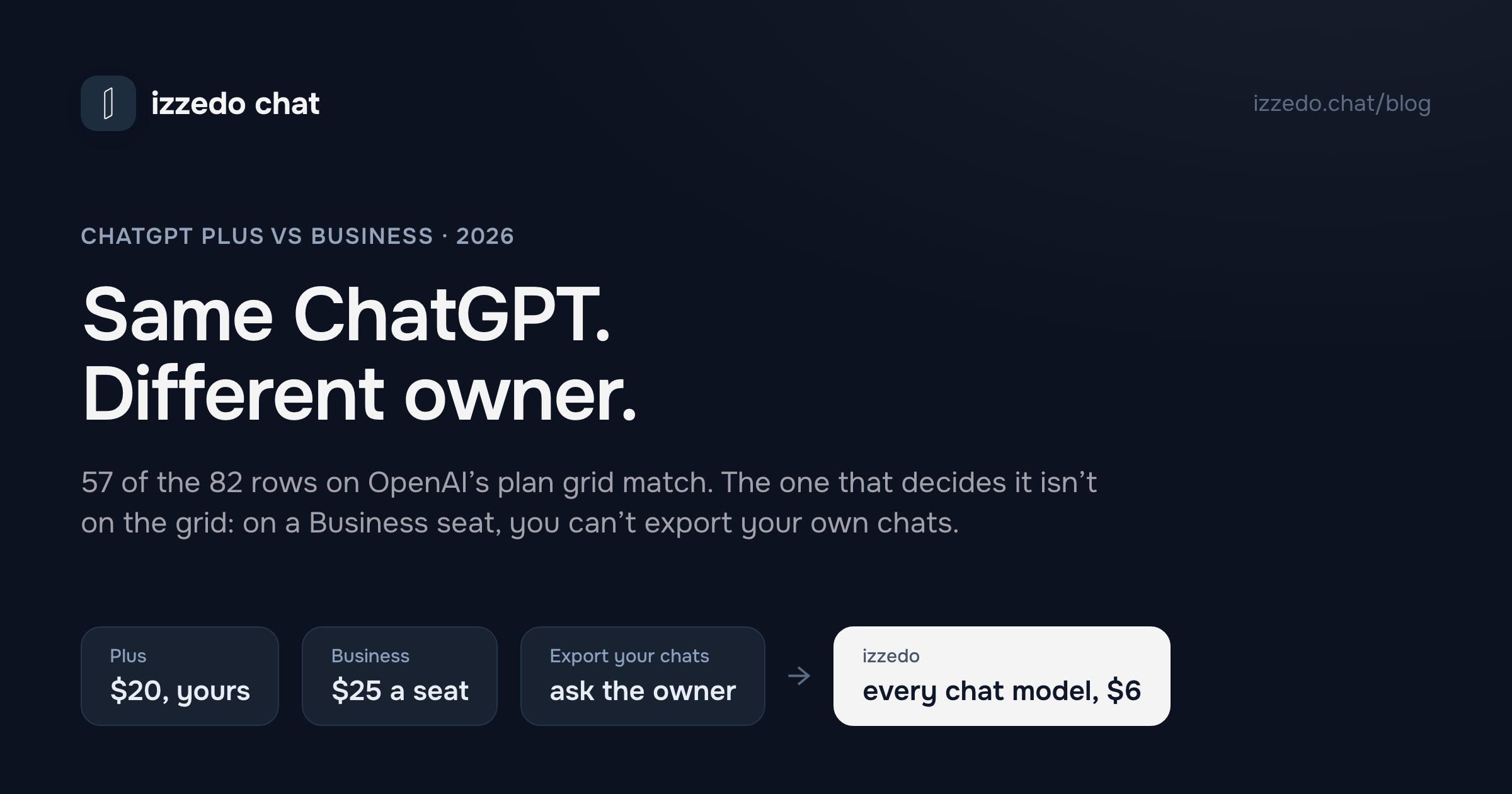
ChatGPT Business costs five dollars more than ChatGPT Plus. A standard seat is $25 a month to Plus's $20, and on annual billing the gap disappears, because a Business seat drops to $20 and Plus has no annual option at all.
So on price, this is barely a decision. That is probably why most write-ups turn into feature lists, and why the feature lists land on "Business if you're a team, Plus if you're not." It's true. It also doesn't help the person running a studio with two contractors, or the freelancer whose client just asked them to "get on a business account."
I read OpenAI's plan grid cell by cell, then seventeen of its help centre articles, to find out what the extra five dollars changes. The feature rows barely move. What moves is who the account belongs to. On Plus, you can export everything you've ever typed, delete the account and switch model training off with one toggle. On a Business seat, you can't export or delete anything yourself, and the training setting belongs to an administrator.
That's the comparison. The rest of this post is the evidence, plus a verdict for each kind of small business that ends up asking the question.
The Short Answer: Plus, Business or Pro
| If this is you | Buy | Why |
|---|---|---|
| A freelancer or solo consultant | Plus | Business needs two paid seats, so one person pays double for admin tools with nobody to administer |
| A two-to-ten person shop that wants shared GPTs, company knowledge and one bill | Business, standard seats, annual | The three team features are real, and annual billing makes each seat cost the same as Plus |
| One person who hits Plus's limits every day | Pro at $100 | Cheaper than a Premium Business seat, a bigger context window, and no second seat to buy |
| A contractor invited into a client's workspace | Join it, never merge | Merging your Plus history into their workspace is one-way, and it stays with them when the contract ends |
| Anyone whose client contract names SOC 2 or no-training terms | Business | The one thing Plus can't give you, whatever you set in its settings |
| A team that wants Claude or Gemini on the same bill | Neither | Both plans are one vendor's models. More on that at the end |
What ChatGPT Business Costs Next to Plus
Plus is $20 a month, billed monthly. OpenAI's help centre is direct about it: "we do not support annual billing or the option to pay for multiple months in advance for ChatGPT Plus subscriptions."
A standard Business seat is $25 a month billed monthly, or $20 billed annually. A Premium seat, added in August, is $125 monthly or $100 annually. Every workspace needs at least two paid seats of either kind, and self-serve workspaces top out at 200. Business is the same plan that used to be called ChatGPT Team, renamed in August 2025. I've worked through the seat arithmetic for teams of three and five already, so I won't repeat it here.
Two billing details matter more to a small business than the seat price does.
The first is that a seat is paid capacity, not a person. OpenAI charges for every seat at the start of each billing cycle, "whether or not they've been assigned to individual members." When a contractor leaves in week two, their seat keeps billing until you schedule a reduction, and reductions only take effect at the next renewal. On annual billing, "added seats remain committed through the end of the current annual term." So every seat you add during an annual plan is a commitment to the end of that year, including the one you bought for a three-month project.
The second is how you pay. Self-serve Business takes a card, or an OpenAI gift card balance, and nothing else. There's no invoicing, no purchase order and no bank transfer, and OpenAI's support team "cannot convert an existing self-serve ChatGPT Business workspace to invoice billing." If your accountant needs an invoice to pay against, that's an Enterprise conversation, and Enterprise has no published price.
One discount is worth knowing. OpenAI for Nonprofits offers up to 75% off Business or Enterprise. At the full discount, an annual standard seat comes to $5, which makes a two-seat Business workspace cheaper than one Plus subscription for a registered charity.
OpenAI's Plan Grid Has 82 Rows. 25 of Them Differ.
OpenAI's pricing page has two tabs, Individual and Business & Enterprise, and each has a long comparison grid underneath. Both grids run the same 82 rows. I put the Plus column next to the Business column and compared every cell.
| Section | Rows that differ | Which way |
|---|---|---|
| Security and administration | 11 | All in Business's favour |
| Models | 8 | Mostly "Flexible" on Business, explained below |
| Features | 5 | Three favour Business, two favour Plus |
| Privacy | 1 | Business says no training, Plus says opt-out available |
| Total | 25 of 82 | The other 57 are identical |
Start with the 57 that match, because they cover most of the reasons people assume they need Business. Shared projects read Yes on Plus, and on Free. Apps connecting to internal tools, the row behind the Google Drive, Slack and Microsoft 365 connections advertised on the Business card, reads Yes on Plus. Deep research, scheduled tasks, custom GPTs, file uploads, data analysis, voice, image generation and the Excel, Word and PowerPoint extensions are the same in both columns. So is the context window, at the same size for everyday answers and for thinking answers.
The eleven admin rows are the core of the Business plan. SAML single sign-on, a dedicated workspace, unified billing, an admin console, admin roles, bulk member management, GPT analytics, basic user analytics, an analytics dashboard, domain verification and SOC 2 Type 2 compliance. All eleven are useful to whoever runs the workspace. None of them changes what ChatGPT does for the person typing.
The three feature rows that favour Business are the actual team product. Company knowledge answers questions about your business from the apps the workspace has connected. Workspace agents are agents for repeatable jobs that the team builds once, shares, runs on a schedule or calls from Slack. Share GPTs with your workspace does what it says. If your team will genuinely use those, they're the reason to buy, and Plus doesn't have them at any price.
Then there are the two rows that run the other way. Memory with past chats, where ChatGPT draws on your earlier conversations, reads "Expanded" on Plus and "Coming soon" on Business. Memory sources reads Yes on Plus and No on Business. For now, the cheaper plan remembers more about you than the business one does.
The model rows are the hardest to read. The Business column mostly says "Flexible," which a footnote defines as "Enterprise and Business can purchase credits for more access." The help centre is clearer, and it's where Business quietly gets more model than Plus. The Extra High thinking level is not included on Plus and is included on Business. OpenAI's Pro-grade reasoning models, which Plus can't use in chat at all, come with a standard Business seat at 15 messages a month. Fifteen isn't much. It's fifteen more than Plus gets.
That leaves the privacy row. Plus says "Opt-out available." Business says "No." That's where the ownership question starts.
ChatGPT Personal vs Business: Who Owns the Account
OpenAI calls the Plus side of your account your personal workspace, and the Business side a managed one. Here are six things you might want to do with your own ChatGPT data, and who gets to do each of them.
| Plus | Business seat | |
|---|---|---|
| Export a copy of all your chats | You, from Settings | Not available. OpenAI says to ask the workspace owner |
| Delete your account | You, from Settings | Not available in a managed workspace |
| Decide whether your chats train OpenAI's models | You, with one toggle | Off by default, with the administrator holding the setting |
| Keep your chats if you stop paying | Yes, cancelling doesn't delete them | The workspace is deactivated and members can't open their chats until it's reactivated |
| Keep your chats if you leave | Nothing to leave | They stay in the workspace, and come back only if you're re-added |
| Keep your chats if the workspace is deleted | Not applicable | No. Every conversation and memory is permanently deleted |
Every cell in the right-hand column comes from OpenAI's own help centre. The data controls article puts it plainly. Signed-in Free, Go, Plus and Pro users can request a copy of their data, while "self-service data export is not available for ChatGPT Business, Enterprise, or ChatGPT for Healthcare workspaces and should be directed to the workspace owner." Deleting an account follows the same line.
The training row needs a closer look, because it's the one Business sells on. "No training on your business data by default" is on the Business card, and it's true. But a Plus user can switch training off in a few clicks, and once they have, the setting belongs to them. On Business, OpenAI's notice for managed accounts says the administrator "may be able to access, export, audit, retain, delete, and opt-in to share data tied to this account with OpenAI to improve OpenAI's models," where the organisation's configuration allows it. The default is better on Business. The control sits with someone else.
The deletion row is the one I'd want to know about before paying. OpenAI's memory FAQ for Business says that when a workspace is permanently deleted, "all user data within the workspace, including conversations and memories, will also be permanently deleted." Separately, when an owner turns memory off for the whole workspace, every member's saved memories are deleted with it.
None of this is sinister. It's what a company account is. Nobody expects to take the work mailbox with them when they leave a job, and a Business workspace runs on the same idea. The trouble is that a lot of people arrive at Business from the other direction. They've had Plus for two years, their history is full of their own drafts and research, and then a client or a business partner says "just get on our workspace." That's where the next part matters.
Merging Your Plus History Into Business Is One-Way
When you join a Business workspace, OpenAI offers to merge your personal workspace into it. You don't have to accept. On Business, unlike Enterprise, you can keep the two separate and switch between them, and "joining Business does not automatically migrate your content or cancel your personal subscription."
If you do merge, read OpenAI's migration guide first, because the terms are firm.
- It's all or nothing. "The migration flow does not let you select individual chats, projects, or files to transfer."
- There's no undo. "Migration does not provide an undo option that moves content from your organization's workspace back into your personal workspace."
- Leaving means leaving it behind. "If you leave or lose access to your organization's workspace, you may lose access to migrated content. That content does not move back to your personal workspace."
- Your Plus subscription ends. OpenAI cancels it automatically and refunds the unused part, unless you subscribed through the App Store or Google Play, where you have to cancel it yourself.
- Some things don't make the trip. Sites don't transfer. Custom connectors and custom plugins don't transfer. Projects that belong to other people don't either.
The guide's own advice is to "save copies of important conversations and files before you migrate," since you won't be able to export them yourself afterwards. I'd go further. If you're a contractor, a freelancer or a partner rather than an employee, don't merge at all. Keep your personal workspace, do the client's work in theirs, and switch between the two. The merge was built for people whose whole working life belongs to one organisation. A contractor on a six-month engagement is not that person, and the merge makes no distinction.
For the owner of a small business, the same facts point the other way, and it's worth being precise about what you get. When someone leaves your workspace, their projects and custom GPTs are reassigned to you. Their conversations are kept, but OpenAI's retention article says those conversations "are not transferred, and are not visible to the workspace owner." Business has no compliance API either. That's an Enterprise row. So Business keeps the shared work inside the company. It doesn't give you a way to read what people typed.
Does ChatGPT Business Get More Usage Than Plus?
This is the most common question after price, and the honest answer is that OpenAI doesn't say. There is no published multiplier between a Plus account and a standard Business seat. What OpenAI does publish is the shape of each plan's limits, and the shapes are different.
A standard Business seat runs on a five-hour usage window. The Premium seat's headline is "5x more usage than standard, with no 5-hour limit," which tells you the standard seat has one. Plus limits exist too. OpenAI describes them as "message caps, especially during high demand," which "may vary based on system conditions."
The clearer difference is what happens at the limit. On Plus, when you run out of the thinking model in chat, "ChatGPT may continue with another available model," or you wait for the reset. Plus can buy credits, but OpenAI's credits article for personal plans lists them for Codex, ChatGPT Work and the Word, Excel and PowerPoint extensions, and ordinary chat isn't on the list. On Business, once a seat's included usage runs out, the owner can let members carry on from a shared pool of workspace credits. OpenAI's rate card prices the chat side directly.
| On Business, past the included allowance | Credits |
|---|---|
| A thinking-model message | 10 |
| A Pro-model message | 50 |
| An agent-mode message | 30 |
| A deep research task | 50 |
| An image | 5 |
| Everyday Instant chat | None, it's unlimited |
Credits last 12 months, and OpenAI refunds them only for billing errors, unauthorised use or its own service failures. If you buy any, check three settings on day one. Monthly credit limits per seat type start empty, because "by default, all seats and users have no limits specified." Automatic reload with the monthly cap left blank "allows unlimited automatic reload purchases each month." And on Business, the Instant setting can switch itself up to a thinking model when a question looks hard, which bills that message at thinking rates once the allowance is gone. The toggle for that is Higher intelligence, under Settings and General. None of the three is a trap, exactly. All three are settings a busy owner tends to discover on the card statement.
So does Business get more usage? It gets a documented way to buy more, one message at a time, which Plus doesn't have for chat. Whether a standard seat's included allowance is bigger than Plus's to begin with, nobody outside OpenAI can tell you, and I'd be wary of anyone who claims they can.
ChatGPT Business vs Pro: The $100 Seat and the $100 Plan
The comparison that surprised me most is one rung up. OpenAI now sells two products at around $100 a month that both promise five times more usage. One is personal and one lives inside Business.
| Pro | Business Premium seat | |
|---|---|---|
| Price | $100 a month | $125 monthly, $100 billed annually |
| Usage | "5x higher usage than Plus" | "5x more usage than standard" |
| Pro-model messages in chat | 50 a week | 50 a week |
| Context window, everyday answers | 128K | 54K |
| Context window, thinking answers | 400K | 256K |
| Seats you must buy | 1 | 2, so at least one more seat alongside it |
| Who controls the account | You | The workspace |
OpenAI's grid has a single Business column for both seat types, so the context figures above are the ones it publishes for Business as a whole.
For one heavy user, the arithmetic is short. Pro costs $100. The cheapest way to put one person on a Premium seat is a Premium seat plus a standard seat to meet the minimum, which comes to $150 a month, or $120 on annual billing. The personal plan is cheaper, holds more of a long document at once according to OpenAI's own grid, and leaves you in control of your data.
There's a second reason Pro looks different this month. On 10 September, OpenAI paused new sign-ups and upgrades to the $200 Pro tier. Existing subscribers keep it and the $100 tier is unaffected, but for now $100 is the highest personal plan a new customer can buy. Above it, the only self-serve plan with more ChatGPT in it is a Premium seat inside a Business workspace. I've covered what separates Go, Plus and Pro for individuals in more detail.
ChatGPT Plus vs Business for One Person
"Plus vs Business as a single user" comes up again and again, and the numbers settle it quickly. Two seats minimum means one human on Business pays $40 a month on an annual plan, or $50 month to month. The second seat can't go to a friend. OpenAI's terms prohibit "sharing your account credentials or making your account available to anyone else," and each seat belongs to one member anyway.
For double the price of Plus, a solo user gets 15 Pro-model messages a month, the Extra High thinking level, credits for when the allowance runs out, SOC 2 paperwork and admin tools for a team of one. They give up memory from past chats, self-service export and control of their own account.
I'd say no for almost everyone. The exception is the freelancer whose client contract says the work must happen under a business agreement, with no training on client data, or who gets asked for a vendor's SOC 2 report. Plus can't satisfy that whatever you toggle, because the two plans run under different documents. Business is governed by OpenAI's Business Terms and its Enterprise privacy commitments, and OpenAI's notice for managed accounts says its consumer Terms of Use and Privacy Policy "do not apply" there. For that freelancer, $40 a month is part of the cost of the contract, and a small part.
Which Plan for Which Small Business
Freelance writers, designers and consultants working alone. Plus. Turn training off in Data controls, export your data every few months as a backup, and keep the money a second seat would have cost.
A two-to-five person agency or studio. Business on annual billing, if the team will use shared GPTs and company knowledge. At $20 a seat you pay what everyone's personal Plus plans were costing, you get one card charge, and the projects and GPTs stay with the business when someone moves on. Set a credit limit per seat type before anyone discovers the Pro models.
Contractors invited into a client's workspace. Join it and keep your personal workspace separate. Don't merge. Your personal history is the most useful thing you own in ChatGPT, and merging hands it to the client.
Anyone heavy enough to hit limits every day. Pro at $100, not a Premium seat. It's cheaper, it holds more context, and you don't have to buy a second seat for the privilege.
Teams that need invoicing, data residency or automatic user provisioning. Not Business. SCIM, data residency and invoice billing are all Enterprise rows, and a self-serve Business workspace can't be switched to invoicing later.
A team split between people who like ChatGPT and people who like Claude. Neither plan helps, and that's the case the next section is about.
What Both Plans Leave Out
Every plan in this comparison, from $20 Plus to a $125 Premium seat, buys one company's models. That's fine if everyone on the team is happy with OpenAI's answers. In the small businesses I talk to, that rarely lasts. One person writes long reports and prefers Claude. Another lives in Google's apps and wants Gemini. Someone checks every factual claim with Perplexity. Before long the team is paying for three or four sets of seats, and Business's admin console only manages one of them.
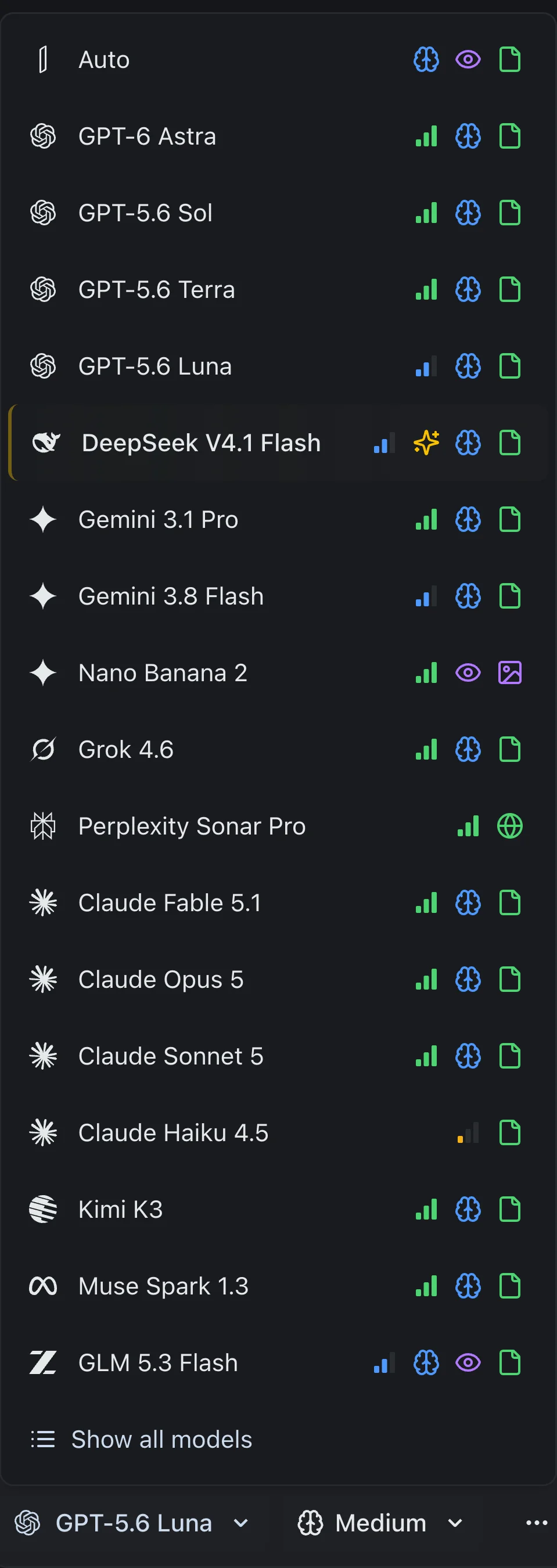
izzedo chat puts OpenAI's models in one picker beside Claude, Gemini, Grok, DeepSeek, Perplexity and the rest. It starts at $6 a month for one person, with a free plan that needs no card.
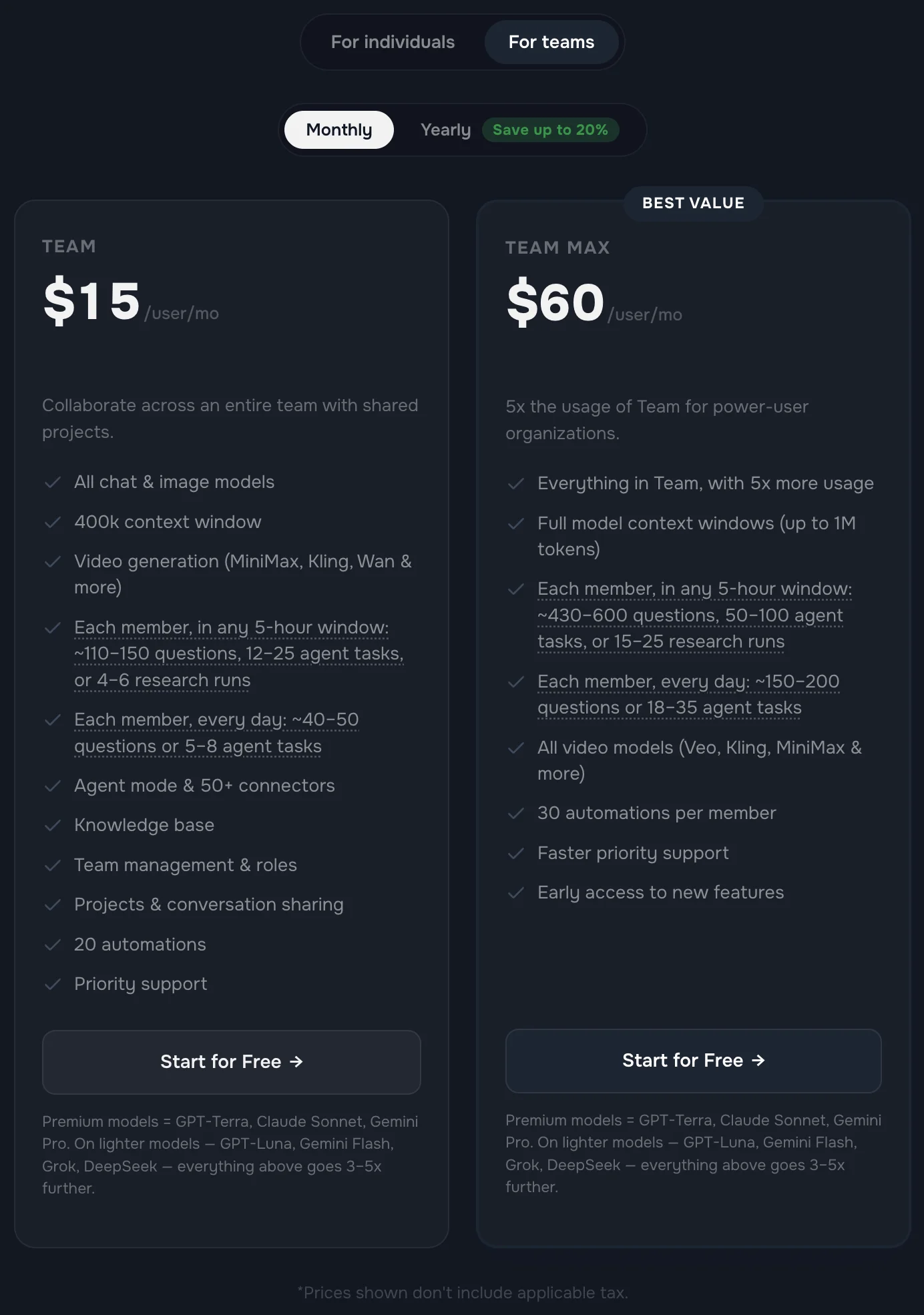
For small teams there's a Team plan at $15 per member a month, or $12 billed annually. It includes team management and roles, shared projects and conversation sharing, and the same model list for everyone on it, so the report writer and the fact checker stop needing separate subscriptions.
I'll be straight about where it doesn't fit. If your client contract names OpenAI's Business Terms, buy ChatGPT Business, because a contract that names one vendor's terms can only be met by that vendor. And if you're choosing between two vendors' $20 plans rather than two of OpenAI's, ChatGPT Plus vs Claude Pro is the comparison to read first.
The Bottom Line
ChatGPT Business is five dollars more than Plus, or nothing more on annual billing, and on OpenAI's own grid it changes 25 rows out of 82. Eleven are admin tools. Three are genuine team features. Two are memory features Business doesn't have yet. The rest are a small allowance of better models and a paid way past the usage wall.
What the grid doesn't show is the thing I'd decide on. A Plus account belongs to the person paying for it. A Business seat belongs to the workspace. That means no self-service export, no self-service deletion, a training setting held by an administrator, and a one-way merge for anyone who brings their history along. For the owner of a small team, that's the whole point of the product. For a freelancer or a contractor, it quietly hands over the most useful thing they own in ChatGPT.
So the test is one question, and it isn't about features. If you left tomorrow, who should keep the chats? If the answer is the business, buy Business. If the answer is you, stay on Plus, export your data today, and try izzedo's free plan before you pay anyone per seat for one vendor's models.
Frequently asked questions
What is the difference between ChatGPT Plus and ChatGPT Business?
Plus is a $20 a month personal subscription that you own and control. Business is a shared workspace sold per seat at $25 a month, or $20 billed annually, with a two-seat minimum. On OpenAI's own comparison grid the two plans match on 57 of 82 rows. Business adds admin controls, single sign-on, SOC 2 compliance, company knowledge, workspace agents, a small monthly allowance of Pro-model messages and no model training by default. It lacks memory from past chats, and members cannot export or delete their own data, because the workspace owner controls the account.
Does ChatGPT Business get more usage than Plus?
OpenAI does not publish a multiplier between the two. What it does publish is that a standard Business seat runs on a five-hour usage window and includes 15 Pro-model messages a month and the Extra High thinking level, none of which Plus has. When a Business seat uses up its included allowance, the workspace can keep going on purchased credits, which Plus cannot do for ordinary chat. For a documented increase, the Premium seat gives five times a standard seat's usage with no five-hour limit, at $125 a month or $100 billed annually.
Can I use ChatGPT Business by myself?
Not on one seat. A Business workspace needs at least two paid seats, so one person pays $40 a month on annual billing or $50 month to month, and OpenAI's terms forbid making your account available to anyone else. That doubles the price of Plus for admin tools with nobody to administer. The real case for it is a client contract that asks for OpenAI's Business Terms, no training on client data, or a SOC 2 report.
What happens to my ChatGPT Plus chats if I join ChatGPT Business?
Nothing, unless you choose to merge. Joining Business does not move your content or cancel Plus, and you can keep the two workspaces separate and switch between them. If you do merge, it is all or nothing with no undo. Your Plus subscription is cancelled and the unused part refunded, your personal workspace is deactivated, and the migrated chats stay with the organisation if you ever leave. Export your data first, because self-service export is not available inside Business.
Is ChatGPT Team the same as ChatGPT Business?
Yes. OpenAI renamed ChatGPT Team to ChatGPT Business on 29 August 2025, and the rename itself changed nothing about the plan. The changes since are separate: a Premium seat type with five times the usage arrived in August 2026, and self-serve workspaces are now capped at 200 paid seats.
ChatGPT Business vs Pro: which is better for one heavy user?
Pro at $100 a month. It gives five times Plus's usage on one login, the same 50 Pro-model messages a week as a Premium Business seat, and a larger context window on OpenAI's grid. A Premium seat is $125 monthly and still needs a second paid seat alongside it, so one heavy user on Business pays at least $150 a month, or $120 on annual billing. New sign-ups to the $200 Pro tier have been paused since 10 September 2026, so $100 is the top personal rung a new customer can buy.
Ready to try multi-model AI workflows?
Access GPT, Claude, Gemini, Perplexity, and more — all in one place.
Start for Free →