Nano Banana Price and Limits: Google Doesn't Sell It on Its Own
Google doesn't sell Nano Banana on its own. It comes with a Gemini plan, with Flow credits or with API tokens, and since 17 May the Gemini app publishes no image count at all. Here's what each route costs, what the old daily limits were, and how the price compares with Midjourney.
Search for Nano Banana's price and the first plans you find are monthly subscriptions with credit packs and countdown timers. None of them are Google's.
Google doesn't sell Nano Banana on its own. Nano Banana is the nickname for Google's Gemini image models, and you pay for them indirectly: through a Gemini plan, through credits in Google Flow, or per image through Google's API. Each route meters it differently. And since 17 May 2026, the Gemini app doesn't publish an image count at all.
I read Google's subscription page, the Gemini, Flow and Google One help centres, the API pricing and billing docs and Google's launch posts on 5 October 2026, plus archived copies of the Gemini limits page from earlier this year. Everything below comes from those pages.
The Short Answer
| Where you use it | What you pay | What you get | The catch |
|---|---|---|---|
| Gemini app, no plan | $0 | Nano Banana 2, downloads at 1K | A shared allowance with no published image count. From 9 October, likely Nano Banana 2 Lite |
| Gemini app, Google AI plan | $4.99, $19.99 or from $99.99 a month | More allowance, 2K downloads, Nano Banana Pro as a redo | Images draw on the same allowance as everything else in Gemini |
| Google Flow | Free credits daily, more on paid plans | Nano Banana 2 Lite at no charge, the others for credits | Flow's help pages don't list image credit costs |
| Gemini API | $0.034 to $0.24 per image | All three current models, up to 4K | No free tier, and a $5 minimum prepayment |
| Sites with "Nano Banana" in the name | From about $5 a month | Credit packs | They aren't Google |
Which Nano Banana You're Buying
Google's current image family has three models, plus a retired one. The nicknames are what people search for. The Gemini names are what the API price list uses.
| Nickname | Google's model name | What Google says it's for |
|---|---|---|
| Nano Banana 2 Lite | Gemini 3.1 Flash-Lite Image | Speed and volume: "our fastest, most cost-efficient" image model |
| Nano Banana 2 | Gemini 3.1 Flash Image | "The generalist workhorse" |
| Nano Banana Pro | Gemini 3 Pro Image | "Complex, professional use cases" where "accuracy is more important than speed" |
| Nano Banana | Gemini 2.5 Flash Image | The original. Google scheduled its API shutdown for 2 October 2026 and recommends Nano Banana 2 Lite instead |
That table matters because of what else is on sale. Several sites have Nano Banana in their domain name and sell monthly plans with credits. One offers about 750 images a year, by its own estimate, for $118.80, which works out to roughly 16 cents an image. That's more than Google charges for Nano Banana Pro through its own API. Some of these sites list models that aren't on Google's price list, such as "Nano Banana 2.1" and "Nano Banana Pro 2". One says in its footer that it "is not affiliated with, endorsed by, or sponsored by any third-party technology providers."
Reselling API access is a legitimate business. But a credit pack on one of those sites isn't Google's limit, and Google's limits don't explain what those credits buy.
Nano Banana in the Gemini App
This is where most people use it, and it's where the price is hardest to pin down, because you pay for Gemini, not for images.
| Plan | Price (US) | Usage | Nano Banana Pro | Download size |
|---|---|---|---|---|
| No plan | $0 | Standard | No | 1K |
| Google AI Plus | $4.99 a month | 2x standard | Redo only | 2K |
| Google AI Pro | $19.99 a month | 4x standard | Redo only | 2K |
| Google AI Ultra | $99.99 or $199.99 a month | 5x or 20x AI Pro | Redo only | 2K |
If you're a college student, check before paying. Google's subscription page currently advertises a free year of Google AI Pro for students, and I've collected that and other student offers in one place.
There's no image count any more
Google's limits page says the Gemini app has "compute-based usage limits" that factor in "the complexity of your prompt, the models and features you use, and the length of your chat." Your allowance "refreshes every 5 hours until you reach your weekly limit." Each paid plan is a multiple of the free allowance, as in the table above.
Images don't have a separate counter. They come out of that one allowance, and Google lists "media generation" among the things that "consume more of your usage." So a morning of image edits can leave less for Deep Research in the afternoon, and the reverse.
Gemini warns you when you're close and tells you when the limit refreshes. On the web you can check where you stand under Settings, then Usage Limits.
Where "100 images a day" comes from
Until May, Google did publish image numbers. Its limits page, as archived in early May 2026, listed:
| Plan | Nano Banana 2 images | Redo with Nano Banana Pro |
|---|---|---|
| No plan | Up to 20 a day | None |
| Google AI Plus | Up to 50 a day | Up to 50 a day |
| Google AI Pro | Up to 100 a day | Up to 100 a day |
| Google AI Ultra | Up to 1,000 a day | Up to 1,000 a day |
Even then, the table came with a warning: "Image generation & editing is in high demand. Limits may change frequently and will reset daily." On 17 May Google moved the Gemini app to the compute-based system and the per-day counts disappeared. One leftover remains. Google's image help page still says that if you reach your "daily quota of Nano Banana 2 images", you can't redo more with Nano Banana Pro.
If someone quotes you a daily image number for the Gemini app, it's from the old table.
Nano Banana Pro is a redo, not a model you pick
In the Gemini app you can't ask Nano Banana Pro for an image directly. You make one with Nano Banana 2 first, then open More and choose Redo with Pro. Google's help page says this needs a paid plan and the Pro model selected in Gemini's model menu. The model you pick also decides which image model makes everything else. Flash-Lite generates with Nano Banana 2 Lite, and Flash and Pro both use Nano Banana 2. I went through what that menu does in Gemini Thinking vs Pro.
That has two costs. Every Pro image starts as a Nano Banana 2 image, so you generate twice for one result. And the redo depends on your Nano Banana 2 allowance, so when that runs out, so does Pro.
Google pitches Pro for "additional detail, especially for images that use text rendering or for infographics." If that's most of your work, the Gemini app is a roundabout way to get it.
What changes on 9 October
Google's help centre now says model availability in the Gemini app is changing. From 9 October 2026, users without a plan get Flash-Lite only. Google AI Plus gets Flash-Lite and Flash, and Google says Plus subscribers will get an email saying when the change reaches them. AI Pro and Ultra keep all three models.
Google hasn't said what this does to images. Its image help page, as it reads today, ties Flash-Lite to Nano Banana 2 Lite and ties the Pro redo to having the Pro model selected. If those pages still hold after the change, free users will generate with Nano Banana 2 Lite instead of Nano Banana 2, and Plus subscribers will lose the Pro redo. That's my reading of three help pages that haven't been updated together, so check the image page again after 9 October.
Watermarks are a setting now
When Nano Banana Pro launched in November 2025, Google said it would keep the visible Gemini sparkle on images from free and AI Pro users and remove it only for Ultra subscribers. That's no longer how it works. The Gemini app now has a Media Watermark switch under Settings that turns the visible mark on or off, except in India, South Korea and Vietnam, where only Ultra subscribers get the switch. The invisible SynthID watermark stays on every image regardless.
Buying more usage
Google's subscription page has a footnote saying you can "extend your limits by purchasing AI credits." Google One's help pages are narrower. They say AI credits give "extra usage in Google Flow and Google Antigravity" and list nothing for the Gemini app. They also say Google AI Plus subscribers can't buy credits, while Flow's own help page says they can. Gemini's help on reaching a limit offers three options: wait, upgrade, or, on a paid plan, keep chatting with Flash-Lite. Until Google lines those pages up, plan on the allowance you pay for.
Nano Banana in Google Flow
Flow is Google's creative studio, mostly for video, but it makes images too, and its pricing works differently.
Everyone gets 50 Flow credits a day, with or without a subscription. They don't roll over. Paid plans add a monthly batch on top: 200 on AI Plus, 1,000 on AI Pro, 10,000 on the $99.99 Ultra and 25,000 on the $199.99 Ultra. Those don't roll over either.
For images, Flow's help page says Nano Banana 2 Lite "is the default model available at no charge", and Nano Banana Pro is the default for Ultra subscribers. Google's subscription page lists "limited access to Nano Banana Pro" in Flow even on the free plan. So Flow is where a free account can use Nano Banana Pro without the redo.
What I couldn't find is the price of a Flow image. The credit table in Flow's help centre lists video models only, and says to check the settings in the prompt box for current costs. When Nano Banana 2 launched in February, Google said it would be free in Flow "for zero credits." Today that no-charge line belongs to the Lite model.
Nano Banana API Price per Image
If you want a number per picture, the API is the only Google product that gives you one. These are from Google's Gemini API pricing page, which was last updated on 1 October:
| Model | 512px | 1K | 2K | 4K | Batch, 1K |
|---|---|---|---|---|---|
| Nano Banana 2 Lite | $0.034 | $0.017 | |||
| Nano Banana 2 | $0.045 | $0.067 | $0.101 | $0.151 | $0.034 |
| Nano Banana Pro | $0.134 | $0.134 | $0.24 | $0.067 |
A hundred Nano Banana 2 images at 1K come to $6.70, or $3.40 through batch processing, which runs requests in the background at half price. A hundred Nano Banana Pro images cost $13.40.
Those figures cover the image itself. Your prompt and any reference images are billed as input, which is cheap, but Nano Banana Pro charges about a tenth of a cent for each reference image you send. The newer models also think before they draw. Google says the "thought images" they try along the way aren't charged, but the thinking is billed as text output, so treat the table as a floor.
Four things to know before you sign up:
- There's no free tier. Google's price list shows "Not available" in the free column for every Nano Banana model.
- You prepay. New accounts default to Google's prepaid billing, which starts with at least $5 in credits, and when the balance hits zero every key on the account stops working. Unused credits expire after 12 months.
- The Google Cloud free trial doesn't cover it. Since March 2026, Google says the $300 trial credit can't be spent on the Gemini API.
- Resellers charge more. fal, which sells access to Google's models through its own API, lists Nano Banana 2 at $0.08 per 1K image and Nano Banana Pro at $0.15, above Google's own prices.
You also need a little code, or an app that accepts an API key. There's no chat window.
Is Nano Banana Unlimited?
No, not anywhere Google sells it. The Gemini app meters it on a five-hour and weekly allowance, and the top Ultra tier gives 20 times AI Pro's allowance, which is a multiple, not the absence of a limit. Flow runs on credits. The API bills every image and adds rate limits and a spending cap that rises with your payment history.
Sites that sell "unlimited Nano Banana" are reselling one of those, so the limit is still there. It's just in their terms instead of Google's.
Nano Banana vs Midjourney: Which Costs Less?
Midjourney sells GPU time instead of images. Its plan page, read the same day:
| Plan | Monthly | Annual, per month | Fast GPU time | Unlimited slow mode |
|---|---|---|---|---|
| Basic | $10 | $8 | 200 minutes | No |
| Standard | $30 | $24 | 15 hours | Images |
| Pro | $60 | $48 | 30 hours | Images and SD video |
| Mega | $120 | $96 | 60 hours | Images and SD video |
Midjourney says a standard image prompt takes about 0.8 minutes of GPU time, and each prompt returns a grid of four options. So Basic buys roughly 250 prompts a month, about 4 cents each. Extra fast time is $4 an hour. There's no free trial on Midjourney's website or Discord, only a limited one in its niji·journey mobile app. And a company making more than $1 million a year has to be on Pro or Mega.
Put side by side:
- To try it, Nano Banana is cheaper. The Gemini app costs nothing, and Midjourney starts at $10 a month.
- Per image, they're close. Nano Banana 2 through the API is 6.7 cents for one image. A Midjourney Basic prompt is about 4 cents for a grid of four, of which you might keep one.
- For volume, Midjourney has something Google doesn't. Standard at $30 a month includes unlimited image generation in Relax mode, where jobs wait in a queue for anything up to half an hour. That's the only unlimited image plan in this post.
Which looks better is a separate question, and a price table won't settle it. Google pitches Nano Banana on editing, keeping characters consistent and getting text right. If you care about a particular style, run the same prompt through both before you commit to either.
Nano Banana Pro Without the Redo
izzedo chat has both Nano Banana 2 and Nano Banana Pro in the same model picker as GPT, Claude, Gemini and the rest. Nano Banana 2 comes with the free plan, and Nano Banana Pro unlocks on Hobby at $6 a month, alongside seven other image models from OpenAI, ByteDance, Black Forest Labs, xAI and others. You switch them on under Settings, then Models.
The difference from the Gemini app is that Nano Banana Pro is a model you pick, not a redo. Choose it and it draws from your prompt straight away, with no Nano Banana 2 image first.
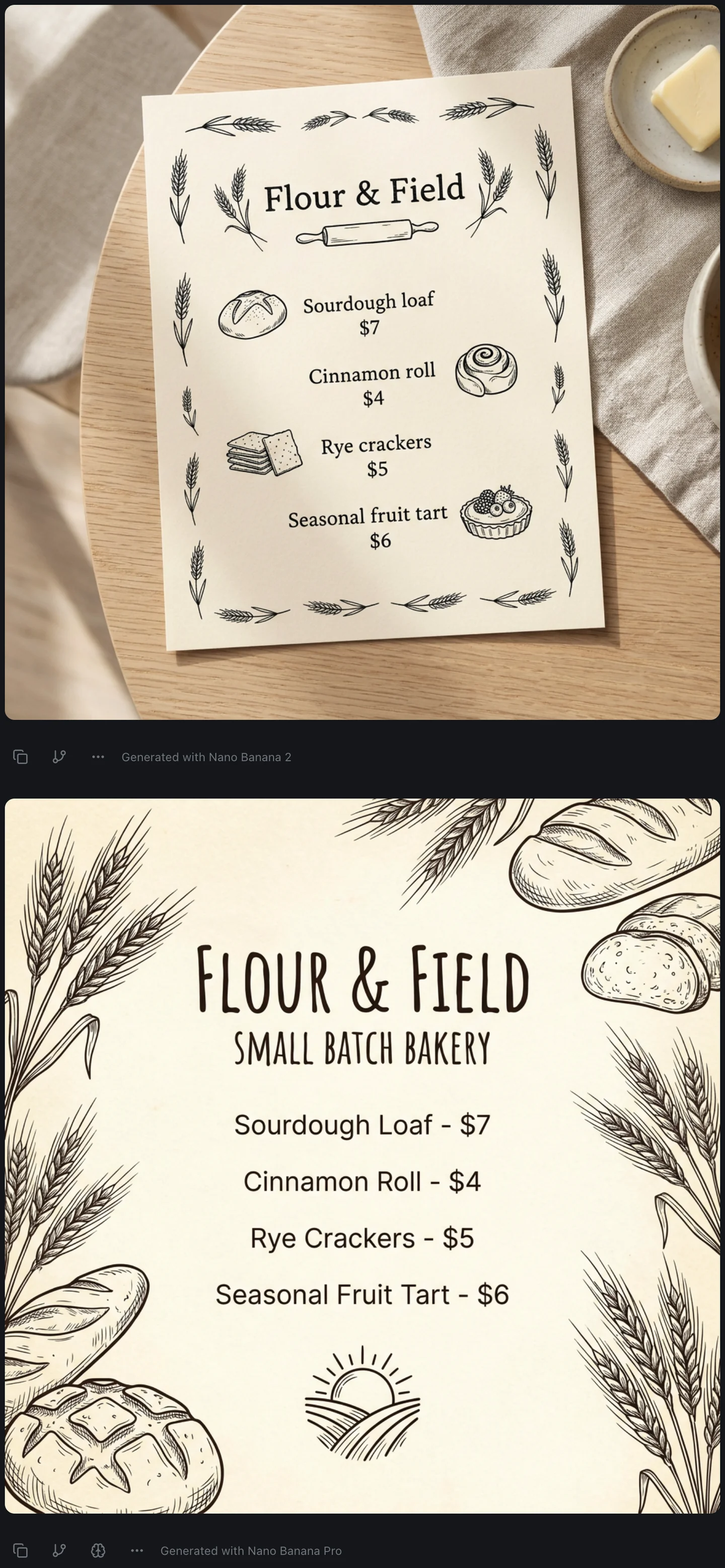
That's one prompt, a menu card for a small bakery with four items and their prices, sent to Nano Banana 2 and then to Nano Banana Pro in the same thread. Nano Banana 2 finished in about 10 seconds and Pro in about 20. Both spelled every item and price correctly. Nano Banana 2 staged the card as a photo on a wooden table next to a dish of butter. Nano Banana Pro made the flat, print-ready version, and added a "Small Batch Bakery" subtitle and a sun logo that nobody asked for. For a menu going to the printer, I'd take Pro's. For a social post, Nano Banana 2's does the job at half the API price.
izzedo meters usage too. It's a single allowance, charged by what each model costs to run, over a rolling five-hour window with a weekly pool behind it. A Nano Banana Pro image uses more of it than a Nano Banana 2 image, for the same reason Google's API charges twice as much for one. There's no separate cap per image model, and the numbers for each plan are on the pricing page.
Sending one prompt to two models works for words too. When an answer matters, asking a second model catches mistakes one model won't flag, which is the one-minute routine behind most of this blog. And if you also make images in ChatGPT, I covered the ChatGPT image limit and the ways past it in a separate post.
The Bottom Line
Nano Banana has no price of its own. In the Gemini app it costs nothing to start and comes out of the same allowance as everything else, with no published image count since 17 May. The "100 a day" figures are from the table Google retired. Nano Banana Pro is a paid-plan redo there, and after 9 October free users will probably be generating with Nano Banana 2 Lite.
If you need a number you can budget, the API gives you one: about 7 cents for a Nano Banana 2 image and 13 cents for Nano Banana Pro, half that in batch. And before you buy a "Nano Banana plan" from a site with the name in its domain, check whose model you're paying for.
Make your first Nano Banana 2 image in izzedo chat for free, no card required. Nano Banana Pro and seven other image models sit in the same menu from the $6 Hobby plan.
Frequently asked questions
How much does Nano Banana cost?
Nothing to start. Nano Banana 2 is in the free Gemini app with a Google account. Google AI Plus at $4.99 a month, Pro at $19.99 and Ultra from $99.99 raise the usage allowance it shares with everything else in Gemini. Through Google's API, Nano Banana 2 costs $0.067 per 1K image, Nano Banana Pro $0.134 and Nano Banana 2 Lite $0.034. Google doesn't sell a plan for Nano Banana on its own.
Is Nano Banana free?
In the Gemini app, yes, within the free usage allowance, with downloads at 1K resolution. Nano Banana Pro needs a paid Google AI plan there. Google says that from 9 October 2026 users without a plan get only the Flash-Lite model, and its image help ties Flash-Lite to Nano Banana 2 Lite. Google's API has no free tier for any Nano Banana model.
How many images can you make with Nano Banana per day?
Google stopped publishing a number on 17 May 2026. Until then its limits table listed Nano Banana 2 at up to 20 images a day without a plan, 50 on AI Plus, 100 on AI Pro and 1,000 on AI Ultra. Images now draw on a compute-based allowance that refreshes every five hours until you reach a weekly limit, and Google says media generation uses more of it than chat.
How much does Nano Banana Pro cost?
Through the API, $0.134 per 1K or 2K image and $0.24 per 4K image, or half that with batch processing. In the Gemini app it isn't sold separately: paid subscribers can redo a Nano Banana 2 image with Nano Banana Pro, which needs the Pro model selected. Google AI Pro is $19.99 a month. Free users get limited Nano Banana Pro access in Google Flow.
Is Nano Banana unlimited?
Not on any Google product. The Gemini app meters it with a five-hour and weekly allowance, Flow charges credits for most generations, and the API bills per image with rate limits. Google AI Ultra raises the allowance 5x or 20x over AI Pro, but Google doesn't call it unlimited either.
What is the Nano Banana API price per image?
From Google's pricing page: Nano Banana 2 Lite $0.034 per 1K image. Nano Banana 2 $0.045 at 512px, $0.067 at 1K, $0.101 at 2K and $0.151 at 4K. Nano Banana Pro $0.134 at 1K or 2K and $0.24 at 4K. Batch processing halves those. Input and thinking tokens cost a little extra, and new accounts prepay at least $5.
Is Nano Banana cheaper than Midjourney?
To start, yes: Nano Banana has a free tier and Midjourney has no free trial on its website. Per image the two are close. Midjourney Basic costs $10 a month for 200 minutes of fast GPU time, about 250 standard prompts at roughly 4 cents each, against 6.7 cents for a Nano Banana 2 image through the API. For volume, Midjourney Standard at $30 a month includes unlimited image generation in its slower Relax mode, which no Google plan offers.
Ready to try multi-model AI workflows?
Access GPT, Claude, Gemini, Perplexity, and more — all in one place.
Start for Free →