How to Get Past the ChatGPT Image Limit, and What Won't Work
OpenAI doesn't publish an image limit for any ChatGPT plan. Here's what each plan gets, the separate image allowance Plus and Pro have in ChatGPT Work, what an image costs through the API, and which workarounds break OpenAI's terms.
You're three edits into a poster and ChatGPT stops making images. It says you've hit a limit and, usually, when it resets. It doesn't say what the limit was.
That's deliberate. OpenAI doesn't publish an image limit for any ChatGPT plan. When it shipped ChatGPT Images 2.5 on 8 September, the release note said "existing image-generation limits are unchanged" and left it there. The launch post for the same model says people make more than 3 billion images a week with OpenAI's image models, so the rationing isn't going away.
You can't plan around a number that doesn't exist. You can still get past the wall. Five ways work, and the most useful one for paid subscribers sits in OpenAI's Codex documentation rather than anywhere near the image button. A few popular ones break OpenAI's terms. I read OpenAI's pricing page, help centre, Work and Codex docs and API docs on 1 October 2026 for everything below.
The Short Answer
| Route | Works on | What it costs | The catch |
|---|---|---|---|
| Wait for the reset | Every plan | Nothing | OpenAI doesn't publish how long the window is |
| Make the image in ChatGPT Work | Plus and Pro | Your Work allowance, then credits | Each image uses that allowance 3 to 5 times faster than a normal turn |
| Upgrade | Free and Go | $20 for Plus, from $100 for Pro | Pro's "unlimited" carries an abuse-guardrail footnote |
| Pay per image through the API | Anyone with an API account | $0.006 to $0.21 per square image in output | A separate bill, and no chat window |
| Use another image model | Everyone | Depends where | A different model draws a different picture |
| Second account, VPN, support reset | Nobody | Against OpenAI's terms, or it doesn't exist |
Which Image Limit Did You Hit?
People blame "the image limit" for six different things, and only the first is the cap this post is about. Read the message before you try anything.
| What happened | What it is | What to do |
|---|---|---|
| ChatGPT won't create or edit any more images | The image-generation cap | Everything below |
| You can't attach a photo | The upload cap: 80 files every 3 hours on paid plans, 3 a day on Free | Wait. It's a rolling window |
| One photo won't upload | The 20MB limit per image | Compress or resize it |
| A message with many photos fails | No fixed number. OpenAI says it depends on the images' size and how much text comes with them | Send fewer or smaller images |
| ChatGPT refuses one particular request | A content-policy refusal, not a usage limit | Waiting won't change it, and nor will anything below |
| A free account has no image option at all | Possibly the free no-ads option, which OpenAI says comes with "no access to tools like images" | Switch back to the standard free plan, or upgrade |
Uploads have their own counter and their own quirks, such as failed uploads counting against it. I've covered those in the ChatGPT limits post. On Free the two counters may be linked, which I'll come to. Everything else here is about the first row.
What Each ChatGPT Plan Gets for Images
Every plan gets the same model, ChatGPT Images 2.5. What changes is how much of it you get, and OpenAI describes that in words, not numbers:
| Plan | Price | OpenAI's pricing page | Images with thinking |
|---|---|---|---|
| Free | $0 | "Limited image creation" | No |
| Go | $6 a month | "More image creation" | No |
| Plus | $20 a month | "More complex and accurate image creation" | Yes |
| Pro | From $100 a month | "Unlimited and faster image creation" | Yes |
Images with thinking lets the model "plan and refine image outputs before generating them", in OpenAI's words. It's on Plus and Pro. Go buys you more images than Free, but not that.
Pro's "unlimited" has the same footnote as every other unlimited on that page: "Unlimited subject to abuse guardrails." OpenAI doesn't say where the guardrail sits.
Where "3 images a day" comes from
The number people quote for the free plan comes from Sam Altman. On 27 March 2025, with demand for ChatGPT's image model swamping OpenAI's servers, he posted that "our GPUs are melting", that OpenAI would "temporarily introduce some rate limits", and that the "chatgpt free tier will get 3 generations per day soon."
That was a stopgap for a model OpenAI has since replaced three times: a new ChatGPT Images in December 2025, Images 2.0 in April 2026 and Images 2.5 in September. OpenAI hasn't published a figure since. The "50 images every three hours" you'll see for Plus is older still, from the DALL·E 3 days, and OpenAI retired its DALL·E GPT on 30 August. Treat any specific number as somebody's guess.
On Free, one cap may stop three tools
OpenAI's free-plan FAQ says file uploads, image generation, voice and data analysis "have separate usage limits." A few lines later it lists data analysis, file and image uploads, and image creation, then says: "If you reach a rate limit for any of these tools, you will need to wait for a later time to use any of these tools."
Those two sentences pull in different directions, and OpenAI doesn't explain further. If you're on Free and your image allowance seemed to run out early, an afternoon of photo uploads may be the reason.
If you upgrade, the cap clears. The same FAQ says usage resets when you move from Free to Plus, Pro or Business.
Plus and Pro Have a Second Image Allowance
This is the part I didn't expect to find. On Plus and Pro, ChatGPT makes images in two places, and they don't share a meter.
The first is ordinary chat, where everyone hits the cap. The second is ChatGPT Work, OpenAI's agent for longer tasks, which shares its usage with Codex. OpenAI's help centre says usage and credit rules in Work and Codex "are separate from Chat." Images 2.5 runs in both. The launch post says it rolled out to "ChatGPT, ChatGPT Work, and Codex users across all tiers."
OpenAI's Work and Codex pricing page explains how images count there:
"Image generation counts toward the same general usage limits as local messages and cloud chats. Image generations use included limits 3-5x faster on average than similar turns without image generation, depending on image quality and size. After you reach your included limits, image generation also draws from credits."
So when chat says you're out of images, switch to Work mode and ask for the image there. Three things to know before you do.
It costs you Work allowance. Each image uses it three to five times faster than a normal turn, and it's the same allowance your documents, spreadsheets and Codex sessions run on. A dozen poster drafts can eat into the Work time you were saving for a report.
It's the only place in ChatGPT you can pay to keep making images. OpenAI's credits cover Codex, ChatGPT Work, and ChatGPT for Word, Excel and PowerPoint. Regular chat isn't on that list, and the Pro help page says credits "do not provide additional usage for every ChatGPT model or feature." In Work, once the included allowance is gone, images draw on credits. Credits expire 12 months after purchase and are generally non-refundable.
It's not on Free. The Work and Codex docs list image generation from Plus upwards and say it "isn't available on the Free plan." They don't mention Go.
Other Ways Past the Limit
Wait, and spend the next window better
ChatGPT shows the reset time when it has one. OpenAI doesn't publish the length of the window, so you can't plan around it.
What you can do is waste fewer images when it comes back. OpenAI's own prompting advice, in its Work and Codex docs, is to say what the image is for, name the subject, setting and style, and state anything it must not contain. For changes, it says to "adjust one element at a time" and, when editing, to "say exactly what should change and what must stay the same." OpenAI doesn't say whether an edit counts the same as a fresh image, so assume it does. A prompt that works first time is one generation, not four.
Upgrade
From Free, Go at $6 a month buys "more image creation" without images with thinking. Plus at $20 adds thinking and the Work route above. Pro starts at $100 and is the only plan OpenAI calls unlimited. If images are the only thing you're short of, Pro is a lot of money for them. The API below costs far less per image. For what else each tier buys, see ChatGPT Go vs Plus vs Pro, and for the $500 tier, what ChatGPT Pro 500 actually buys.
Pay per image through the API
OpenAI's API sells its current image models, GPT-Image-2.5 Flare and GPT-Image-2.5 Sunburst, by the token. Flare is the one OpenAI calls "the default choice for most applications". Sunburst is for detailed editing and takes longer. Both cost the same per token. OpenAI's own calculator puts the output cost of one 1024 by 1024 image at:
| Quality | Output cost per square image |
|---|---|
| Low | $0.006 |
| Medium | $0.013 |
| High | $0.053 |
| Extra high | $0.094 |
| Max | $0.21 |
Those figures leave out the tokens for your prompt and any reference images, which add a little. Even so, a hundred medium-quality images come to about $1.30 in output.
There are three catches. The API is a separate account with a separate bill. OpenAI's Plus page says API usage "is separate and billed independently." OpenAI may ask you to complete organisation verification before you can use its image models. And there's no chat window. You need an API key plus either a little code or an app that accepts one. OpenAI's Codex docs recommend exactly this route "for larger batches".
Use another image model
ChatGPT's cap covers OpenAI's image model inside ChatGPT, and nothing else. Google's Nano Banana models, ByteDance's Seedream, Black Forest Labs' FLUX and xAI's Grok Imagine all sit behind someone else's allowance. Each vendor rations its own way. Grok's image allowance, for example, lives inside one weekly pool xAI never puts a number on.
A different model also draws a different picture, which is sometimes the point. I'll come back to that below.
What Won't Get You Past It
A second account. OpenAI's Terms of Use say you may not "circumvent any rate limits or restrictions or bypass any protective measures" on its services. A second account opened to keep generating images does exactly that. The same terms forbid sharing account credentials, and OpenAI's Pro help page says it "may restrict access for misuse." Browser tools that rotate accounts for you are built for the thing the terms forbid.
A VPN. It doesn't change your account's allowance. A VPN is also one of the first things OpenAI tells you to turn off when ChatGPT shows its "unusual activity" warning, which the ChatGPT limits post covers.
Asking support, or looking for a setting. OpenAI is blunt about both: "Support cannot reset ChatGPT or Codex limits," and "You cannot bypass a limit or increase it through a setting."
Buying credits for chat. As above, credits don't cover image generation in regular chat. They only help in Work.
Retrying a refused request. A content-policy refusal isn't a usage limit, so the reset doesn't touch it. If the request breaks OpenAI's policies, no plan changes the answer.
Other Image Models in the Same Picker
The image cap is one vendor's wall around one model. The workaround that costs nothing extra is having more than one image model within reach, so a cap on one doesn't stop the job.
izzedo chat has nine image models in the same model picker as GPT, Claude, Gemini and the rest: OpenAI's latest GPT Image model, Google's Nano Banana 2 and Nano Banana Pro, ByteDance's Seedream 5.0 Pro, Reve 2.1, Microsoft's MAI Image 2.5, xAI's Grok Imagine Pro, Alibaba's Qwen Image 3 and Black Forest Labs' FLUX.2 [max]. Nano Banana 2 is on the free plan. The others unlock on Hobby at $6 a month, and you switch them on under Settings, then Models. Most of them can also edit a photo you upload.
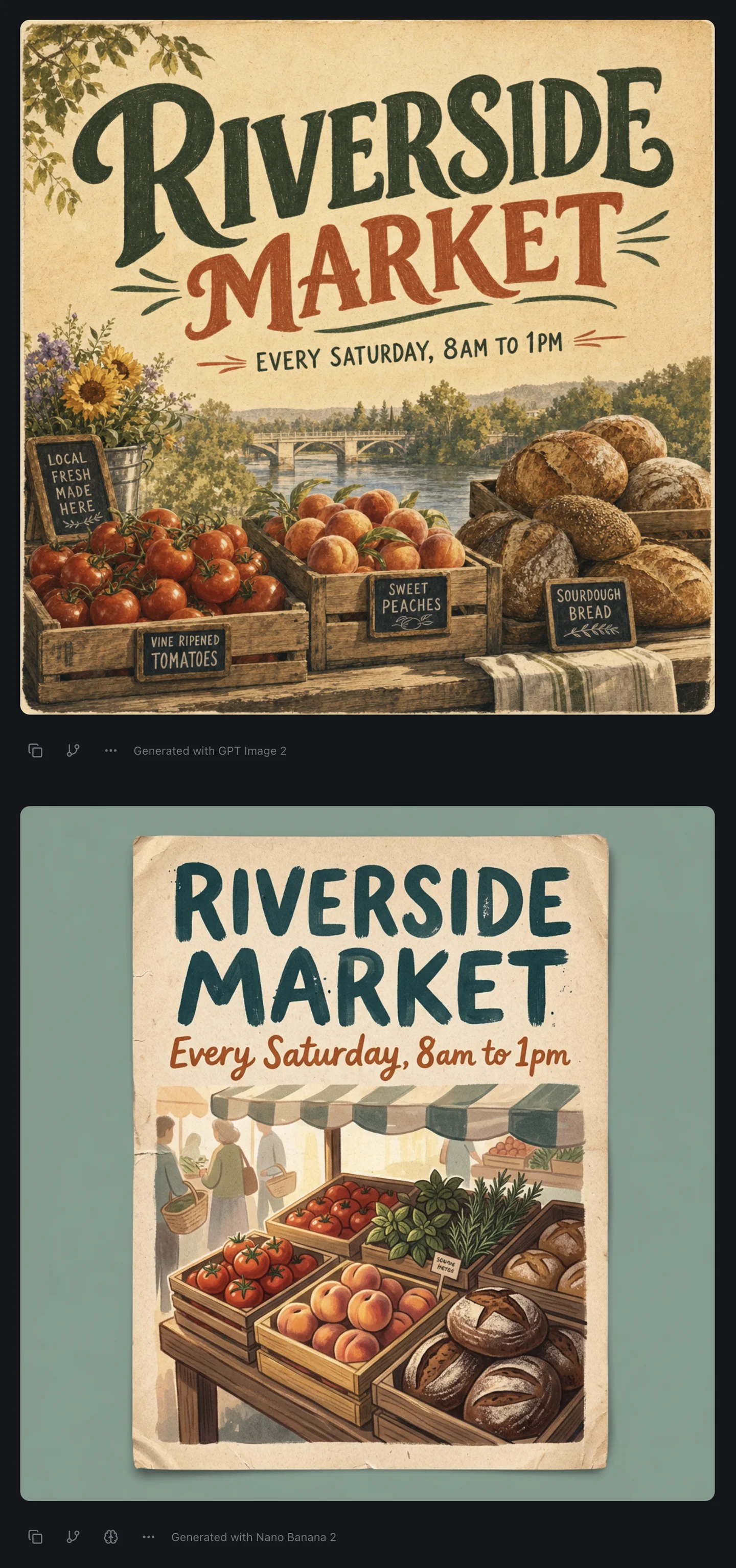
That's one prompt, asking for a farmers market poster with a title and opening hours, sent to GPT Image 2 and then to Nano Banana 2 in the same thread. Both got the title and the hours right. GPT Image 2 added a river, a bridge and four chalkboard signs nobody asked for. Nano Banana 2 added shoppers, an awning and a tiny herb label it couldn't spell. Neither is wrong, and I didn't have to leave the thread to see both.
izzedo has limits too. Usage is one allowance, metered by what each model costs to run, on a rolling five-hour window with a weekly pool behind it. An image on a heavy model takes a bigger bite than one on a light model. What you don't get is a separate wall for each image model. You decide where the allowance goes, and switching models stretches it rather than refilling it. The current figures are on the pricing page.
The same habit works for text. When an answer matters, asking a second model the same question catches mistakes a single model won't flag. That's the one-minute routine behind most of what this blog recommends.
The Bottom Line
ChatGPT's image limit is real and unpublished on every plan, including the "unlimited" one. The "3 a day" figure was a temporary cap from March 2025.
If you're on Plus or Pro, the fastest way past it is ChatGPT Work, which runs on a separate allowance and is the only part of ChatGPT where credits buy more images. On Free, wait or upgrade. If you need volume, the API costs about a cent per medium-quality image. Skip the second account, which breaks the terms you agreed to.
And if any good picture will do, not ChatGPT's picture specifically, another image model gets you there without waiting on OpenAI's clock.
Hit ChatGPT's image cap mid-project? Try izzedo chat free, no card required, and send the same prompt to a different image model.
Frequently asked questions
How many images can you generate with ChatGPT for free?
OpenAI doesn't publish a number. Its pricing page describes the free plan as "Limited image creation" and stops there. The "3 a day" figure that circulates comes from a Sam Altman post in March 2025 announcing a temporary limit, for an image model OpenAI has since replaced three times.
How long does the ChatGPT image limit last?
OpenAI doesn't publish the length of the window. ChatGPT tells you when you reach a limit and shows the reset time when that information is available. On the free plan, OpenAI says upgrading to Plus, Pro or Business resets your usage straight away.
How do I get past the ChatGPT image limit?
Five ways work. Wait for the reset. On Plus or Pro, make the image in ChatGPT Work, which draws on a separate allowance and then on credits. Upgrade your plan. Generate through OpenAI's API, where a square image costs roughly $0.006 to $0.21 in output depending on quality. Or use a different image model. Opening a second account to keep generating breaks OpenAI's Terms of Use.
Can I buy more image generations in ChatGPT?
Not in regular chat. OpenAI's credits cover Codex, ChatGPT Work, and ChatGPT for Word, Excel and PowerPoint, and its help centre says credits don't add usage for every ChatGPT feature. Image generation inside ChatGPT Work does draw from credits once your included Work allowance runs out.
Does ChatGPT Plus have an image limit?
Yes, but OpenAI doesn't say what it is. The pricing page lists "More complex and accurate image creation" for Plus, which also gets images with thinking. Plus subscribers can make images in ChatGPT Work too, which counts against the Work allowance rather than the chat one.
Is ChatGPT Pro image generation unlimited?
The pricing page says "Unlimited and faster image creation" for Pro, with the footnote "Unlimited subject to abuse guardrails." OpenAI doesn't define where that line is. Pro starts at $100 a month.
Can I use a second ChatGPT account to get around the image limit?
Not within the rules. OpenAI's Terms of Use say you may not "circumvent any rate limits or restrictions" on its services, and that you may not share your account credentials. OpenAI's help centre adds that it may restrict access for misuse.
Ready to try multi-model AI workflows?
Access GPT, Claude, Gemini, Perplexity, and more — all in one place.
Start for Free →