The Best AI Image Generator in 2026: The Rankings Agree, the Fine Print Doesn't
Both image leaderboards put OpenAI's GPT Image models in the top five, for marketing, products and text too. What separates ChatGPT, Gemini, Midjourney, Adobe Firefly, Canva and Ideogram for a small business is whether your images are public, what the terms let you do with them and what each plan costs. Plus one flyer brief run through four models.
Most small businesses want AI images for ordinary jobs: this week's offer on Instagram, a flyer for the counter, a product photo on a cleaner background. If "best" means the model, this month has an unusually clear answer. On the two leaderboards people check, OpenAI's GPT Image models hold the top five places overall, and at least the top four in the marketing, product and text categories.
That still doesn't make ChatGPT the right pick for every shop. The model is the one part you can't see on the plan page. What actually separates ChatGPT, Gemini, Midjourney, Adobe Firefly, Canva and Ideogram is written in their pricing and terms. Can strangers see your images? Do the terms let you use them in business? Can you edit your own photo on the plan you'd buy? And what does the free plan hold back?
I read both leaderboards and each company's pricing, help and terms pages on 15 November 2026. The next day I gave four image models the same flyer brief, and the results are further down.
The Short Answer
| If you need... | Use | Watch for | Paid from |
|---|---|---|---|
| Text on social posts and flyers | ChatGPT | No published free limit, and it trains on chats by default | $6 (Go), $20 (Plus) |
| Free images most days | Gemini | Keep Activity, on by default, lets Google train on your chats | $4.99 (AI Plus) |
| A look people recognise | Midjourney | No free trial, and images are public below the $60 Pro plan | $10 (Basic) |
| Images you know you can use commercially | Adobe Firefly | Adobe's "safe for commercial use" covers its own models, not partners' | $9.99 (Standard) |
| A finished design, not only a picture | Canva | Dream Lab images carry a visible AI label | $18 (Pro) |
| Hundreds of images on a small budget | Ideogram | Everything made on the free plan is public | $20, or $15 yearly (Plus) |
Start on ChatGPT's or Gemini's free plan. Pay when the limit gets in your way, and pay for Midjourney only if you want its look.
What the Image Leaderboards Say
Two sites rank image models by blind votes: voters see two images made from the same prompt and pick the better one. Artificial Analysis listed 114 text-to-image models on 15 November. OpenAI's models held the top five places, led by GPT Image 2.6 Sunburst, released this month. Arena, formerly LMArena, listed 85 in its 12 November update and also had OpenAI in the top five.
Below OpenAI the two boards mostly agree. Microsoft's MAI-Image-2.6, Google's Nano Banana 2.1 and xAI's Grok Imagine Image 2.0 come next on Arena. On Artificial Analysis the same three sit seventh to ninth, behind a preview of a model you can't buy yet. Canva's new Craft model is tenth there.
Both sites also rank by use. Artificial Analysis has boards for marketing and advertising, retail and ecommerce, social media and text rendering, and Arena has product, branding and commercial design, and text rendering. OpenAI holds at least the top four places on every one.
Three things the rankings don't tell you.
They don't test the apps. Both boards call each company's API at a fixed setting. Artificial Analysis rates OpenAI's models at "max" and prices that at about $0.21 a square image, and Arena rates the newest ones at "medium". ChatGPT's pricing page describes its plans as "Limited", "More" and "More complex and accurate image creation", not by setting.
Midjourney isn't on either board. It's still the tool many designers pick for its style, and neither ranking can tell you how it compares.
The text specialist isn't near the top. Ideogram's model page says it "has led on text rendering since launch". No Ideogram model is in the top ten of either board's text-rendering ranking.
The Best AI Image Generators, by Job
ChatGPT, for text on posts and flyers
ChatGPT has run Images 2.6 since 4 November, on every plan including Free. OpenAI's release note says it is "better at preserving details across edits, like a character's outfit when you change the background." You can upload a photo and describe what to change. The free plan allows three file uploads a day.
The plan cards give no numbers. Free is "Limited image creation", Go at $6 is "More image creation", and Plus at $20 is "More complex and accurate image creation" and adds images with thinking. If you keep running into the wall, ChatGPT's image limits explains where it is.
OpenAI's terms assign you its rights in what you make. Every image carries Content Credentials and Google's invisible SynthID mark, but no visible watermark. On Free, Go, Plus and Pro, ChatGPT trains on your chats unless you switch off "Improve the model for everyone" under Data controls.
Gemini, for free images most days
The Gemini app makes and edits images with Nano Banana 2, and paid plans can redo an image with Nano Banana Pro. Google publishes no image count for any plan. Its limits page says usage is "compute-based" and refreshes every five hours until you reach a weekly limit. AI Plus at $4.99 gives "2x higher usage access than Free", AI Pro at $19.99 four times, and any paid plan downloads at 2K instead of 1K.
One catch on the free plan: Google's help pages say Nano Banana 2 Lite runs when Gemini is set to Flash-Lite, the model most free prompts go to. So a free image may come from the lighter version, which Google says "isn't designed for multiple image references or for multiple edits." Nano Banana's prices and limits has the details.
Gemini has a visible watermark you can switch off under Settings, Media Watermark, except in India, South Korea and Vietnam, where only AI Ultra gets the switch. The invisible SynthID mark stays on everything. Google's terms say it "won't claim ownership" of what you make. Keep Activity is on by default for adults, and while it's on Google can use your chats to train its models, with human reviewers (more on Gemini's free plan).
Midjourney, for a look you can't get elsewhere
Midjourney's default model has been V8.2 since 24 July. There's no free trial on its website or Discord, only a limited one in its niji·journey app. Basic costs $10 a month for about 200 image jobs, each making four images. Standard at $30 adds unlimited slower generations, then Pro at $60 and Mega at $120. Paying yearly takes 20% off.
The plan you pick decides who sees your work. Midjourney's pricing page says "by default every image and video you create can be found on the Explore page." Stealth Mode, which hides them, is "available only to Pro and Mega Plan members." The same goes for photos you upload to its Editor and change with the default V8 Edit model. The help page says those edits "will appear on midjourney.com for other members to see unless you have Stealth mode enabled. This applies to Midjourney-generated images and external images." A product shot you haven't launched yet doesn't belong on Basic or Standard.
The terms add a rule for bigger businesses. A company with more than $1,000,000 a year in revenue "must be subscribed to a 'Pro' or 'Mega' plan to own Your Assets."
Adobe Firefly, when you need to know you can use it
Firefly runs Adobe's own Firefly Image Model 5 and partner models in the same app, including GPT Image 2.6, Nano Banana 2 and Pro, and FLUX.2. The free plan has "Limited free daily generations". Standard costs $9.99 a month with 2,000 generative credits and Pro $19.99 with 4,000. Adobe's plans page says "All paid plans include unlimited standard image and vector generations," and spends the credits on "premium features such as video, audio, and partner model outputs."
Partner models use them quickly. For now a GPT Image 2.6 image at high quality and 2K costs 40 credits and a Nano Banana 2 image at 1K costs 20, so Standard covers 50 or 100 of them a month. Pro adds unlimited generations on some partner models, Nano Banana 2 at 1K among them, for its first year.
The reason to pay Adobe is its licence line: "Outputs from Adobe Firefly AI models are safe for commercial use." A later line on the same page matters as much. "You're responsible for determining whether content generated by partner models is appropriate for your project." Adobe's IP indemnity is for enterprise plans only. It says it doesn't use your content to train its models or its partners' models, and it adds Content Credentials rather than a visible watermark.
Canva, when the image is part of a design
Canva launched its own image model, Craft, on 22 October, in Dream Lab for every user. Artificial Analysis ranks it tenth. Canva doesn't sell images by count. Each plan has a monthly AI allowance, Pro ($18 a month) gets ten times Free's, and Canva says a Craft image currently uses "about 1 cent" of it.
The background generator for your own photos isn't on Free. Dream Lab images "include a visible label showing that AI created them." Canva's AI terms let you use output "for any lawful purpose" but "at your own risk", and its indemnity covers eligible Enterprise customers only. Designs are private by default.
Ideogram, for volume on a budget
Ideogram's free plan gives 30 credits a week, but only if you sign in with Google, Apple or Microsoft. Its flagship, Ideogram 4.5, uses 3 to 10 credits an image, so that's a handful of images a week. Ideogram's docs say "on the free plan… everything you generate is public." Plus costs $20 a month, or $15 paid yearly, for 2,400 credits, a few hundred images at 3 to 10 credits each, and new images stay private until you publish them.
Precise Edit, the tool for editing a photo you upload, "requires a paid plan or purchased credits." Ideogram's terms say it doesn't restrict commercial use of what you make.
Copilot, Meta AI and Grok
All three make images for free, with limits.
Bing Image Creator gives 15 fast creations a day, then carries on free at standard speed, and offers Microsoft's MAI-Image-2.6-Flash. Its terms don't claim ownership of what you make, but they call the service "for entertainment purposes" and tell you not to rely on it. The Copilot app is stricter. Its terms say "You can only use Copilot for your own personal use," which rules it out for a shop flyer.
Meta AI makes images with Muse Image, free up to a daily limit Meta doesn't publish. Images stay private unless you post them to your feed. Meta's AI terms don't say who owns them, and they say Meta is "not responsible for Outputs".
Grok's newest image model is Imagine Image 2.0, and xAI's pricing page gives the free plan "Limited" image generation. xAI's FAQ says every image carries a Grok watermark and "there is no setting to remove the watermark."
The Best Free AI Image Generator
For business use the free plans differ less on picture quality than on three practical questions.
| Free plan | How much | Who sees your images | Business use, per the terms |
|---|---|---|---|
| ChatGPT | "Limited", no number | You, unless you share a link | OpenAI assigns you its rights in the output |
| Gemini | No number; resets every five hours | You, and Google's reviewers while Keep Activity is on | Google won't claim ownership |
| Bing Image Creator | 15 fast creations a day, then standard speed | Not stated | No ownership claim; "for entertainment purposes" |
| Meta AI | Daily limit, no number | You, unless you post it | Not stated |
| Ideogram | 30 credits a week, with a Google, Apple or Microsoft sign-in | Everyone | Not restricted |
| Canva | Monthly AI allowance, no number | You | "Any lawful purpose", at your own risk |
| Adobe Firefly | "Limited free daily generations" | Not stated, except what you submit to its gallery | Firefly models "safe for commercial use" |
ChatGPT and Gemini are the safest free picks. Both run current models, keep your images out of public view and let you edit your own photo. ChatGPT is better when the image has words on it, and Gemini is the one to try when ChatGPT's free limit runs out. Ideogram is fine for ideas you don't mind the world seeing.
Editing a Product Photo You Already Have
Editing has its own rankings, and OpenAI leads them too. On Artificial Analysis's editing board, GPT Image 2.6 holds the top two places, and Microsoft's MAI-Image-2.7, the closest rival, is a preview with no public API.
Every app above can edit an uploaded photo, but not always on the plan you'd expect. ChatGPT and Gemini do it free. Canva's background generator needs a paid plan, and so does Ideogram's Precise Edit. Firefly's free plan gets a limited number of generations a day. Midjourney's Editor works on every plan, and with the default V8 models, edits below Pro are public.
Whatever you use, compare the result with the original before you post it. ChatGPT's own help page warns that "edits may extend beyond the area you selected." Look at the label, the logo and the product's shape, because those are what a customer checks.
I Gave Four Models the Same Flyer
I wanted to see where the ranking gaps show up on an ordinary job. In one izzedo chat thread I sent the same brief to four image models: a square Instagram post for a bike repair shop, headline "Winter Tune-Up", "Full service $59", and "Book by December 20 · Spoke & Chain, 14 Mill Street" at the bottom.
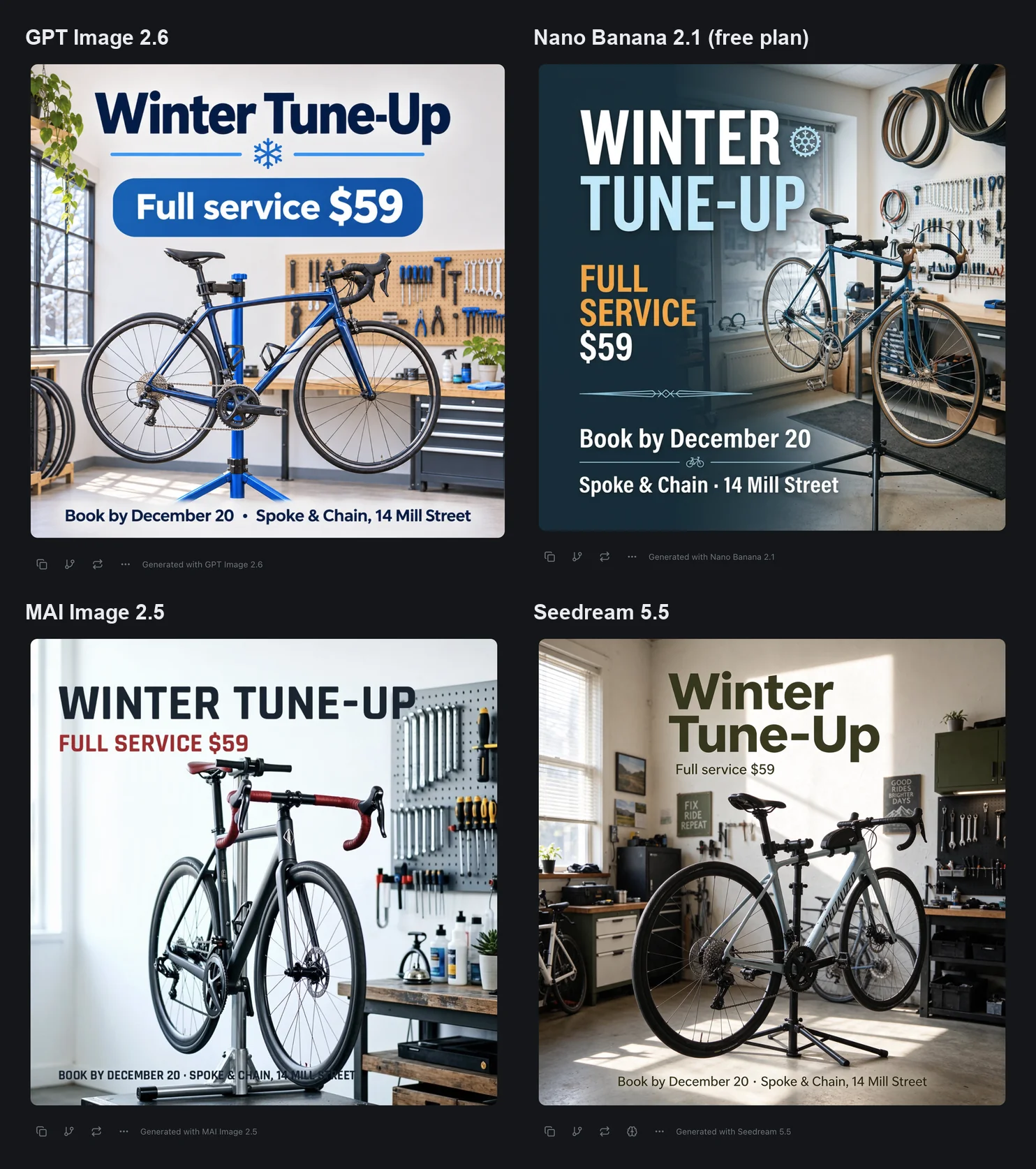
All four spelled every word, the price and the address correctly, including MAI Image 2.5, which Artificial Analysis ranks 17th. Short text isn't the hard part any more.
The differences were in what each model added or moved. Seedream 5.5 printed Specialized, a real bike maker's name, down the frame, and hung two signs with slogans nobody asked for, "Fix Ride Repeat" and "Good Rides Brighter Days". MAI Image 2.5 laid the shop's address over the repair stand and a tyre. Nano Banana 2.1, the free one, split the booking line in two and swapped the comma in the address for a dot. GPT Image 2.6 added a snowflake and a blue box behind the price and nothing else, the cleanest of the four. On another brief it could be a different one.
Where izzedo Fits
izzedo chat has image models from Google, OpenAI, ByteDance, Microsoft, xAI, Meta and Black Forest Labs in one picker, next to its chat models. Nano Banana 2.1, seventh on both leaderboards, is on the free plan, with no card. The $6 Hobby plan adds GPT Image 2.6, Seedream 5.5, MAI Image 2.5, Grok Imagine 2.0, Muse Image and FLUX.3; turn them on under Settings, Models.
The OpenAI model is GPT Image 2.6 Sunburst, first on Artificial Analysis and second on Arena. izzedo runs it at the "high" setting, where Artificial Analysis tests "max". Every one of these models can edit a photo you upload.
The test above is the way to use it. Pick an image model, send your brief, then pick another and send it again. Each image is labelled with the model that made it, and you keep the one that got your shop right. You can also describe what you want to a chat model such as Claude, and it makes the image with Nano Banana 2.1 unless you name another image model.
The allowance is shared across models, and a pricier image model uses more of it. Current amounts are on the pricing page. If you haven't compared models on one prompt before, here's how it works.
The Bottom Line
The best AI image model in November 2026 is OpenAI's. Both leaderboards say so, for marketing, product and text work alike, and all four models I tried, one of them ranked 17th, got a short flyer's words right.
The best image generator for a business depends on the fine print. Use ChatGPT or Gemini free for everyday posts. Use Adobe Firefly's own models when a client asks whether you're allowed to use the image, and Midjourney for its look, on Pro if the pictures show products you haven't launched. Ideogram is worth a look if you want a few hundred images a month for $15 to $20, or don't mind public free images. Whatever you pick, look at what the model added before you post it.
These tools change monthly. ChatGPT moved to Images 2.6 on 4 November and Canva launched Craft on 22 October, so check the date on anything you read, this post included. For chat rather than images, see the best AI chatbot, and for paid plans, the best AI subscription.
Want Nano Banana 2.1 free, and GPT Image 2.6, Seedream and FLUX on one $6 plan? Try izzedo chat free, no credit card required.
Topics
- best ai image generator
- best free ai image generator
- best ai for image generation
- which ai is best for image generation
Frequently asked questions
What is the best AI image generator in 2026?
On image quality, OpenAI's. Its GPT Image models held the top five places on both Artificial Analysis and Arena in mid-November, and at least the top four on their marketing, product and text boards. For a small business the better question is which app fits the job. ChatGPT and Gemini are the best free starting points. Adobe Firefly suits work where you need to know you can use the image commercially, Canva suits finished designs, and Midjourney suits a distinct look, as long as you pay for a plan that keeps your images private.
What is the best free AI image generator?
ChatGPT or Gemini. Both run current models on their free plans, don't publish your images unless you share a link, and let you edit a photo you upload. Neither publishes a number of free images. Ideogram gives 30 credits a week if you sign in with Google, Apple or Microsoft, but everything made on its free plan is public. Microsoft's Bing Image Creator gives 15 fast creations a day and then carries on at standard speed, though its terms call it 'for entertainment purposes'. The Copilot app's terms say you can only use it for your own personal use.
Is ChatGPT the best AI for image generation?
Its model is. OpenAI's GPT Image models led both leaderboards in November, and ChatGPT runs Images 2.6 on every plan, free included. The free plan is 'Limited image creation' with no published number. Go ($6) gives more, and Plus ($20) adds images with thinking. ChatGPT trains on your chats by default unless you switch off 'Improve the model for everyone'.
Which AI image generator can I use for business?
Read the terms of the app, not the model. OpenAI assigns you its rights in what you make, and Ideogram says it doesn't restrict commercial use. Midjourney says a company with more than $1 million a year in revenue must be on Pro or Mega to own its images. Adobe calls output from its own Firefly models safe for commercial use and says you're responsible for checking output from the partner models in the same app. Microsoft's Copilot terms say you can only use Copilot for your own personal use.
Is Midjourney free?
No. Midjourney's help centre says no free trial is available on its website or Discord, only a limited trial in the niji·journey app. Basic costs $10 a month for about 200 image jobs of four images each. Every image is public on Midjourney's Explore page unless you turn on Stealth Mode, which only the $60 Pro and $120 Mega plans have.
Which AI is best for product photos?
For editing a photo you already have, OpenAI's models lead both leaderboards' editing boards, and ChatGPT lets free users upload three files a day. Gemini and Adobe Firefly also replace backgrounds, and so does Canva on a paid plan. Avoid Midjourney's Editor below the Pro plan for unreleased products. Edits of uploaded photos made with its default V8 Edit model show on Midjourney's website unless Stealth Mode is on. After any edit, check the label, the logo and the shape of the product.
Which AI is best for text in images?
OpenAI's GPT Image models lead the text-rendering rankings on both Artificial Analysis and Arena, and no Ideogram model is in the top ten of either, though text was Ideogram's pitch. In my test GPT Image 2.6, Nano Banana 2.1, MAI Image 2.5 and Seedream 5.5 all spelled a short headline, a price and an address correctly. Keep text short: Ideogram's own guide says each extra word raises the odds of a typo.
Can I use several AI image generators in one app?
Yes. izzedo chat has image models from Google, OpenAI, ByteDance, Microsoft, xAI, Meta and Black Forest Labs in one picker. Nano Banana 2.1 is on the free plan. The $6 Hobby plan adds GPT Image 2.6, Seedream 5.5, MAI Image 2.5, Grok Imagine 2.0, Muse Image and FLUX.3. You can send the same brief to one model after another in the same chat and keep the best result.