What Is ChatGPT Work? How It Differs From Chat, and What Changes in December
ChatGPT Work is the mode where ChatGPT stops answering and starts doing: research, spreadsheets, decks, reports and scheduled tasks. It runs on its own models and spends the same allowance as Codex, Free and Go only get it on the desktop app, and from December Plus, Pro and Business share one allowance across ChatGPT and Codex.
On 9 July 2026, OpenAI split ChatGPT in two. Chat kept the job it always had: you ask, it answers. Work, the new half, is described in OpenAI's help centre as "an agent designed for longer, multi-step work and finished deliverables". You give it a task, it goes away and does it, and you get back a spreadsheet, a deck, a report or a website you can review.
Work isn't a plan, an add-on or a separate app. It's a toggle inside ChatGPT that comes with your subscription. But three things about it aren't obvious from the toggle. It runs on different models from Chat. It spends a different allowance, the one Codex uses, with credits when that runs out. And Free and Go accounts only get a limited version of it in the desktop app. On top of that, OpenAI has said the split changes again in December.
I read OpenAI's help centre, its release notes, its pricing page and the ChatGPT Learn documentation on 12 November 2026. Here's what Work is, when to use it instead of Chat, who gets it, and how its usage works.
The Short Answer
| Chat | Work | |
|---|---|---|
| What it's for | Questions, search, brainstorming, short drafts | Research, analysis, documents, spreadsheets, presentations, reports, Sites |
| What you get back | An answer in the conversation | A finished file or a completed task to review |
| Models | GPT-6 and GPT-5.6, which ones depending on your plan | GPT-6.1 Sol, GPT-6.1 Terra, GPT-6 Sol and GPT-6 Luna, plus GPT-6 Astra on Plus and up |
| What it spends | Chat's own limits | The same allowance and credits as Codex |
| Free and Go | Unlimited everyday text chat | Limited, desktop app only |
| Plus and Pro | Yes | Desktop, web and mobile |
OpenAI's own rule of thumb, from its Learn docs: "Use Chat when you want an answer, explanation, brainstorm, or short draft. Use ChatGPT Work when you want ChatGPT to complete a task with a clear outcome."
What ChatGPT Work Does
The launch note lists the core of it. Work "can research and analyze information, work across connected apps and files, and create finished documents, spreadsheets, presentations, reports, and Sites. You can follow its progress, answer questions, change direction, and approve important actions as it works."
In practice that covers a few kinds of task.
- Files. Work creates and edits documents, spreadsheets and presentations, including Word, Excel and PowerPoint files, and native Google Docs, Sheets and Slides when Google Workspace is connected. You can hand it a reference file to match, as in OpenAI's example, "Use this presentation's master slides and section order, but replace the content with the attached customer research," or save a reusable template with the
@Template-Creatortool, so a weekly report or a client brief comes out in the same shape every time. - Research and analysis. It can pull from the web, your uploads and your connected apps, then turn that into a report or a dashboard. A Data plugin, added in September, analyses connected business data inside Work.
- Sites. On Plus and Pro, Work can build a small website that ChatGPT hosts. OpenAI calls Sites a public beta and says building one counts toward Codex usage, which Work shares.
- Scheduled Tasks. A Work task can run once, repeat on a schedule, or watch for changes. Since August it can also react to events: a new Gmail message, a new message in a Slack channel, or activity on a GitHub pull request. Event-triggered tasks aren't available on Free or Go.
- Your own computer. In the desktop app, Work can open local files and use desktop apps with your permission. On the web and mobile it runs in the cloud and can't see your computer.
- Voice. You can talk to Work and ask it to start a task. If you hang up mid-task, it carries on in text.
Work also replaced something. OpenAI's help page for ChatGPT agent, the mode that browsed websites and ran tasks on your behalf, now opens with "ChatGPT agent is no longer available. Use ChatGPT Work for longer, multi-step tasks and finished deliverables." If you went looking for agent mode and found it gone, that's where it went. Our AI agent mode explainer covers what the other vendors call theirs, and Meta Muse is Meta's.
Chat or Work: Which One to Use
Work tasks take longer and draw on a separate, metered allowance, so Work pays off when you want a thing at the end, not an answer.
OpenAI's Learn docs say a good first Work task has "a clear outcome, a few source materials, and an output you can review." For a small business that might be:
- a proposal built from your meeting notes and last year's prices,
- a monthly sales sheet from three exported CSV files, with the formulas left in,
- a five-slide pitch in your existing deck template,
- a scheduled Monday summary of what came into the shared inbox.
Chat is still the right tool for a question, an email draft, a quick rewrite or a brainstorm. It's faster, and on Free and Go OpenAI doesn't cap everyday text chat beyond its abuse guardrails.
The models aren't the same
OpenAI's help centre says GPT-6.1 Sol, GPT-6.1 Terra, GPT-6 Sol and GPT-6 Luna "are models for ChatGPT Work and Codex. They are not available in regular ChatGPT conversations." Its model article blurs that a little, because GPT-6 in Chat runs on GPT-6 Sol, even though you can't pick it by that name. The clear difference on Plus is at the top. Chat on Plus runs GPT-6 at Instant, Medium and High, as GPT-6 reaches each account. GPT-6 Astra, the model behind GPT-6 Pro, is in Chat only on Pro, Business and Enterprise. Plus gets Astra in Work and Codex, with "limited Astra usage," and GPT-6.1 Sol only there too.
So on a $20 Plus plan, switching to Work isn't only a different way of working. Work, or Codex, is also the only way to reach GPT-6.1 Sol and GPT-6 Astra. Whether that's worth the usage depends on the task.
Who Gets ChatGPT Work
From OpenAI's pricing page and help centre, read 12 November 2026:
| Plan | Price | ChatGPT Work | Models in Work |
|---|---|---|---|
| Free | $0 | Limited, desktop app only | GPT-6 Luna, rolling out |
| Go | $6 a month | Limited, desktop app only | GPT-6 Luna, rolling out |
| Plus | $20 a month | Desktop, web and mobile | GPT-6.1 Sol (rolling out), GPT-6.1 Terra, GPT-6 Sol, GPT-6 Luna, limited GPT-6 Astra |
| Pro | $100, $200 or $500 a month | Desktop, web and mobile | The same, with more Astra, and Ultrafast speed on Pro $500 |
| Business | Per seat | Workspace admins decide | Business Premium seats get full Astra use, Standard seats a limited amount |
| Enterprise and Edu | Per agreement | On by default for eligible workspaces, admins can turn it off | Set by the workspace |
On Free and Go, the pricing page lists Work as "Limited (desktop app)". You need the ChatGPT desktop app for macOS or Windows, and OpenAI's pricing docs say Free and Go get GPT-6 Luna "at Standard speed in the desktop app, subject to rollout." That's enough to try it, not to run your week on it. The is ChatGPT free breakdown has the rest of the Free plan.
On Business and Enterprise, admins control two separate permissions: Work Cloud, for tasks that run on OpenAI's servers, and Work Local, for tasks on members' computers. If Work is missing from a work account, check those two first.
How ChatGPT Work Usage Works
Work doesn't use Chat's limits. OpenAI's pricing docs say: "ChatGPT Work and Codex share usage. ChatGPT Work usage inside ChatGPT uses the same pricing, credits, and usage limits as Codex." ChatGPT for Excel draws on the same pool where your plan has it. If you use Codex and Work, they eat into one allowance.
OpenAI publishes estimates rather than fixed numbers. These are its figures for Plus and Business Standard seats, in "local messages per five-hour period":
| Model | Plus, per five hours |
|---|---|
| GPT-6 Astra | 5 to 45 |
| GPT-6.1 Sol | 15 to 160 |
| GPT-6.1 Terra | 35 to 285 |
| GPT-6 Sol | 15 to 150 |
| GPT-6 Luna | 350 to 3,000 |
The ranges are wide because a message in Work can be a one-line edit or a task that runs for a long time. OpenAI adds that "cloud tasks may use more of your allowance than local messages", that weekly limits may also apply, and that image generation uses the allowance three to five times faster. Fast mode uses it 2.5 times faster. Pro plans "currently have no five-hour limit", and on 29 October OpenAI doubled the Work and Codex allowance on Pro $100 and Pro $500.
When it runs out
You can wait for the reset, upgrade, or buy credits. Plus and Pro can buy credits without changing plans. OpenAI charges credits per million tokens, by model: GPT-6.1 Sol costs 50 credits per million input tokens and 250 per million output tokens, GPT-6 Astra 250 and 1,250. The documentation doesn't put a dollar price on a credit; it says purchase prices "depend on your plan or agreement."
Two lines in OpenAI's credits article are worth reading before you buy any.
"A saved instruction such as 'ask me before using credits' does not add a billing approval step. If you continue using ChatGPT Work or Codex after your included allowance is exhausted, available credits can be used automatically."
And a balance can dip below zero: "If a task starts while your balance is positive but finishes after concurrent usage depletes it, your balance can go negative." Later purchases may go toward paying that off first. If you turn on automatic reload, set a monthly limit.
OpenAI also says a task that hits the limit halfway doesn't stop dead: "If you reach your usage limits during an active turn, the agent will be able to continue working on that turn, subject to fair use limits."
What Changes in December
OpenAI has already said the current setup will change. Its usage article says:
"Starting in December, Plus, Pro, and Business plans' usage allowance will be shared across ChatGPT and Codex as we bring the agentic capabilities of Work into the main ChatGPT experience."
Three details follow in the same article. OpenAI will measure usage in tokens, so how much you use depends on the model and the task. "Instant chat will not draw from your usage," so quick everyday answers stay outside the pool. And you'll see your "combined remaining usage and reset times in Settings → Usage." OpenAI says it expects "most users won't need to wait for their usage to reset more often than they do now."
What it doesn't say yet is the date, or whether the Work toggle survives once its abilities are in regular ChatGPT. As I read it, the practical change on Plus is that Chat answers with thinking switched on will draw on the same pool as Work tasks from December, so a long Work job could leave less for Chat. Check Settings, Usage after the change, and expect to update anything you've set up around the current limits.
How to Start a Work Task
On the web or in the mobile app, open ChatGPT and select Work. In the desktop app, choose ChatGPT from the menu, then Work from the toggle. From inside a project you can pick Chat or Work, and a Work chat picks up the project's files and instructions.
Then do what OpenAI's guide suggests:
- Describe the outcome you want.
- Attach the source material, and only the files the task needs.
- Name the format and where the file should go, such as a Google Sheet or an .xlsx.
- Say what must stay unchanged: formulas, layout, tone, slide order.
- Review the result and ask for changes in the same chat.
Don't skip the last step. OpenAI's own documents article says "Check the completed file's content, layout, formulas, and charts before sharing or relying on it." The message Work writes at the end is the model's own summary of what it did, and a summary can be wrong when the file is right.
Where izzedo Fits
izzedo chat has an agent mode that's on by default, on every plan, the free one included. Like Work, it makes finished files: PDF, Word, PowerPoint and Excel. It can use the 1,400+ apps you connect. It runs on GPT, Claude, Gemini, Grok, DeepSeek and the other chat models that can use tools, so you can start a task on one model and check it with another in the same thread.
To test it on a Work-style job, I asked GPT-6 Luna, a free-plan model, for a quote spreadsheet for a two-person catering business: 40 sandwich boxes at $11.50, 4 fruit platters at $38, 40 drinks at $2.75, and $45 delivery, with a subtotal, a 10% service charge and a total. It made the .xlsx, and the formulas in the file were right. The totals it typed into its reply were not. It said the subtotal was $829.00 and the total $911.90. The lines add up to $767.00, and with the service charge the total is $843.70.
Then I switched to Claude Haiku 5.5, also on the free plan, and asked it to check the totals before I sent the quote and to write the cover email. It found the mistake, said the file's formulas were correct and only the typed figures were wrong, laid out the right numbers line by line, and wrote the email with $843.70.
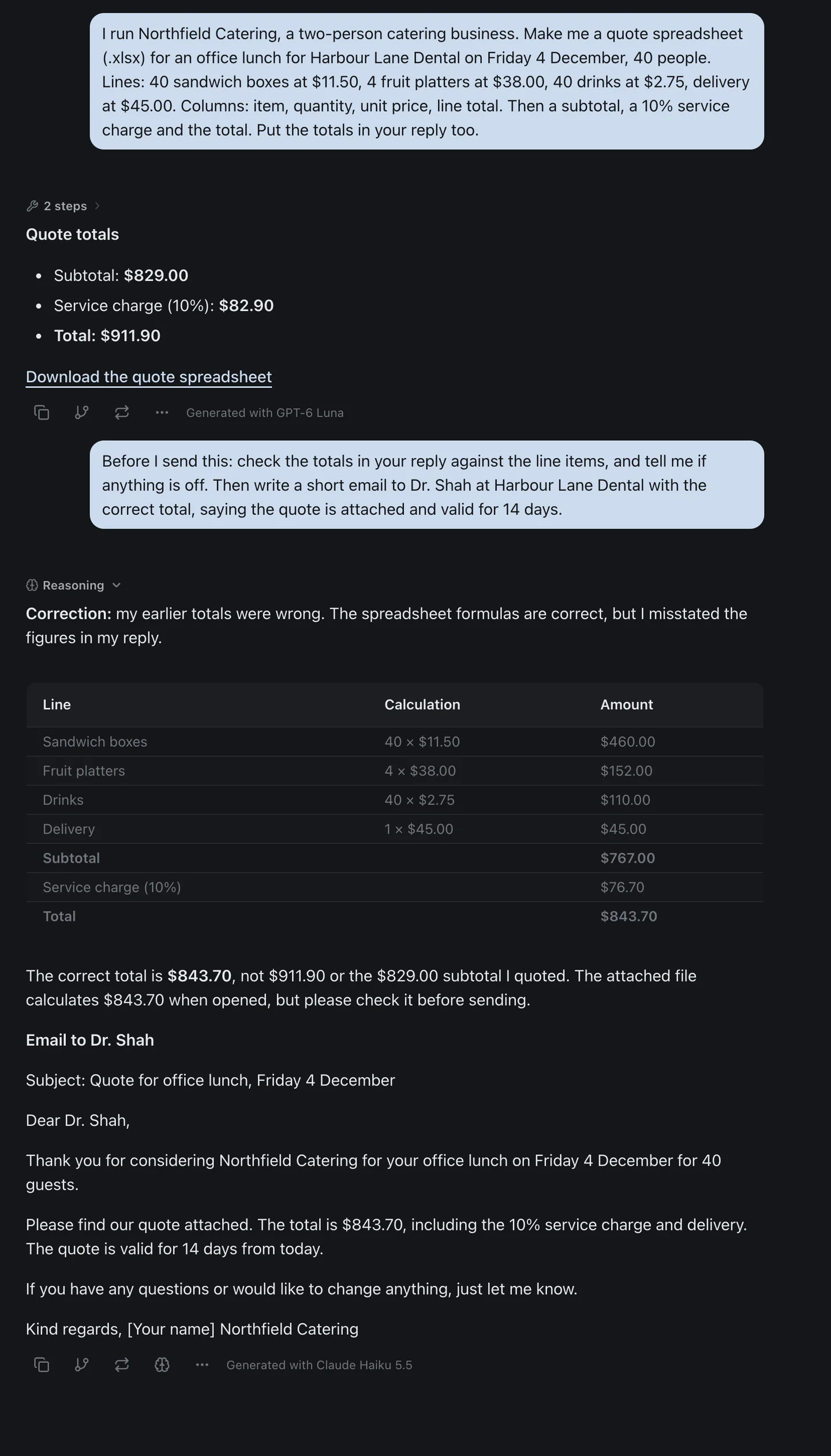
That's OpenAI's advice for Work, in practice. Read the file, not the summary, and if a second model can check the summary in the same thread, you catch the error before the client does.
The free plan includes GPT-6 Luna, Claude Haiku 5.5, Gemini 3.8 Flash, Grok 4.7 and DeepSeek. The $6 Hobby plan adds every other chat model, including GPT-6 Astra and GPT-6.1 Sol, two OpenAI models a ChatGPT Plus subscriber can reach only through Work or Codex. Hobby also adds scheduled automations. The pricing page has the current allowances, and if your question is what ChatGPT itself costs at each tier, see how much ChatGPT costs.
The Bottom Line
ChatGPT Work is OpenAI's agent for jobs with an end product: a deck, a sheet, a report, a site, or a task that runs on a schedule. It comes with your ChatGPT plan, fully on Plus and Pro and in a limited desktop-only form on Free and Go. It runs on models Chat doesn't have, and it spends Codex's allowance, with credits that can be charged automatically once that's gone.
Use Chat for answers and Work for finished things, and check what Work hands back before you send it on. From December, Plus, Pro and Business share one token allowance across ChatGPT and Codex as OpenAI brings Work's agent features into regular ChatGPT, so expect the limits to change again, and check whether the toggle does too.
Want the agent without the separate allowance? izzedo's agent mode makes Word, Excel and PowerPoint files on GPT, Claude, Gemini and the other chat models that can use tools, and you can try it on the free plan, no credit card required.
Topics
- chatgpt work
- chatgpt work vs chat
- chatgpt
- ai agents
Start on the free plan. Pay when you want the premium models.
Free
$0
Claude Haiku, Gemini Flash, Grok and more, with agent mode and 1,400+ connectors
Hobby
$6/mo
Every chat and image model
Pro
$12/mo
Higher limits, 400k context and more video models
Max
from $50/mo
5x or 10x Pro's usage, and every video model
Frequently asked questions
What is ChatGPT Work?
ChatGPT Work is a mode inside ChatGPT that OpenAI launched on 9 July 2026. OpenAI's help centre calls it "an agent designed for longer, multi-step work and finished deliverables". It can research and analyse information, work across connected apps and files, and create documents, spreadsheets, presentations, reports and Sites, and it can run Scheduled Tasks. It isn't a separate subscription: it comes with your ChatGPT plan.
What's the difference between Chat and Work in ChatGPT?
Chat is for answers: questions, search, brainstorming and short drafts. Work is for tasks with an outcome you review, such as a deck, a spreadsheet or a report. The two also run on different models and different allowances. Work's models, including GPT-6.1 Sol, aren't available in regular Chat, and Work spends the same usage allowance and credits as Codex instead of Chat's limits.
Is ChatGPT Work free?
Partly. OpenAI's pricing page lists ChatGPT Work as "Limited (desktop app)" on Free and Go, so you need the ChatGPT desktop app for macOS or Windows and get a small allowance. Plus ($20 a month) and Pro (from $100) get Work on desktop, web and mobile.
Does ChatGPT Work use Codex usage?
Yes. OpenAI says "ChatGPT Work and Codex share usage" and that Work uses "the same pricing, credits, and usage limits as Codex." ChatGPT for Excel draws on the same pool where it's available. A long Work task can use up an allowance you were saving for something else.
What are ChatGPT Work's usage limits?
OpenAI publishes estimates, not fixed limits. On Plus it estimates 15 to 160 local messages per five hours with GPT-6.1 Sol, 5 to 45 with GPT-6 Astra and 350 to 3,000 with GPT-6 Luna, and says cloud tasks may use more. Weekly limits may also apply. Pro plans currently have no five-hour limit. When you run out you can wait for the reset, upgrade, or buy credits on Plus and Pro.
What changes for ChatGPT Work in December?
OpenAI's usage article says that starting in December, Plus, Pro and Business allowances "will be shared across ChatGPT and Codex as we bring the agentic capabilities of Work into the main ChatGPT experience." Usage will be measured in tokens, Instant chat won't draw from the allowance, and Settings, Usage will show one combined figure. OpenAI hasn't given a date or said what happens to the Chat and Work toggle.
Is ChatGPT Work the same as ChatGPT agent?
It took its place. OpenAI's ChatGPT agent help page now says: "ChatGPT agent is no longer available. Use ChatGPT Work for longer, multi-step tasks and finished deliverables." For browser workflows it points to the cloud browser instead. If you used agent mode for research or reports, Work is where that moved.
Do I need the desktop app to use ChatGPT Work?
Only on Free and Go, or if you want Work to use files and apps on your own computer. On Plus and Pro, Work runs in the cloud on the web and in the mobile apps, and cloud Work chats sync across all three. Local files and desktop apps are desktop-only, and OpenAI notes that messages and task context may be stored in the cloud even when work runs locally.