AI Agent Mode: What It Does, and Where ChatGPT's Went
OpenAI's own help page says ChatGPT agent is no longer available, then lists its current per-plan limits four paragraphs later. Google renamed its agent to Spark, Anthropic's is Cowork. Here is what survived the renaming, and which plan you need.
If you came here because the agent mode button disappeared from your ChatGPT, you are not imagining it, and you are in a lot of company. Two of the top results for its own feature name are now Reddit threads asking where it went.
Here is the state of things on 11 September 2026. OpenAI's help article at the original agent URL opens with this: "ChatGPT agent is no longer available. Use ChatGPT Work for longer, multi-step tasks and finished deliverables." Four paragraphs later, the same article says agent mode "is currently available on Pro, Plus, Business, Enterprise, and Edu plans" and publishes its monthly limits down to the credit. Both statements are on the page right now. Neither one has been taken down.
That is the tidiest illustration I can give you of what has happened to this whole category in the last year. Every major vendor shipped an agent. Every major vendor then renamed it, moved it, or quietly changed what it means. OpenAI's is inside ChatGPT Work. Google's is called Spark. Anthropic's is Cowork. Perplexity has stopped using the word agent for its top product entirely.
So this is not a post about which agent is best. It is a post about what these things are, what each vendor's version actually does, which plan you need, and the one question that sorts them all: what happens when you close your laptop.
The Short Answer: Who Has an Agent and What It Is Called Now
| Assistant | What the agent is called today | Cheapest plan with it | Keeps working with your device off |
|---|---|---|---|
| ChatGPT | ChatGPT Work | Free, desktop app only | Scheduled tasks, from Go up |
| Claude | Claude Cowork | Pro | Yes, stated plainly |
| Gemini | Gemini Spark | Google AI Pro | Only on its remote browser |
| Perplexity | Computer | Pro | Yes, for hours or months |
| Copilot | Browse with Copilot, inside Edge | Included in Edge | No, it drives your browser |
| Grok | Grok Bot | Premium ($30) | Yes, on its own cloud computer |
| izzedo chat | Agent mode | Free | Automations, on the paid plans |
Read that table twice and the interesting column is the last one, not the first.
What Actually Happened to ChatGPT Agent Mode
Agent mode launched as a distinct thing you turned on. You picked it from the tools menu or typed /agent, described a task, and watched it work in a virtual browser it drove itself, pausing to ask you things.
It has been absorbed. The pricing page's feature comparison now has rows for ChatGPT Work, Scheduled tasks, Sites, Built-in browser and Workspace agents. It has no row called agent mode. The help article redirects your attention to ChatGPT Work and to the cloud browser, splitting the old feature into a task engine and a browsing engine.
ChatGPT Work is the replacement, and its product page describes something broader than the old agent: it takes a goal, gathers context from your apps and files, plans the approach, then produces finished documents, spreadsheets and slides. There is a Plan mode where it "gathers context, asks questions, and creates a step-by-step plan" and waits for you to approve before it starts. There is a built-in browser in the desktop app with multiple tabs. There is Sites, which turns a plan or a dataset into an interactive web page you can share.
For most people the honest summary is that the capability grew and the label vanished. That is still a real cost. A feature you cannot name is a feature you cannot find in the menu, cannot search for, and cannot tell a colleague to turn on.
One number worth flagging while we are on OpenAI's pages: the Work page advertises "more than 1,400 plugins". That is the current size of the catalogue your agent can pull from, and it is a different framing from the connector directories I went through last week.
Is ChatGPT Agent Mode Free?
This is the most-asked question about the feature and the answer has quietly become interesting.
ChatGPT Work is listed on the pricing comparison as "Limited (desktop app)" for both Free and Go, and as "Desktop, web, and mobile" for Plus and Pro. So yes, a free account can run agentic work. You just have to install the desktop app, because that is the only surface where the free and Go tiers get it.
The parts that decide whether an agent is useful are gated differently, and this is where the free answer gets thinner:
| Feature | Free | Go | Plus | Pro |
|---|---|---|---|---|
| ChatGPT Work | Limited, desktop app | Limited, desktop app | Desktop, web, mobile | Desktop, web, mobile |
| Built-in browser | Yes | Yes | Yes | Yes |
| Scheduled tasks | No | Yes | Yes | Yes |
| Sites | No | No | Yes | Yes |
| Apps connecting to internal tools | No | No | Yes | Yes |
| Deep research | Limited | Limited | Yes | Yes |
The shape of that is worth sitting with. A free account gets the agentic browser, the piece that felt like magic when agent mode launched. What it does not get is the ability to leave the agent running on a schedule. You can watch an agent work for free. You cannot walk away from one.
Go at $6 buys the schedule but not the internal-tool connection, which is the gap I flagged when I went through Go against Plus and Pro. If you want an agent that touches an internal system on a timer, Go is the wrong plan and Plus is the floor.
The Limits OpenAI Still Publishes for a Feature It Says Is Gone
Since the numbers are still live on the help page, they are still the best guide to what OpenAI thinks agentic work costs it:
| Plan | Agent mode allowance |
|---|---|
| Plus | 40 messages a month |
| Pro | 400 messages a month |
| Business and Enterprise | 40 messages a month |
| Business and Enterprise on flexible pricing | 30 credits per message |
Two details in the fine print matter more than the headline numbers. First, "only initial user-initiated agent requests count toward the limit", so the clarifications and authentication steps in the middle of a long task are free. That is a fairer meter than it looks. Second, "each unique agent invocation will count against the monthly message limit. This includes agent requests that are part of scheduled tasks."
Forty a month on Plus, with every scheduled run eating one, is not much. A single daily task consumes 30 of your 40 before you have done anything by hand. If you have been wondering why your agent quota evaporated, that is usually the reason, and it is the strongest argument on this page for keeping schedules rare and deliberate. The same arithmetic is why I keep coming back to what agent runs actually cost rather than what they are priced at.
"Agent" Now Means Two Different Products
Somewhere in the last year the word split in two, and comparison posts still treat it as one thing.
Grok's Multi-agent feature is the clean example of the first meaning. What it does is this: "Multiple agents work in parallel for deeper answers on the hardest questions. Each agent shows its work so you can audit the reasoning." Parallel agents take sub-problems, and the results merge into one cited answer. That is a thinking feature. Nothing leaves the chat. Nobody books anything.
ChatGPT Work, Claude Cowork, Gemini Spark, Perplexity Computer and, since 12 October, xAI's Grok Bot mean the second thing. They open websites, fill in forms, write files, send things. They act.
Perplexity has noticed the confusion and written its way out of it. The Computer product page carries the line "Chat answers. Agents do tasks. Computer works." A vendor drawing a three-level distinction in its own headline is a vendor telling you the middle word has stopped being useful.
I find this genuinely annoying as a buyer. Two products, one word, and the marketing pages for both say "parallel agents". If you are comparing plans, the question to ask is not whether there is an agent, it is whether the agent is allowed to touch anything.
The Question That Sorts Every Agent: What Happens When You Close the Laptop
Everything else follows from where the agent runs. I did not expect this to be the dividing line when I started reading, but it explains the plan gates, the country restrictions and the privacy prerequisites better than any feature list does.
Claude Cowork runs in the cloud and says so. Anthropic's help article states that sessions run remotely, that "Claude keeps working when you close your laptop or step away", and, most usefully, that "scheduled tasks run in the cloud, with no device online". That is the least ambiguous sentence any vendor has written on this subject.
Perplexity Computer is built for it. The product page describes workflows "capable of running for hours or even months", with background tasks and continuous monitoring. Whether you need something that runs for months is a separate question, but the architecture is not in doubt.
Gemini Spark is both, and the difference matters. Spark can drive your own local Chrome or a remote browser. On the local path, Google's documentation tells you plainly: "you'll need to keep your device and Google Chrome awake and running." On the remote path, "your task can continue even if you close your device", but it stops dead when a site asks you to sign in, and waits for you.
Copilot in Edge does not run unattended at all. It drives the browser in front of you. Microsoft's page describes Copilot searching, comparing and filling in forms "with your approval before anything is finalized". That is a chaperone, not a worker.
ChatGPT sits in the middle. The old agent used a virtual browser on OpenAI's side, which is why the help article talks about taking over the browser and clearing remote browser data. Scheduled tasks live at chatgpt.com/schedules on OpenAI's servers. The new built-in browser, though, is in the desktop app on your machine.
So the practical buying question is not "does it have an agent". It is "do I want work happening while I sleep, and am I comfortable with that". Those are different appetites and the vendors have made different bets about which one you have.
Whose Browser Does It Drive, and Why You Should Care
There are three designs in the market, and they carry different risks.
A remote browser runs on the vendor's machines. Your agent gets a clean environment with no access to your logged-in sessions until you hand it one. OpenAI's agent worked this way, and its help article is candid about the mechanics: the agent uses screenshots of its virtual browser window to see pages, and those screenshots sit in your conversation history until you delete the chat.
Your own browser is the opposite trade. Google is blunt about what that means for Spark: "Gemini Spark has access to all the same sites that you do, including sites you're signed into." With your permission it can pull logins out of Password Manager to get into loyalty programmes and accounts. That is enormously convenient and it is also the broadest grant of authority in this entire post.
A dedicated browser is Perplexity's answer. Comet is a separate Chromium browser you install, with the assistant built in. It is a real commitment: to get Perplexity's agent, you change browsers.
Anthropic hedges. Cowork uses a browser built into the Claude desktop app by default, but if you already use Claude in Chrome it works in your own browser instead, and you can switch in settings.
If you are choosing on risk rather than features, the remote browser is the conservative pick and your own browser is the one that needs a clear head about what it can reach.
Gemini Spark Has Four Conditions Nobody Mentions
Google's agent is capable and the documentation is unusually good, which is why it is worth reading before you plan around it. Spark requires all four of these:
You must be 18 or over. You must sign in with a personal Google account, because "for now, this feature isn't available if you sign in with a work or school Google Account". You need a Google AI Pro or Ultra subscription. And you must have Keep Activity switched on.
Then there is where it works. Spark is available "wherever Gemini Apps are supported, except in the European Economic Area, Nigeria, Switzerland, and the United Kingdom."
I want to be precise about how big that exclusion is, because it is easy to skim past. Google's personal AI agent is unavailable across the whole European Union, plus the UK and Switzerland. If you are a small operator in Dublin, Berlin, Zagreb or Manchester, Gemini Spark is not a product you can buy, however many comparison tables tell you Gemini has an agent.
The work-account exclusion is the one that made me laugh. The feature is pitched at getting your work done, and it does not accept a work account.
The Keep Activity requirement deserves a flag of its own. It means Google's privacy control and Google's agent switch are the same switch, and the page does not present that as a trade. Turn off the setting that governs what Google retains, and the agent stops working. You are choosing between the agent and the privacy posture, not configuring them separately.
The Risk Every Vendor Documents and Almost Nobody Reads
Give something an agent's permissions and you inherit an agent's failure modes. What is unusual here is that the vendors write this down clearly, in their own help pages, and it never makes the marketing.
OpenAI's help article includes a worked example of prompt injection that I think everyone turning this on should read once. You ask the agent to find a restaurant for a group dinner by checking your calendar and recent emails. While researching, it hits a malicious comment on a page, planted to trick it into fetching a password reset code from your Gmail and sending it to an attacker's site. That is not a hypothetical from a security vendor. It is OpenAI describing its own product.
Its countermeasures are listed honestly too: confirmations for high-impact actions, refusal patterns, injection monitoring, and a "watch mode" that requires you to supervise on certain sites. And then the line that matters: these measures "don't eliminate all risks".
Google's warning is about time rather than trickery, and it stopped me: "If a schedule runs when you are offline, you may not be able to stop Gemini from completing an unintended action." That is the real price of unattended work stated in one sentence. The same page tells you not to type sign-in details or payment information into a task thread at all.
The sensible habits fall out of this without much thinking. Turn on only the apps a task needs. Keep schedules few. Avoid open-ended instructions like "check my email and handle everything", which OpenAI calls out by name. And prefer a default where the thing asks before it acts.
How to Find Your Agent Today
Current names and paths, since the old instructions are the reason half the internet thinks the feature was deleted:
ChatGPT. The old route was the tools menu or /agent in the composer. Now open the desktop app and use ChatGPT Work from the message box. On Free and Go the desktop app is the only place it exists. Recurring work is managed at chatgpt.com/schedules, and after a task finishes you can set it to repeat with the clock icon.
Claude. Chat and Cowork share one message box on desktop, web and mobile. Select Cowork instead of Chat, then describe the task. In the Chrome side panel, opening the panel starts a Cowork session directly. It needs a paid plan.
Gemini. Go to gemini.google.com and click "Switch to Spark" in the sidebar, or open Spark then Tasks in the Mac app. Google offers a nice onboarding trick: type "set up", "get started" or "interview me" into a Spark task and it will walk you through your first skills and schedules.
Perplexity. Computer is available to Pro and Max subscribers on desktop, mobile, Slack and Microsoft 365. The browser assistant is a separate install called Comet.
Copilot. Open a Copilot tab in Edge or click the Copilot icon at the top right, then say what you need.
Grok. Updated 13 October 2026. Grok Bot comes with the $30 Premium plan of The X Subscription and the tiers above it, not with Free or the $8 Plus plan. xAI's docs say each Bot works "on a persistent cloud computer with a browser, filesystem, and terminal," and that work continues while your laptop is closed. You set one up by messaging it, on desktop or mobile. Multi-agent, the parallel-reasoning feature that came with SuperGrok, is still the thinking kind: it gives you a better answer, not an action.
What a Small Business Actually Needs From an Agent
Having read all six vendors' documentation in one sitting, my honest opinion is that most small operators are being sold the wrong half of this category.
The demos are all about booking and shopping, because browsing is the part that looks impressive on video. The work that actually pays back is duller: pull this week's numbers from three places and write the summary, read 40 pages and tell me what changed, take these notes and produce the document. Almost none of that needs an agent to fill in a form on a website. It needs parallel reading, tool access and a decent write-up at the end.
That matters commercially, because the browsing half is what drags in the heavy requirements. Browser automation is why Spark wants your logged-in Chrome, why the region restrictions exist, why the injection warnings are so prominent, and why the monthly allowances are so small. If your real need is research and deliverables, you can often skip that entire risk surface and the plan tier that comes with it.
So before you buy a plan for its agent, write down the three tasks you would give it. If none of them involve a website you must be signed into, you need less than the marketing implies.
One Task, Several Models
Here is where I will make the izzedo case, briefly, because it is the one genuinely different thing on this page.
Every agent above runs on its own vendor's models. ChatGPT's agent thinks with OpenAI models. Cowork thinks with Anthropic's. That is not a criticism, it is just how a single-vendor product works. But it means the agent is only as good as one lab's current lineup at the specific thing you asked for, which is the same argument for not committing to one model applied to work you are not watching.
izzedo's agent mode dispatches each sub-agent to a model you choose. The orchestrator picks a model per task from whatever your plan allows, so a research fan-out can send the live-web question to a search-native model, the long synthesis to a reasoning model, and the summary back to whichever model is writing well this month.
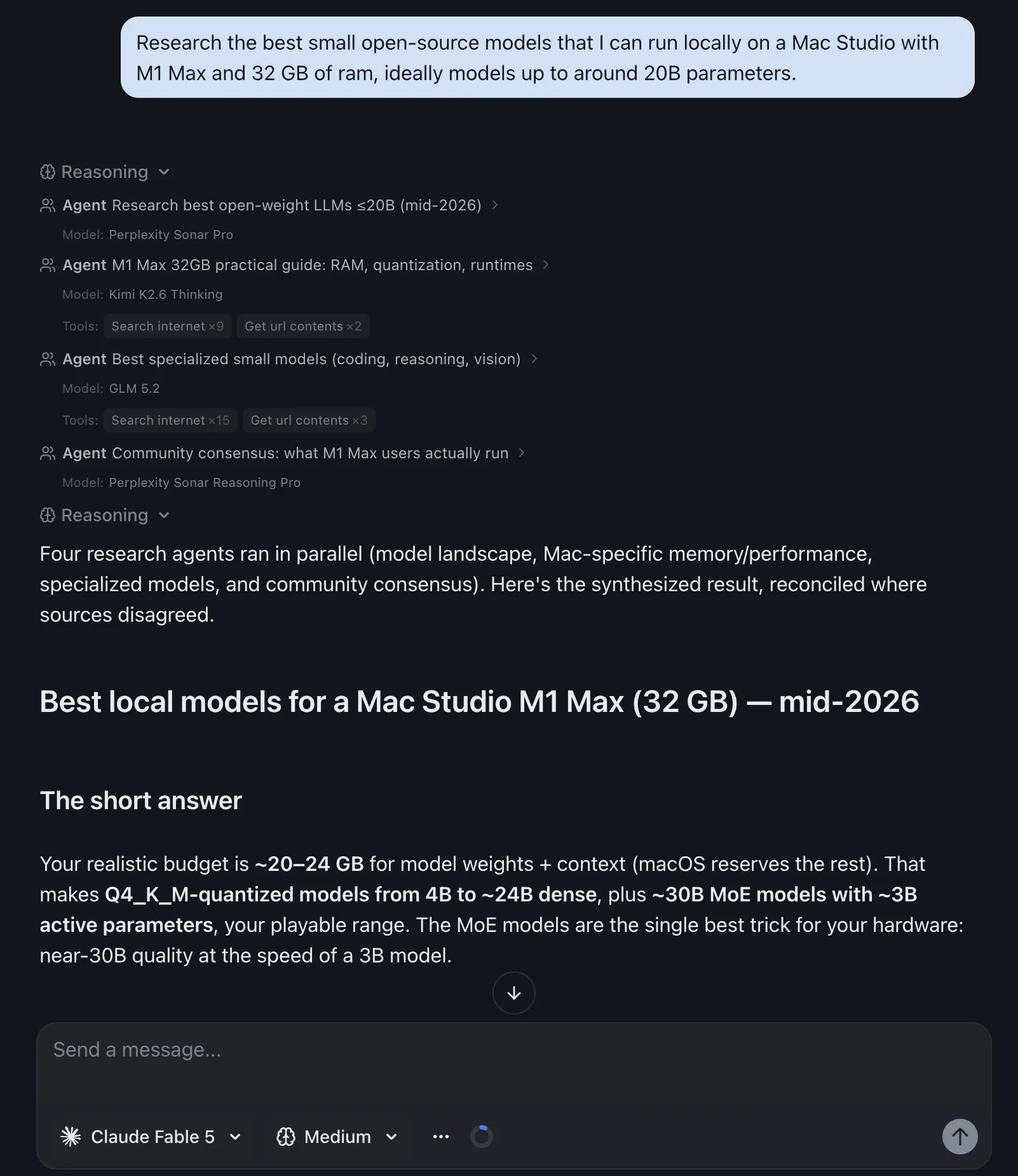
That screenshot is a real run. Four agents, four different models, one thread, and the tool calls each one made listed underneath so you can see what it did rather than trusting a summary.
A few specifics, since this post has been strict about sourcing everyone else:
Agent mode is on the free plan, not as a trial. More than 30 of the chat models in the picker can call tools, spanning the GPT, Claude, Gemini, Grok, DeepSeek, Qwen, Kimi, GLM and MiniMax families; image and video models cannot, and neither can the search-native Perplexity models, which do their own retrieval by design.
It is also, refreshingly, still called agent mode, and it is a switch in the composer rather than a product you have to go and find:
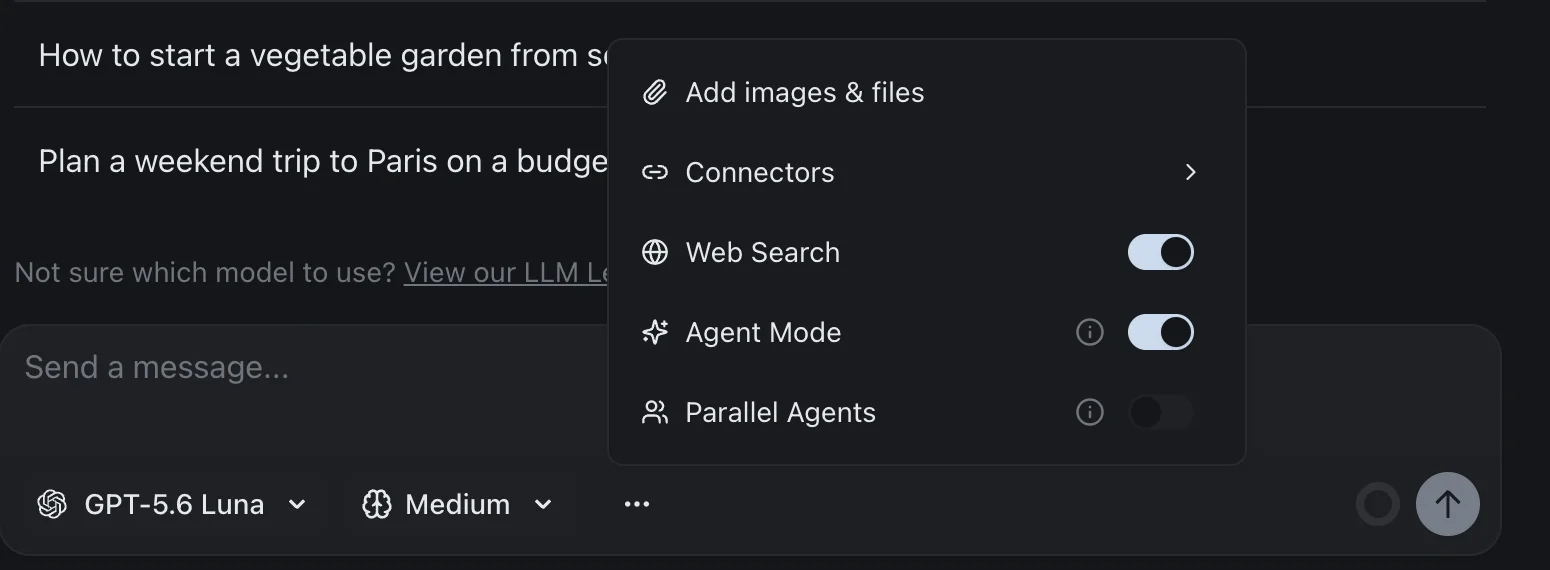
Note that Parallel Agents is its own switch. Agent mode gives one agent tools; Parallel Agents is what turns the model you picked into an orchestrator that fans work out. Keeping them separate is deliberate, because the second one costs meaningfully more to run than the first.
The default conversation mode is supervised, which means it confirms every tool call before running it, reads included. That is a deliberately conservative default, and after a week inside OpenAI's and Google's injection warnings I am more comfortable with it than I was.
What the paid plans add is scheduling. Automations, the unattended half of everything discussed above, start on the paid tiers; the free plan has none. That is the same boundary ChatGPT draws between Free and Go, and I think both of us have drawn it in the right place: watching an agent work should be free, and leaving one running unattended is the part that costs real money to provide.
Connectors and custom MCP servers work the same way across all of it, up to ten of your own servers, which is the escape hatch when nobody has built the integration you need. Sometimes the built-in list covers what the big assistants don't. Google publishes no MCP server for Search Console and Claude's directory has no Search Console connector, while here it's a built-in connector that asks before every call, as I set out in the Search Console guide.
The Bottom Line
Agent mode was not cancelled. It was renamed, and the renaming has done more damage to people's ability to use it than any feature change would have. If your button vanished, you are looking for ChatGPT Work, and it is in the desktop app even on the free plan.
For everyone else deciding whether this category is worth paying for, the three questions that actually separate these products are these. Does it act or only think, because Grok's parallel agents and Claude's Cowork are not the same kind of thing. Does it keep working when your device is off, because that single answer explains most of the pricing. And whose browser does it drive, because handing an agent your signed-in Chrome is a much larger decision than handing it a blank one on someone else's server.
Answer those three and the comparison tables mostly write themselves. Ignore them and you will buy a plan for a feature you cannot use in your country, on an account type it does not accept, with a monthly allowance one daily schedule will eat.
If you want to try the parallel-research half of this without picking a vendor first, izzedo's free plan includes agent mode and no card, and you can watch which model handled which part of the job.
Topics
- chatgpt agent mode
- ai agent mode
- gemini spark
- claude cowork
Start on the free plan. Pay when you want the premium models.
Free
$0
Claude Haiku, Gemini Flash, Grok and more, with agent mode and 50+ connectors
Hobby
$6/mo
Every chat and image model
Pro
$12/mo
Higher limits, 400k context and more video models
Max
from $50/mo
5x or 10x Pro's usage, and every video model
Frequently asked questions
Why is ChatGPT agent mode gone?
It was folded into ChatGPT Work rather than deleted. OpenAI's help article at the old agent URL now opens with a line saying ChatGPT agent is no longer available and pointing you to ChatGPT Work for longer, multi-step tasks, and to the cloud browser for browser workflows. The pricing page has no agent mode row at all any more. The confusing part is that the same help article still publishes agent mode's plan availability and monthly limits further down, so it reads as both retired and current depending on how far you scroll.
Is agent mode on ChatGPT free?
The thing that replaced it partly is. OpenAI's pricing comparison lists ChatGPT Work as Limited on the desktop app for both Free and Go, and as available on desktop, web and mobile for Plus and Pro. So a free account can run agentic work, but only in the installed desktop app. Two pieces that make an agent useful unattended are not free: scheduled tasks start on Go, and apps connecting to internal tools start on Plus.
How do I activate ChatGPT agent mode?
The old instructions still in OpenAI's help article are to pick it from the tools menu or type /agent in the composer. If that is not there for you, it is because the feature moved. Open the ChatGPT desktop app and use ChatGPT Work instead, then look for Plan mode if you want it to show you its approach before it starts. On Free and Go, the desktop app is the only surface where you will find it.
Does ChatGPT Go have agent mode?
Go gets the same Limited ChatGPT Work access on the desktop app that the free plan gets, plus scheduled tasks, which Free does not have. What Go does not get is Sites or apps connecting to internal tools, both of which start at Plus. If your reason for wanting an agent is to have it reach an internal system on a schedule, Go is the wrong plan to buy.
What are the ChatGPT agent mode limits?
OpenAI's help article still publishes them: 40 messages a month on Plus, 400 a month on Pro, and 40 a month on Business and Enterprise, with Business and Enterprise on flexible pricing charged 30 credits per message. Only the initial request counts, so the clarifications and sign-in steps in the middle of a task are free. Each scheduled run counts as its own invocation, which is the part that catches people out.
What is a good free alternative to ChatGPT agent mode?
Look at what you actually lost. If it was parallel research, most multi-model workspaces including izzedo run agent mode on the free plan, and izzedo lets each sub-agent run on a different model. If it was browser automation, Copilot in Edge does that without a separate subscription. If it was unattended scheduled work, there is no good free option anywhere: Claude Cowork, Gemini Spark and Perplexity Computer all require a paid plan, and ChatGPT gates scheduled tasks behind Go.