How to Cancel Your ChatGPT Subscription: Cancel Where You Paid
ChatGPT has four places to cancel, and the right one depends on where you paid. Here are the steps for the web, iPhone, Android and Business, why the cancel button goes missing, when you can get a refund, and what to save before your paid time ends.
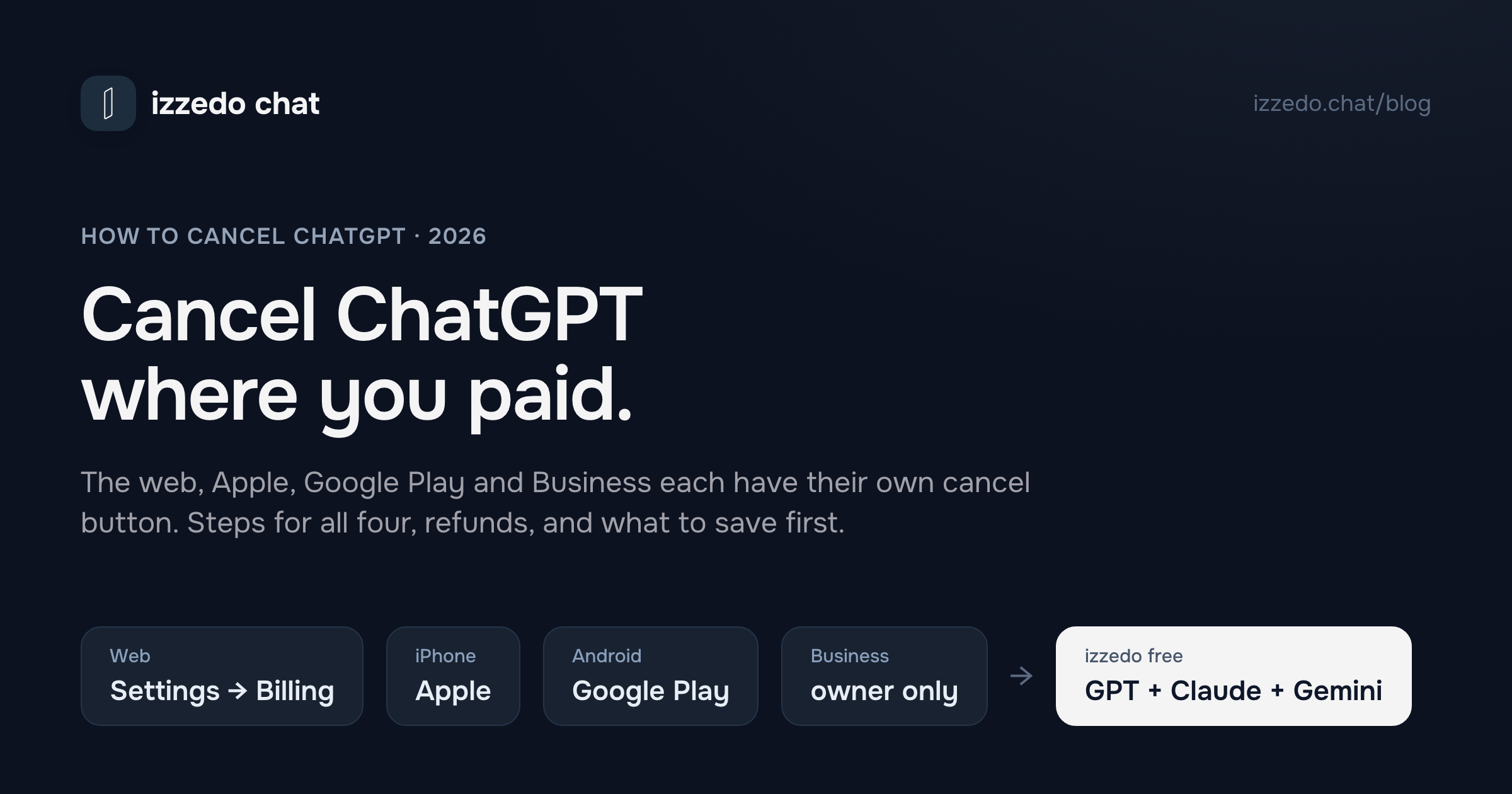
ChatGPT has four places to cancel, and the right one depends on where you paid. A subscription bought on chatgpt.com is cancelled in ChatGPT's settings. One bought in the iPhone app belongs to Apple, one bought in the Android app belongs to Google Play, and a team plan can only be cancelled by its workspace owner. OpenAI's cancellation article puts the whole rule in one line: "Cancel your subscription through the platform where you purchased it."
When ChatGPT won't let you cancel, the usual cause is looking in the wrong one of those four places. The others are timing, a second account, a second subscription, or an Apple payment that keeps retrying in the background.
This guide gives the steps for each platform, what to check when the button isn't there, what you keep and lose once the paid time runs out, and when you can get money back. I read OpenAI's help centre and Apple's and Google Play's subscription pages on 7 November 2026. OpenAI revised its cancellation and refund articles that same day, so the wording below is the current version.
The Short Answer
| Where you subscribed | Where you cancel | The path |
|---|---|---|
| chatgpt.com | ChatGPT, in a web browser | Settings → Billing → Cancel plan → Cancel |
| iPhone or iPad app | Apple | Settings app → your name → Subscriptions → ChatGPT → Cancel Subscription |
| Android app | Google Play | Play Store → profile → Payments & subscriptions → Subscriptions → ChatGPT → Cancel |
| ChatGPT Business | Workspace billing, owners only | Workspace settings → Billing → Manage plan → Cancel subscription |
Three rules are worth knowing first. Cancel at least 24 hours before your next billing date, or that charge may already be on its way. Cancelling stops the next renewal and refunds nothing, and your paid features stay on until the end of the period you've paid for. And uninstalling the app cancels nothing, while deleting your account doesn't cancel a subscription Apple bills.
How to Cancel ChatGPT Plus on the Web
These are OpenAI's steps for a Plus, Pro or Go plan bought on chatgpt.com.
- Sign in to ChatGPT in a web browser.
- Open your account menu and select Settings.
- Select Billing.
- Under Cancel plan, select Cancel.
OpenAI's Plus article still sends you to Settings → Account for the same job, so if your menu doesn't match, check both. If the billing controls don't appear at all, OpenAI's fix is to sign in to the same account in a different browser and try again.
OpenAI's steps for a web subscription are all in the browser, so use one, even if it's the one on your phone.
You can still change your mind afterwards. OpenAI's article on the Pro plans says a scheduled cancellation "does not end your subscription immediately," and that you can undo it before the paid period ends. Either way, check the subscription afterwards to confirm it's no longer set to renew.
Cancelling ChatGPT Go
Go is cancelled the same way. OpenAI's Go page says it's billed monthly and "can be canceled anytime." If you got Go free for a year through OpenAI's offer in India, it renews at ₹399 a month on the date in your subscription unless you cancel at least 24 hours before. Cancelling on the web or in the Android app may bring up a lower price for three paid months, which doesn't restart the free year.
How to Cancel ChatGPT on iPhone
If you paid in the iOS app, Apple bills you, and nothing in ChatGPT's settings can stop it. On an iPhone or iPad:
- Open the Settings app.
- Tap your name.
- Tap Subscriptions.
- Tap ChatGPT.
- Tap Cancel Subscription, then confirm.
If there's no Cancel Subscription button and Apple shows an expiry date instead, the subscription is already cancelled. If ChatGPT isn't in the list at all, search your email for "receipt from Apple" and check which Apple Account paid. Apple's page adds that you can't cancel a family member's subscription. The person whose account is on the receipt has to do it.
Two Apple details catch people out. Deleting your ChatGPT account doesn't cancel an Apple subscription, so cancel with Apple first. And a failed renewal isn't a cancellation. OpenAI says Apple may keep trying to recover a failed payment, so if you've since subscribed on the web and then update the card on your Apple Account, Apple can renew the old subscription and you'll pay twice. If you've moved to the web, cancel the Apple subscription even if ChatGPT shows it as inactive.
How to Cancel ChatGPT on Android
A Google Play subscription is cancelled in Google Play, signed in to the Google account that paid.
- Open the Google Play Store app.
- Tap your profile picture, then Payments & subscriptions, then Subscriptions.
- Select ChatGPT.
- Tap Cancel subscription and follow the prompts.
On a computer, open your Google Play subscriptions page, select Manage next to ChatGPT, then Cancel subscription. If ChatGPT isn't listed, check each Google account on the phone. Google's own help page agrees with OpenAI on the basics. Uninstalling the app doesn't cancel the subscription, and after you cancel you keep access for the time you've already paid for.
How to Cancel ChatGPT Business
Only a workspace owner can cancel a self-service Business plan.
- Sign in to ChatGPT and open your account menu.
- Select Workspace settings, then Billing.
- Select Manage plan, then Cancel subscription.
If Billing shows only a payment or reactivation screen, OpenAI says to contact Support from the owner account and give the workspace name or ID. Members who aren't owners can't cancel and have to ask one.
For a small team, this takes a week of notice, not a minute. OpenAI's Business FAQ says a workspace "may be deactivated after its subscription is canceled," and that members then lose access. Deactivation doesn't delete the data, and only an owner can reactivate the workspace. Business workspaces have no self-service export at all. So unless you plan to reactivate later, anything your team wants from its Business chats has to be copied out by hand before the end date. Unused seats generally aren't refunded for the period you committed to, which on an annual plan means the year. A Standard seat is $25 a month, or $20 a month billed annually.
Why ChatGPT Won't Let You Cancel
When the cancel button isn't where these steps say, OpenAI's troubleshooting articles cover five causes.
You're looking on the wrong platform. A subscription bought on chatgpt.com doesn't appear in Apple's or Google's lists, and OpenAI says an Apple subscription is managed by Apple and has to be cancelled in iOS settings. Your receipt tells you who billed you.
You're signed in to a different ChatGPT account. The email on an App Store or Google Play receipt can differ from your ChatGPT login. If you signed up with Apple and chose Hide My Email, your ChatGPT account may use an address ending in privaterelay.appleid.com.
You're paying for two subscriptions. Subscribing again on another platform, or on a second account, starts a second subscription rather than moving the first. Check the web, Apple and Google Play, and cancel the one you don't want where it was bought.
You cancelled less than 24 hours before renewal. The next charge may already have been processed. OpenAI's article treats that as a refund question, not a cancellation one.
You can't get into the account's email any more. For a subscription billed by ChatGPT, OpenAI Support may be able to cancel it for you. Give the email linked to the account or subscription, plus any two of these: the card's last four digits, its expiry date, the billing address, or the date of the latest charge. Never send the full card number. For an Apple or Google Play subscription, you need to get back into that store account, and Apple or Google handles the recovery.
What Happens When You Cancel ChatGPT Plus
Nothing, until the end of the period you've paid for. Then the account moves to the Free plan. The account stays, and so does your chat history. Deleting it is a separate step you only need if you want it all gone.
Here's what changes when a Plus month runs out, from OpenAI's plan table and help articles.
| Plus, $20 a month | Free | |
|---|---|---|
| Ads | None | May appear, in countries where OpenAI shows them |
| Models in Chat | GPT-6 Sol as it rolls out, GPT-5.6 Sol, older models | Luna, OpenAI's lightest model |
| Window for instant answers | 54K tokens, input up to about 40 pages | 27K tokens, input up to about 12 pages |
| Library storage for your files | 20 GB | 500 MB |
| Active scheduled tasks | 5 | None or 3, depending on which OpenAI page you read |
| Your chats | Kept | Kept |
| Training on your chats | On unless you opt out | On unless you opt out |
OpenAI's pricing table says Free gets no scheduled tasks. Its tasks article says Free gets three, run at most once a day. Either way, plan on losing some.
Some free promotions end on the spot. For a free Plus promotion, OpenAI's promotions article says "your access may end immediately upon cancellation" rather than at the end of the month, so check your offer's terms first. OpenAI's student offer works differently and keeps access to the end of the current month. A paid discount keeps its remaining paid time. Either way the code can't be used again, and resubscribing later doesn't bring the promotional price back.
Custom GPTs are retiring anyway. OpenAI plans to retire custom GPTs on every plan on 11 December 2026 and move creators to plugins. Your old conversations with GPTs stay readable. If you built a GPT you rely on and Migrate to plugin shows up in My GPTs, do it while you still pay, since OpenAI's plan table lists creating plugins as a paid feature. Only the published version moves, and custom actions don't transfer.
Files above 500 MB. OpenAI's Library article gives Plus 20 GB and Free 500 MB, but doesn't say what happens to files over the Free limit after a downgrade. The Storage button in Library shows whether you're over. Download what you need before the paid period ends.
What cancelling doesn't change is training. OpenAI's plan table marks training on your content as opt-out on every personal plan, Plus included, so if you never switched off Improve the model for everyone in Settings → Data controls, it's still on after you cancel. Even with it off, a thumbs up or down on an answer can send that whole conversation into training. Is ChatGPT free? has the detail, and how the free plan's ads work.
Can You Get a Refund?
Usually not, and never automatically. OpenAI's refund article puts the rule in four words, "Payments are generally non-refundable," then lists the exceptions.
- Within seven days, unused. For an individual subscription, OpenAI may grant a discretionary refund if you ask within seven days of the charge. The conditions include "no substantial use" and limits on repeat refunds. Forgetting to cancel or changing plans doesn't qualify on its own.
- In the EU, the UK and Turkey. You're eligible for a prorated refund if you cancel within 14 days of purchase.
- In Korea and Brazil, separate seven-day rules apply, set out in the same article.
- When OpenAI got it wrong. A verified billing error, an unauthorised charge or a documented service failure can be refunded.
Where you ask depends on who billed you. For chatgpt.com and Google Play purchases, sign in to ChatGPT with the account that was charged, open help.openai.com, and request the refund in the chat widget. It shows a summary of your eligibility before you reach an agent. OpenAI says approved refunds take 5 to 7 business days for web purchases and up to 10 for Google Play, before your bank's own time. For App Store purchases, Apple decides. Sign in at reportaproblem.apple.com, choose "I'd like to", then "Request a refund", and pick the reason and the subscription. Apple says to expect an update within 24 to 48 hours.
Two things before you ask. A granted refund normally ends the access it paid for, so you lose the rest of the month. And while a dispute with your bank is open, OpenAI won't issue a separate refund.
Before Your Paid Time Runs Out
You can cancel today and keep everything until the end of the period. A few of these get harder once you're on Free, so do them first.
- Request your data export. Settings → Data controls → Export data → Export, then Confirm export. Export works on Free too, so this only has a deadline if you plan to delete the account. OpenAI says the email can take up to 7 days to arrive, and the download link expires 24 hours after you get it. Download it signed in to the same account. The ZIP holds your chat history, but it can't bring back chats you've already deleted.
- Download large files from Library if you're over the Free plan's 500 MB.
- Migrate any custom GPT you built, as above.
- Turn off credit auto-reload. If you bought ChatGPT credits for Codex or Work and switched on automatic reload, it buys more on your saved card whenever the balance drops below your minimum. OpenAI's cancellation article covers the subscription and says nothing about reloads, so switch it off yourself in Settings → Usage. Credits you already hold last 12 months from purchase and aren't refundable.
- Remove your card once the plan has ended. It's in Settings → Billing, under Payment methods. OpenAI says an active subscription, or a cancellation that hasn't taken effect yet, can block removal, and so can a card used for auto-reload. Removing the card doesn't cancel anything.
- Copy the memories and instructions you rely on. OpenAI's export article promises your chat history and "other relevant account data," not your saved memories by name. Copy the ones that matter into a note. Leaving ChatGPT without losing your history has the steps for memories and GPT instructions.
Cancel, Downgrade or Delete?
Cancelling isn't the only way to stop paying $20.
Downgrade to Go. At $6 a month, Go keeps unlimited everyday text chats and gives you more uploads, image creation and memory than Free. OpenAI says the switch happens at the end of your Plus billing cycle, with no refund for the rest, and that Go doesn't include the Sol models. Go may show ads too. You change plans in Settings → Account.
Step down a Pro tier. Pro subscribers see the plan changes open to them in Settings → My Plan.
Delete the account. Only if you want everything gone. On the web it's Settings → Account → Delete, then you type DELETE to confirm. OpenAI deletes your data within 30 days, apart from what it's required or allowed to keep by law. A deleted account can't be reactivated, though you can sign up again with the same email after 30 days. Deleting cancels a subscription billed by ChatGPT but not one billed by Apple, so cancel that first. On a Business, Enterprise or Edu account you can't delete it yourself. Your organisation has to.
Don't wait for a discount. The only cancel-flow offer I found in OpenAI's help centre is the India Go one above, and the cancellation article mentions none for Plus. BGR reported in October 2025 that some Plus subscribers were shown a discount at the cancel button while many others saw nothing, as the ChatGPT discounts section explains.
Which to Choose
You use ChatGPT a few times a week, for emails and quick questions. Cancel and try the free plan for a month. Everyday text chats are unlimited, with ads in some countries and a smaller window.
You want more than Free gives you, but not at $20. Go at $6, if ads don't bother you.
You run a small team on Business. Give everyone a week or two to copy what they need, then cancel. Nobody can export a Business workspace themselves.
You're leaving OpenAI altogether. Request the export, wait for it, open it and check it, then delete the account. If you paid through Apple, cancel there first.
Where izzedo Fits
If you're cancelling because $20 a month is a lot for how often you use ChatGPT, izzedo chat has GPT-6 Luna on its free plan, in the same picker as Claude Haiku 5.5, Gemini 3.8 Flash, Grok 4.7 and DeepSeek. There's no card to start and no ads. You can switch model on any message, and the new one reads the whole thread above it.
The $6 Hobby plan adds every other chat model, GPT-6 Astra and GPT-6.1 Sol among them, in the ordinary chat. On ChatGPT Plus, Astra is available only in Work and Codex, and OpenAI lists GPT-6.1 Sol as a Work and Codex option. izzedo shares one usage allowance across all its models, and the strongest ones use it up faster than the light ones. The pricing page has the current allowances.
Your ChatGPT custom instructions can come with you. Paste them into a project's system prompt, on any plan, and every model you use in that project follows them.
Here's a thread with two free-plan models, on the job from the Business section above. GPT-6 Luna drafted the notice for a three-person design studio cancelling its workspace. Then I switched to Claude Haiku 5.5 and asked for a three-line Slack version. Haiku kept both dates from Luna's note without my pasting anything, though it gave me two sentences rather than three lines.
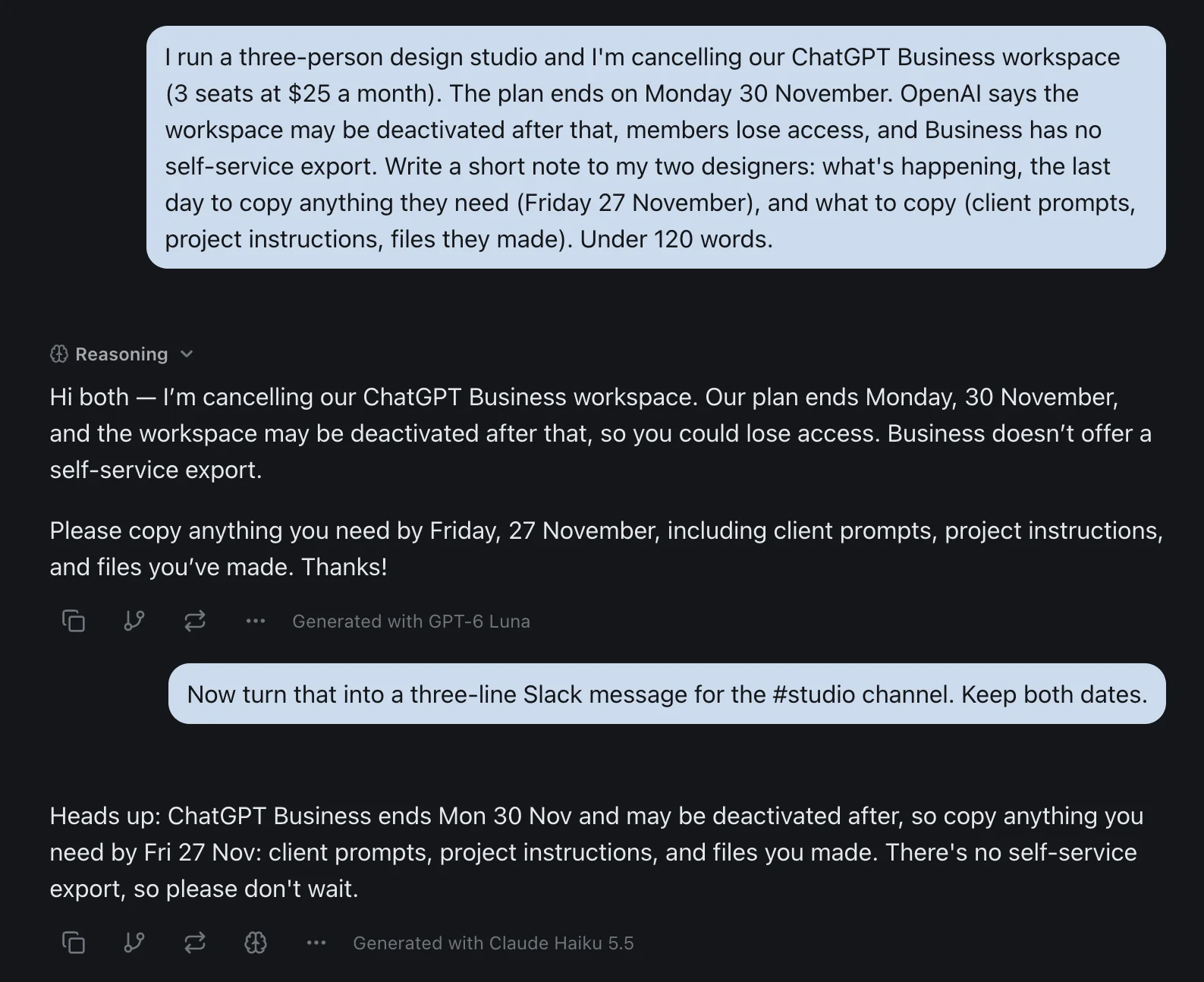
If you've never put the same question to two models, this is how it works in practice.
The Bottom Line
Find out who bills you, then cancel there. That's chatgpt.com in a browser, Apple's Subscriptions screen, Google Play, or the workspace owner's Billing page. Do it at least a day before the renewal date.
A cancellation stops the next charge. It doesn't refund the current month, delete your chats or switch off training, and OpenAI doesn't say it stops a credit auto-reload, so turn that off yourself. If you're deleting the account afterwards, request the export first, because it can take a week to arrive. If you're on Business, warn your team first, because nobody can export a Business workspace themselves.
OpenAI revised its cancellation and refund articles on the day I read them, and its plan table and help articles already disagree in places. Check the date on anything you read about ChatGPT's billing, this post included.
Cancelling ChatGPT Plus? Try GPT-6 Luna, Claude and Gemini in one thread on izzedo chat's free plan, no credit card required.
Topics
- how to cancel chatgpt subscription
- cancel chatgpt subscription
- how to cancel chatgpt plus
- cancel chatgpt on iphone
Start on the free plan. Pay when you want the premium models.
Free
$0
Claude Haiku, Gemini Flash, Grok and more, with agent mode and 1,400+ connectors
Hobby
$6/mo
Every chat and image model
Pro
$12/mo
Higher limits, 400k context and more video models
Max
from $50/mo
5x or 10x Pro's usage, and every video model
Frequently asked questions
How do I cancel my ChatGPT subscription?
Cancel it where you paid. If you subscribed on chatgpt.com, sign in on the web and go to Settings, then Billing, and select Cancel under Cancel plan. If you subscribed in the iPhone app, cancel in your iPhone's Settings app under your name and Subscriptions. If you subscribed in the Android app, cancel in Google Play under Payments & subscriptions. A ChatGPT Business plan is cancelled by a workspace owner in Workspace settings, under Billing and Manage plan. Cancel at least 24 hours before your next billing date.
Why can't I cancel my ChatGPT subscription?
Often because you're looking in the wrong place. A subscription bought in the iPhone or Android app is managed by Apple or Google Play and is cancelled there, not in ChatGPT's settings, and one bought on chatgpt.com doesn't appear in Apple's or Google's lists. Check your receipt to see who billed you. The other common causes are being signed in to a different ChatGPT account from the one that paid, having two subscriptions on two platforms, or billing controls that don't load, which OpenAI says to fix by signing in from a different browser.
How do I cancel ChatGPT Plus on my iPhone?
If you subscribed in the iOS app, Apple bills you. Open the Settings app, tap your name, tap Subscriptions, tap ChatGPT, then Cancel Subscription and confirm. If there's no Cancel button and Apple shows an expiry date, it's already cancelled. If you subscribed on chatgpt.com instead, cancel in a web browser, even on your phone, using Settings and then Billing.
Can I cancel ChatGPT Plus anytime?
Yes. Plus, Go and Pro bill monthly and you can cancel at any point. You keep your paid features until the end of the period you've already paid for, and OpenAI's Pro article says a scheduled cancellation can be undone before that period ends. Cancel at least 24 hours before the next billing date, or that charge may already be processing. Some free promotions are the exception. OpenAI says access to a free Plus promotion may end as soon as you cancel, so check your offer's terms.
Do I get a refund if I cancel ChatGPT Plus?
Not automatically. Cancelling stops the next renewal and refunds nothing. OpenAI may grant a discretionary refund for an unused subscription if you ask within seven days of the charge, and in the EU, the UK and Turkey you're eligible for a prorated refund if you cancel within 14 days of purchase. Ask through the chat on help.openai.com while signed in to the account that was charged. App Store purchases are refunded by Apple, at reportaproblem.apple.com. A granted refund normally ends your access.
What happens when you cancel ChatGPT Plus?
Nothing until the end of your paid period. Then your account moves to the Free plan. Your account and chats stay. Free answers with OpenAI's lighter Luna model, has a 27K-token window for instant answers against 54K on Plus, gives 500 MB of Library storage against 20 GB, and may show ads in countries where OpenAI runs them. Model training on your chats is opt-out on both plans, so cancelling doesn't change that setting.
Does deleting the ChatGPT app or my account cancel my subscription?
Deleting the app cancels nothing. Deleting your ChatGPT account cancels a subscription billed directly by ChatGPT, but it doesn't cancel one billed by Apple, and OpenAI says to check and cancel a Google Play subscription yourself too. Cancel any store subscription first. If you only want to stop paying, you don't need to delete the account.
How do I cancel a ChatGPT Business subscription?
Only a workspace owner can. Sign in, open the account menu, select Workspace settings, then Billing, Manage plan and Cancel subscription. OpenAI says the workspace may be deactivated after the subscription ends, and members then lose access to it, although the data isn't deleted and an owner can reactivate it. Business workspaces have no self-service export, so tell your team to copy anything they need before the end date. Unused seats generally aren't refunded for the period you committed to.