Meta Muse Pricing: Is Muse Free, and What Do Power and Maximum Get You?
Muse, Meta's personal AI agent, is free up to a weekly token allowance, with Power at $20 and Maximum at $100 a month for more. Meta also sells a separate Muse Code subscription that reuses the Power and Maximum names at other prices, and an API priced per token. Here's what each one buys, and how Muse compares with ChatGPT's agents.
Meta launched Muse on 8 September 2026 and called it "a secure, private personal AI agent." You give it a goal, and it works on it in the background on a computer Meta runs for you in the cloud, with its own browser. It can send email, fill out forms and buy things, and it asks before the important steps.
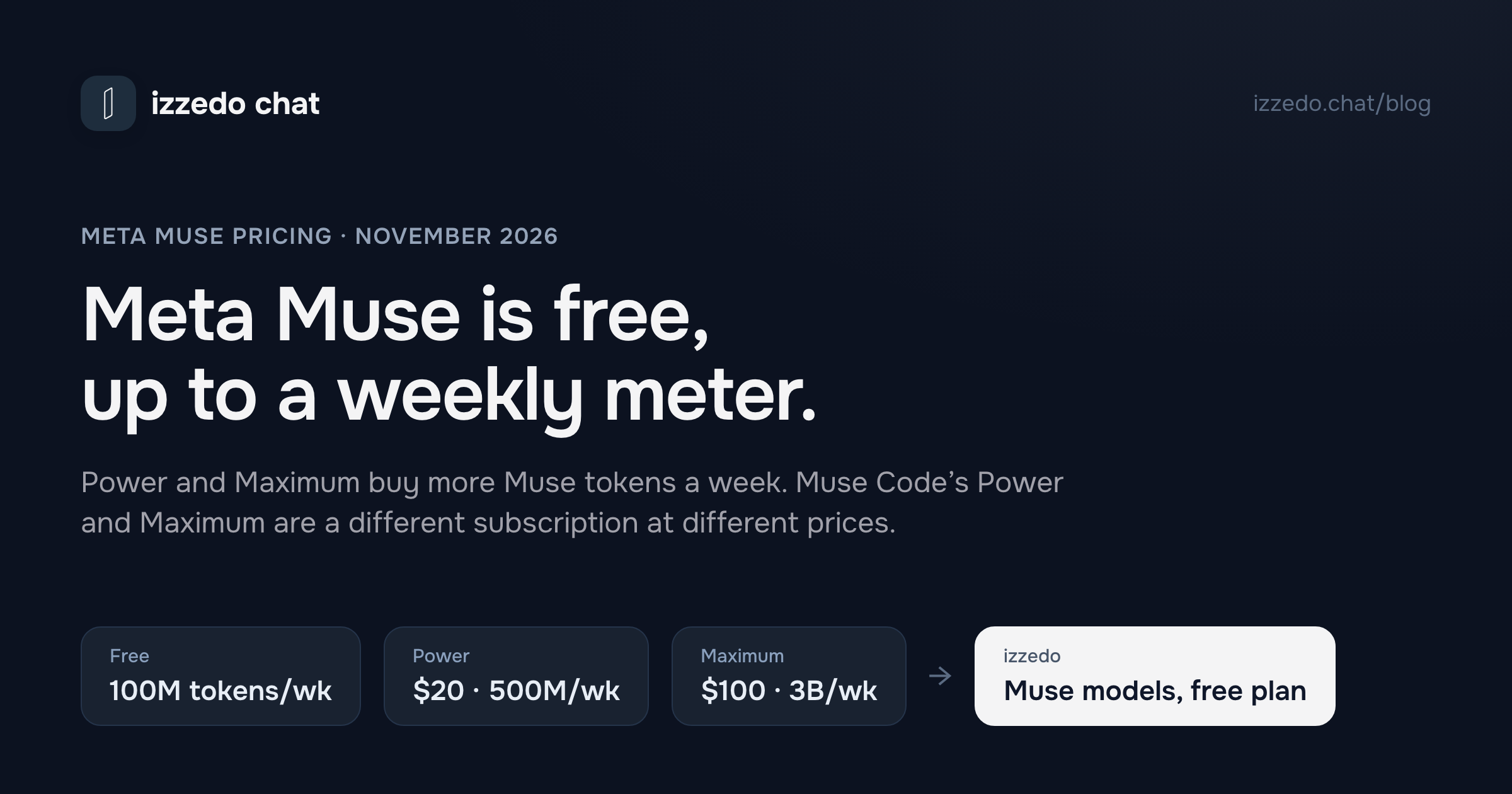
The pricing looks simple. Muse is free, and if you want more there's Power at $20 a month and Maximum at $100. But three things about it aren't obvious from those three numbers. The plans meter usage in weekly "Muse tokens," and Meta doesn't say how many a task uses. Meta sells a second subscription, for its Muse Code coding tool, with plans also called Power and Maximum at different prices. And Muse lets Meta train its models on your conversations unless you switch that off.
I read Meta's help centre, its newsroom, its developer pages and Mark Zuckerberg's launch posts on 13 November 2026. Here's what Muse costs, what each plan gets you, and how it compares with what OpenAI charges for ChatGPT's agents.
The Short Answer
| Plan | Price | Weekly allowance | What else to know |
|---|---|---|---|
| Free | $0 | 100 million Muse tokens | Meta's help centre says "a usage limit"; the number comes from Zuckerberg's launch post |
| Power | $20 a month | 500 million Muse tokens | Five times the free allowance |
| Maximum | $100 a month | 3 billion Muse tokens | Six times Power's allowance for five times the price |
| Extra tokens | One-time purchase | The amount you choose in the app or at muse.ai | Never expire, no refunds, no subscription needed |
That's the Muse app, on iOS, Android, the web at muse.ai and Mac. Two other Meta price lists use the same name. Muse Code, Meta's coding agent, has its own plans from $5 to $200 a month. The Meta Model API charges developers per token for Meta's Muse models. Both are further down.
Is Meta Muse Free?
Yes. Meta's subscription page says "Muse is available for free with a usage limit," and its newsroom calls it "free for most of what people need, with subscription plans for people who want to do more."
Meta's own help pages don't put a number on the free limit. Zuckerberg did, on launch day: "Muse is built to help deliver personal superintelligence to everyone over time, so we're making it free to use for up to 100M tokens per week." Meta's subscription page adds that benefits "may vary by region and account," and that you see what's included before you subscribe.
When you reach the free limit, you have three choices, according to Meta's token article. You can wait until the limit refreshes, make a one-time purchase of extra tokens, or subscribe.
Meta's subscription page lists only a bigger weekly allowance for the paid plans, so for now the free plan appears to get the same agent. Muse runs on what Meta calls Muse Secure VM, "a dedicated, virtual machine (VM) that houses both the agent and a person's data." It can browse, fill out forms, negotiate on your behalf, remember things you mentioned once, and keep working after you close the app. It connects to email, calendar, Instagram and dozens of other services. You can talk to it in the Muse app or in WhatsApp.
It can also pay for things. Meta's payments article says Muse "will always ask for your approval prior to completing a purchase," and recommends paying with Link by Stripe, which issues a one-time card number for each purchase. It also says, plainly, "You're responsible for all transactions your Muse makes on your behalf." So the free plan is free, but the agent can spend your money once you approve it.
Who can get it
Muse launched in the US, then Canada, and reached Singapore on 28 October. Meta's business page says it's for people 18 and over in the US and Canada, and you have to be 18 to subscribe. You sign in with a Meta account, which you can create from a Facebook or Instagram account or with an email address or phone number. Meta says Muse and its subscriptions "are in limited testing and aren't available in all locations yet." If you're anywhere else, none of the prices below apply to you yet.
What it costs you besides money
Meta's privacy page for Muse says you decide whether your interactions are used to "develop and improve our AI models," and that "This setting is on when you first use Muse." You can turn it off in Settings, under Data controls, and the change also applies to past interactions. With it on, Meta says it removes some personal details, such as names, email addresses, phone numbers and Social Security numbers, and separates the interactions from your account.
Ads are a different matter. Meta says Muse "doesn't share your conversations or the data in your virtual machine with Meta ad systems," even if your Accounts Center includes other Meta products. Meta AI, the assistant in Meta's social apps, runs under different rules, which I covered in Meta AI vs ChatGPT.
What Power and Maximum Get You
Meta's subscription page lists exactly one benefit per plan: "Weekly usage allowance for Muse increases as you upgrade plans."
- Power, $20 a month. 500 million Muse tokens a week.
- Maximum, $100 a month. 3 billion Muse tokens a week.
Per dollar, Power buys 25 million tokens a week and Maximum 30 million. So Maximum is the better rate, but it only beats Power if you'd use more than five times Power's allowance, about 2.5 billion tokens a week. Most people who outgrow the free plan should try Power first.
There's one more possible difference, and Meta hasn't written it into the plans yet. On 12 October Meta introduced Muse Wonder and Muse Wonder Full, which it called its "most capable models to date," and said Muse Wonder "will soon power more of Muse, rolling out first to subscribers." On 6 November it said it was "rolling out specialized versions of our models to Muse, trained with learnings from Muse Wonder," without saying which plans get them. Muse launched on Muse Spark. As of 13 November, the subscription page still lists only token allowances, so treat a model upgrade as something Meta has said is coming, not something the $20 buys today.
Billing and cancelling
A Muse subscription renews every month on the date you bought it. You manage it on the same platform you bought it on, so a subscription bought through the App Store or Google Play has to be cancelled there, not at muse.ai. Deleting the app or signing out doesn't cancel it.
When you cancel, you keep the plan until the end of the billing cycle. Meta doesn't give credits or partial refunds "unless required by law." The weekly allowance doesn't carry over either. Meta says unused weekly usage from a previous billing cycle "does not rollover."
What a Muse Token Is
Here's the part Meta doesn't make easy. A "Muse token" isn't a message, and Meta doesn't publish how many tokens a typical task uses. Its token FAQ says a dollar figure appears in the app only "to simplify pricing for variable Muse token usage, because different requests, models, tools, context lengths, and outputs may consume different amounts of usage." It also says "Meta sets usage rates and doesn't guarantee a set amount of usage will produce a fixed quantity or quality of output."
So 100 million a week is a meter with no published scale. You find out how far it goes by using Muse and watching the usage figure in Settings, which is where the Upgrade button sits.
The one-time token purchases come with their own rules. From Meta's help page:
- You can buy them on the free plan or on top of a subscription. You pick the amount in the app or at muse.ai.
- Purchased and promotional tokens don't expire and stay in your account if you cancel a subscription.
- They're tied to your account. You can't transfer them, cash them out or combine them with Meta Credits or Stars.
- Purchases are final, except where the law says otherwise. If you bought through Apple or Google, their refund rules apply.
Meta's help pages don't list the token packs or their prices. You see them when you buy, in the app or at muse.ai.
Muse Code Has Its Own Power and Maximum
If you've seen Muse prices of $50 and $200 a month, they belong to a different product. Muse Code is Meta's coding agent, which runs in a terminal, and its subscription is sold through Meta's Accounts Center, separately from the Muse app. Meta's developer site lists four plans.
| Muse Code plan | Price | Usage | Models |
|---|---|---|---|
| Everyday Usage | $5 a month | 10 to 50 prompts every 5 hours | Muse Spark, Muse Wonder, Muse Image |
| High Usage | $15 a month | 5 times Everyday | The same |
| Power Usage | $50 a month | 20 times Everyday | Adds Muse Wonder Full |
| Maximum Usage | $200 a month | 80 times Everyday | The same as Power Usage |
Muse Code subscriptions also start in what Meta calls Contributor mode: "you get more usage from your plan in exchange for letting Meta use your content to train future Meta models." You can turn it off.
Two things follow for anyone shopping on price. The $5 Everyday plan is the cheapest Meta subscription that includes Muse Wonder, but Muse Code is a command-line tool for software work, not the Muse app. And a Power plan in the Muse app ($20) and a Power Usage plan in Muse Code ($50) are different subscriptions that share half a name.
The Meta API Price List
The third price list is for developers who call Meta's models from their own software, through the Meta Model API. It's per million tokens, read from Meta's developer pages on 13 November:
| Model | Input | Cached input | Output |
|---|---|---|---|
| Muse Spark 1.3 | $1.25 | $0.15 | $4.25 |
| Muse Spark 1.3, contributor | $0.10 | $0.002 | $0.20 |
| Muse Wonder | $4.00 | $0.20 | $20.00 |
| Muse Wonder Full | Muse Code subscription only |
The contributor version costs about a twelfth as much for input, and Meta labels it "Used to improve our products." The standard one says "Not used to improve our products." In the API, Meta puts a price on your training data.
Meta One and Muse Charm Are Separate
Two more Meta products show up next to Muse and don't change its price.
Meta One is Meta's subscription for its social apps and Meta AI: Core at $7.99 a month and Premium at $19.99, in limited testing. Meta's page for Premium describes "expanded access to advanced AI features" across Meta AI, Instagram, Facebook, Messenger and WhatsApp. Muse isn't on that list, and Muse has its own subscription pages. If you want more Muse, Meta One isn't the plan.
Muse Charm is a pocket device for talking to Muse, announced at Meta's Connect event in September. Its page has a "Notify me" button and no price.
Muse for Small Business Is the Same Plans
On 29 September Meta announced Muse for Small Business. It isn't a business plan. Meta describes it as "a collection of new skills and connectors inside Muse," and uses the same pricing line: free for most of what people need, with subscriptions for more.
What it adds is the connections. Muse can link your Facebook Pages, Instagram professional account and Meta ad accounts "in a few clicks," and Meta's business page lists connectors for Asana, Box, Canva, Dropbox, Figma, Granola, HighLevel, QuickBooks, Klaviyo, Lovable, Notion, Shopify, Slack, Stripe and Zoom. Meta's example prompts include "How was my business's financial performance this month? Find any expenses that look off." Its FAQ says "Nothing publishes, sends or spends without your approval, and you can undo it."
For a small shop in the US or Canada, that makes the free plan worth trying before paying for anything.
Muse vs ChatGPT
Muse's closest match in ChatGPT isn't ChatGPT itself. It's a dot. OpenAI introduced dots on 29 September, three weeks after Muse, as "always-on agents in ChatGPT that can take on ongoing work and keep making progress between conversations." Like Muse, a dot has its own cloud computer, connects to your apps and keeps working while you're away. For deliverables such as a spreadsheet or a deck, ChatGPT also has Work, which I covered in what ChatGPT Work is.
The prices are far apart.
| Muse | ChatGPT | |
|---|---|---|
| Always-on agent with its own cloud computer | On every plan, free included | A dot: for individuals, Pro only ($100, $200 or $500 a month); also Business Premium, Enterprise and Edu |
| Paid plans | Power $20 and Maximum $100 a month | Go $6, Plus $20, Pro from $100 a month |
| Agent for finished files | Muse makes PDFs, documents, spreadsheets, images and podcasts | Work: limited and desktop-only on Free and Go, desktop, web and mobile on Plus and up |
| How usage is metered | Muse tokens per week | Chat has its own limits; Work and Codex share an allowance and credits; talking to a dot doesn't count toward ChatGPT limits, but the Work and Codex tasks it starts do |
| Where | US, Canada and Singapore; 18+ to subscribe | Dots on Pro: 18+, outside the EEA, Switzerland and the UK, rolling out gradually |
| Models | Muse Spark, with Muse Wonder promised to subscribers first | Dots run on GPT-6 Astra and GPT-6.1 Terra |
So the question "Muse or ChatGPT?" splits in two.
If you want an agent that runs errands and follows up on its own, Muse costs nothing to start and ChatGPT costs $100 a month. That's the biggest difference between them. The catch is a weekly meter without a published scale and a short list of countries. Both train on your chats by default, and both let you opt out.
If you want finished work, such as a proposal, a sheet with working formulas or a five-slide deck, ChatGPT Plus at $20 gets you Work on the web, desktop and mobile. Muse makes files too, but Meta hasn't published per-plan limits for that work, so it's harder to know what $20 buys there.
And if you already pay for ChatGPT Plus, Muse's free plan costs nothing to add on top.
Where izzedo Fits
izzedo chat isn't a personal agent with its own computer, and it doesn't shop for you. What it has is Meta's models in the same chat as everyone else's. Muse Spark Open and Muse Glimmer 30B are on the free plan, and Muse Wonder is on the $6 Hobby plan, next to GPT, Claude, Gemini, Grok and DeepSeek. Agent mode is on by default on every plan. It makes PDF, Word, PowerPoint and Excel files and can use the 1,400+ apps you connect.
To test it on one of Meta's own small-business prompts, I gave Muse Spark Open, a free-plan model, a flower shop's October card payments, 11 of them, and asked it to total them by category and flag anything odd before they went to the bookkeeper. It got the totals right, $4,550.49 in all. It flagged the $39 online store plan charged twice in one month and the two identical $212.50 packaging orders nine days apart. It also made a spreadsheet with the formulas left in.
Then I switched to Claude Haiku 5.5, also on the free plan, and asked it to check the totals against my list and write a note to the bookkeeper. It confirmed every total. It also caught something Muse Spark Open got wrong: the spreadsheet dated October 2024, not 2026. I opened the file, and every transaction date and the sheet name say 2024. Then it worked out the total to post if both charges turn out to be duplicates, $4,298.99, which the first answer hadn't given, and wrote the note.
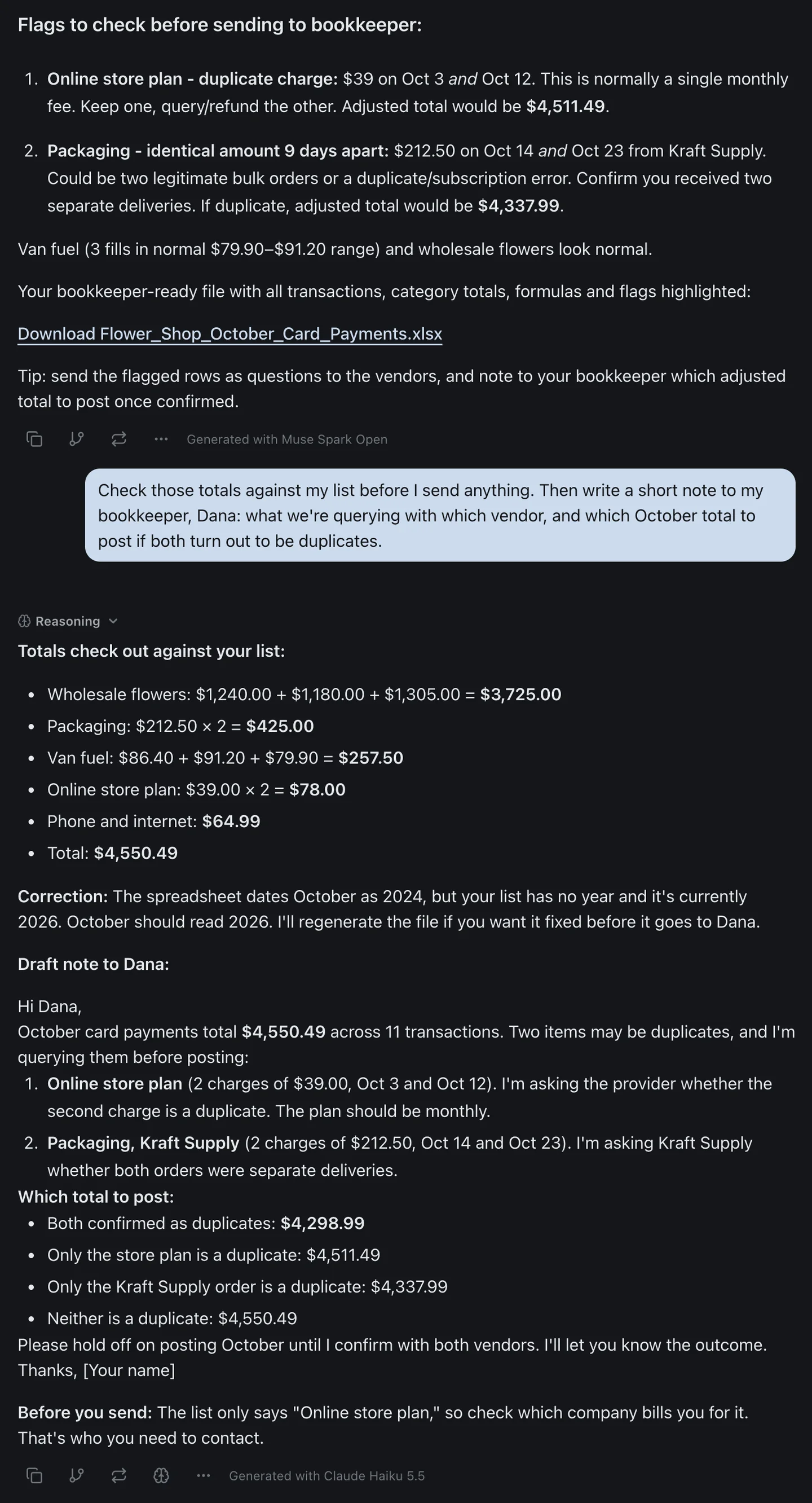
That's the case for keeping a second model in the thread. The first answer was right about the money and wrong about the file. The check took one message.
The free plan includes Muse Spark Open, Muse Glimmer 30B, GPT-6 Luna, Claude Haiku 5.5, Gemini 3.8 Flash, Grok 4.7 and DeepSeek. The $6 Hobby plan adds every other chat model, Muse Wonder included, and scheduled automations. The pricing page has the current allowances.
The Bottom Line
Meta Muse is free, up to 100 million Muse tokens a week, for people in the US, Canada and Singapore. Power at $20 a month raises that to 500 million, and Maximum at $100 to 3 billion. Extra tokens are a one-time purchase that never expires. Meta doesn't say how many tokens a task takes, so the only way to size a plan is to use the free one and watch the meter.
Don't confuse it with Muse Code, whose Power and Maximum plans cost $50 and $200, or with Meta One, which pays for Meta AI. Switch off model training in Data controls if you don't want your Muse chats used for it. And if you're comparing Muse with ChatGPT, the like-for-like agent in ChatGPT is a dot, which starts at $100 a month.
Want Meta's models in the same chat as GPT, Claude and Gemini? Muse Spark Open is on izzedo's free plan and Muse Wonder on the $6 plan, and you can try it on the free plan, no credit card required.
Topics
- meta muse pricing
- is meta muse free
- meta muse cost
- muse vs chatgpt
Start on the free plan. Pay when you want the premium models.
Free
$0
Claude Haiku, Gemini Flash, Grok and more, with agent mode and 1,400+ connectors
Hobby
$6/mo
Every chat and image model
Pro
$12/mo
Higher limits, 400k context and more video models
Max
from $50/mo
5x or 10x Pro's usage, and every video model
Frequently asked questions
Is Meta Muse free?
Yes, up to a weekly limit. Meta's help centre says "Muse is available for free with a usage limit", and Mark Zuckerberg put the number at 100 million tokens a week when Muse launched on 8 September 2026. When you reach it, you can wait for the weekly refresh, buy extra tokens once, or subscribe to Power or Maximum. Muse is available in the US, Canada and Singapore, and you must be 18 or older to subscribe.
How much does Meta Muse cost?
Muse has three plans: free, Power at $20 a month with 500 million Muse tokens a week, and Maximum at $100 a month with 3 billion Muse tokens a week. You can also make a one-time purchase of extra tokens, with or without a subscription. Muse Code, Meta's coding tool, is a separate subscription from $5 to $200 a month, and the Meta Model API charges per token.
What's the difference between Muse Power and Maximum?
The weekly allowance. Power ($20 a month) gives 500 million Muse tokens a week, five times the free amount. Maximum ($100 a month) gives 3 billion, six times Power's allowance for five times the price. Meta also said in October that its newer Muse Wonder model would reach subscribers first, but its subscription page lists only the token allowances.
What is a Muse token?
It's the unit Meta uses to meter Muse. Meta says different requests, models, tools, context lengths and outputs use different amounts, and it doesn't publish how many tokens a typical task takes. Muse's Settings show your usage information. Weekly plan allowances don't roll over, but tokens you buy separately never expire.
Is Muse the same as Meta AI?
No. Meta AI is the assistant inside Facebook, Instagram, WhatsApp, Messenger and the Meta AI app. Muse is a separate agent with its own app, its own cloud computer and its own subscriptions, though you can also message it in WhatsApp. Meta One plans ($7.99 and $19.99 a month) add usage for Meta AI and extras in Meta's social apps, and Meta's help pages for them don't list Muse.
Is Muse better than ChatGPT?
They're priced for different people. Muse gives everyone an always-on agent with its own cloud computer for free, up to the weekly limit. ChatGPT's equivalent, a dot, needs a Pro plan from $100 a month, or a Business Premium, Enterprise or Edu workspace. ChatGPT Work, on Plus at $20, is the better fit for producing finished files. If you're outside the US, Canada and Singapore, Muse isn't available yet.
Can I get a refund if I cancel Muse?
No, unless the law requires one. Meta says it doesn't give credits or partial refunds for canceled Muse subscriptions, and you keep your plan until the end of the billing cycle. You must cancel on the same platform you subscribed on, such as the App Store, Google Play or muse.ai. Extra tokens you bought separately stay in your account after you cancel.
Does Muse use my data to train Meta's AI?
By default, yes. Meta's privacy page says the setting is on when you first use Muse and you can turn it off in Settings, under Data controls, which also applies to past interactions. Meta says Muse doesn't share your conversations or the data in your virtual machine with its ad systems.