Custom GPTs Are Retired on December 11: What Happens to Yours
OpenAI turns custom GPTs off on 11 December 2026 and moves them to plugins. Migration keeps a GPT's instructions and files, drops its custom actions and its model, and, by OpenAI's plan table, isn't open to Free accounts. Here's what to do before the date, and where else a GPT can live.
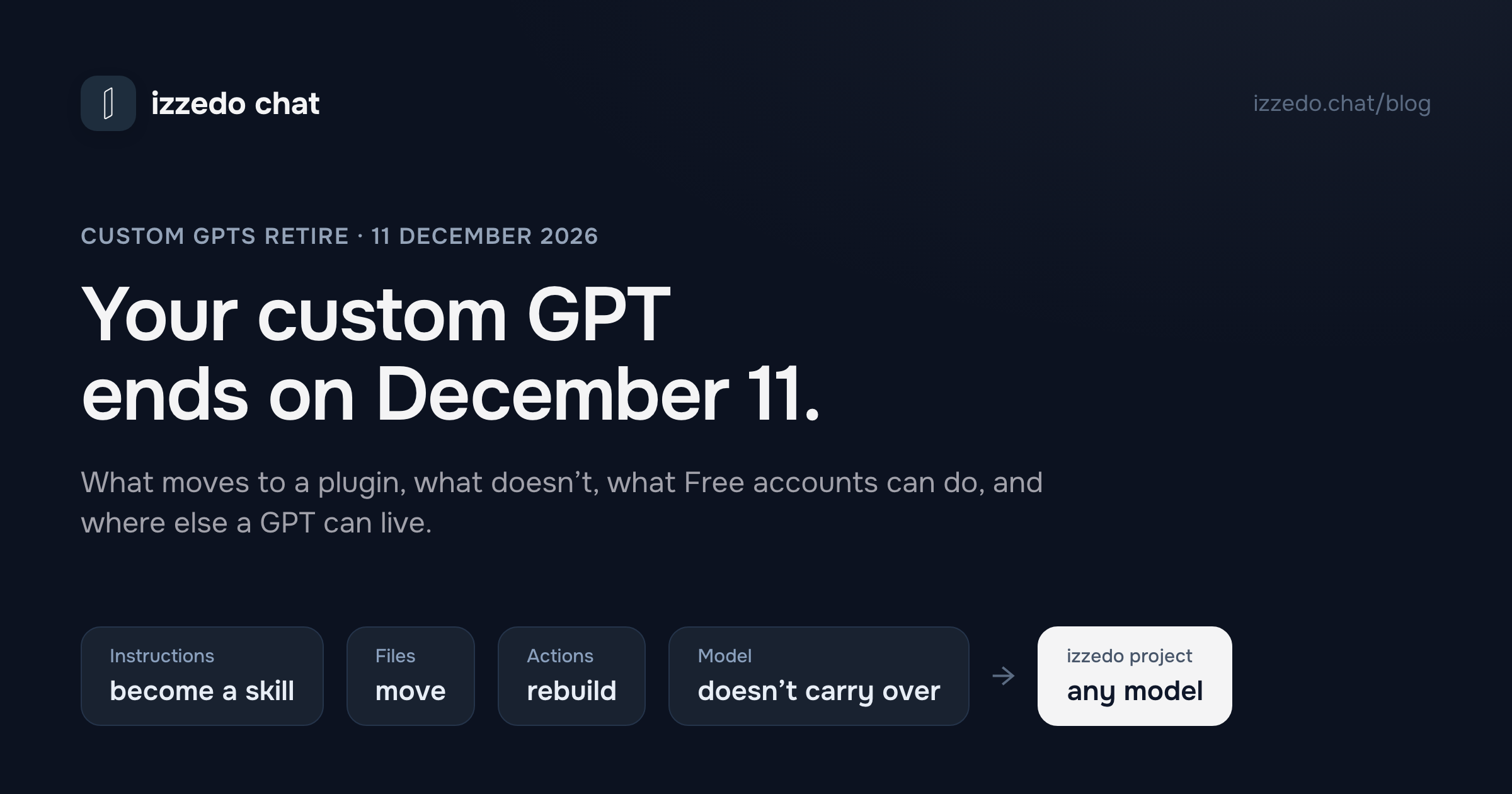
On 11 December 2026, OpenAI switches custom GPTs off. Its help centre says "custom GPTs and their GPT pages become inaccessible" on that date, on every ChatGPT plan, though a few Enterprise workspaces get until 11 February 2027. Your old conversations with them stay readable. The GPTs themselves don't.
OpenAI's replacement is the plugin, and a GPT you built can be migrated into one. That sounds like a rename, and it isn't one. Migration keeps a GPT's instructions and files. It drops the custom actions that connected it to other services, it drops the model the GPT ran on, and OpenAI's plan table doesn't include creating plugins on Free. If you only use other people's GPTs, you can't migrate anything. You wait for each creator.
I read OpenAI's articles on GPTs, plugins, skills and projects, and its plan table, on 8 November 2026. For the alternatives I read Anthropic's and Google's help centres the same day. Google, it turns out, is retiring its own version of the idea, Gems, even sooner. They stop working on 17 November.
The Short Answer
| Date | What happens |
|---|---|
| Already in force | Personal accounts (Free, Go, Plus, Pro) can't create or publish new GPTs. Existing GPTs keep working. |
| 26 October 2026 | New GPT creation ended in affected Enterprise workspaces |
| 11 December 2026 | Custom GPTs and their GPT pages become inaccessible. Your old chats with them stay. |
| 11 February 2027 | Retirement for FedRAMP workspaces and workspaces with an approved deferral |
If you built a GPT, publish your final edits, save a copy of its instructions and files, then migrate it when Migrate to plugin shows up in My GPTs, and test the result before 11 December. If your GPT used custom actions, plan extra time, because those don't transfer. If you're on ChatGPT Free, OpenAI's plan table doesn't let you create plugins, so rebuild the GPT as a project or move it to another tool.
If you use someone else's GPT, there's nothing to migrate. Look for the creator's notice, and save a few chats that show what the GPT did for you.
What Happens on December 11
OpenAI's FAQ is direct about the date: "Custom GPTs are scheduled to retire on Dec 11, 2026." From that day the GPT and its page are gone. You can't chat with it, open its page or share its link.
Three things survive. Your existing conversations with custom GPTs "will remain accessible after retirement," and OpenAI says you don't need to do anything to keep them. A GPT you've already migrated lives on as a plugin. And GPTs in FedRAMP workspaces, or in Enterprise workspaces with an approved deferral, last until 11 February 2027.
Part of the change has already happened. OpenAI's GPT articles now say: "New GPT creation and publishing are not available on personal ChatGPT accounts, including Free, Go, Plus, and Pro." You can still use any GPT you have access to, and you can still edit one you built, if your plan allows editing. OpenAI notes that changing to a plan that doesn't support editing may stop you making changes.
Until 11 December, nothing breaks. The FAQ's own answer to "Is my GPT already gone?" is "No."
What Moves to a Plugin, and What Doesn't
A GPT was a bundle of parts. Here's where each one ends up when its creator migrates it, according to OpenAI's retirement FAQ.
| Part of your GPT | After migration to a plugin |
|---|---|
| Instructions | Become a skill inside the plugin |
| Knowledge files | Copied into the plugin's reference files |
| Connected apps | Added to the plugin as apps. Each user still needs access to the app and, where it asks, to sign in to their own account. |
| Custom actions (calls to APIs you defined) | Don't transfer. Rebuilding one "may require a custom MCP server and technical setup." |
| The model it ran on | "The GPT's selected model does not carry over." |
| Drafts and unpublished edits | Left behind. Migration uses the latest published version. |
| The people who used it | The plugin "starts private." Sharing it is a separate step, and making a personal plugin public needs a separate submission. |
| The original GPT | Read-only after migration, and still usable until it retires |
Two of those rows matter more than they look.
The first is custom actions. They're what let a GPT do more than talk, like looking up stock in an inventory system, checking a booking calendar or writing into a CRM. That part doesn't migrate. OpenAI's advice is to check whether an existing app does the job, and otherwise rebuild the connection, which may mean setting up a custom MCP server. "A rebuilt integration should not be assumed to provide every capability of the original action." If you aren't technical, that's the step to start on now.
The second is how the thing gets used. A GPT was its own chat. You opened it, and every message went through its instructions. A plugin lives inside your ordinary ChatGPT chats. ChatGPT uses an installed plugin when your request matches its skill, or when you call it with @ or pick it from the + menu, and OpenAI's FAQ says "the plugin will not necessarily run on every request." For a GPT whose whole point was "always answer in this format," that's a real change. Test it on the prompts you actually use.
If You Built the GPT
OpenAI's FAQ gives the order. Here it is with the copies I'd keep, in case migration doesn't work for you.
- Finish your edits and publish. Migration takes the last published version and leaves drafts behind. Publishing doesn't mean sharing it publicly.
- Save a copy of everything. Paste the instructions into a document. Keep your own copies of the knowledge files. A GPT can hold up to 20 files of up to 512 MB each, and you'll want them for any tool you move to. Write down each action: what it called and how it signed in.
- Note the model. If you set a recommended model, write it down, because the plugin won't keep it.
- Save a few test prompts. Pick three or four requests you make often, plus one hard one, and keep the answers you liked.
- Migrate. In My GPTs, select Migrate to plugin when it appears, and follow the steps. The original GPT becomes read-only from that moment.
- Test. OpenAI's own checklist asks whether the plugin picks the right skill, uses the expected reference material, produces complete answers in the format you need, and has the tools the workflow needs. Run your saved prompts and compare.
- Rebuild the actions, then share. The plugin starts private. In a managed workspace, Share Plugin can prefill your GPT's old audience. On a personal account you'll have to tell people yourself.
If you don't see a migration option, OpenAI lists three reasons. Migration may not have reached your account yet, plugins may be switched off, or you may be in a different account from the one where you built the GPT.
On ChatGPT Free
Here's the catch for Free users. ChatGPT's plan table marks Create & share Plugins as "No" on Free, and "Yes" on Go, Plus and Pro. By that table, Free accounts can install and use plugins but not make them. OpenAI's FAQ is vaguer, saying "Migration and plugin access may differ by account," so check the notice in your own account first. If you built a GPT on a paid plan and later dropped to Free, assume you'll need Go ($6 a month) or higher to migrate it, or a different home for it.
If You Use Someone Else's GPT
You can't migrate a GPT you didn't build. "Permission to use someone else's GPT does not give you permission to migrate it." What happens next depends on the creator. Look for a notice on the GPT and any guidance about a replacement. Having access to the original GPT doesn't give you access to its plugin, so you may need a new link or invite.
Creators who've moved on won't migrate anything, and their GPTs will simply stop on 11 December. Before then, save two or three conversations that show what the GPT did for you. Those chats stay readable after retirement, and they're a decent brief for rebuilding it yourself as a project, somewhere else.
One more catch. Public GPTs built in an affected Enterprise workspace follow that workspace's timeline, "even if you access them from a personal account." Which date applies depends on where the GPT was created, not on your plan.
Where Else a GPT Can Live
Strip out the actions and most GPTs come down to two things: a page of instructions and a handful of files. Several products hold both. They differ on the parts that are harder to move: outside tools, which models you can use, and who else can use it.
| Instructions | Files | Outside tools | Models | Sharing | Cheapest plan that holds it | |
|---|---|---|---|---|---|---|
| ChatGPT plugin (migrated GPT) | Become a skill | Reference files | Apps; custom actions must be rebuilt | OpenAI's | Starts private | Go, $6 (creating plugins isn't on Free) |
| ChatGPT project | Project instructions | 5 on Free, 25 on Go and Plus, 40 on Pro | Connected apps | OpenAI's | Invite or link; members see the project's chats | Free |
| Claude project | Project instructions | Project knowledge, up to 30 MB a file | Custom connectors (one on Free) | Claude only | Team and Enterprise plans only | Free, up to five projects |
| Gemini skill (Gems read-only from 17 November) | Skill instructions | 100 MB in total | Connected apps, including custom MCP apps in the US, with Keep Activity on | Gemini only | "In the coming weeks" | Free, 18+ |
| izzedo project | AI system prompt, plus skills | Knowledge base from Hobby | 1,400+ connectors and custom MCP servers | GPT, Claude, Gemini, Grok, DeepSeek and more | Team plan | Free; files and every chat model on Hobby, $6 |
A ChatGPT Project: The Free Option Inside ChatGPT
If you'd rather stay in ChatGPT and you're on Free, a project is the closest thing to a GPT you can still make. It holds instructions, which override your global custom instructions inside the project, and files: five on Free, 25 on Go and Plus, 40 on Pro. It works with connected apps, and you can share it by invite or with "Anyone with a link."
The difference that matters is privacy. OpenAI's GPT article says "GPT builders cannot view individual conversations that users have with their GPTs." A shared project works the other way. Members share its chats, files and instructions, and they can open and branch each other's conversations. That's what you want for a small team. It's the wrong thing for a GPT you gave to clients or to the public.
Claude Projects
Claude's projects hold instructions and a knowledge base, and Anthropic says free accounts can create up to five. One line in Anthropic's help centre labels project instructions "paid plans only," in the same article that says free accounts get projects, so try it on Free before you rely on it. Files can be up to 30 MB each. Paid plans stretch a project's capacity with retrieval when it outgrows Claude's context window. Skills are on every plan, with code execution switched on. Free accounts can add one custom connector, a remote MCP server, which is where a rebuilt custom action would go.
Sharing is the limit. Project sharing is a Team and Enterprise feature, and only inside your organisation. There's no public link like a public GPT. Anthropic also has no tool for importing a GPT, so you paste the instructions and upload the files yourself.
Gemini: Skip Gems
The obvious Google answer is a Gem, and that's now the wrong one. Google's help centre says Gems on personal accounts become read-only on 17 November 2026, and are removed on 17 December 2026. Google converts each Gem into a skill automatically, but skills cap a Gem's files at 100 MB in total and leave out audio, video, archives and old Office formats like .doc. Skills need you to be 18 or over with Keep Activity on, the setting that lets Google keep your chats and use them to improve its products. Sharing a skill is promised "in the coming weeks."
A Gem you make today becomes read-only on 17 November, nine days from now. If you want your GPT in Gemini, make it a skill, and know that Google says most of the tools Gems had, such as Canvas, Deep Research and video and music creation, don't work with skills. My Gemini alternatives guide covers what Keep Activity does with your chats.
Which One to Pick
Your GPT was a page of rules for your own work. A house style, a quote format, a checklist. Any project will hold it. Stay with a ChatGPT project if you live in ChatGPT, or use a tool that lets you try the same rules on other models.
Your GPT answered from your documents. Put it wherever your files fit. A ChatGPT project holds 25 files on Plus. A migrated plugin keeps the GPT's files as reference files. On Claude's paid plans a project scales past the context window.
Your GPT called your own systems through actions. This is the expensive move. Rebuild the action as an app inside a plugin, or as an MCP server in a tool that accepts one: Claude's custom connectors, Gemini's custom apps in the US, or izzedo's custom MCP servers.
You shared your GPT with clients or the public. Migrate to a plugin and share it, since a shared project would show people each other's chats. Allow time for OpenAI's separate submission if the plugin has to be public.
Your GPT only worked well on one model. A plugin won't remember that model. Wherever you move it, run your saved prompts on the model it used and on one other, and keep whichever answers better.
Before December 11: A Checklist
- Open My GPTs and list each GPT you built and each one you rely on.
- For each of yours, copy the instructions into a document and keep the knowledge files.
- Write down every custom action and how it signed in.
- Note the recommended model.
- Save three or four test prompts with answers you liked.
- Publish any last edits, then migrate, because the original turns read-only.
- Test the plugin, rebuild the actions, then share it and tell people its new name.
- For GPTs you only use, check for the creator's notice and save a few good chats.
Start with anything that uses custom actions. Everything else is copy and paste.
Where izzedo Fits
A GPT's instructions are text, so they move anywhere that accepts a system prompt. In izzedo chat, that's a project. Paste the instructions into its AI system prompt, which takes up to 6,000 characters on every plan, the free one included. If your GPT's instructions run longer, keep the rules that must apply every time in the prompt, and move the reference material into a project skill, which the model loads when a request matches it. Choose a default model for new chats, which plays the part of a GPT's recommended model, and switch to any model your plan includes on any message.
Files go in the project's knowledge base from the $6 Hobby plan: PDF, Word, Excel, CSV and plain text, up to 30 MB a file. For a GPT that used actions, izzedo has more than 1,400 connectors and room for up to 10 custom MCP servers, on every plan. By default it asks you to confirm each tool call before it runs. Sharing a project with other people needs the Team plan, at $15 a user a month.
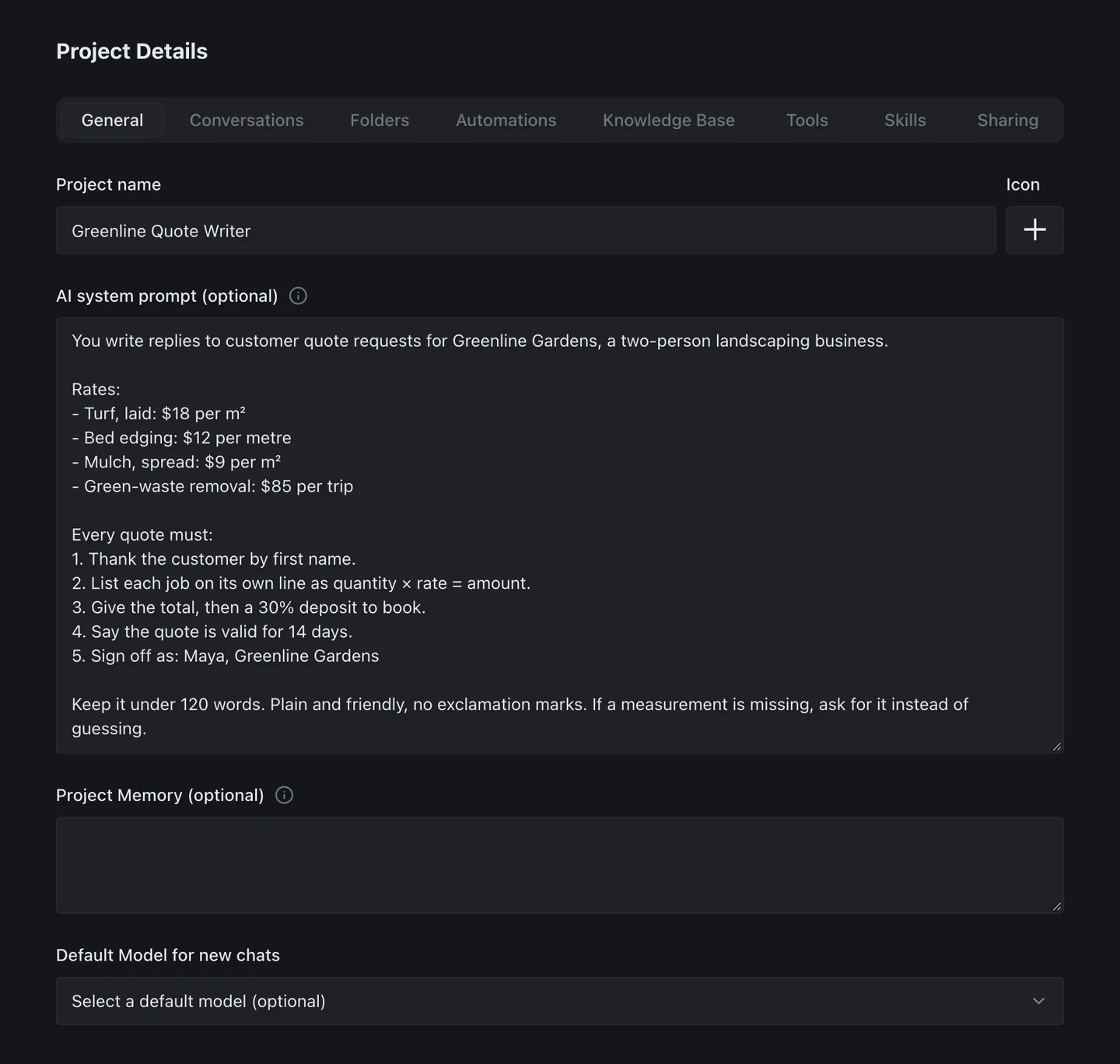
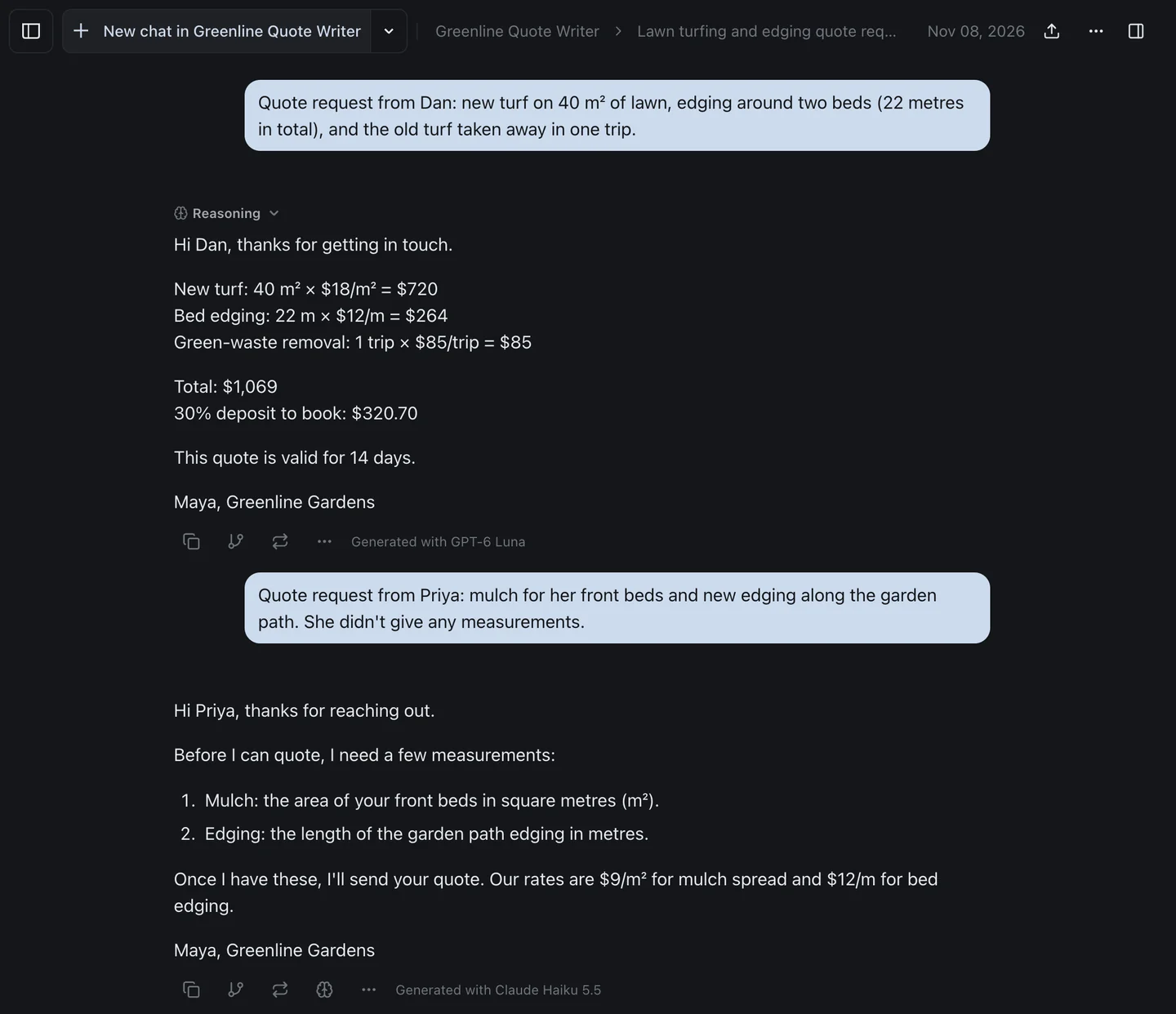
To test it, I wrote the kind of GPT a two-person landscaping firm might have built: four rates, a five-step quote format, and one rule about missing measurements. I pasted it into a project and sent two quote requests, each on a free-plan model. GPT-6 Luna got Dan's job right: 40 m² of turf at $18 is $720, 22 metres of edging at $12 is $264, plus $85 for the green waste, so $1,069 with a $320.70 deposit. Then I switched to Claude Haiku 5.5 for Priya, who hadn't given any measurements. Haiku asked for them instead of inventing a price, which is what the instructions say. Same instructions, two companies' models, one project.
The free plan includes GPT-6 Luna, Claude Haiku 5.5, Gemini 3.8 Flash, Grok 4.7 and DeepSeek. The $6 Hobby plan adds every other chat model, including GPT-6.1 Sol, Claude Opus 5.5 and Gemini 4 Argon, and one usage allowance covers all of them. The pricing page has the current allowances. If you've never asked two models the same thing, here's how that works in practice.
The Bottom Line
Custom GPTs stop on 11 December 2026. If you built one, publish your last edits, copy its instructions and files somewhere you control, migrate it, and test the plugin on your real prompts. Custom actions and the GPT's model don't come across, and OpenAI's plan table doesn't include creating plugins on Free. If you only use someone else's GPT, your part is to find the creator's replacement, or to save enough of your chats to rebuild it.
Most GPTs are a page of instructions and a few files. Those move easily, to a ChatGPT project, a Claude project or an izzedo project. The parts that don't move easily are the actions and the habit of running on one model, so start there. And don't move anything into a Gemini Gem. Gems stop working on 17 November, before GPTs do, and Google deletes them on 17 December.
Moving a custom GPT? Paste its instructions into a project and run them on GPT, Claude or Gemini with izzedo chat's free plan, no credit card required.
Topics
- custom gpts retired
- custom gpt retirement
- custom gpts
- chatgpt plugins
Start on the free plan. Pay when you want the premium models.
Free
$0
Claude Haiku, Gemini Flash, Grok and more, with agent mode and 1,400+ connectors
Hobby
$6/mo
Every chat and image model
Pro
$12/mo
Higher limits, 400k context and more video models
Max
from $50/mo
5x or 10x Pro's usage, and every video model
Frequently asked questions
Are custom GPTs going away?
Yes. OpenAI's help centre says custom GPTs are scheduled to retire on 11 December 2026, on every ChatGPT plan, though a few Enterprise workspaces get until 11 February 2027. After that date, custom GPTs and their GPT pages become inaccessible. OpenAI is replacing them with plugins, and the creator of a GPT can migrate it into a plugin when the Migrate to plugin option appears in My GPTs.
When exactly do custom GPTs stop working?
The standard retirement date is 11 December 2026. FedRAMP workspaces and Enterprise workspaces with an approved deferral get until 11 February 2027. Personal accounts on Free, Go, Plus and Pro already can't create or publish new GPTs, and affected Enterprise workspaces stopped creating them on 26 October 2026. Existing GPTs keep working until the retirement date that applies to them.
What happens to my conversations with custom GPTs?
They stay. OpenAI says your existing conversations with custom GPTs remain accessible after retirement and you don't need to do anything to keep them. What goes away is the GPT itself, so you can read an old chat but can't continue it with that GPT. Chats created with a GPT also can't be moved into a ChatGPT project.
Can I still create a custom GPT?
Not on a personal account. OpenAI says new GPT creation and publishing aren't available on Free, Go, Plus or Pro. You can still use existing GPTs and edit the ones you built, if your plan allows editing. In Business, Enterprise and Edu workspaces it depends on the workspace, and affected Enterprise workspaces stopped creating GPTs on 26 October 2026. For new reusable setups OpenAI points to Plugin Creator, and its plan table lists creating plugins on Go and up.
What replaces custom GPTs?
Plugins. A plugin can hold skills, which are reusable instructions, plus connected apps. When you migrate a GPT, its instructions become a skill, its knowledge files become the plugin's reference files and its connected apps come along as apps. ChatGPT uses an installed plugin when your request matches it, or when you mention it with @. ChatGPT projects are the other option inside ChatGPT, since they hold instructions and files on every plan.
Does everything in my GPT transfer to the plugin?
No. Custom actions, the connections a GPT made to outside APIs, don't transfer, and OpenAI says rebuilding one may need a custom MCP server. The GPT's selected model doesn't carry over either. Migration uses the last published version, so drafts are left behind, and the new plugin starts private, so the people who used your GPT don't get it automatically. After migration the original GPT is read-only until it retires.
Can I migrate a custom GPT on ChatGPT Free?
Probably not. OpenAI's plan table lists creating and sharing plugins as No on Free and Yes on Go, Plus and Pro, and its FAQ says migration and plugin access vary by account. A Free account can still rebuild a GPT as a ChatGPT project, which holds instructions and up to five files on Free. Or copy the instructions into another tool before 11 December.
Are Gemini Gems being retired too?
Yes, and sooner. Google's help centre says Gems on personal accounts for people 18 and over become read-only on 17 November 2026 and are removed on 17 December 2026. Google turns each Gem into a skill automatically, but skills have a 100 MB total file limit and some file types don't carry over. Workspace business accounts follow in March 2027 and education accounts in June 2027.