How to Use AI for Studying: Make It Quiz You Before It Tells You
AI makes the study habits that feel productive effortless, and those are the ones the research rates lowest. Here's a six-step method built on the studies, what every vendor's study mode actually does, and the one thing none of them schedules for you.
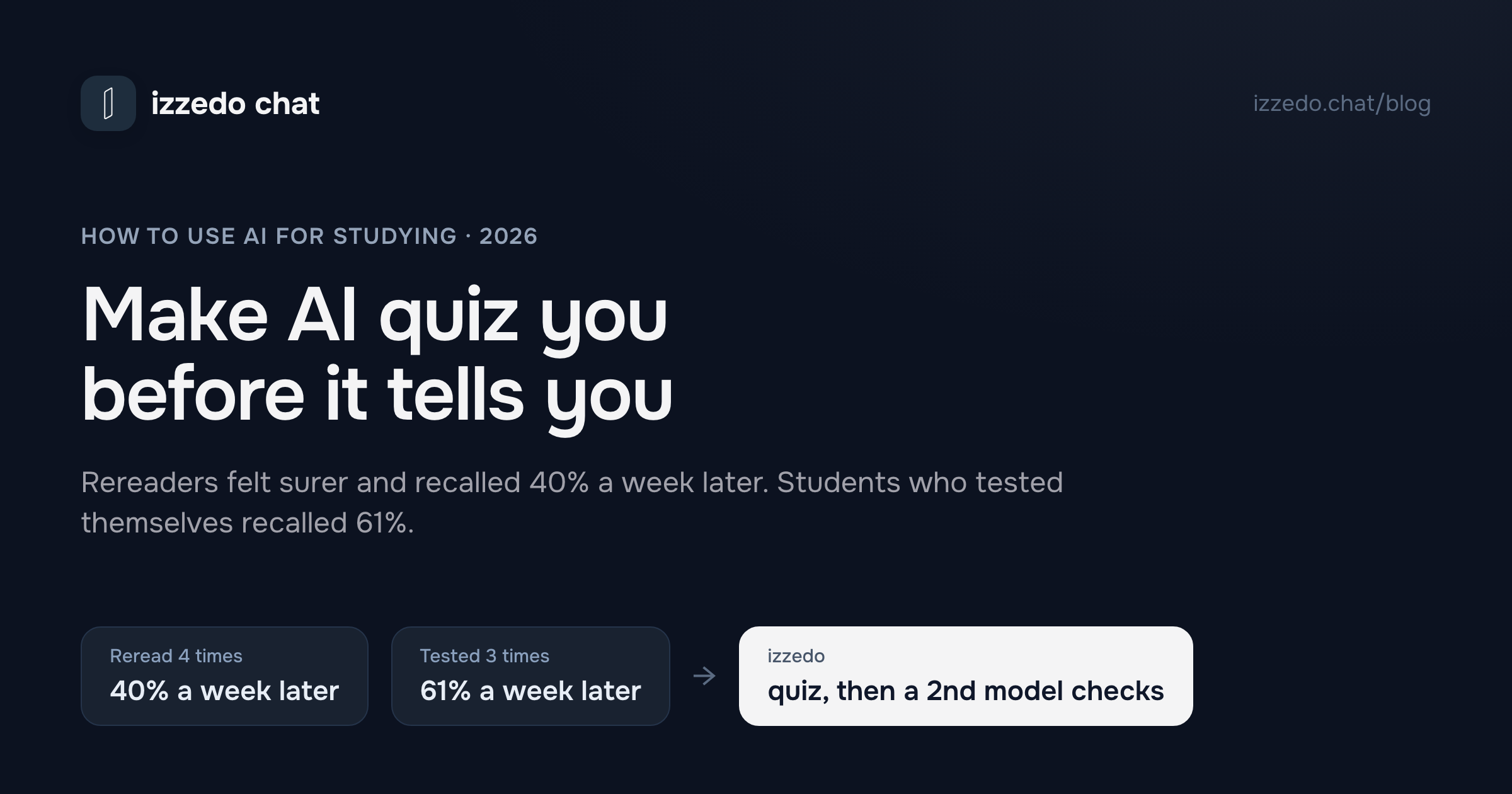
In a 2006 experiment, students who read a passage four times were more confident they would remember it than students who read it once and then tested themselves three times. A week later the rereaders recalled 40% of it. The testers recalled 61%.
That result is twenty years old, and two large meta-analyses have backed it up since. It matters more now than it did then, because AI has made the habits that feel like studying free. Summarize this chapter. Explain that again. Rewrite my notes so they make sense. Each one feels productive, and each one is a version of rereading.
Every major AI company now ships a study feature. OpenAI has study mode, quizzes and flashcards. Google has Guided Learning and the notebook tool that used to be called NotebookLM. Anthropic built a learning mode for Claude. They're useful, but the research says the button matters less than what you do with it. Below is the method I'd use, built on what the studies actually found, then what each vendor's study feature does and where it stops.
The Short Answer
Use AI to make you remember, not to remember for you. In practice that's six defaults, set once per course:
- Put the course in one place. Notes, readings, slides exported to PDF.
- Give the AI one standing rule: ask before you tell. It quizzes you first and holds the answer until you've tried.
- Quiz first, in short answers. Answering from memory beats multiple choice.
- Explain it back. Every missed answer gets restated in your own words.
- Come back in one to three days. None of the study tools I checked schedules this for you, so your calendar has to.
- Check the answer key with a different model. The model that wrote the quiz can be wrong about it.
Why the Default Way of Using AI Teaches You Less
The most useful single paper on study techniques is a 2013 review by John Dunlosky and four colleagues in Psychological Science in the Public Interest. They rated ten common techniques by the strength of the evidence behind them. Two came out high: practice testing, and distributed practice, which means spreading study sessions out. Five came out low, and they are summarization, highlighting, the keyword mnemonic, imagery for text, and rereading. The authors' advice fits in a parenthesis: "practice testing instead of rereading."
Now line that list up against what you usually ask a chatbot for. The middle column is my mapping. The ratings are the review's.
| What you ask the AI for | What it amounts to | How the 2013 review rated it |
|---|---|---|
| "Summarize this chapter" | Summarization | Low |
| "Explain it again" | Rereading, in new words | Low |
| "Rewrite my notes more clearly" | Summarization again | Low |
| "Quiz me on this" | Practice testing | High |
| "Ask me again on Thursday" | Distributed practice | High |
| "Make me explain it in my own words" | Self-explanation | Moderate |
The requests people make by default are the low-rated ones. The high-rated techniques only happen if you ask for them.
Two recent trials with university students show what happens when you don't. In the first, 117 students revising essays were randomly given ChatGPT, a human expert, a writing-analytics tool or nothing. The ChatGPT group improved their essays the most, and their "knowledge gain and transfer were not significantly different" from anyone else's. The researchers called the pattern "metacognitive laziness". In the second, 91 university students researched a science question with either ChatGPT or ordinary web search. The ChatGPT group reported a lower mental load and produced "lower-quality reasoning and argumentation".
Neither study says AI is bad for learning. Both say the easiest way to use it gets you better work and no extra learning, and that you won't feel the difference while it's happening. That's the rereading result again. The students who reread four times felt more confident, and they were wrong.
What a Good AI Tutor Actually Does
The research also has a case where AI worked very well, and the details matter more than the headline.
In a Harvard physics course in 2023, researchers ran a crossover trial with 194 students, comparing an AI tutor against the course's own active-learning classes, which were already good teaching. With the tutor, median learning gains were more than double the classroom's, and 70% of students finished in under an hour. That gets quoted as "AI tutors double learning". The paper says something narrower. The team found that "a system prompt could not reliably provide enough structure to scaffold problems with multiple parts", so their platform fed the problems in sequence and the prompts carried step-by-step answers written by the instructors. The AI that won had been told exactly when to hold back.
Two meta-analyses describe what holding back should look like. One, from 2014, found that recall tests produce bigger learning benefits than recognition tests. A question you have to answer from memory beats a multiple-choice question you can recognize your way through. The other, from 2018, pooled 64 research reports on self-explanation, which means explaining material in your own words, and found an average effect of g = 0.55. Then it recommended that future research "explore computer-generation of self-explanation prompts." A chatbot can do that job today if you tell it to.
So a good AI tutor does four things. It asks before it tells, it asks for answers from memory, it makes you explain, and it brings the material back later. The method below sets up all four.
The Method: Six Defaults to Set Once per Course
1. Put the Course in One Place
Every tool in this post works better when it's reading your materials instead of the internet's idea of your course. That means lecture notes, the assigned readings and the learning outcomes from the syllabus. Most assistants take PDFs and Word files. Not all of them take PowerPoint, so export slide decks to PDF first.
Gemini Notebook, the Google tool formerly called NotebookLM, is built around this idea, and Google says its answers are always "grounded in the information you provide." In a general assistant the equivalent is one project per course, with the files attached to it.
2. Give It One Standing Rule: Ask Before You Tell
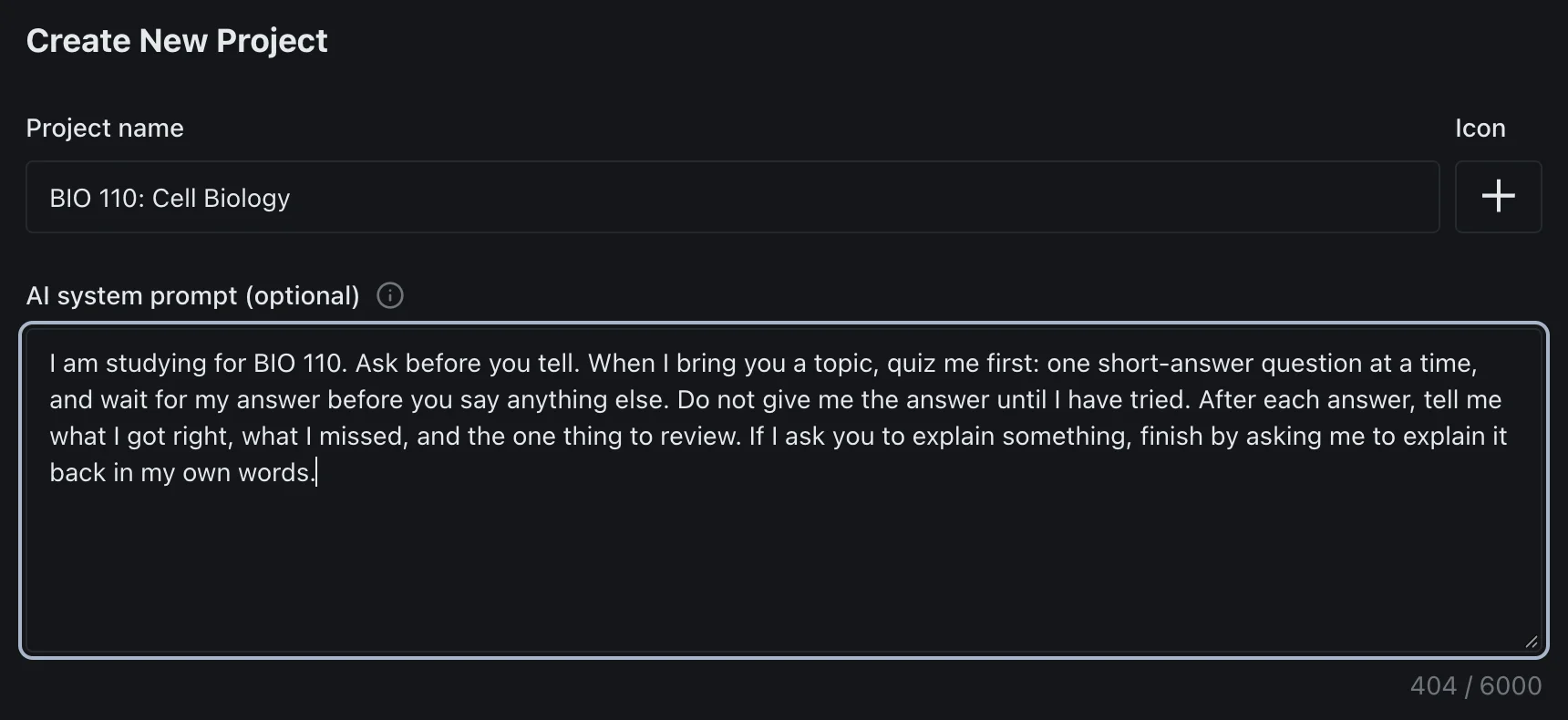
This is the step that turns a chatbot into a tutor, and it's one paragraph. Here's the one I used for the screenshots in this post:
I am studying for BIO 110. Ask before you tell. When I bring you a topic, quiz me first: one short-answer question at a time, and wait for my answer before you say anything else. Do not give me the answer until I have tried. After each answer, tell me what I got right, what I missed, and the one thing to review. If I ask you to explain something, finish by asking me to explain it back in my own words.
Put it somewhere it applies to every conversation for that course, rather than pasting it into each chat. In ChatGPT the natural home is a project's instructions, and that's where it runs into a conflict. OpenAI's help centre says study mode, its built-in tutor setting, "is not available in Temporary Chats, GPTs, or Projects." So in ChatGPT you choose between the course folder and the tutor mode. You can't have both, which is the best argument for writing the rule yourself. It takes two minutes and it works in any project.
3. Quiz First, in Short Answers
Start every session with questions, before any explanation. Ask for questions you answer from memory rather than multiple choice, because recall beats recognition. Take them one at a time so the next question can't give away the last answer.
The feedback format in the rule matters too. "What you got right, what you missed, and the one thing to review" leaves you with a short list to come back to, and step 5 needs that list.
4. Explain It Back
When you miss one, don't just read the correction. Have the model hold the answer while you restate the idea in your own words, then ask it what your version gets wrong. That's self-explanation, the g = 0.55 technique, and it's the step most students skip because it's slow. It's supposed to be slow. That's where the learning happens.
5. Come Back in One to Three Days
Spacing is the other high-rated technique, and the numbers on it are specific. A 2008 study of more than 1,350 people found that the best gap between study sessions was about 20% to 40% of the time left before the test when the test was a week away, falling to 5% to 10% when it was a year away. For an exam seven days out, that puts the second session roughly one and a half to three days after the first. That arithmetic is mine. The percentages are the study's.
This is where the tools leave you on your own. None of the flashcard or quiz features I read up on from OpenAI or Google tells you when to come back. ChatGPT's flashcards let you mark the cards you know and practise the ones you missed. Gemini Notebook can review "only cards you missed." Neither one sets a date. So put the second session in your calendar before you close the first, and open it with the "one thing to review" list from last time.
6. Check the Answer Key With a Different Model
AI-written quizzes are sometimes wrong, and a wrong answer key is worse than none, because you'll memorise it. OpenAI says as much on its own flashcards help page: "ChatGPT can make mistakes. Check your flashcards against your original notes or study guide, especially before an exam."
Checking against your notes is the right instinct. Having a second model do the first pass is faster, and a model from a different lab reads the key fresh. In the thread below, Claude quizzed me on a set of lecture notes and marked my deliberately wrong answer. I then switched the same thread to GPT and asked it to check Claude's feedback against my notes only. It agreed with the correction and flagged one sentence Claude had added that my notes didn't support.
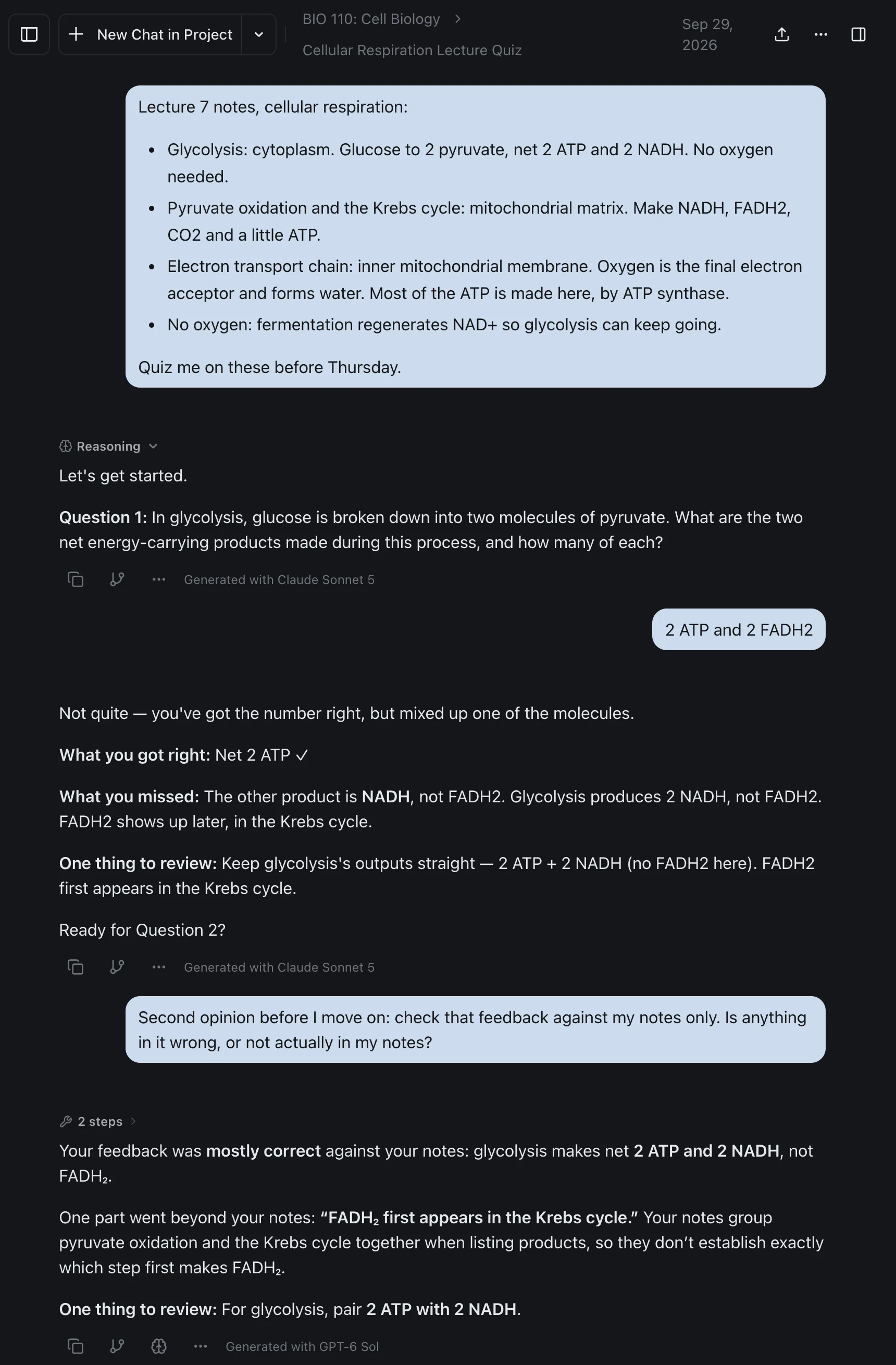
That's the whole check. Same thread, different model, one question. It caught something small here, and when the answer key is the thing you're about to memorise, small matters. (How switching models inside one conversation works is covered step by step here.)
Every Vendor's Study Mode, Checked
I read each of these on the vendor's own pages on 29 September 2026.
| Vendor | What it has | What it does | The catch |
|---|---|---|---|
| ChatGPT | Study mode, quizzes, flashcards | Study mode gives "step by step guidance instead of quick answers" on every plan and every model. Quizzes arrived in August 2026 and flashcards in September 2026, both on every plan | Study mode is switched off inside Projects, custom GPTs and Temporary Chats |
| Claude | Learning mode | Launched in April 2025 with Claude for Education, inside Projects, to guide "students' reasoning process rather than providing answers" | In mid-2026 Anthropic's help centre said the Learning style would continue as a skill you install, and skills need code execution switched on. That article has since been taken down, so check the Customize menu in your own account |
| Gemini | Guided Learning, quizzes, flashcards, study guides | Guided Learning is built on Google's learning-tuned models and sits under More tools. Quizzes and flashcards open in Canvas | The flashcards have no review schedule |
| Gemini Notebook (formerly NotebookLM) | Source-grounded chat, flashcards, quizzes, audio overviews | Answers only from the sources you add, offers a "Learning Guide" chat style, and can limit a flashcard review to the cards you missed | Limits have been compute-based since 2 September 2026, refreshing every five hours up to a weekly cap, and Google's own help pages disagree on the counts |
| Perplexity | Learn Mode | Explains answers in detail and generates flashcards, quizzes and free-response exercises, with progress tracking | Perplexity's help article says the Learn Mode toggle is for verified students |
| Grok | Nothing study-specific | I found no study mode, quiz or flashcard feature in xAI's product docs or announcements | Use it with the standing rule from step 2, like any other model |
Study mode doesn't buy you more usage either. OpenAI says it "does not add extra messages, bypass rate limits, or make unavailable models available", so ChatGPT's normal caps still apply.
Two things stand out in that table. Every vendor has arrived at the idea the research supports, that a tutor should hold the answer back. And after testing, the two things the research rates most useful, spacing and self-explanation, are the parts every feature leaves to you. That's why the method works with any of them.
The vendors know what they're up against. When Anthropic analysed 574,740 academic conversations from university accounts in 2025, it found that nearly half were "Direct", with students "seeking answers or content with minimal engagement." The study modes exist because that's what most students do by default.
Do You Need a Separate AI Study App?
Dedicated study apps market themselves as AI study tools that are better than ChatGPT, and the core of the pitch is turning your notes into quizzes and flashcards. In 2026 the general assistants do that too, much of it for free. ChatGPT's study mode, quizzes and flashcards are on every plan. Gemini's Guided Learning needs only a signed-in Google account. Gemini Notebook has a free tier.
So the free AI study tools you already have cover the mechanics. What neither the apps nor the assistants do is the method: asking for recall instead of recognition, making you explain, and bringing the material back on a schedule. A dedicated app could still be worth paying for if it handles spacing properly, because that's the one thing the big assistants don't do. Check that before you pay, and check what student discounts exist before you pay anyone.
Where izzedo Fits
The screenshots in this post come from izzedo chat, and it's the setup I'd recommend if you want more than one model involved. Each course gets a project, and the project's system prompt is where the standing rule from step 2 lives. It applies to every chat in the project and to whichever model you switch to, so the rule doesn't reset when you move from Claude to GPT to Gemini. Projects and system prompts are on the free plan.
Step 6 is where having several models pays off. The quiz thread above is one conversation, Claude quizzing and GPT checking, with nothing copied between apps. On paid plans the project also gets a knowledge base, so a full course reader can sit behind every chat instead of being re-uploaded each time. Slides need exporting to PDF first.
Paid plans start at $6 a month for ChatGPT, Claude, Gemini, Grok, DeepSeek and more, and the free plan needs no card. If you're weighing that against one vendor's $20 plan, the student version of that maths is here.
Using AI to Study Without Crossing the Line
Everything above uses AI to test what you know, which is about as safe as AI use in a course gets. Handing in its output as your work is a different matter, and the rules vary by course and by vendor. Anthropic's usage policy, for one, prohibits submitting AI-assisted work without proper permission or attribution. Check your syllabus first. I went through what each vendor's rules say about coursework in Claude vs Grok vs Gemini for school, and where the line between a study aid and a ghostwriter sits in the best AI for college students.
The Bottom Line
How to use AI for studying comes down to who does the remembering. If the AI does it, you get cleaner notes and a better essay and learn about as much as you would have without it. If it makes you do it, it's the most patient tutor you'll ever have, and the research on testing, spacing and self-explanation is on your side.
So set the rule once per course. Quiz before you review, explain what you miss, come back in a couple of days, and let a second model check the key. Which assistant you use matters less than that. For subject-specific picks, the best AI for writing essays and the best AI for math go further.
Want a tutor that asks before it tells, with a second model one click away to check it? Try izzedo chat free. No credit card required.
Frequently asked questions
How do I use AI to study for exams?
Give it your own notes and ask it to quiz you with short-answer questions, one at a time, before it explains anything. Restate every missed answer in your own words, come back to the same material one to three days later, and have a second model check any answer key before you trust it. Practice testing and spaced practice are the two techniques a major 2013 review of study methods rated highest.
What is the best AI for studying?
The method matters more than the model. ChatGPT, Gemini and Gemini Notebook (formerly NotebookLM) all make quizzes and flashcards from your notes, and ChatGPT and Claude both have tutor-style modes that hold the answer back. Pick the one that accepts your course materials, set it to ask before it tells, and check its answer keys with a second model.
Does ChatGPT have a study mode?
Yes. Study mode is on every ChatGPT plan and model, and you turn it on by typing @study or choosing Study from the + menu. OpenAI's help centre says it isn't available in Projects, custom GPTs or Temporary Chats, and that it doesn't bypass rate limits. ChatGPT also added quizzes in August 2026 and flashcards in September 2026.
Is NotebookLM still available?
Yes, under a new name. Google renamed NotebookLM to Gemini Notebook in July 2026 and says existing notebooks are unchanged. It still answers only from the sources you add and makes flashcards and quizzes from them. Since 2 September 2026 its usage limits are compute-based, refreshing every five hours up to a weekly cap.
Does using AI to study make you learn less?
It can. In a randomised trial with 117 university students, the group revising essays with ChatGPT improved their essays the most but gained no more knowledge than the other groups. A study of 91 university students found that ChatGPT users felt less mental strain than students using web search and reasoned worse. The fix those studies point to is making the AI ask you questions instead of handing you answers.
Can AI make flashcards from my notes?
Yes. ChatGPT's flashcards are on every plan, and Gemini and Gemini Notebook make them too. Check the cards against your notes, since OpenAI's own help article warns that ChatGPT can make mistakes in them. None of these tools tells you when to review the cards again, so put the next session in your calendar yourself.
Ready to try multi-model AI workflows?
Access GPT, Claude, Gemini, Perplexity, and more — all in one place.
Start for Free →