The Best AI Video Generator in 2026: The Famous Names Rank Low, and the Free Plans Come With Conditions
Arena puts Google's Gemini Omni first, Artificial Analysis puts Alibaba's Wan 3.0 first, and both rank Veo 3.1 and Runway well below. For a small business the free plan, the watermark, the clip length and the terms matter more. Plus one product photo animated by six models.
A small business wants video for a few plain jobs. A 10-second Reel of a new product. A short ad. Someone talking to camera about the shop. If you last looked at AI video a year ago, the names you know are probably Sora, Veo and Runway. Sora has closed, and the other two now sit well down both of the rankings people check.
The rankings don't agree on who's first, though. One puts a Google model on top, the other an Alibaba one, and neither tells you what a small business needs to know before it pays. Is there a free plan you can actually use for business? Does it put a watermark on the clip? How long can a clip be? And does your product's label come out the way it went in?
Everything below comes from the two leaderboards and each company's own pricing, help and terms pages, read on 26 November 2026. That afternoon I also handed one product photo to six video models, and their clips are near the end.
Quick Picks by Job
| Your job | Tool | The catch | Paid plans from |
|---|---|---|---|
| Free clips most days | Google Flow | The free credits cover one 10-second clip a day at 720p, and free users may be shut out 2 to 5 PM UTC | $4.99 (Google AI Plus) |
| A longer clip from your product photo | Kling 4.0 | Videos made on the free plan aren't for commercial use | $6.50, then $8.80 (Standard) |
| A clip that goes into a finished design | Canva | Video clips need Pro, run 8 seconds, and Canva publishes no clip count | $18 (Pro) |
| Clips cleared for commercial use | Adobe Firefly | "Safe for commercial use" covers Adobe's own video model, not its partners' | $9.99 (Standard) |
| A presenter talking to camera | HeyGen | Free videos are watermarked and for personal, non-commercial use only | $29 (Creator) |
| Several top models on one plan | Runway | Its own Gen-4.5 ranks far below the Kling and Seedance models it also offers | $15 (Standard) |
Start with Flow's free credits. Pay when you need longer clips, no watermark or a model Flow doesn't have.
What the Video Leaderboards Say
Two sites rank video models by blind votes. Voters watch two clips generated from one prompt, not knowing which model made which, and choose the one they prefer.
They disagree at the top. Arena's text-to-video board, updated 8 November from about 892,000 votes, puts Google's Gemini Omni Flash 1.2 first, 27 points clear of second place. Grok Imagine 1.5 is fourth, ByteDance's Seedance 2.0 and 2.5 fifth and sixth, and Alibaba's Wan 3.0 seventh. Artificial Analysis runs separate boards for video with and without sound. With sound, Wan 3.0 is first of 39, Seedance 2.5 fifth and Gemini Omni Flash 1.2 sixth. Without sound, HeyGen's own model, HeyGen Video 1, is first. Grok Imagine 1.5 is only 20th there.
They agree further down. Veo 3.1 is 30th of 39 on Artificial Analysis's board with sound, and 14th of 50 on Arena, one place below Sora 2 Pro, a model OpenAI has already shut down. Runway's Gen-4.5 is 29th on Arena. It isn't on Artificial Analysis's board with sound at all and is 36th of 44 without. Google has moved on too: Omni replaced Veo in the Gemini app, and Google Flow retires Veo 3.1 Fast and Veo 3.1 Quality on 5 December.
Price doesn't follow rank either. Artificial Analysis lists what a minute of video costs on each maker's own API. HeyGen Video 1 costs $2.40 a minute and is in the top ten with and without sound. Seedance 2.5 costs $34.12 a minute and ranks fifth. Veo 3.1 costs $24 a minute with sound and ranks 30th.
The boards leave three things out.
They test models, not apps. The boards rate each model at the settings they chose to test, and an app can give you less. Flow's free plan caps Gemini Omni at 10 seconds, and xAI's help pages say Grok's 720p video "automatically" falls back to 480p once you hit your plan's cap.
Many top names are one model. MiniMax released its H3 model's weights in August, so other companies can build on it. Six of the top fifteen on Artificial Analysis's board with sound are H3 or built on it, HeyGen Video 1 among them. Some, such as Utopai X in second place, have no public API you could buy.
They don't check your product. Voters judge the whole clip. Nobody checks whether the words on your label are still spelled right in the last frame, which is the first thing a customer reads.
The Best AI Video Generators, by Job
Google Flow and Gemini, for free clips
The Gemini app makes video with Gemini Omni 1.2 Flash, the model at the top of Arena's board. It needs a Google AI plan. AI Plus at $4.99 a month is the cheapest, with clips of 3 to 10 seconds, or 15 on AI Ultra. You can start from up to five of your own images, and you can ask for sound. If you're 18 or over, Gemini's History and the setting that lets Google train on your chats and attachments are both on from the start.
The free route is Google Flow, Google's video studio. "With or without a subscription, you receive 50 Google Flow credits per day." Google's subscription page mentions only images for free Flow users, but Flow's own help pages and plan list give free accounts video too. Gemini Omni at 720p costs 3 credits a second for clips up to 10 seconds, so a 10-second clip costs 30 credits, and unused credits don't carry over. The free plan also gets Veo 3.1 Lite at 10 credits a clip. Google warns that "during peak hours, roughly 2 PM to 5 PM UTC, you may not be able to generate videos without a subscription." Paying adds credits, with 200 a month on AI Plus and 1,000 on AI Pro, plus clips up to 15 seconds and free upscaling to 1080p for clips up to 10 seconds.
Everything Flow makes carries Google's invisible SynthID mark. You can switch the visible watermark off unless you're in India, South Korea or Vietnam. Google's terms say it "won't claim ownership over that content".
If your video goes to YouTube anyway, Shorts has the same model for free. The Create Video tool in the YouTube app and YouTube Create makes Omni clips up to 10 seconds, labelled as altered or synthetic. It isn't available in the European Economic Area, and in Shorts it needs your device language set to English.
Kling, for longer clips from a photo
Kling 4.0 became available to everyone on 15 October. It makes clips of 3 to 30 seconds, at 720p, 1080p or 4K, with stereo sound, from text or from your own photos. On Artificial Analysis it's 11th from text with sound and sixth when animating an image.
The free plan has monthly credits when you log in, and Kling doesn't say how many. Its credit guide says that on the free plan "generated content is not for commercial use", and its terms ask free users to keep Kling's brand and logo on what they make. Standard is $6.50 a month for three months in the current sale, then $8.80, with 660 credits. Paid members' commercial use "is not restricted", except to build a rival product. Kling's terms let it use what you upload to train its models unless you email support to stop it.
Seedance, Wan and Hailuo: top-ranked and cheap
These three models rank near the top of both boards, and the apps that sell them are cheap. Their terms are the part to read.
Seedance 2.5 is ByteDance's model, second on Artificial Analysis for animating an image with sound and the top-ranked model on its retail and ecommerce board for the same job, though Kling 4.0 scores slightly higher there on too few votes to be ranked. It makes clips up to 30 seconds. In ByteDance's Dreamina app, a beta long-video mode extends them to 180 seconds, and free US accounts get 120 credits a day. Dreamina's free-plan guide says they cover the older Seedance 2.0, while its Seedance 2.5 page says they let you try 2.5. Downloads carry a watermark until you pay, from $15 a month on Basic. The terms say you own what you upload and what you make, but you also give ByteDance "and other users of the Platform" a licence to use it "for any purpose". The same terms, for free and paid users alike, call the service "generally provided for private, non-commercial use", while the Seedance 2.5 page pitches it for ads. I wouldn't put an unreleased product through it.
Wan 3.0 is Alibaba's, first on Artificial Analysis's board with sound. The free plan on create.wan.video has daily check-in credits and watermarked downloads, and 1080p and clips of 10 to 30 seconds are only on paid plans. Pro costs $6.50 a month, or $5 a month paid yearly, for 300 credits, which Wan says covers up to 60 videos. Alibaba hands you whatever rights it holds in your clips, and its terms let it use content you upload, other than personal data, to develop its AI.
Hailuo runs MiniMax's own H3, third on Artificial Analysis with sound. New accounts get one batch of trial credits that expire after three days, and free downloads carry a watermark. Its general terms allow "personal, non-commercial use only", while paid plans add commercial rights. Standard costs $14.99 a month, currently $10.50, for 1,000 credits, which Hailuo says is about 143 seconds of H3 at 768p.
Runway, for one plan with many models
Runway's own model is still Gen-4.5, from December 2025. It makes clips of 2 to 10 seconds at 720p, at 12 credits a second. The free plan gives 125 credits once, for a limited set of models that doesn't include Gen-4.5, and every free video carries a Runway watermark. Standard costs $15 a month, or $12 paid yearly, for 625 credits, which Runway says is 52 seconds of Gen-4.5.
The better reason to pay Runway is the other models in the same app, Kling 4.0 and Seedance 2.5 among them. They cost more credits. At 720p, Kling 4.0 is 16 credits a second and Seedance 2.5 is 30, so Standard's 625 credits buy 39 seconds of Kling or 20 of Seedance.
Runway's help centre says what you make is "yours to use without any non-commercial restrictions", and uploads are private by default. Its terms, updated 23 October, also say your inputs and outputs "may be used by the Company to train" its models.
Canva, when the clip goes into a design
Canva's Create a Video Clip is "powered by Google's Veo-3". It makes 8-second clips with sound, or 6-second ones without, one per prompt. It's only on Pro, Business, Enterprise and Nonprofit, as "a limited number of cinematic video clips per month", and Canva doesn't publish the number. When the allowance runs out, you wait for the monthly reset or buy Canva's AI Pass add-on. Pro costs $18 a month or $144 a year. The free plan can turn a photo into a 5-second clip without sound.
Canva earns its place after the clip exists. You can put it in a design, add your logo, captions and music, and cut several clips into one ad. Canva's AI terms allow any lawful use of what you generate, "at your own risk", and its feature page warns that "you may not have exclusive rights" to it.
Adobe Firefly, when a client asks about rights
Firefly has Adobe's own Firefly Video Model plus partner models in the same app, including Gemini Omni Flash 1.2, Veo 3.1, Kling 4.0 Omni, Seedance 2.5 and Runway Gen-4.5. Free accounts get a "limited" number of image and video generations each day.
Standard costs $9.99 a month for 2,000 credits, which Adobe says makes "up to 400 images and 20 five-second videos". Until 6 December, Pro costs the same $9.99 for its first six months, with 4,000 credits. Check the resolution behind those numbers. Adobe's credits page charges its own video model 100 credits a second at 1080p, 50 at 720p and 20 at 540p. The 20 clips hold at 540p. At 1080p the same credits make four.
Adobe's pitch is one sentence: "Outputs from Adobe Firefly AI models are safe for commercial use." That covers Adobe's own models only. For Kling, Seedance, Veo and the other partners, the same page leaves it to you to decide whether their output suits your project. Adobe says it never trains on your content, and it marks files with Content Credentials, not a visible watermark. Its own video model isn't on either leaderboard.
HeyGen and Synthesia, for a presenter
If the video is a person talking to camera, you want an avatar tool, not a clip model.
HeyGen's free plan makes three videos a month of up to a minute each, watermarked, and its help centre says one to three depending on your region. The terms limit free output to "personal, non-commercial, and internal evaluation purposes", which rules out ads and client work. Creator costs $29 a month, or $24 paid yearly, and removes the branding. To make an avatar of yourself you record a short consent video first.
Synthesia's free Basic plan gives 10 minutes of video a month with nine stock avatars and a watermark, and you can share the videos by link but not download them. Starter costs $29 a month, or $18 a month paid yearly. Read its licence before you run ads. Stock avatars can't be used "in any form of paid promotion", including paid Facebook, Instagram, YouTube and TikTok ads. That rule doesn't apply to a custom avatar of yourself.
Grok, Meta AI and ChatGPT
Grok Imagine 1.5 is fourth on Arena and 20th on Artificial Analysis. Video starts on xAI's $30 Premium plan, with nothing on Free or the $8 Plus plan. Every clip carries a Grok watermark, and xAI's FAQ says you can't turn it off. Grok's limits has the caps.
Meta AI makes videos for free and shares them through its Vibes feed, and Meta's Muse Video is tenth on Arena. Posts on Vibes are public, show up in search, and other people can remix them. Meta's AI terms don't say who owns what you make.
ChatGPT doesn't make video. OpenAI closed the Sora app on 26 April and the Sora API on 24 September, and ChatGPT's plan table has no video-generation row. Sora alternatives covers what replaced it.
The Best Free AI Video Generator
Free plans differ less in picture quality than in what they let you do with the clip.
| Free option | How much | Watermark | Business use, per the terms |
|---|---|---|---|
| Google Flow | 50 credits a day, one 10-second Omni clip at 720p | Invisible; the visible one can be switched off in most countries | Google won't claim ownership |
| YouTube Shorts | Omni clips up to 10 seconds, no published limit | Labelled as altered or synthetic | Not stated; made for Shorts |
| Dreamina | 120 credits a day in the US | Dreamina watermark | "Generally provided for private, non-commercial use" |
| Kling | Monthly login credits, no number published | Kling's brand and logo | "Not for commercial use" |
| Runway | 125 credits once; Gen-4.5 needs Standard | Runway watermark | No non-commercial restriction |
| HeyGen | 3 presenter videos a month, up to a minute each | HeyGen watermark | Personal, non-commercial use only |
| Meta AI | No published limit | Not stated | Not stated, and posts are public |
The Gemini app, ChatGPT and Grok have no free video at all.
Flow is the best free pick by some distance. It runs the model at the top of Arena's board, gives enough credits for a clip a day, and its terms let you use what you make. Runway's terms are fine as well, but its free credits come once and the clips carry its watermark.
Clips Are Short. An Ad Is an Edit.
Every tool above makes one clip at a time, and most clips are short. The Gemini app makes up to 10 seconds, or 15 on AI Ultra, and can extend a clip by another 10. Runway's Gen-4.5 also stops at 10, Grok Imagine at 15, Luma's Ray3.2 makes 5 or 10, and Canva's clips are 8. Kling 4.0, Seedance 2.5 and Wan 3.0 go up to 30 seconds.
So a 30-second ad is either one long clip from those three, or several short ones joined in an editor. Canva and CapCut do that, and so does Adobe's Firefly video editor, which adds voiceover and music. InVideo puts the generators and a timeline in one app. Its help pages say "edits and exports are free" and generation costs credits, from $9 a month on Basic.
Put the words in the editor too. Ask the model for the motion and add your price, offer and small print as text on top. The test below shows why.
I Gave Six Video Models the Same Product Photo
Rankings average thousands of prompts. I wanted one ordinary job. In a single izzedo chat thread I made a product photo for a made-up candle brand with Nano Banana 2.1, an image model on izzedo's free plan. Its label read "LARKSPUR & CO.", "Cedar & Fig" and, in small type, "Hand-poured soy candle · 8 oz". Then I attached that photo and sent six video models the same request: a slow push-in for an Instagram Reel, the flame flickering, a wisp of smoke, "keep the jar, the lid and the label exactly as they are", and quiet room sound with no music. Each model used its default length of 5 or 6 seconds, and I set Grok Imagine to 720p, close to the others' 720p or 768p.
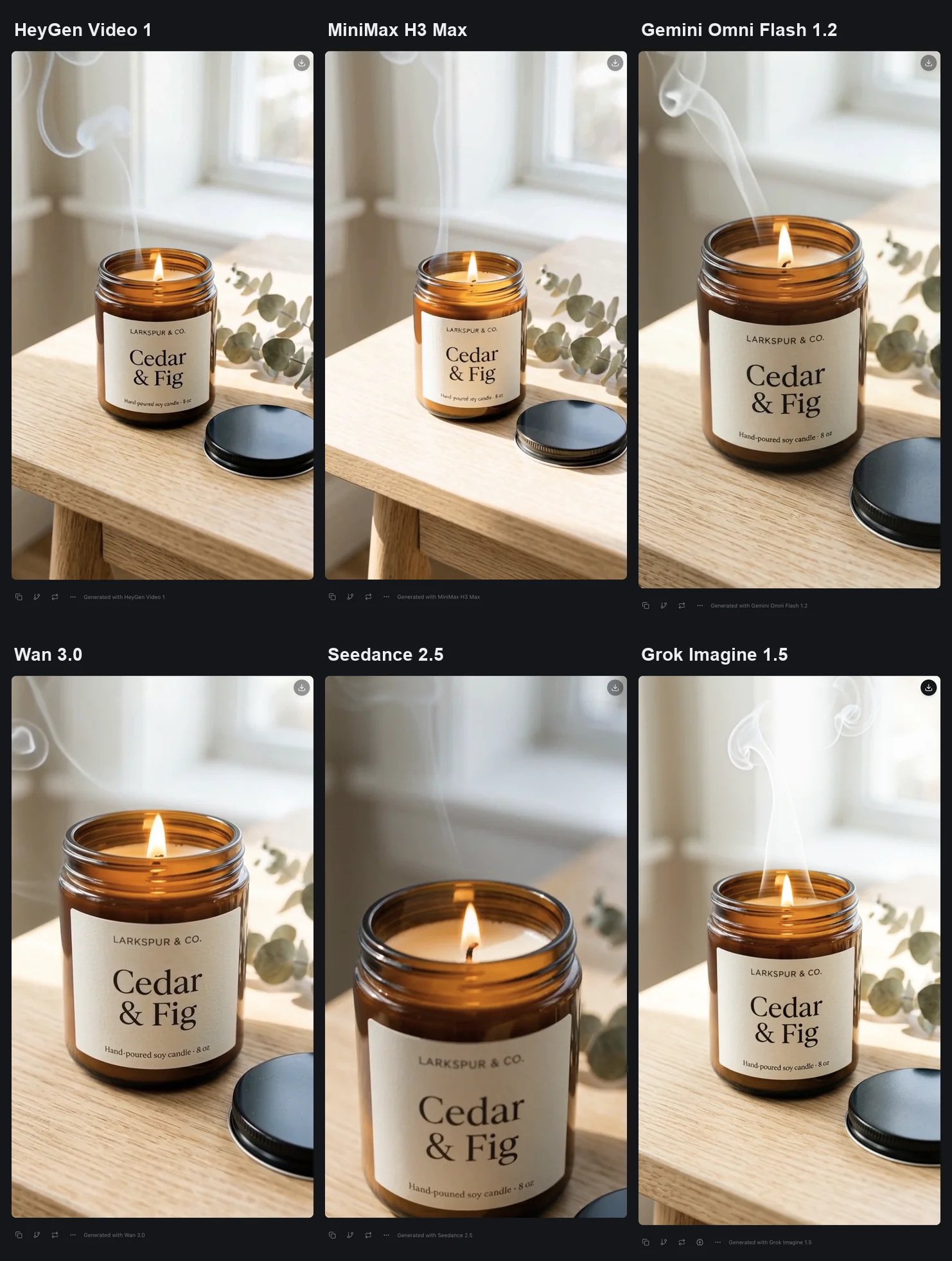
All six kept the jar, the lid and the big words on the label. Four followed the push-in. MiniMax H3 Max kept the camera still and HeyGen Video 1 barely moved it. Every model added smoke.
The small print is where they split.
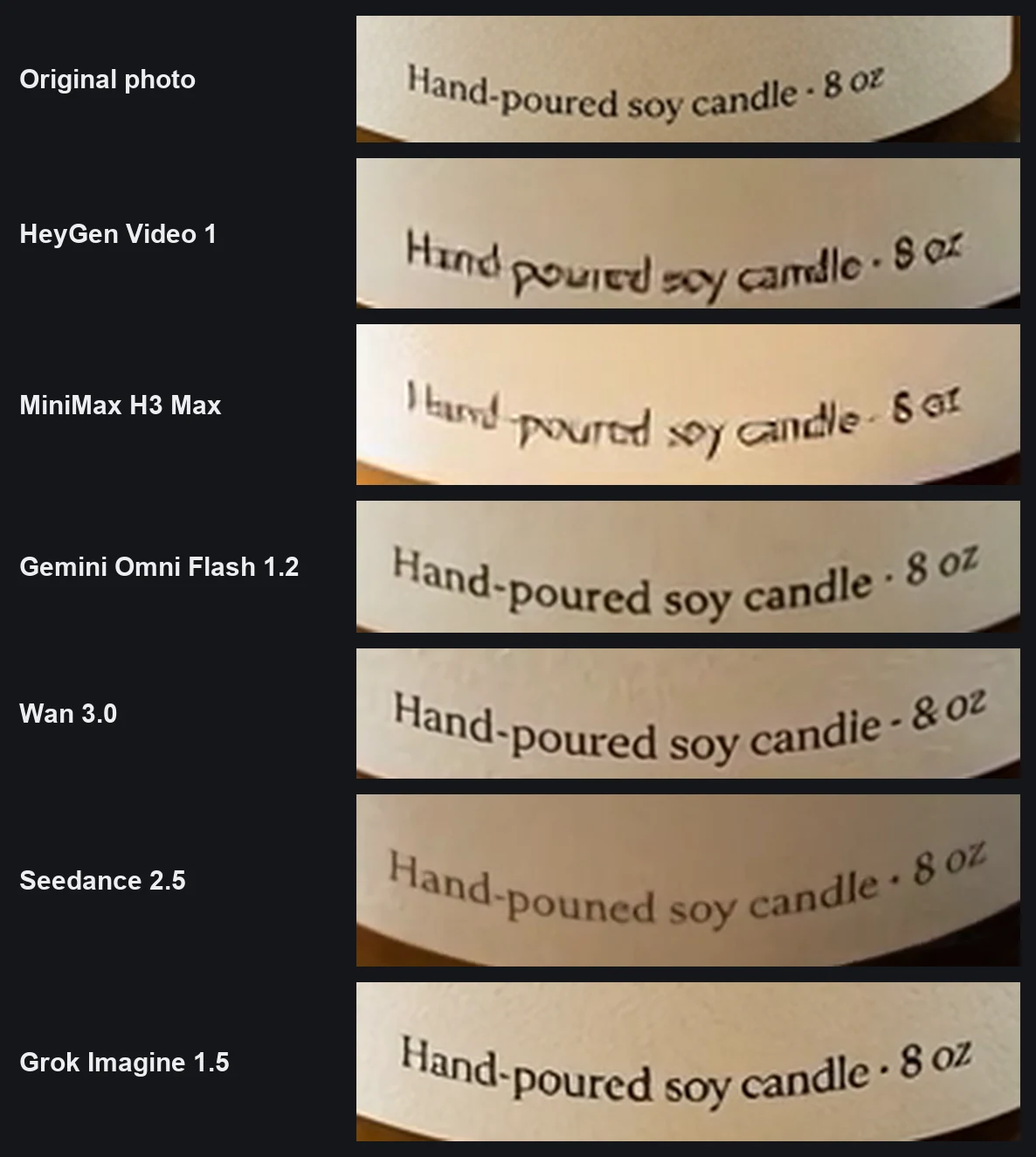
Only Gemini Omni Flash 1.2 and Grok Imagine 1.5 still had "Hand-poured soy candle · 8 oz" right in the last frame. Wan 3.0 turned "candle" into "candie" and the 8 into an ampersand. Seedance 2.5 printed "pouned". HeyGen and MiniMax warped the letters until they looked hand-drawn, and HeyGen's "candle" reads more like "camdle". On a label a customer reads, each of those is a reshoot.
The two that kept it are 18th and 22nd on Artificial Analysis's board for animating an image with sound, and Seedance 2.5, second on that board, is the one that misspelled it. One photo isn't a ranking, and another product might reverse the order. It does show what the rankings can't, so watch every clip to the end before you post it.
Sound and speed differed too. Gemini Omni, Wan and Seedance added room sound you can hear. Grok's was barely there, and HeyGen's and MiniMax's clips came back silent, though I had asked for quiet sound. MiniMax and HeyGen finished in under 40 seconds and Gemini Omni and Grok in about a minute. Wan took about three minutes and Seedance nearly four.
Where izzedo Fits
izzedo chat has six video models in the same picker as its chat models. Gemini Omni Flash 1.2 is first on Arena, Wan 3.0 first on Artificial Analysis's board with sound, and HeyGen Video 1 first on its silent board. Seedance 2.5, MiniMax H3 Max and Grok Imagine 1.5 complete the list. Each makes clips from text or from a photo you attach, 4 to 10 seconds long, and every model but Gemini Omni goes up to 1080p.
MiniMax H3 Max and HeyGen Video 1 come with the $6 Hobby plan. The $12 Pro plan adds Gemini Omni Flash 1.2, Wan 3.0 and Grok Imagine 1.5, and the $50 Max plan adds Seedance 2.5. Turn them on under Settings, Models. The free plan has no video, but it has Nano Banana 2.1 for images, which made the candle photo above.
The test is the way to use it. Attach your product photo, send your prompt, then pick another video model and send it again. Every clip shows which model made it, so you can compare them in one thread and keep the one that got your label right. Video uses more of the plan's allowance than chat. Plan details are on the pricing page, and the guide to using several models at once shows the routine.
The Bottom Line
Which video model is best depends on the ranking you trust. Arena says Google's Gemini Omni, Artificial Analysis says Alibaba's Wan 3.0, and both put Veo 3.1 and Runway's own model well behind. Sora is gone, and ChatGPT makes no video.
For a small business the plan matters more than the model. Start free on Google Flow, which runs Gemini Omni and lets you use what you make. Pay for Kling when you need 30-second clips. Dreamina's Seedance is cheap too, but read its terms first, because they call it non-commercial and give other users a licence to what you make. Use Canva or Adobe Firefly to turn clips into a finished ad, with Adobe's own model when a client wants proof you can use the footage, and HeyGen when you want a presenter. Whatever you use, read the label in the last frame.
These tools change monthly. Kling 4.0 opened to everyone on 15 October and Flow drops two Veo models on 5 December, so date-check whatever you read, including this. For pictures rather than video, see the best AI image generator, and for Veo, Kling and Seedance prices by the second, Veo vs Kling vs Seedance.
Want MiniMax and HeyGen video from $6, and Gemini Omni, Wan and Grok Imagine from $12? Try izzedo chat free, no credit card required.
Topics
- best ai video generator
- best free ai video generator
- what is the best ai video generator
- ai video generator
Frequently asked questions
What is the best AI video generator in 2026?
It depends on the ranking. Arena's text-to-video board puts Google's Gemini Omni Flash 1.2 first. Artificial Analysis puts Alibaba's Wan 3.0 first for video with sound and HeyGen Video 1 first for silent video. Both rank Veo 3.1 and Runway Gen-4.5 well below those. For a small business, start with Google Flow's free daily credits, which run Gemini Omni. Pay for Kling when you need clips up to 30 seconds, Canva or Adobe Firefly when the clip goes into a finished ad, and HeyGen when you want a presenter talking to camera.
What is the best free AI video generator?
Google Flow. Every adult in a supported country gets 50 credits a day, and a 10-second Gemini Omni clip at 720p costs 30 of them. Google warns that free users may not be able to make video between about 2 and 5 PM UTC. Google says it won't claim ownership of what you make, and outside India, South Korea and Vietnam you can switch the visible watermark off. YouTube Shorts also makes free 10-second Omni clips on your phone. Most other free plans watermark your video, and Kling's and HeyGen's don't allow commercial use.
Can ChatGPT make videos?
No. OpenAI closed the Sora app on 26 April 2026 and the Sora API on 24 September 2026. ChatGPT's plan table lists image generation but no video generation on any plan, Pro included.
Is Veo 3 free?
Partly. Google Flow's free daily credits cover Veo 3.1 Lite, at 10 credits for a 4, 6 or 8-second clip at 720p. The Gemini app no longer uses Veo. Google replaced it with Gemini Omni, and video there needs a Google AI plan, from $4.99 a month. Flow retires Veo 3.1 Fast and Veo 3.1 Quality on 5 December 2026.
Can I use AI-generated video for my business?
On most paid plans, yes, but read the free plan's terms first. Kling says content made on its free plan is not for commercial use, and HeyGen's terms limit free output to personal, non-commercial use. Hailuo's general terms allow personal, non-commercial use, and its paid plans add commercial rights. Adobe says output from its own Firefly models is safe for commercial use and leaves partner models to you. Synthesia doesn't allow its stock avatars in any paid promotion, Facebook, Instagram, YouTube and TikTok ads included.
Which AI is best for turning a product photo into a video?
On Artificial Analysis's image-to-video board with sound, Seedance 2.5 is second and Kling 4.0 sixth, and on its retail and ecommerce board the two score about the same. In my test of six models on one candle photo, all six kept the jar and the big label words, but only Gemini Omni Flash 1.2 and Grok Imagine 1.5 kept the small print exactly. Check every frame before you post, and add prices and small text in an editor.
How long can an AI-generated video be?
Most tools make one clip of 5 to 15 seconds. The Gemini app makes 3 to 10 seconds, or 15 on AI Ultra. Runway's Gen-4.5 goes up to 10 seconds and Canva's video clips are 8. Kling 4.0, Seedance 2.5 and Wan 3.0 go up to 30 seconds, Wan only on paid plans. For a longer ad, join clips in an editor such as Canva, CapCut or InVideo.
Can I use several AI video generators in one app?
Yes. izzedo chat has six video models in the same picker as its chat models: Gemini Omni Flash 1.2, Wan 3.0, Seedance 2.5, HeyGen Video 1, MiniMax H3 Max and Grok Imagine 1.5. MiniMax H3 Max and HeyGen Video 1 come with the $6 Hobby plan, Gemini Omni, Wan and Grok Imagine with the $12 Pro plan, and Seedance 2.5 with the $50 Max plan. Attach one product photo, send the same prompt to several models in one chat and keep the best clip.