Gemini Gems Are Going Away: What Happens on November 17
On 17 November 2026, Gems on personal Google accounts stop working and turn into skills. Skills need Keep Activity switched on, hold 100 MB of files and leave Canvas, Deep Research and video behind. Here's what changes, what to save first, and who gets until March.
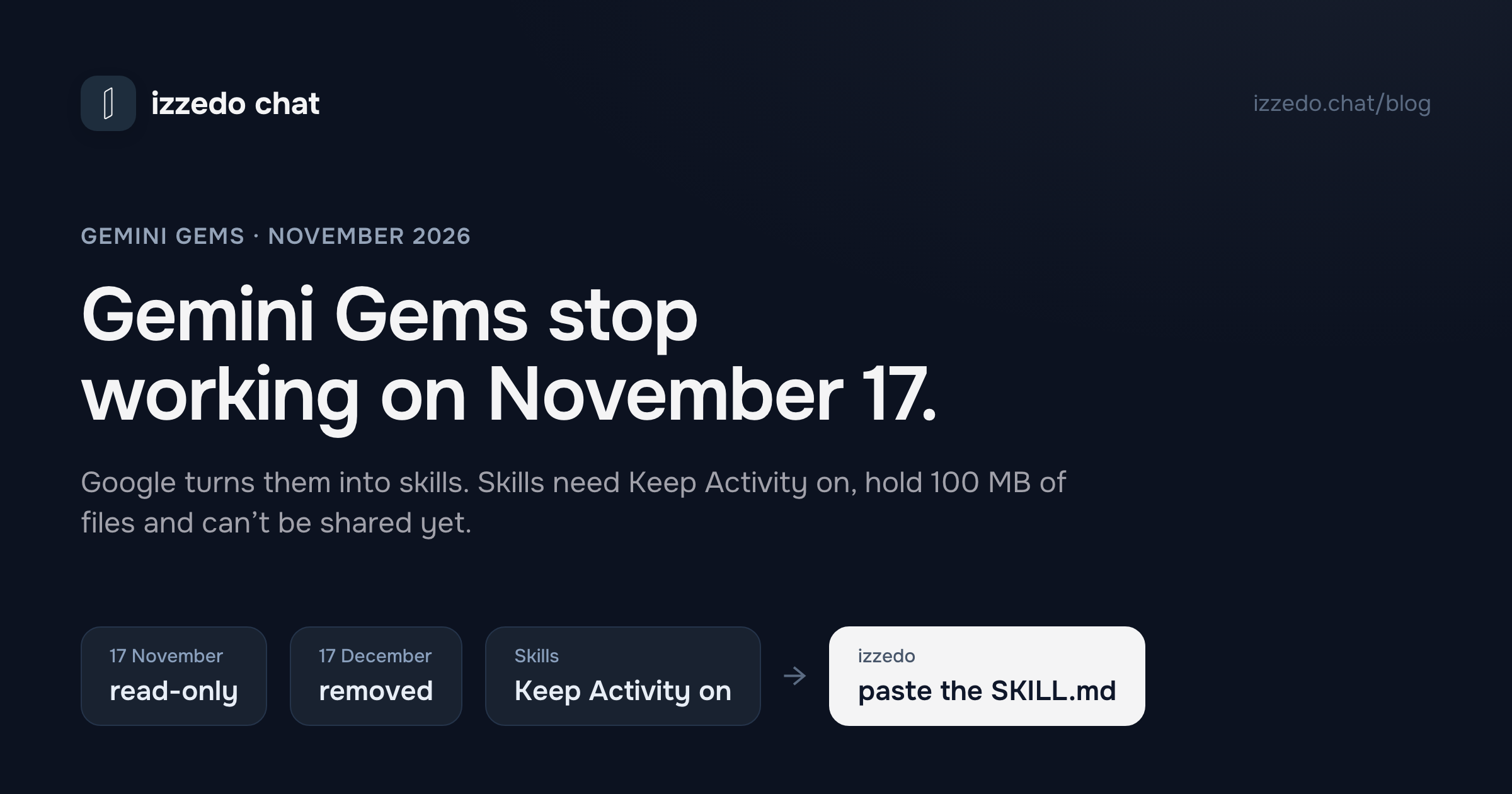
On 17 November 2026, Gemini Gems on personal Google accounts stop working. Google's help centre puts it plainly: Gems "transition to skills and become read only. You can still access your Gems, but can't use or edit them, or create new ones." A month later, on 17 December, Google removes them.
Google will turn each Gem into a skill for you, so for a lot of people this will pass with a banner and nothing else. For others it's a bigger change than the word "transition" suggests. A skill needs a setting a Gem only needed for Drive files, Keep Activity, the one that lets Google learn from your chats. It holds less, it can't use Canvas, Deep Research or video, and you can't share it yet. And if you use Gemini through a work account, none of this happens until March.
I read Google's Gemini help centre, its Workspace admin guide and its privacy hub on 8 November 2026. Here's what changes, what to save while you still can, and where else a Gem can go.
The Short Answer
| Account | What happens to Gems |
|---|---|
| Personal Google account, 18 or over | Read-only from 17 November 2026. Removed on 17 December 2026. Turned into skills automatically. |
| Google Workspace business, enterprise, non-profit | Gems move to Settings on 17 November and keep working. They stop no sooner than 1 March 2027. |
| Google Workspace education | They stop no sooner than 1 June 2027 |
| Gems by Google Labs and Opal | Both go away in November too |
If you rely on a Gem, do two things before 17 November. Copy its instructions somewhere you control. Download its knowledge files, especially audio, video, zip files and old .doc, .xls and .ppt files, which won't move to the skill, and the largest files if they add up to more than 100 MB, because Google drops those first. Then decide whether you're happy to switch Keep Activity on, since skills don't work without it.
What Happens on November 17
From that date a personal account's Gems are frozen. You can open them and read them. You can't chat with them, change them or make new ones. Google's transition FAQ says it will "automatically recreate your Gems as skills" when Gems go away, and on 17 December the Gems themselves are removed: "You'll no longer be able to access your Gems."
Google's own explanation is that skills are more flexible. A Gem was its own chat, which you opened from the sidebar. A skill is a set of instructions that works inside any chat. You call it by typing / and its name (Google says @ is coming), Gemini can apply it on its own when your prompt matches, and you can stack several in one conversation. You can keep up to 100 skills active.
That's a real improvement for some uses. Google's pitch is that you no longer switch to a separate Gem chat, so you can apply your brand voice to a draft already in progress. It's also a different habit. Your skill chats don't get their own list the way a Gem's did. They sit in the main chat history with everything else.
What Moves to a Skill, and What Doesn't
Google lists what carries over and what doesn't in its transition FAQ and its skills article.
| Part of your Gem | As a skill |
|---|---|
| Name, description and instructions | Copied across |
| Knowledge files | Copied, up to 100 MB in total. Over that, "we automatically remove the largest files first." |
| Audio, video, zip and other archives, .doc, .xls, .ppt, GitHub files | Not copied. Download them from the Gem before 17 December. |
| Gem tools: Create video, Create music, Canvas, Deep Research, Guided Learning | "Most default tools that are available in Gems do not work with skills" yet |
| Sharing | Not available yet. Google says it's coming "in the coming weeks." |
| Its own chat list | Gone. Skill chats show in your main history. |
| Who can use it | Personal accounts of people 18 and over now; Workspace accounts as skills roll out there |
| Keep Activity | Required. Gems needed it only for Drive files. |
The tools row matters if your Gem made things. A Gem you used to draft slide outlines in Canvas, or to turn product photos into short clips, will come out the other side as a skill that can't make the video or open Canvas, for now. Google promises Gem features "in the coming weeks," but the ones it names are sharing and Drive files, not Canvas or Deep Research.
The Keep Activity catch
This is the row I'd read twice. Google's skills article lists three requirements to create or use a skill: be 18 or over, be signed in, and "Have Keep Activity on." Gems needed Keep Activity only to pull files from Google Drive.
Keep Activity is Gemini's history setting. It's on by default for adults. When it's on, Google uses your activity to improve its services, including training its AI models. A subset of chats is read by human reviewers, and Google's privacy hub says reviewed chats "are retained for up to three years," even if you delete your activity.
Plenty of people switched it off for exactly that reason. If you're one of them, Google says it will convert your Gems for you, but it doesn't say what happens when Keep Activity is off, and you can't use a skill until you switch it back on. So the choice is yours to make before 17 November: accept the training to keep using your Gem's instructions inside Gemini, or move the instructions somewhere else.
Where skills work
Google's skills article says that, for now, skills are only available in the Gemini mobile app, the Gemini app on Mac and the Gemini web app. Its Gems article says a Gem you create "will appear in the Gemini mobile app and the Gemini side panel in Google Workspace." The side panel isn't on the skills list, so if you used a Gem from the side panel in Gmail or Docs, expect to lose that for now.
If You Use Gemini Through Work
Google Workspace accounts run on a slower clock, and Google's admin guide is the place to read it. On 17 November, Gems on business accounts move into Settings in the Gemini app, and "all users can continue to create, edit, and use them." The cut-off for business, enterprise and non-profit accounts is "no sooner than March 1, 2027." Education accounts follow no sooner than 1 June 2027.
When that day comes, two things happen. Remaining Gems become skills, but as inactive drafts, and their creator has to review and switch each one on before anyone can use it. And Workspace Studio flows with an Ask a Gem step stop working. You already can't add that step to new flows. Separately, Google says skills don't currently sync between the Gemini app and Workspace apps, so a Gem used in Workspace has to be rebuilt by hand in Workspace Studio.
If a small team runs on Workspace Business Starter or Standard, you have until March. Use the time to rebuild the two or three Gems people actually use, rather than waiting for the automatic drafts.
Before November 17: A Checklist
- Open the Gems list in the Gemini sidebar, which sits under More if you don't see it, and note the ones you use.
- For each one, select Edit and copy the name, description and instructions into a document.
- Download its knowledge files one at a time: open each file and select Download. Prioritise audio, video, archives, old Office files and anything that takes the Gem over 100 MB.
- Decide on Keep Activity. Skills need it on.
- If you want to test early, recreate one Gem as a skill yourself: Customize, then Skills, then Create manually, and paste in the details. Google's article walks through adding the files.
- After the switch, open the Skills page, check each converted skill is switched on, and run a prompt you used to send the Gem.
- For a Gem someone shared with you, open it and copy the instructions yourself, since anyone with access can see them, or ask the owner for its files. Google's transition page doesn't say what happens to shared Gems, and skills can't be shared yet.
You can download files any time before 17 December. You can use the Gem as it is until 17 November.
Where Else a Gem Can Live
Here's the good news in Google's change. Skills use the SKILL.md format, a plain Markdown file with a short header, and Google's Workspace guide says it "lets users create, customize, and transfer instructions across tools without platform lock-in." Once your Gem is a skill, you can download it from the Skills page as a .zip with its SKILL.md inside, and take it elsewhere.
Claude. Anthropic's skills are on every plan, Free included, with code execution switched on, and you add one by uploading a .zip from Customize, then Skills. Claude wants the skill in a folder inside the zip, so you may need to re-zip Gemini's download. For a Gem that leaned on documents, a Claude project holds files of up to 30 MB each, and free accounts get up to five projects.
ChatGPT. Not a safe harbour this month. OpenAI is retiring its own version of Gems, custom GPTs, on 11 December. What happens to custom GPTs covers that move and the options inside ChatGPT.
izzedo chat. It reads the same file, and it runs Gemini's models without Keep Activity. More on that below.
Where izzedo Fits
If you want Gemini's models without Gemini's history setting, izzedo chat has Gemini 3.8 Flash on its free plan, and Gemini 3.1 Pro and Gemini 4 Argon on the $6 Hobby plan. izzedo reaches them through Google's paid Gemini API, and Google's terms for paid API use say it "doesn't use your prompts... or responses to improve our products." There's no Keep Activity switch to think about.
Your Gem's instructions come with you. izzedo's skill editor has a Paste SKILL.md tab, on every plan, the free one included. Paste in the file from your downloaded Gemini skill, or the instructions you copied from the Gem, and save it to a project or as a global skill that works in every conversation. Like Gemini, izzedo loads a skill when your request matches its description. The Gem's files go in the project's knowledge base, which starts on the Hobby plan.
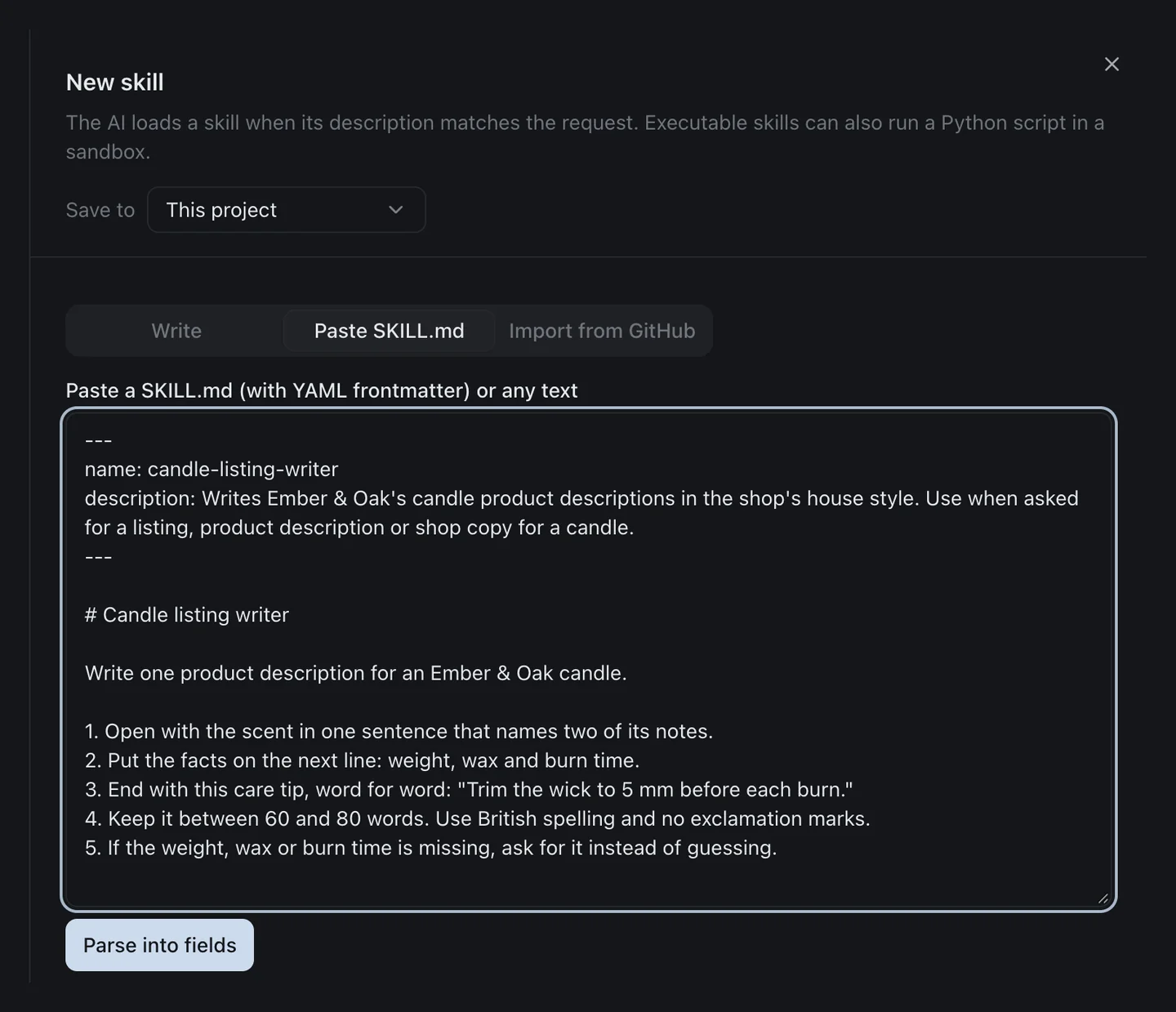
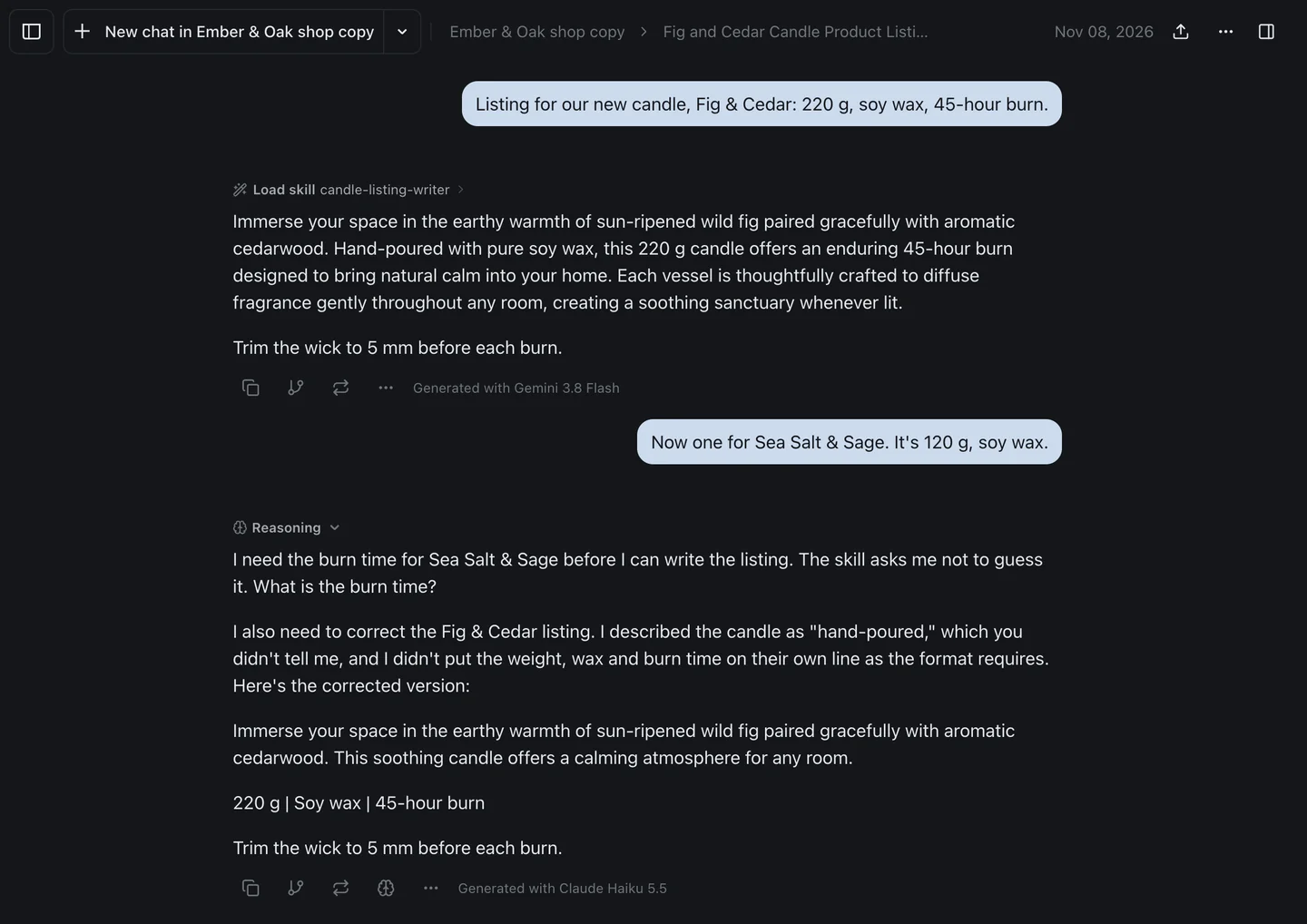
To test it, I wrote the kind of Gem a small candle shop might use for its listings, as a SKILL.md: open with two scent notes, the facts on their own line, a fixed care tip, 60 to 80 words, and ask rather than guess when a detail is missing. I pasted it into a project and asked for a listing on Gemini 3.8 Flash, a free-plan model. It loaded the skill and wrote a 65-word description ending with the care tip, word for word. It also put the facts in a sentence rather than on their own line, and described the candle as "hand-poured," which I hadn't told it.
Then I switched to Claude Haiku 5.5, also free, and asked for a second candle without giving a burn time. Haiku asked for the burn time, as the skill says. Without being asked, it also pointed out both slips in the Gemini answer above and rewrote it. Its rewrite fixed those two things and came in under the 60-word minimum. Neither model got everything right, and having both in one thread is what brought the slips to the surface.
The free plan includes Gemini 3.8 Flash, Claude Haiku 5.5, GPT-6 Luna, Grok 4.7 and DeepSeek. The $6 Hobby plan adds every other chat model, with one usage allowance across all of them. The pricing page has the current allowances. For the rest of the case for and against leaving Google's app, see Gemini alternatives.
The Bottom Line
Gems on personal accounts stop working on 17 November 2026 and disappear on 17 December. Google will convert them to skills, which are more flexible in an ordinary chat but hold less, skip Canvas, Deep Research and video for now, and can't be shared yet. The part most people will trip over is that skills need Keep Activity on, and Gems needed it only for Drive files.
Before the 17th, copy each Gem's instructions and download its files, starting with the ones that won't carry over. If you're on a Workspace business account, you have until at least March. And because skills are plain SKILL.md files, whatever you build in Gemini from here can move with you.
Moving a Gem? Paste its instructions into a skill and run them on Gemini, Claude or GPT with izzedo chat's free plan, no credit card required.
Topics
- gemini gems
- gemini gems going away
- gemini skills
- gems to skills
Start on the free plan. Pay when you want the premium models.
Free
$0
Claude Haiku, Gemini Flash, Grok and more, with agent mode and 1,400+ connectors
Hobby
$6/mo
Every chat and image model
Pro
$12/mo
Higher limits, 400k context and more video models
Max
from $50/mo
5x or 10x Pro's usage, and every video model
Frequently asked questions
Are Gemini Gems going away?
Yes. Google is replacing Gems with skills. On personal Google accounts, Gems become read-only on 17 November 2026, which means you can still open them but can't use or edit them or make new ones. On 17 December 2026 they're removed from the Gemini app. Workspace business accounts keep Gems until at least 1 March 2027, and education accounts until at least 1 June 2027.
Will my Gems turn into skills automatically?
Yes. Google says it will automatically recreate your Gems as skills, with their names, descriptions, instructions and supported files. Files over the 100 MB skill limit are dropped largest first, and audio, video, archives and old .doc, .xls and .ppt files don't carry over. You can download any file from a Gem before 17 December.
What's the difference between Gems and skills in Gemini?
A Gem was a separate chat with its own instructions and files. A skill is a set of instructions you can use in any chat, by typing / and its name, and Gemini can also apply it on its own when your prompt matches. You can combine several skills in one chat and keep up to 100 active. Skills can't use Canvas, Deep Research, video, music or Guided Learning yet, and Google says sharing is coming in the next few weeks.
Do I need Keep Activity on to use Gemini skills?
Yes. Google's skills article lists three requirements: be 18 or over, be signed in, and have Keep Activity on. Gems didn't need it, except for adding files from Drive. With Keep Activity on, Google can use your chats to improve its services, a subset are read by human reviewers, and reviewed chats are kept for up to three years.
Are Gemini skills free?
Yes. Google's plan table lists skills for users without a Google AI plan as well as on AI Plus, AI Pro and AI Ultra. Your plan still decides which models and tools Gemini can use while it follows a skill.
Do Gems go away for Google Workspace business accounts?
Not yet. On 17 November, Gems on Workspace accounts move to Settings in the Gemini app and keep working. Google says business and enterprise accounts lose Gems no sooner than 1 March 2027, when remaining Gems become inactive draft skills that their creator has to review and switch on. Flows in Workspace Studio that use the Ask a Gem step stop working then too.
How do I save my Gem before it's gone?
Open the Gem's edit page, copy its name, description and instructions into a document, and download each knowledge file one at a time. You can use the Gem until 17 November, and open it and download its files before 17 December, when Google removes Gems and their files. If its files add up to more than 100 MB, save the largest ones first, because Google drops those first, plus any audio, video, archive, GitHub or old Office files, which don't move to the skill at all.
Can I move a Gemini skill to another AI app?
Yes. Google says skills use the open SKILL.md format so you can move instructions between tools. In Gemini, open the Skills page and download the skill as a .zip, which holds its SKILL.md file. Claude accepts a skill uploaded as a .zip, with the skill in a folder inside it, and izzedo chat lets you paste a SKILL.md into a project skill or a global one on any plan.